<?xml version="1.0" encoding="utf-8"?>
<feed xmlns="http://www.w3.org/2005/Atom">
    
    <id>https://lorisleiva.com/rss</id>
    <title><![CDATA[Loris]]></title>
    <updated>2022-05-02T18:15:00+00:00</updated>

    
    <link href="https://lorisleiva.com"/>
    <link href="https://lorisleiva.com/rss" rel="self"/>
    <author>
        <name>Loris Leiva</name>
        <email>loris@lorisleiva.com</email>
    </author>

    
    <subtitle><![CDATA[Learn stuff from another hooman being. 👋]]></subtitle>
    <logo>https://lorisleiva.com/assets/brand/logo.png</logo>
    <icon>https://lorisleiva.com/assets/brand/logo-mark.png</icon>
    <rights>Copyright 2026 lorisleiva.com</rights>

    
        <entry>
            
            <id>https://lorisleiva.com/owning-digital-assets-in-solana/how-nfts-are-represented-in-solana</id>
            <title><![CDATA[How NFTs are represented in Solana]]></title>
            <updated>2022-05-02T18:15:00+00:00</updated>
            <link rel="alternate" href="https://lorisleiva.com/owning-digital-assets-in-solana/how-nfts-are-represented-in-solana"/>

            
            <author>
                <name><![CDATA[Loris Leiva]]></name>
            </author>
            <summary><![CDATA[The way NFTs are structured in Solana is pretty unique. Let’s embark on a journey that will tell us everything we need to know about them.]]></summary>
            <content type="html">
                <![CDATA[ 
                    
                        
                            <a href="https://lorisleiva.com/owning-digital-assets-in-solana/how-nfts-are-represented-in-solana">
                                <img alt="How NFTs are represented in Solana" src="https://lorisleiva.com/assets/articles/2022/0501-solana-nft-2/solana-nft-2.jpg" />
                            </a>


                        <p class="lead">In <a href="https://lorisleiva.com/owning-digital-assets-in-solana/a-new-way-of-owning-data">a previous article</a>, we saw how NFTs unlock new ways of owning data. Now let’s take a look at how NFTs actually work in Solana.</p>
<p>Since the Solana blockchain structures data differently than other blockchains, it may be confusing at first but, in my opinion, its model makes a lot of sense and is closer to how we represent things in the real world.</p>
<p>Thus, we’ll first start by looking at how we do things in the real world and gradually move our way towards the representation of an NFT.</p>
<p>Bear with me, we’re going on a little journey.</p>
<h2><a id="content-not-your-typical-program" href="#not-your-typical-program" class="heading-permalink" aria-hidden="true" title="Permalink">❡</a>Not your typical program</h2>
<p>This article is not about coding but it’s worth noting that, if you’re used to other blockchains such as Ethereum, then you’ll have a bit of unlearning to do.</p>
<p>In these blockchains or any typical piece of code, you add variables within your program, and your logic updates these variables. In Ethereum, a deployed “Smart Contract”, contains both the logic and the data needed for that contract to do its job.</p>
<p>That’s not the case for Solana. In Solana, a “Program” (the equivalent of a Smart Contract) interacts with “Accounts” that are stored outside of the program. This enables us to create more generic logic that can scale to new orders of magnitude since the data is no longer bound by the size of the program. Additionally, it enables the blockchain to run more efficiently since it can run the same program in parallel with different accounts.</p>
<p>The TL;DR; here is: <strong>Data in Solana is stored outside of programs, in reusable and scalable models called “Accounts”</strong>.</p>
<h2><a id="content-the-usd-printing-machine" href="#the-usd-printing-machine" class="heading-permalink" aria-hidden="true" title="Permalink">❡</a>The USD printing machine</h2>
<p>Alright, let’s step back into the real world for a minute and reflect on what makes us own the money that we own in a given currency.</p>
<p>Finance is a complex subject and there are many different ways to own money: cash, banks, assets, etc. To get closer to how we model things in Solana, we need to simplify our real-world model.</p>
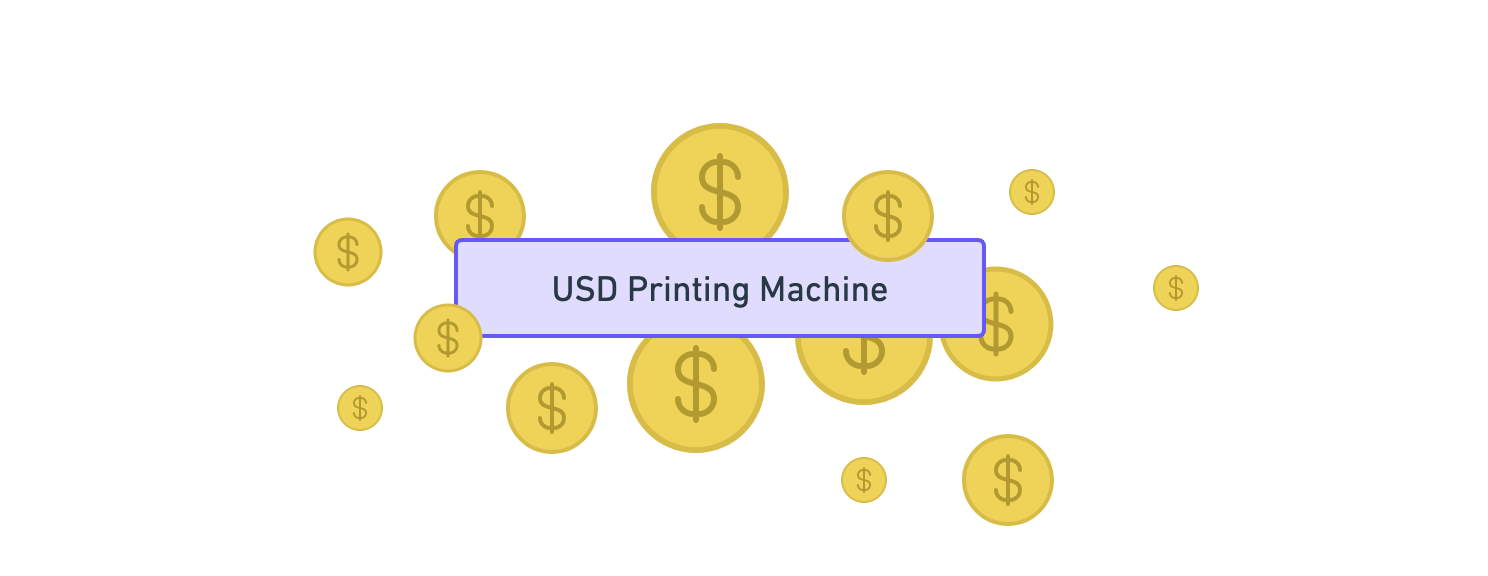
<p>Imagine all of the money in the world for a given currency is generated by one bank and one bank only. Let’s call them “Printing Machines” since they would literally be able to control how much of that currency is in circulation. For instance, the “USD Printing Machine” would be responsible for managing all the US dollars in the world. Nice and simple.</p>
<p><img src="https://lorisleiva.com/assets/articles/2022/0501-solana-nft-2/solana-nfts-1.png" alt="Diagram with only one rectangle node labeled “USD Printing Machine” with lots of US dollar coins scattered around it." /></p>
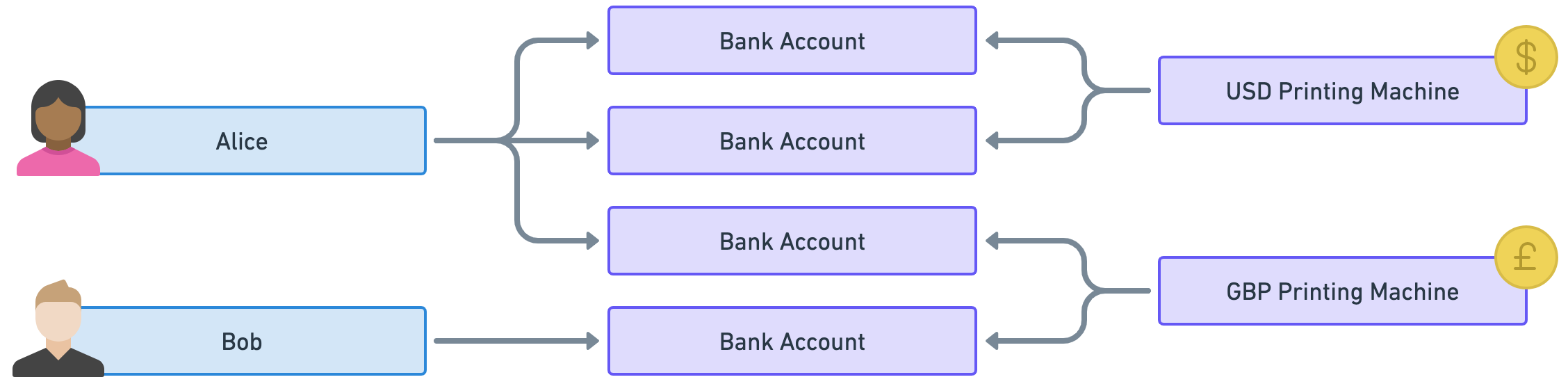
<p>These “Printing Machines” would then allow individuals to own money via “Bank Accounts” where each individual can have as many bank accounts as they want. That way bank accounts act as many-to-many relationships between individuals and currencies.</p>
<p>In the example below, Alice owns US dollars and British pounds via three different bank accounts (two for USD and one for GBP) whereas Bob only owns British pounds via one bank account.</p>
<p class="wide"><img src="https://lorisleiva.com/assets/articles/2022/0501-solana-nft-2/solana-nfts-2.png" alt="Diagram showing Alice linked to two bank accounts linked to the USD printing machine. Alice is also linked to a third bank account linked to the GBP printing machine. The diagram also shows Bob linked to its own bank account that also links to the GBP printing machine." /></p>
<p>Good, with that model in mind, let’s enter the world of tokens!</p>
<h2><a id="content-mints-and-tokens" href="#mints-and-tokens" class="heading-permalink" aria-hidden="true" title="Permalink">❡</a>Mints and tokens</h2>
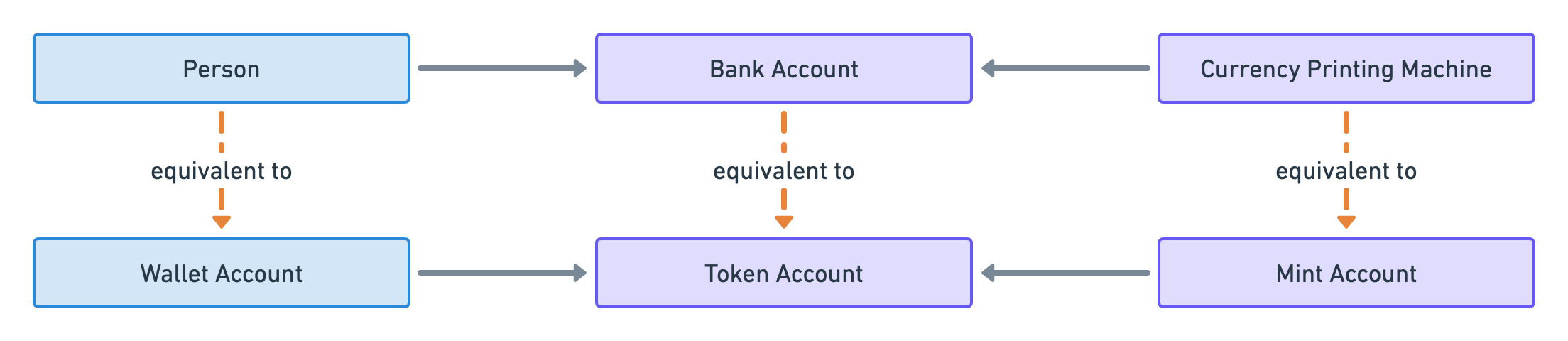
<p>In the previous section, we created a simple model where people use bank accounts to access money in a given currency.</p>
<p class="wide"><img src="https://lorisleiva.com/assets/articles/2022/0501-solana-nft-2/solana-nfts-3.png" alt="Diagram showing a “Person” linked to multiple “Bank Accounts” all linked to a “Currency Printing Machine”." /></p>
<p>Well, surprise surprise, <strong>that model is analogous to how tokens are represented in Solana</strong>. You can think of a token as a decentralised currency that lives on a blockchain.</p>
<p>Each type of token is defined by what we call a “Mint Account”. That account is analogous to a “Printing Machine” because it can literally be used to “mint tokens” which is equivalent to printing money.</p>
<p>Then, individuals can own tokens via “Token Accounts” which store the number of tokens owned.</p>
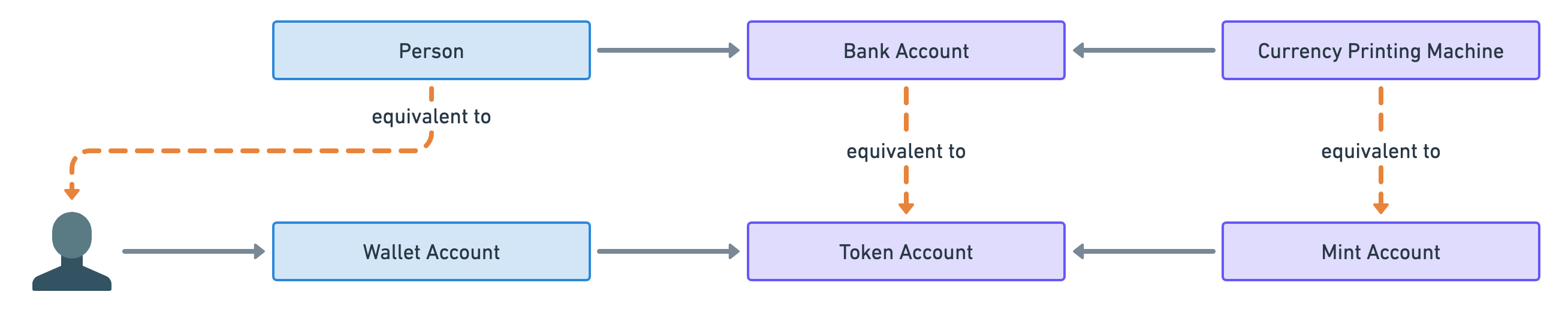
<p>Finally, there’s no such thing as individuals in blockchains since people interact with them through cryptographic key pairs called wallets. The public key of each wallet points to an account in Solana that stores the amount of SOL owned by the wallet. For that reason, I will refer to these accounts as “Wallet Accounts”.</p>
<p>So that leads us to the following analogy.</p>
<p class="wide"><img src="https://lorisleiva.com/assets/articles/2022/0501-solana-nft-2/solana-nfts-4.png" alt="Diagram showing a “Person” linked to a “Bank Account” which is linked to a “Currency Printing Machine”. It also shows a “Wallet Account” linked to a “Token Account” which is linked to a “Mint Account”. Dashed arrows labelled “equivalent to” pointing from person to wallet account; from bank account to token account and from “Currency Printing Machine” to mint account highlight the analogy." /></p>
<p>Note that it is common for individuals to have multiple wallets — usually for security purposes. Therefore, the following analogy is more accurate.</p>
<p class="wide"><img src="https://lorisleiva.com/assets/articles/2022/0501-solana-nft-2/solana-nfts-5.png" alt="Diagram showing a “Person” linked to a “Bank Account” which is linked to a “Currency Printing Machine”. It also shows a user icon linked to a “Wallet Account” linked to a “Token Account” which is linked to a “Mint Account”. Dashed arrows labelled “equivalent to” pointing from person to the user icon; from bank account to token account and from “Currency Printing Machine” to mint account highlight the analogy." /></p>
<p>Before we move on to the next section, let’s take a quick example of token ownership in Solana.</p>
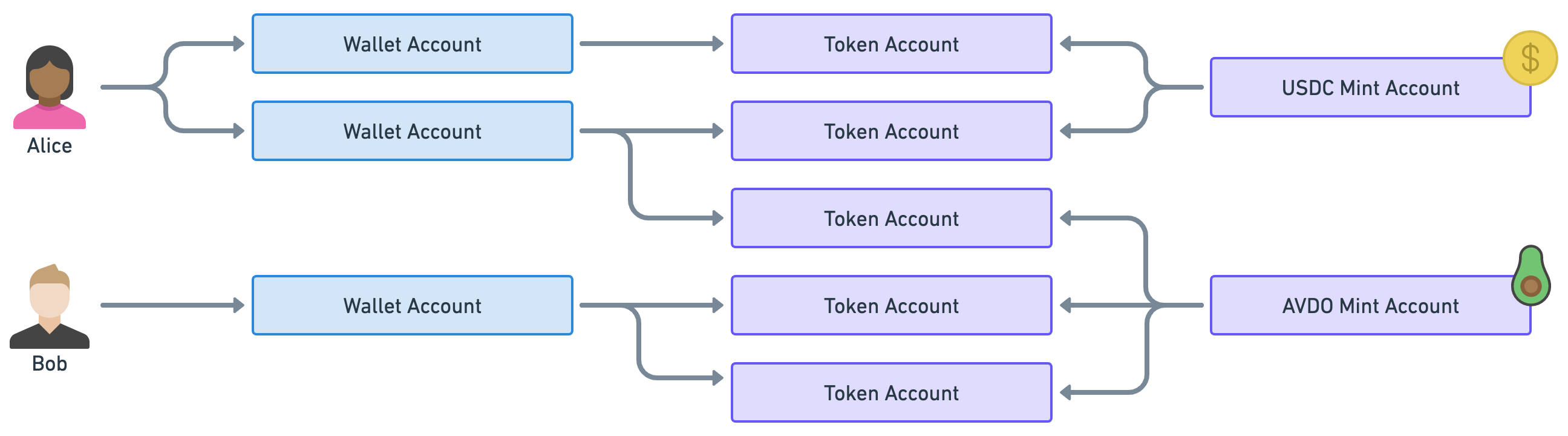
<p>Instead of US dollars and British pounds, we’ll use the tokens <code>USDC</code> and <code>AVDO</code>. These are real tokens in Solana. <code>USDC</code> is <a href="https://www.coinbase.com/usdc">a stablecoin</a> pegged to the US dollar and <code>AVDO</code> is <a href="https://www.avocadocoin.com/">a cryptocurrency backed by the avocado industry</a> (because why not).</p>
<p class="wide"><img src="https://lorisleiva.com/assets/articles/2022/0501-solana-nft-2/solana-nfts-6.png" alt="Example diagram showing Alice owning two wallet accounts. The first one is linked to the “USDC Mint Account” via one token account. The second one is linked to the USDC and AVDO Mint Accounts via one token account each. Bob owns only one wallet account that is linked to AVDO via two token accounts." /></p>
<p>As you can see Alice owns some USDC and some AVDO via two wallets and three token accounts. On the other hand, Bob only owns AVDO through one wallet and two token accounts.</p>
<h2><a id="content-whats-your-iban" href="#whats-your-iban" class="heading-permalink" aria-hidden="true" title="Permalink">❡</a>What’s your IBAN?</h2>
<p>Now, there’s one big inconvenience with the model described so far.</p>
<p>To illustrate the issue, imagine that Alice, in our previous example, wanted to send some AVDO tokens to Bob.</p>
<p>Since Bob has two token accounts for his AVDO tokens, which token account should Alice choose to deposit her tokens? Should she ask Bob to send her the public key of the token account of his choice? Even worse, imagine Alice now wants to send some USDC tokens to Bob when Bob doesn’t currently have any USDC token accounts. Should she create a new token account for Bob and then send him its public key?</p>
<p>None of these issues makes it impossible to send tokens but they make our life harder than it should be.</p>
<p>When sending tokens to someone, you usually only have the public key of their wallet and you really don’t want to worry about which token account to use or if it even exists.</p>
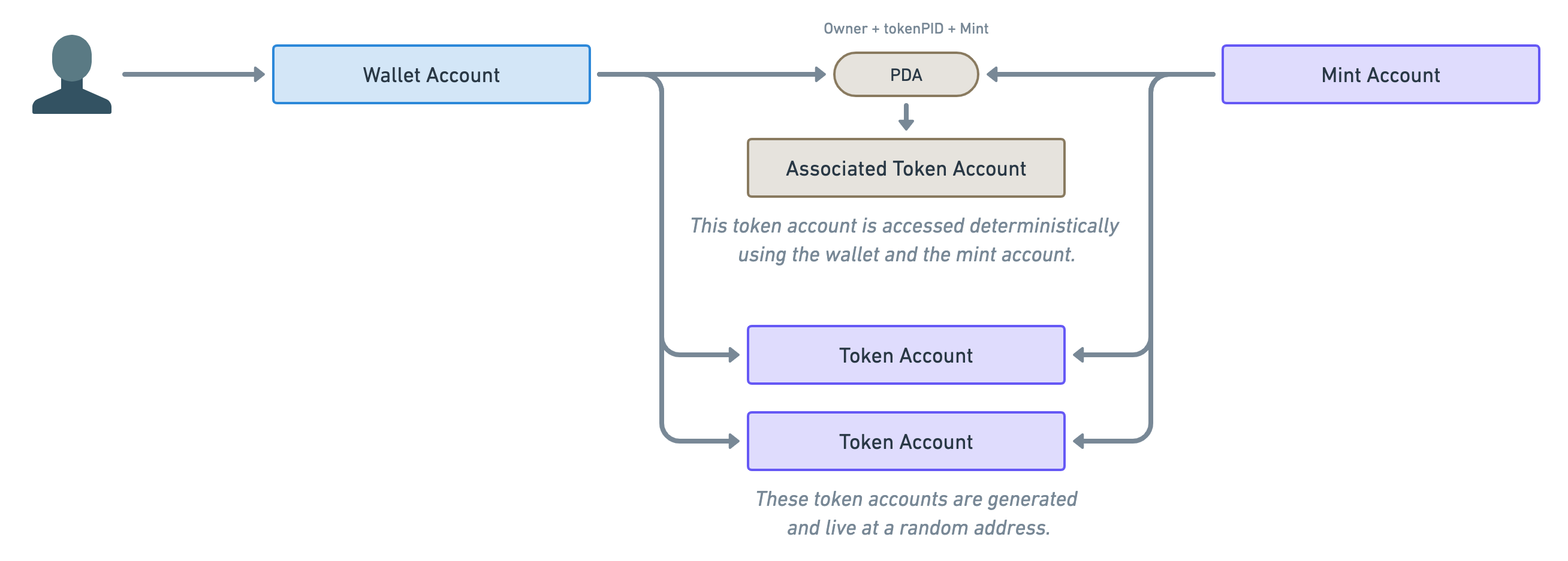
<p>The solution to that problem is called “Program Derived Addresses” or PDA for short. These are public keys that are <strong>derived from other public keys</strong> using a special algorithm.</p>
<p>What that means for us is, given a “Wallet Account” and a “Mint Account”, <strong>we can deterministically find the associated Token Account</strong>. In fact, these accounts are called “Associated Token Accounts” (ATA for short) and they are managed by the “<a href="https://spl.solana.com/associated-token-account">Associated Token Account Program</a>”.</p>
<p>Therefore, we end up with two ways of creating and using token accounts: One that’s deterministic (using PDAs) and one that’s not (using normal token accounts).</p>
<p class="wide"><img src="https://lorisleiva.com/assets/articles/2022/0501-solana-nft-2/solana-nfts-7.png" alt="Diagram showing a user icon pointing to a wallet account which connects to a mint account through different ways. The first way is using a PDA. The wallet account and the mint account both point to a PDA pill which points to a brown rectangle labelled “Associated Token Account”. Above the PDA pill is written, “Owner + tokenPID + Mint” representing the seeds of the PDA. Below the “Associated Token Account” rectangle reads “This token account is accessed deterministically using the wallet and the mint account.” The second way wallet and mint accounts are linked together is via two normal “Token Accounts” displayed in purple rectangles. Below these two accounts reads “These token accounts are generated and live at a random address.”." /></p>
<p>Note the annotation above the PDA. These are the parameters required to derive the address of the associated token account. If you’d like to read more about PDAs, <a href="https://solanacookbook.com/core-concepts/pdas.html">the Solana Cookbook</a> is a good place to start.</p>
<p>Since we’re going to use this diagram a lot in this article, let’s shorten its representation slightly. We’ll use the following diagram to represent the generic connection between wallets and mint accounts. They could be using PDAs or they could not.</p>
<p class="wide"><img src="https://lorisleiva.com/assets/articles/2022/0501-solana-nft-2/solana-nfts-8.png" alt="Diagram showing a user icon pointing to a wallet account which connects to a mint account through a brown “PDA” pill which itself points to a purple rectangle that reads “(Associated) Token Account”. The “PDA” text is displayed in italic to show it’s optional." /></p>
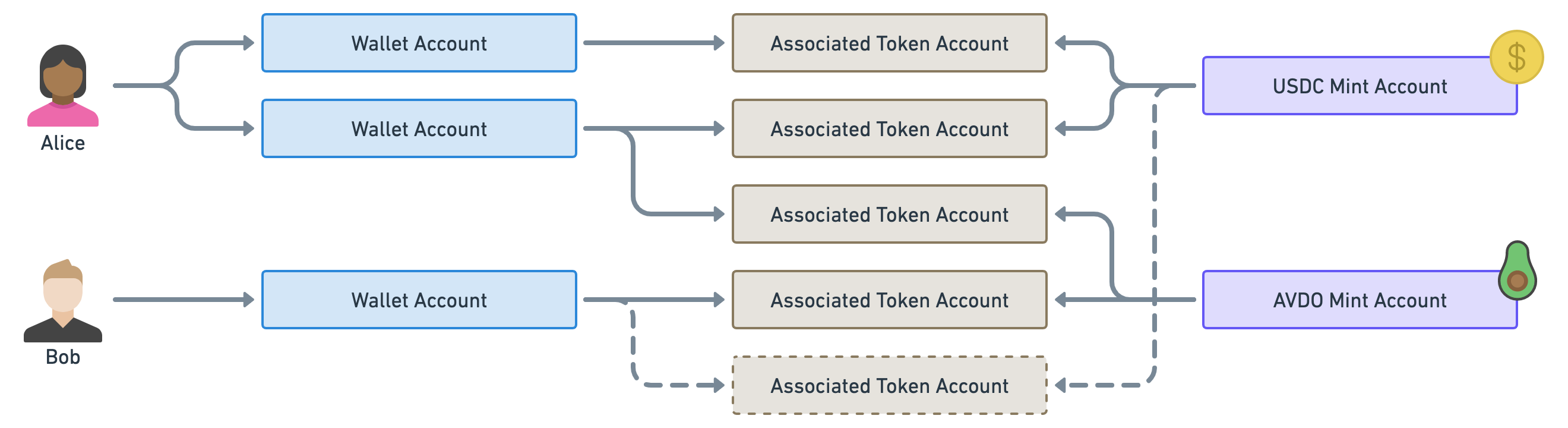
<p>Before we move on from this important PDA parenthesis, let’s take a quick look at our previous example using only associated token accounts.</p>
<p class="wide"><img src="https://lorisleiva.com/assets/articles/2022/0501-solana-nft-2/solana-nfts-9.png" alt="Example diagram showing Alice owning two wallet accounts. The first one is linked to the “USDC Mint Account” via one associated token account. The second one is linked to the USDC and AVDO Mint Accounts via one associated token account each. Bob owns only one wallet account that is linked to AVDO via one associated token account. Bob’s wallet is also linked to the USDC mint account via an associated token account represented as a dashed rectangle to show it does not exist yet. The arrow pointing to that rectangle is also dashed." /></p>
<p>Notice how we’ve now only got one token account per wallet per mint which means Alice knows where to send the AVDO tokens to Bob. Additionally, Alice knows where to send Bob some USDC even though the account does not exist yet.</p>
<p>Okay, let’s move on!</p>
<h2><a id="content-data-on-mints-and-tokens" href="#data-on-mints-and-tokens" class="heading-permalink" aria-hidden="true" title="Permalink">❡</a>Data on mints and tokens</h2>
<p>I appreciate your patience but you might be thinking: “Loris, what does that have anything to do with NFTs?”.</p>
<p>I promise we’re getting there! But to answer that, we first need to understand what data is stored in both the token accounts and the mint accounts.</p>
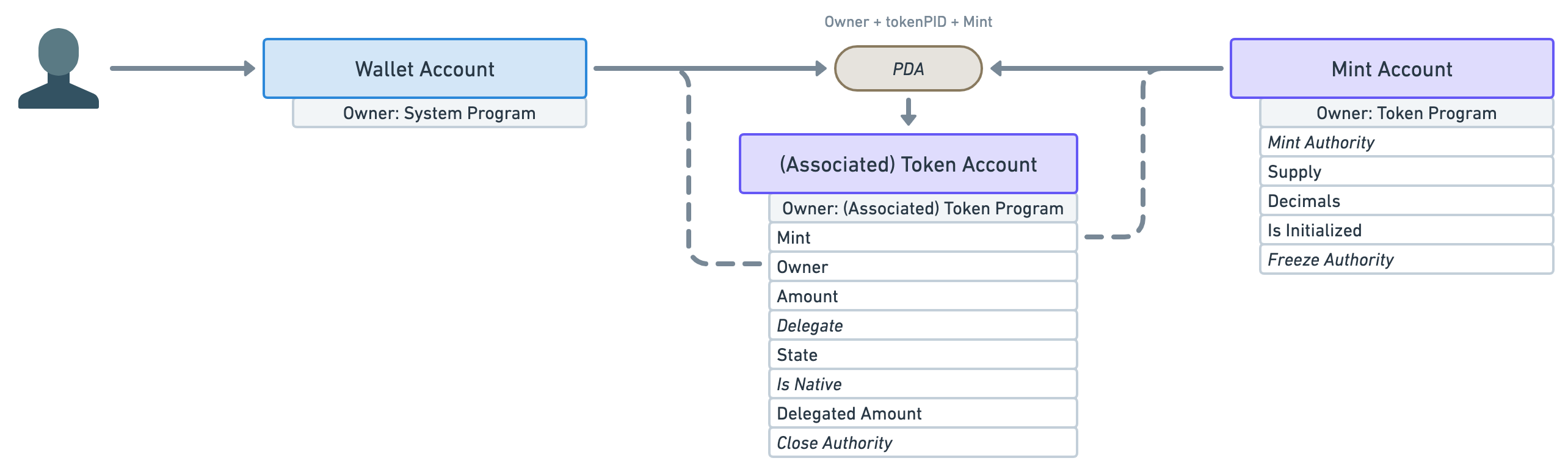
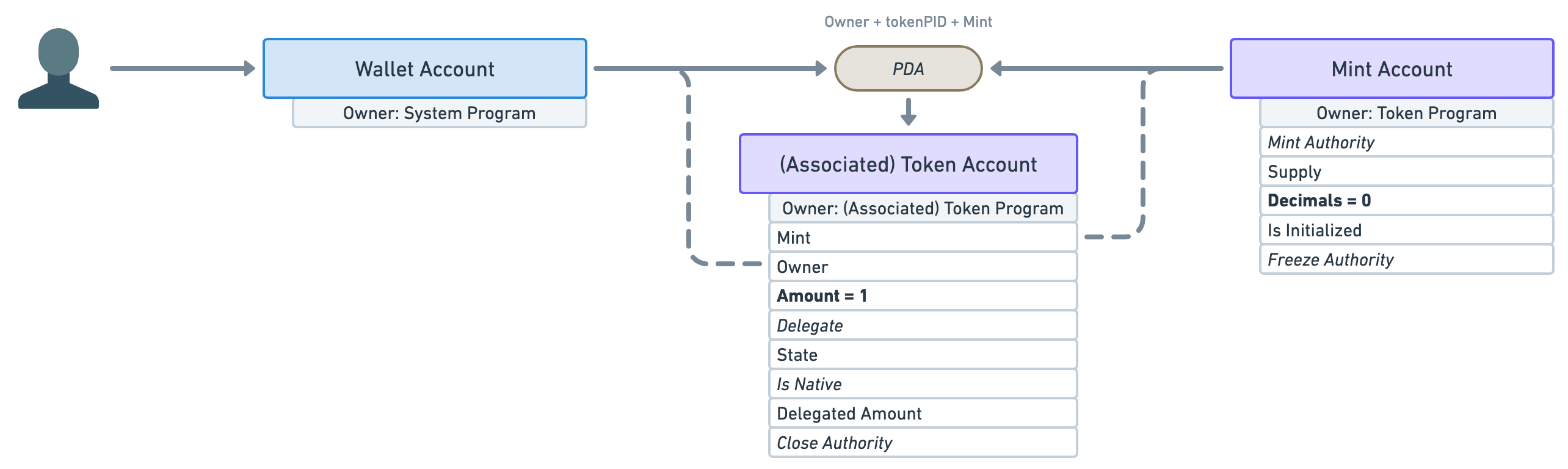
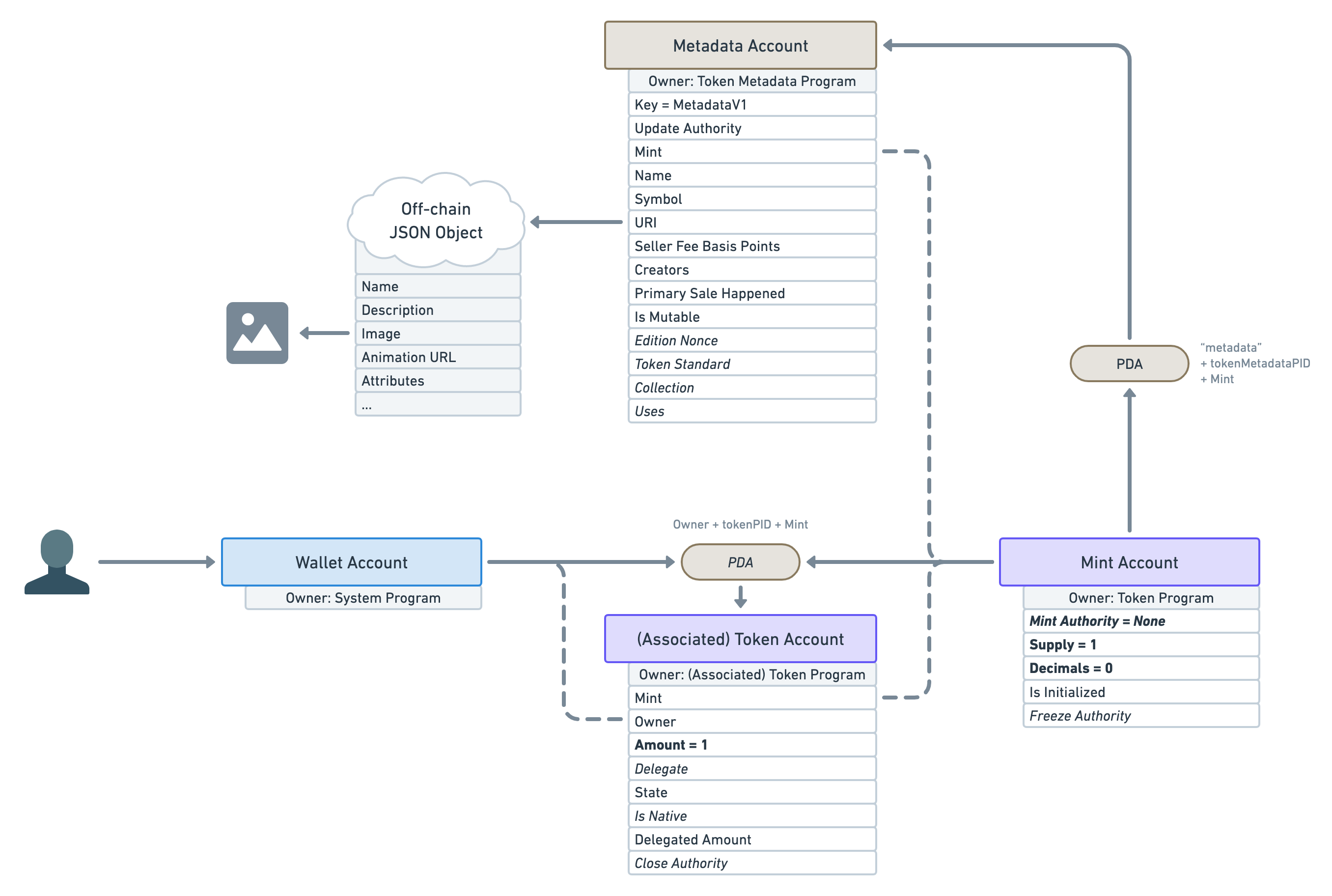
<p>To that end, let’s update our diagram to show all of the data available under each account and, whilst we’re at it, let’s also display the owner of the account — i.e. the Solana program responsible for creating it.</p>
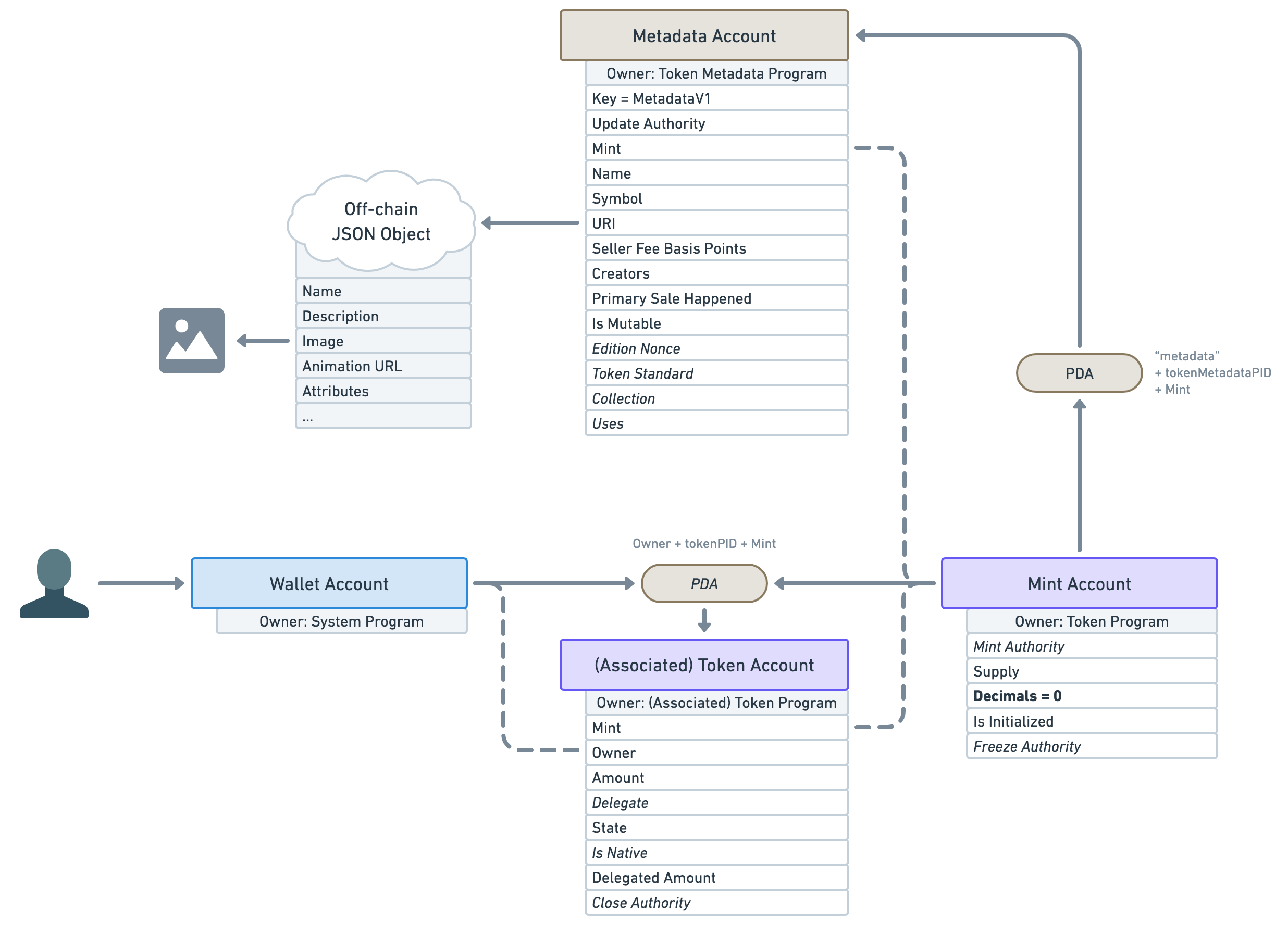
<p class="wide"><img src="https://lorisleiva.com/assets/articles/2022/0501-solana-nft-2/solana-nfts-10.png" alt="Diagram showing a user icon pointing to a wallet account which connects to a mint account through an “(Associated) Token Account”. There is now additional data available below each of these accounts. Below the wallet account reads: “Owner: System Program”. Below the token account reads “Owner: (Associated) Token Program” followed by the data attributes (one per line): Mint; Owner; Amount; Delegate (in italic); State; Is Native (in italic); Delegated Amount; Close Authority (in italic). Below the mint, the account reads “Owner: Token Program” followed by the data attributes (one per line): Mint Authority (in italic); Supply; Decimals; Is Initialized; Freeze Authority (in italic)." /></p>
<p>Okay, we have a few things to notice here.</p>
<ul>
<li>First, notice how the token account (associated or not) keeps track of both the mint and the wallet accounts. I’ve highlighted these connections using dashed lines.</li>
<li>The next important piece of data on the token account is <strong>“Amount”</strong>. It stores the number of tokens available in the account.</li>
<li>The rest of the data is also important but out of scope for this article so I won’t be going through them. I’ll just say that when you see an <em>italic</em> attribute, that means it is optional.</li>
<li>Moving on to the mint account’s data. The first attribute is the optional <strong>“Mint Authority”</strong>. This represents the account that can mint more tokens — i.e. print more money. It is usually the wallet account that created it. It is optional because a mint authority can revoke its own right, therefore, making the mint account immutable — i.e. the number of tokens in circulation will never increase.</li>
<li>Speaking of, the next attribute — <strong>“Supply”</strong> — tells us the total amount of tokens currently in circulation. This attribute cannot be manually updated and is automatically kept up-to-date by the program.</li>
<li>Next, the <strong>“Decimals”</strong> attribute dictates how many decimal places we should use for that token. For instance, if a token account has <code>Amount = 250</code> and the mint account has <code>Decimals = 2</code>, that means the token account actually owns <code>2.50</code> of that token. That way, all monetary values can be stored using integers.</li>
<li>We’ll also skip the rest of the attributes since they are out of scope for this article.</li>
</ul>
<p>In order to move closer to the representation of an NFT, let’s play with these attributes a little.</p>
<p>What if we created a mint account with <strong>zero decimals</strong> and immediately <strong>minted one token</strong> to a wallet account?</p>
<p>The result would be <strong>a mint account with only one token in circulation</strong> that cannot be broken down into smaller units — e.g. Alice and Bob cannot both have 0.5 of that token.</p>
<p class="wide"><img src="https://lorisleiva.com/assets/articles/2022/0501-solana-nft-2/solana-nfts-11.png" alt="Same as the previous diagram but “Amount” became “Amount = 1” on the token account and “Decimals” became “Decimals = 0” on the mint account. Both the updated fields are displayed in bold." /></p>
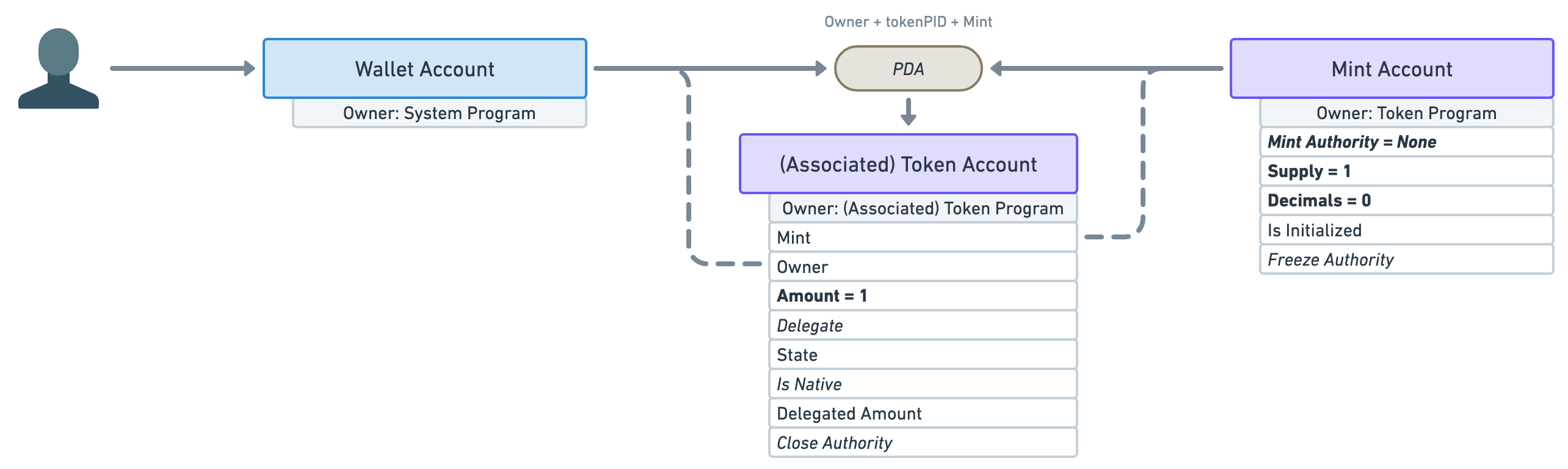
<p>The only issue with that is nothing stops the “Mint Authority” to continue minting more tokens in the future. If they did, we’d suddenly have more than one token in circulation and, thus, more than one wallet could own them.</p>
<p>To prevent that, <strong>the mint authority needs to revoke its right</strong> to mint more tokens immediately <strong>after minting the first one</strong>.</p>
<p class="wide"><img src="https://lorisleiva.com/assets/articles/2022/0501-solana-nft-2/solana-nfts-12.png" alt="Same as the previous diagram but “Mint Authority” became “Mint Authority = None” and “Supply” became “Supply = 1” on the mint account. Both of them are now also displayed in bold." /></p>
<p>What we end up with is a mint account whose supply will never go above one and whose token cannot be shared or divided.</p>
<p>Thus, <strong>there can only be one token holder for that mint</strong> at any given time.</p>
<h2><a id="content-an-nft-is-just-a-special-mint" href="#an-nft-is-just-a-special-mint" class="heading-permalink" aria-hidden="true" title="Permalink">❡</a>An NFT is just a special Mint</h2>
<p>And that, my frens, is a Non-Fungible Token! 🥳</p>
<p>The definition of a “Fungible” is:</p>
<blockquote>
<p>Being of such nature or kind as to be freely exchangeable or replaceable, in whole or in part, for another of like nature or kind.</p>
</blockquote>
<p>In other words, it can be replaced by something else of the same kind. For instance, olive oil is fungible. One litre of olive can be replaced with another litre of olive oil and we’ve not lost any value. The same goes for currencies: replace a 10 USD note with another 10 USD note and you’ve still got 10 dollars.</p>
<p>Therefore, for a token to be <em>non-fungible</em>, it needs to have such characteristics that it cannot be traded with something of the same kind. We have managed to achieve this by creating a mint account that will never have more than one token holder. Whoever owns this token, owns the mint account and therefore, owns the NFT.</p>
<p>To recap: <strong>An NFT is a mint account with zero decimals and whose supply will never exceed one</strong>.</p>
<p>I’d also like to take a second to appreciate how elegant that model is. Not only is its representation inlined with its definition, but by relying on token accounts and mint accounts, we can interact with NFTs the same way we can interact with tokens. Sending an NFT to someone is as simple as giving them your only token for that mint account.</p>
<h2><a id="content-wheres-the-picture" href="#wheres-the-picture" class="heading-permalink" aria-hidden="true" title="Permalink">❡</a>Where’s the picture?</h2>
<p>Okay, I’ll be honest we haven’t completely finished our journey in explaining NFTs in Solana. What we’ve explained so far is indeed an NFT by definition but not a very useful one. All it’s telling us is that we own a token and that no one else can own that token. Great! But what’s that token called? What is its purpose? Where’s the picture?!</p>
<p>Well, it sounds like we need to attach more data to our NFT to make it useful. That’s where Metaplex comes in!</p>
<p><a href="https://www.metaplex.com/">Metaplex</a> is a company that creates and maintains Solana programs. Their most popular program is called the <strong>“Token Metadata Program”</strong>. You guessed it, it adds metadata to our tokens!</p>
<p>It does that by using Program Derived Addresses (PDAs). If you remember, PDAs allow us to deterministically find an address using other addresses.</p>
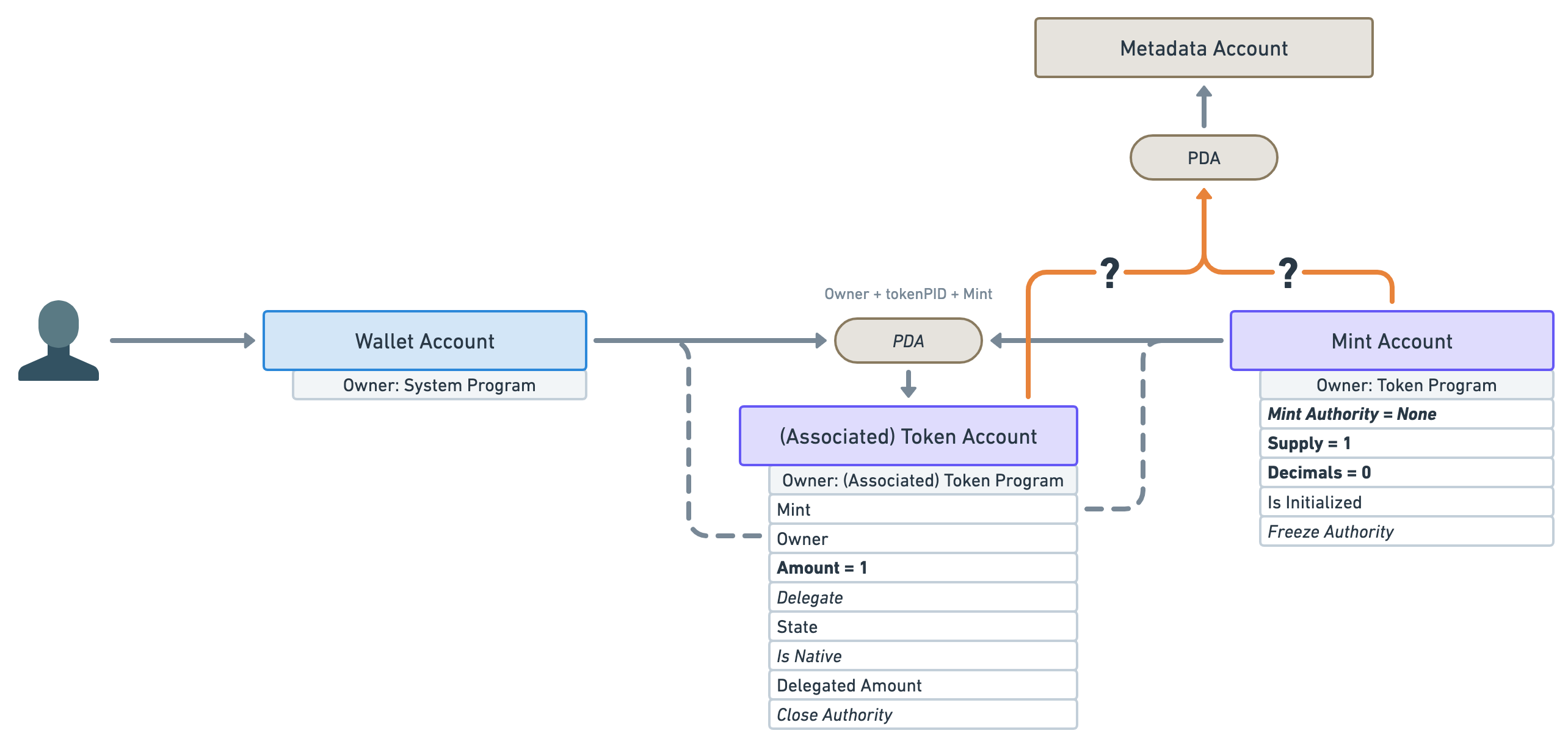
<p>In this case, the Token Metadata program will create a new “Metadata Account” attached to that NFT. But can you guess which address it uses to derive its own address? Is it the mint account or the token account?</p>
<p class="wide"><img src="https://lorisleiva.com/assets/articles/2022/0501-solana-nft-2/solana-nfts-13.png" alt="Same as the previous diagram (with the wallet account, the token account, the mint account and their data) but this time there’s a new PDA pill pointing to a brown rectangle labelled “Metadata Account”. There are two orange arrows labelled with question marks pointing from the token account and the mint account towards that new PDA pill." /></p>
<p>The answer is: <strong>the mint account</strong>! The mint account is the most important account for an NFT. A token account is a relationship between an NFT and a wallet. If we attached a PDA to a token account and then sold our NFT, the new owner will lose all of that data. Therefore, <strong>the mint account is the main entry point of an NFT</strong>.</p>
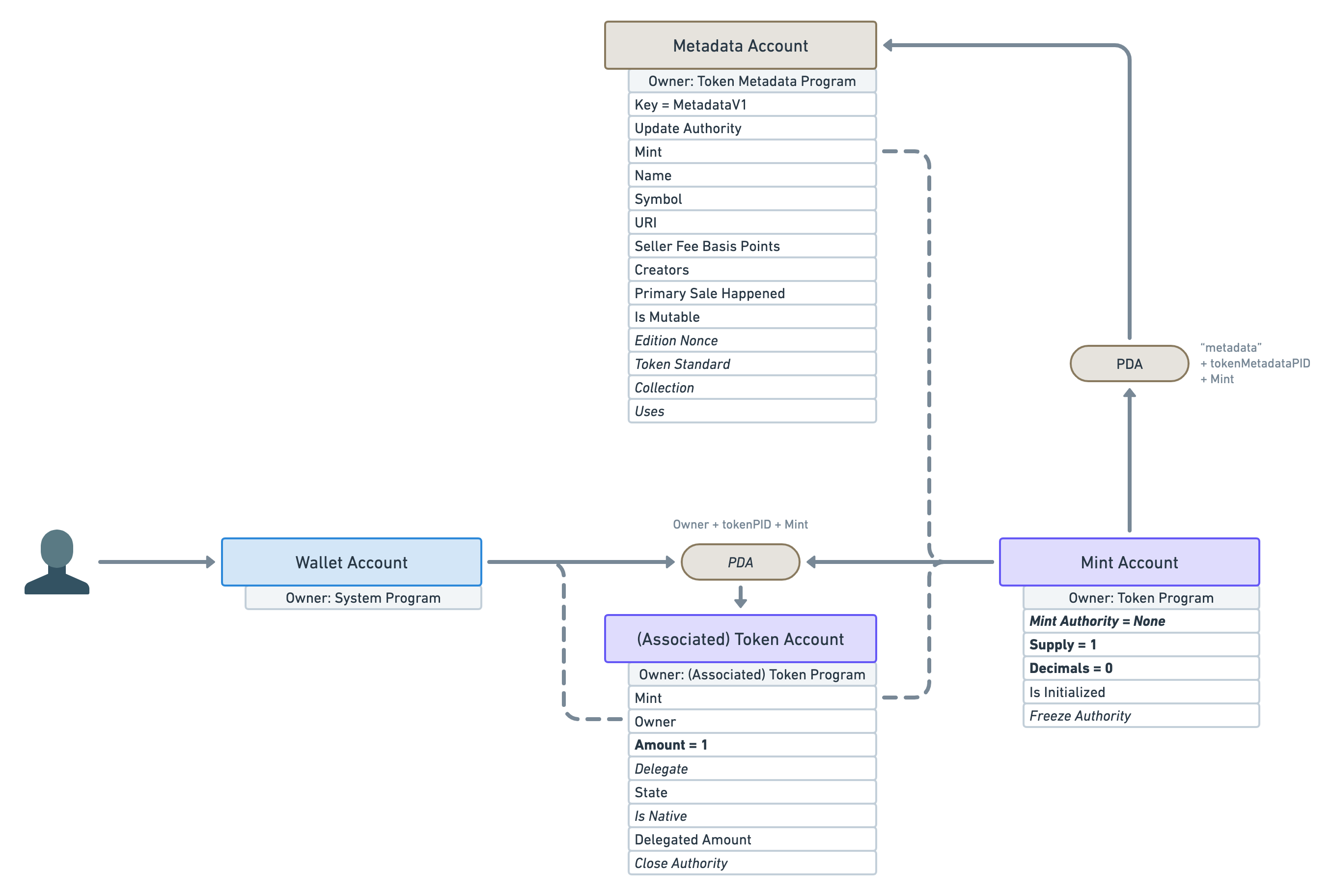
<p>Alright, let’s see what sort of data Metaplex has blessed us with on the “Metadata Account”.</p>
<p class="wide"><img src="https://lorisleiva.com/assets/articles/2022/0501-solana-nft-2/solana-nfts-14.png" alt="We’re back to the diagram before the last one with the wallet account, token account, mint account and their data. This time we have a brown PDA pill annotated “‘metadata’ + tokenMetadataPID + Mint”. These are the seeds of the PDA. An arrow points from the mint account to the new PDA pill which also has an arrow pointing to the new “Metadata Account”. Underneath the new account reads: “Owner: Token Metadata Program” followed by the data attributes (one per line): Key = MetadataV1; Update Authority; Mint; Name; Symbol; URI; Seller Fee Basis Points; Creators; Primary Sale Happened; Is Mutable; Edition Nonce (in italic); Token Standard (in italic); Collection (in italic); Uses (in italic)." /></p>
<p>Let’s go through all of these attributes one by one.</p>
<ul>
<li>
<code>Key</code>: This attribute is what we call a discriminator. Because Metaplex has many different types of account within the Token Metadata Program, this tells us which account we are dealing with. Here, the “Metadata Account” is identified by the <code>MetadataV1</code> key. Note that the Token Program uses the size of the account instead of a discriminator to figure this out, which is more performant but less flexible.</li>
<li>
<code>Update Authority</code>: This is the account that can update the “Metadata Account”.</li>
<li>
<code>Mint</code>: This points back to the mint account.</li>
<li>
<code>Name</code>: The on-chain name of the NFT – limited to 32 bytes.</li>
<li>
<code>Symbol</code>: The on-chain symbol of the NFT – limited to 10 bytes. This is often left as an empty string but can be useful if you want your NFT collection to have a shared symbol. For instance, your “Banana Blossom” NFT drop could have the symbol “BNBL”.</li>
<li>
<code>URI</code>: The URI of the NFT– limited to 200 bytes. <strong>This is one of the most important attributes.</strong> It contains a URI that points to a JSON file off-chain. This JSON file can either be stored in a traditional server (e.g. using AWS) or it can be stored using a permanent storage solution on another chain (e.g. using Arweave). We’ll talk more about this JSON file in a minute.</li>
<li>
<code>Seller Fee Basis Points</code>: The royalties shared by the creators in basis points — i.e. <code>550</code> means <code>5.5%</code>.</li>
<li>
<code>Creators</code>: An array of creators and their share of the royalties. This array is limited to 5 creators. A <code>verified</code> attribute exists on each creator to ensure they signed the NFT to prove its authenticity.</li>
<li>
<code>Primary Sale Happened</code>: A boolean keeping track of whether the NFT has been sold before or not. This affects the royalties.</li>
<li>
<code>Is Mutable</code>: A boolean indicating if the on-chain metadata of the NFT can be modified. Once flipped to <code>false</code>, it cannot be reverted.</li>
<li>
<code>Edition Nonce</code>: This optional attribute is slightly out of scope but it is used to verify the edition number of limited edition NFTs.</li>
<li>
<code>Token Standard</code>: This optional attribute captures the fungibility of the token. We’ll talk more about this in this article.</li>
<li>
<code>Collection</code>: This optional attribute links to the mint address of another NFT that acts as a Collection NFT. This is helpful for marketplaces to group NFTs together and safely verify these collections.</li>
<li>
<code>Uses</code>: This optional attribute can make NFTs usable. Meaning you can load it with a certain amount of “uses” and use it until it has run out. You can even make it so the NFT destroys itself when it’s been completely used out.</li>
</ul>
<p>Phew! As you can see, lot’s of cool features. I’m not going to go through them all here but I’m hoping to add more articles to this series on that subject. In the meantime, feel free to check <a href="https://docs.metaplex.com/token-metadata/specification">the official Metaplex documentation</a> for more information.</p>
<h2><a id="content-again-wheres-the-picture" href="#again-wheres-the-picture" class="heading-permalink" aria-hidden="true" title="Permalink">❡</a>Again, where’s the picture?</h2>
<p>So many attributes, yet, still no picture or digital asset? Isn’t that a big part of what an NFT is?</p>
<p>Yes! Worry not, we do have a place to store that information.</p>
<p>Remember that <code>URI</code> attribute that points to an off-chain JSON object? Well, that JSON object follows a certain standard in order to store even more data.</p>
<p class="wide"><img src="https://lorisleiva.com/assets/articles/2022/0501-solana-nft-2/solana-nfts-15.png" alt="Same as the previous diagram with the “URI” attribute of the Metadata Account pointing to the left towards a cloud labelled “Off-chain JSON Object“. That cloud has data attributes listed underneath it: Name; Description; Image; Animation URL; Attributes and three dots at the end to illustrate there can be more data. The “Image” attribute below the JSON cloud also has an arrow pointing left towards an icon representing a generic image." /></p>
<p>As you can see, we can provide, amongst other things, a <code>name</code>, a <code>description</code> and, finally, an <code>image</code>! Similarly to the <code>URI</code> attribute of the Metadata Account, that <code>image</code> attribute should be a URI that can be used to download the digital asset. There’s also an <code>animation_url</code> attribute and a <code>files</code> array for NFTs that have more custom needs. All of these assets could be either stored off-chain (in a traditional server) or using a permanent storage solution (in another blockchain such as Arweave). Be sure to <a href="https://docs.metaplex.com/token-metadata/specification#token-standards">check out the Metaplex documentation</a> for more information on its NFT standard.</p>
<p>It is worth mentioning that you can add anything you want within that JSON object. If you’re planning on building an app that recognises your own NFTs that can be useful. But be aware that other applications and marketplaces will not be aware that this data exists and therefore will not be using it.</p>
<h2><a id="content-why-two-metadata-storage" href="#why-two-metadata-storage" class="heading-permalink" aria-hidden="true" title="Permalink">❡</a>Why two metadata storage?</h2>
<p>You might be wondering, why do we need two places to store the data of our NFT? Couldn’t we just store everything on the Metadata Account?</p>
<p>There are several issues with that.</p>
<ul>
<li>First, it costs money to store data on-chain. When designing accounts used by thousands of people, you want to be mindful of the price it will cost to create them.</li>
<li>Second, on-chain data is much less flexible. Once an account is created using a certain structure, it cannot easily be changed. Therefore, if we had to store everything on-chain, we would greatly limit the amount of data that can be attached to an NFT.</li>
</ul>
<p>As a result, we need to cleverly and safely split the data into two categories: on-chain and off-chain. For instance, the <code>Creators</code> array is on-chain because we need a trustless way of knowing if an NFT has truly been offered and signed by a given artist. The <code>Is Mutable</code> attribute is on-chain because we need to ensure that, once flipped to <code>false</code> it can never be reverted.</p>
<p>The bottom line is: <strong>the Token Metadata Program can create guarantees and expectations for on-chain data but cannot do that for off-chain data</strong>.</p>
<p>However, that doesn’t necessarily mean the off-chain JSON file is insecure and never to be trusted. Permanent storage blockchains such as Arweave are commonly used to store both the digital assets and the JSON metadata that references them, ensuring the immutability of the off-chain data. Additionally, NFTs can be made immutable ensuring that the <code>URI</code> attribute of the Metadata Account will never point elsewhere. This is the most secure configuration of an NFT as it is guaranteed nothing could even be done to alter it.</p>
<p>Also, note that some NFT projects might need their data to be mutable in ways that will benefit the NFT owners. For instance, if you’re planning on creating an NFT of a baby monkey that gradually grows into an adult monkey, you need the JSON metadata stored on a server you control in order to make these gradual changes. Next time, the NFT owners open up their wallets they will see another image but they will be delighted rather than outraged. My point is, as long as you trust the creators of your NFT — which are guaranteed by the <code>Verified</code> flag of the on-chain <code>Creators</code> attribute — mutable off-chain data can be genuine. But of course, always do your own research.</p>
<h2><a id="content-printing-multiple-editions" href="#printing-multiple-editions" class="heading-permalink" aria-hidden="true" title="Permalink">❡</a>Printing multiple editions</h2>
<p>Okay, surely we’ve now reached the final representation of an NFT in Solana?</p>
<p>For the most part, yes, but not quite.</p>
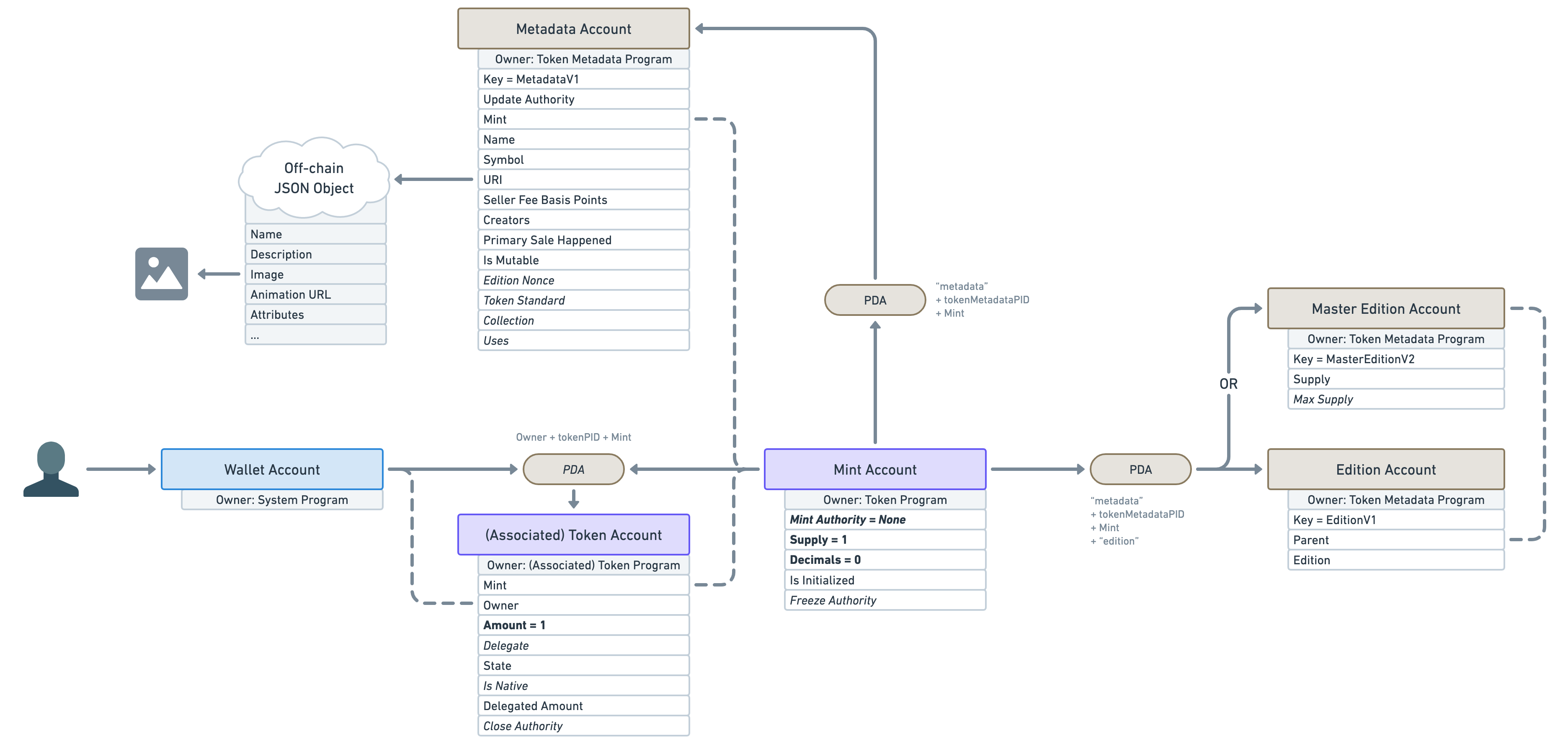
<p>There is another important account offered by the Token Metadata Program, derived from the mint account (using a PDA).</p>
<p>In fact, the account located inside that PDA can be one of two different types. It can either be a “Master Edition” or an “Edition”.</p>
<p class="wide"><img src="https://lorisleiva.com/assets/articles/2022/0501-solana-nft-2/solana-nfts-16.png" alt="We start with the same diagram as the previous one which illustrates: the wallet account, the token account, the mint account, the metadata account and the off-chain JSON Object. On top of that, we’ve added a new “PDA” pill starting from the mint account. The new PDA is annotated with the following seeds: “’metadata’ + tokenMetadataPID + Mint + ‘edition’”. The new PDA points to two brown rectangles labelled “Master Edition Account” and “Edition Account”. The arrows that point to these accounts are labelled with “OR” to show that it can contain one account or the other but not both. Both of these accounts are owned by the Token Metadata Program. The “Master Edition Account” contains the following attributes: Key = MasterEditionV2; Supply and Max Supply (in italic). The “Edition Account” contains the following attributes: Key = EditionV1; Parent and Edition. There’s also a dashed arrow from the “Parent” attribute of the “Edition Account” to the “Master Edition Account” to show the relationship between the two." /></p>
<p>A “Master Edition” also known as an “Original Edition” is an NFT that can be duplicated by its owner a certain amount of times dictated by the “Max Supply” attribute.</p>
<p>An “Edition” also known as a “Print Edition” is an NFT that was duplicated from a “Master Edition”. Whenever a new “Edition” is created, it keeps track of its parent &quot;Master Edition&quot; and its edition number. It also increases the supply of its parent “Master Edition”. Once the supply reaches the max supply, no more NFTs can be printed that way. Note that the “Max Supply” of a “Master Edition” can be null, which means an unlimited amount of NFT can be printed from it.</p>
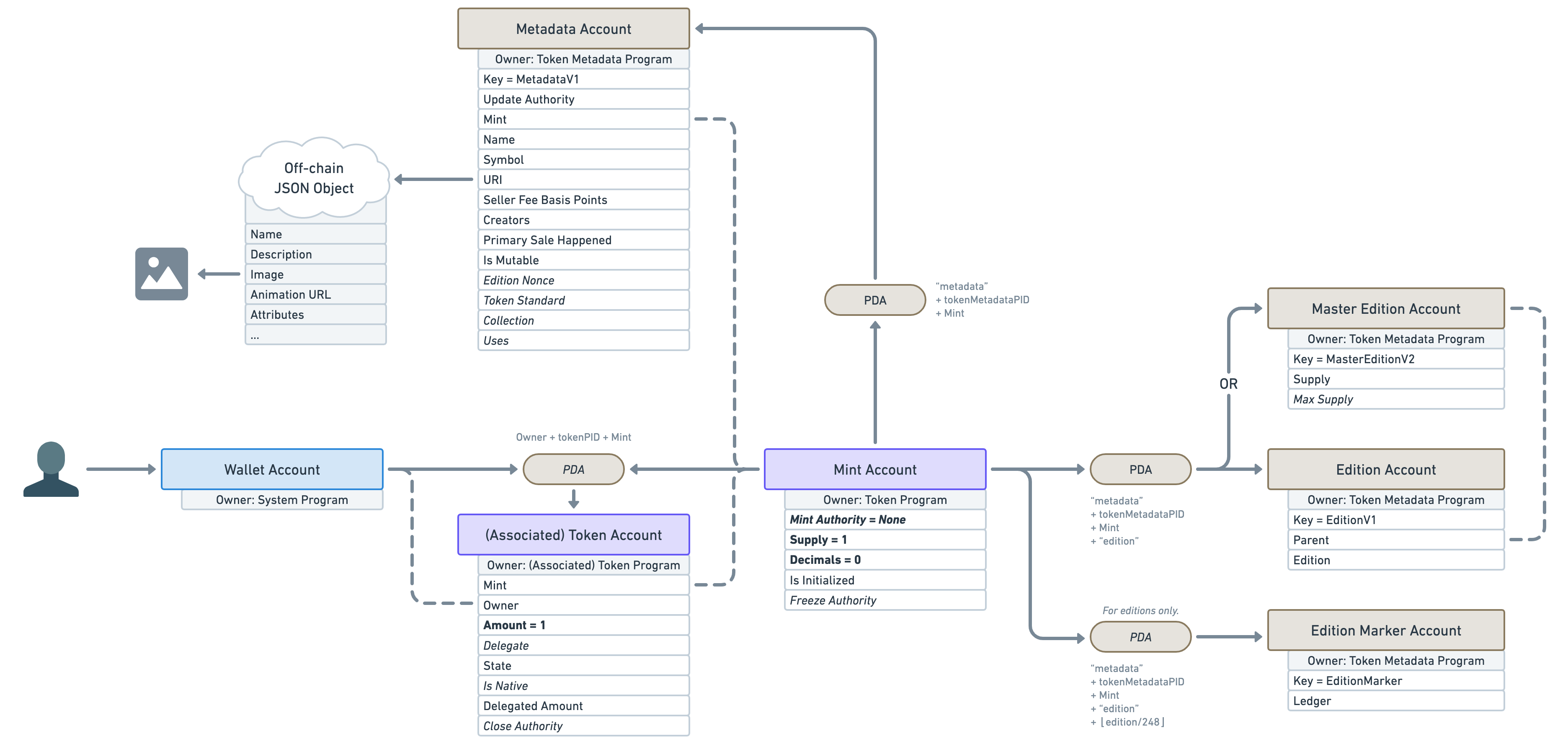
<p>Also note that another — lesser-known — PDA Account called “Edition Marker” exists on “Edition” NFTs to ensure there is no overlap between the edition numbers of a given “Master Edition”.</p>
<p class="wide"><img src="https://lorisleiva.com/assets/articles/2022/0501-solana-nft-2/solana-nfts-17.png" alt="Same diagram as before but with a new “PDA” pill (written in italic) starting from the mint account and pointing to a new “Edition Marker Account”. The latter is also owned by the Token Metadata Account and contains the following attributes: Key = EditionMarker and Ledger. The new PDA has a small text above it that reads “For editions only.”. " /></p>
<p>One use-case for this feature is to allow artists to sell more than one copy of their art. For instance, they can release 100 limited editions of their 1/1 NFT and each of them will keep track of their edition number on-chain.</p>
<p>It is worth noting that printing multiple editions of an NFT is totally optional and most NFTs out there will set their “Max Supply” to 0 to prevent using it.</p>
<p>So why did I decide to mention ”Master Editions” and “Editions” in this — rather long — article? Because, whilst printing editions is their primary purpose, <strong>they are responsible for more than just that.</strong></p>
<p>If you remember, we said earlier that for a “Mint Account” to be an NFT, it needed to:</p>
<ul>
<li>Have zero decimals.</li>
<li>Have minted exactly one token to a wallet.</li>
<li>Have revoked its right to mint additional tokens via the “Mint Authority” attribute.</li>
</ul>
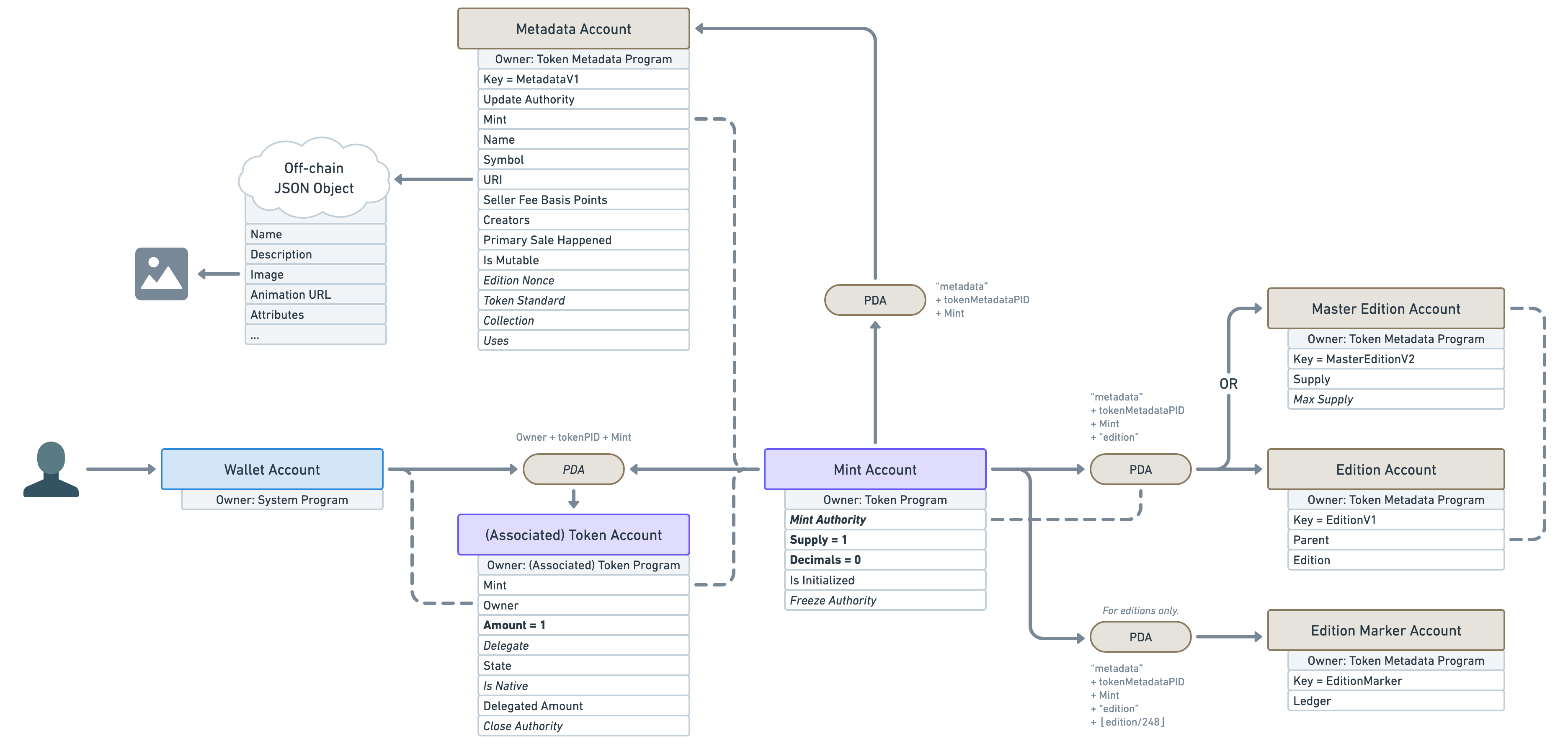
<p>Well, the Token Metadata Program uses the edition PDA to guarantee these properties. When creating the edition PDA account (whether it’s a “Master Edition” or an “Edition”) it will check that the mint account has got zero decimals and a supply of exactly one. If either of these conditions fails, it will refuse to create the account. If they succeed, it will transfer the “Mint Authority” to that new edition PDA ensuring no wallet can ever mint additional tokens. What that means is, <strong>the simple fact that a “Master Edition” or “Edition” account exists on a mint account, is proof of its non-fungibility</strong>.</p>
<p>This is why “Master Edition” and “Edition” accounts are important in Solana NFTs and are worth mentioning in this article.</p>
<p>Here’s a little update on our NFT diagram. As you can see the “Mint Authority” is no longer null but points to the edition PDA which can only be controlled by the open-sourced and audited Token Metadata Program.</p>
<p class="wide"><img src="https://lorisleiva.com/assets/articles/2022/0501-solana-nft-2/solana-nfts-18-19.png" alt="Same as the previous diagram but the “Mint Authority” on the mint account no longer reads “Mint Authority = None”. Instead, it reads “Mint Authority” and has a dashed arrow pointing to the edition PDA." /></p>
<h2><a id="content-token-standard-and-semi-fungible-tokens" href="#token-standard-and-semi-fungible-tokens" class="heading-permalink" aria-hidden="true" title="Permalink">❡</a>Token Standard and Semi-Fungible Tokens</h2>
<p>We now have the full picture of what makes a mint account an NFT in Solana!</p>
<p>However, this article wouldn’t be complete if I didn’t mention that the Token Metadata Program also supports what we call “<strong>Semi-Fungible Tokens</strong>” or SFT for short.</p>
<p>SFTs are basically the same as NFTs but without the non-fungible guarantees, we talked about earlier.</p>
<p>“But why?”, you might ask, “I thought non-fungibility was the whole point?”.</p>
<p>Well, it is for NFTs but, when you think about it, <strong>the core purpose of the “Metadata Account” is to add data to tokens</strong>. Why should we only restrict that feature to non-fungible tokens?</p>
<p>Why couldn’t our fungible Avocado token (AVDO) from earlier add on-chain data to its mint account? It could use that data to let decentralised exchanges know which symbol to use, which external links to list, which logo to display and so on.</p>
<p>Another use case for this would be creating a gaming asset as a zero-decimal token. For instance, you could create a token for the “Wood” resource in your game. Since players should be able to own and trade more than one wood, it makes little sense to have to create one single NFT for every single piece of wood in your game. That’s why making game resources fungible assets whilst still benefiting from on-chain data is super valuable.</p>
<p>As such, the Token Metadata Program allows us to create Metadata Accounts for mint accounts that are fungible. This is why, <strong>it is the responsibility of the edition PDA to guarantee non-fungibility</strong>.</p>
<p>To make our life easier, the Metadata Account keeps track of “how fungible” a token is via the “<strong>Token Standard</strong>” attribute. It can be one of the following values.</p>
<h3><a id="content-nonfungible" href="#nonfungible" class="heading-permalink" aria-hidden="true" title="Permalink">❡</a><code>NonFungible</code></h3>
<p>If the token standard is <code>NonFungible</code>, we know <strong>we are dealing with an NFT</strong>. This standard is applied if and only if a “Master Edition” or “Edition” account was created for that mint.</p>
<p>That means, we have the following guarantees:</p>
<ul>
<li>Mint supply is one.</li>
<li>Mint decimals are zero.</li>
<li>An account exists under the edition PDA.</li>
<li>Mint authority has been transferred to the edition PDA.</li>
</ul>
<p class="wide"><img src="https://lorisleiva.com/assets/articles/2022/0501-solana-nft-2/solana-nfts-18-19.png" alt="This is exactly the same diagram as the previous one since we were previously describing non-fungible tokens." /></p>
<h3><a id="content-fungibleasset" href="#fungibleasset" class="heading-permalink" aria-hidden="true" title="Permalink">❡</a><code>FungibleAsset</code></h3>
<p>If the token standard is <code>FungibleAsset</code>, we know <strong>we are dealing with a non-decimal SFT</strong>. For instance, our “Wood” resource example would be marked as a <code>FungibleAsset</code>.</p>
<p>That means we have the following guarantees:</p>
<ul>
<li>Mint decimals are zero.</li>
<li>No account exists under the edition PDA.</li>
</ul>
<p class="wide"><img src="https://lorisleiva.com/assets/articles/2022/0501-solana-nft-2/solana-nfts-20.png" alt="Same diagram as before but the following accounts and their PDAs have been removed: “Master Edition Account”, “Edition Account” and “Edition Marker Account”. On the token account, “Amount = 1” has been replaced with “Amount” and is no longer in bold. On the mint account, “Supply = 1” has been replaced with “Supply” and is no longer in bold. The “Mint Authority” no longer points to anything and is no longer in bold. However, “Decimals = 0” is still present and in bold." /></p>
<h3><a id="content-fungible" href="#fungible" class="heading-permalink" aria-hidden="true" title="Permalink">❡</a><code>Fungible</code></h3>
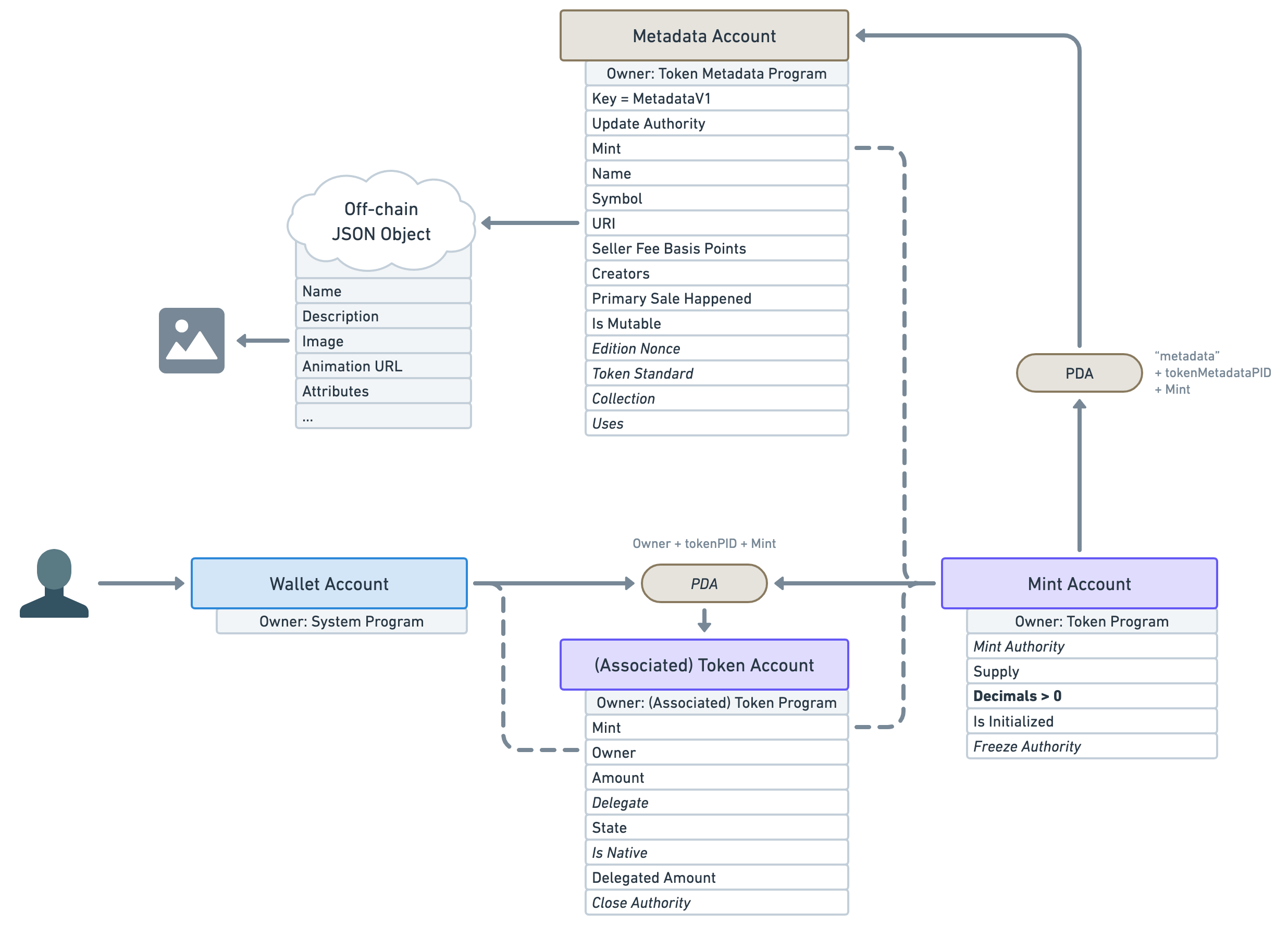
<p>If the token standard is <code>Fungible</code>, we know <strong>we are dealing with a decimal SFT</strong>. For instance, the Avocado token or the USDC token would both fit in this category.</p>
<p>That means we have the following guarantees:</p>
<ul>
<li>Mint decimals are strictly greater than zero.</li>
<li>No account exists under the edition PDA.</li>
</ul>
<p class="wide"><img src="https://lorisleiva.com/assets/articles/2022/0501-solana-nft-2/solana-nfts-21.png" alt="Same diagram as before but, on the mint account, “Decimals = 0” has been replaced with “Decimals &gt; 0”. It is still in bold." /></p>
<p>It is worth noting that the off-chain JSON metadata standard varies based on the “Token Standard” we’ve just discussed. You can find the JSON standard definition for each token type below.</p>
<ul>
<li>
<a href="https://docs.metaplex.com/token-metadata/specification#token-standards">JSON standard for Non Fungible tokens</a>
</li>
<li>
<a href="https://docs.metaplex.com/token-metadata/specification#token-standards">JSON standard for Fungible Asset tokens</a>
</li>
<li>
<a href="https://docs.metaplex.com/token-metadata/specification#token-standards">JSON standard for Fungible tokens</a>
</li>
</ul>
<h2><a id="content-conclusion" href="#conclusion" class="heading-permalink" aria-hidden="true" title="Permalink">❡</a>Conclusion</h2>
<p>Phew, what a journey!</p>
<p>Not only do we now have a full picture of what an NFT and an SFT look like in Solana, but we also understand why things are structured the way they are and how they compare to other models we are used to.</p>
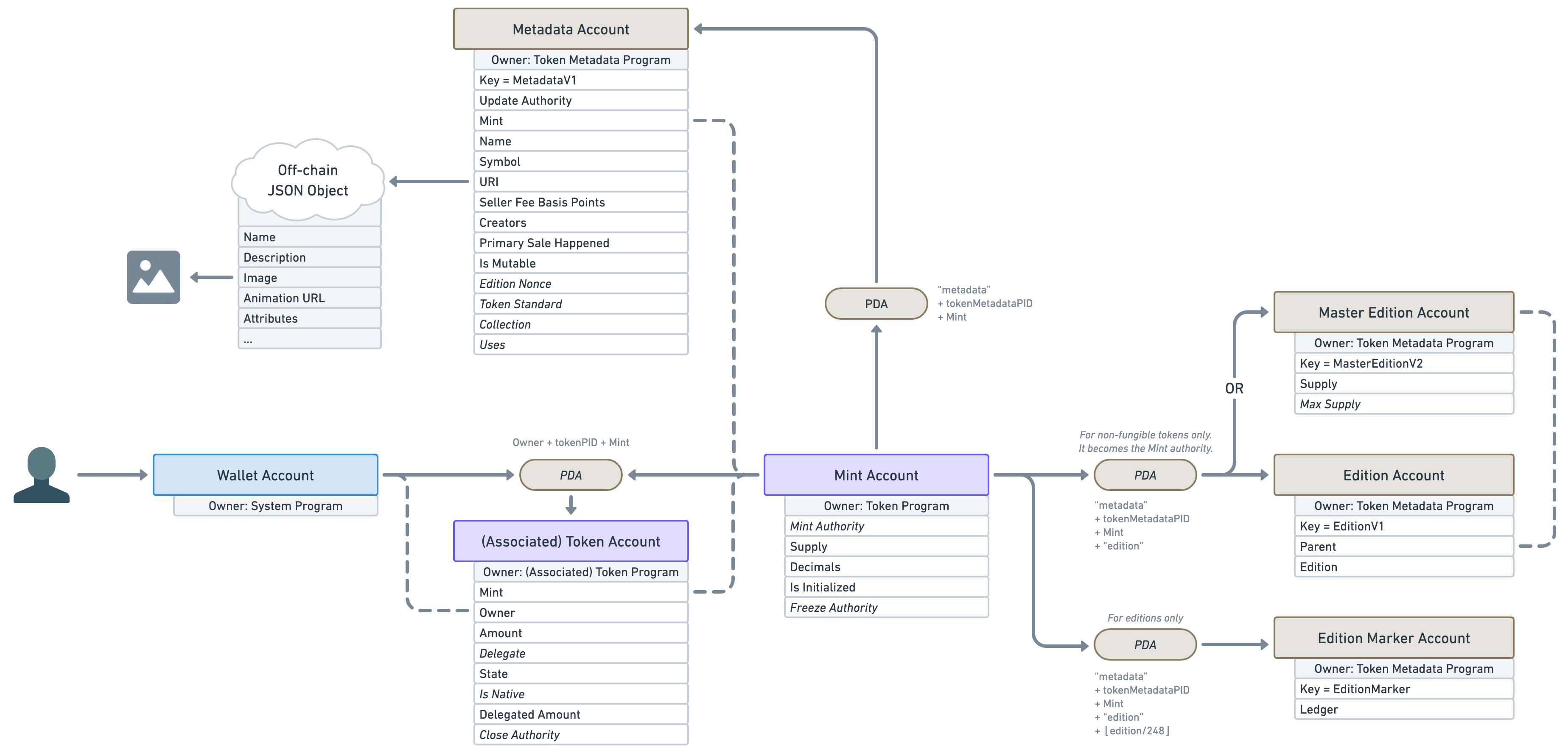
<p>This article wouldn’t be complete without a final diagram resuming what we’ve learned here.</p>
<p class="wide"><img src="https://lorisleiva.com/assets/articles/2022/0501-solana-nft-2/solana-nfts-22.png" alt="A recap diagram containing all of the accounts we discussed in this article: wallet account, token account, mint account, metadata account (and its off-chain JSON object), master edition account, edition account and edition marker account. None of the account attributes previously highlighted in bold, are in bold anymore to account for the fact that they can have different values based on their fungibility. The PDA that points to edition accounts has a new text above it that says: “For non-fungible tokens only. It becomes the Mint authority.”." /></p>
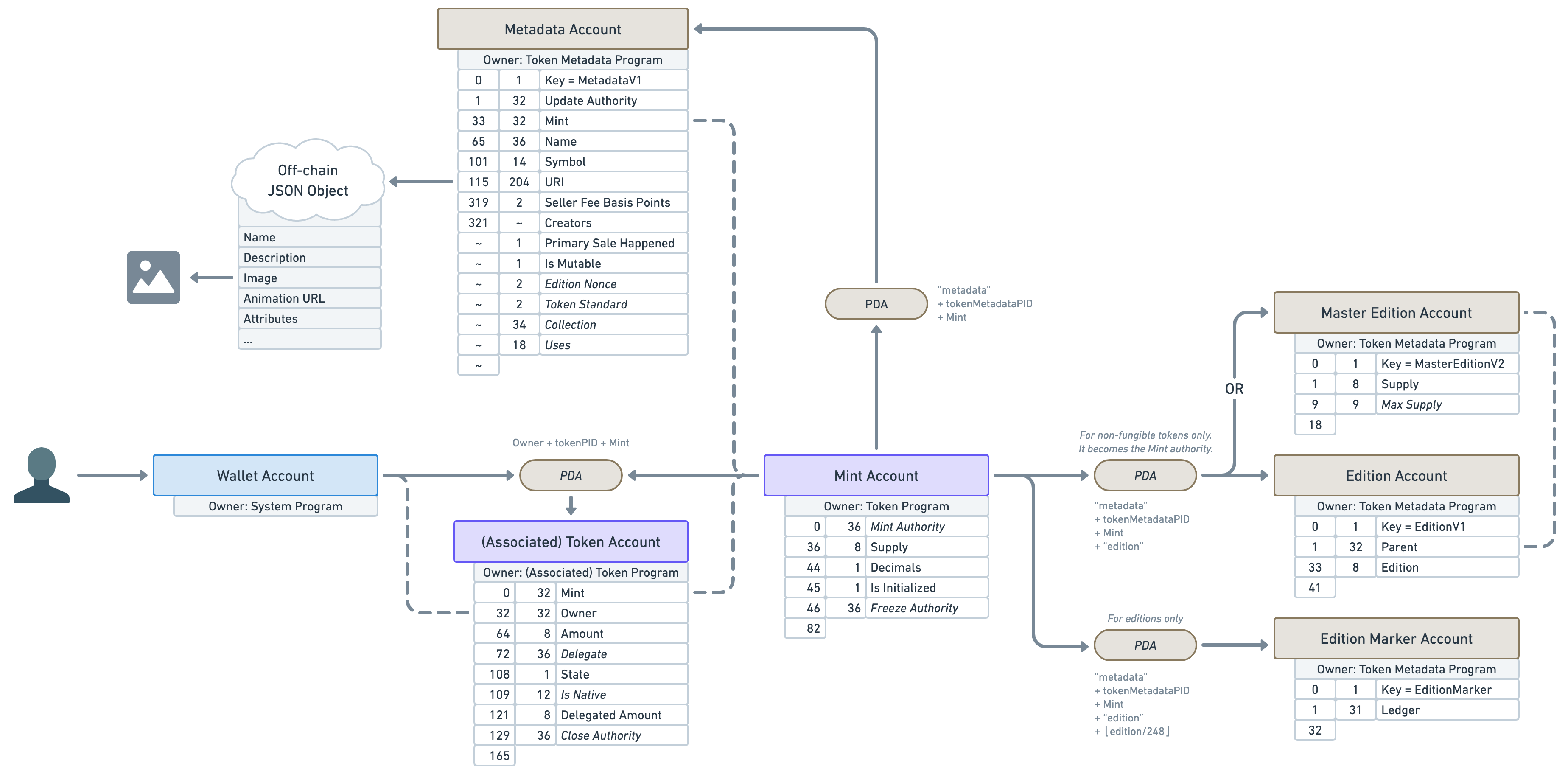
<p>And for the sake of making this diagram even more useful for developers out there, let’s also add the offset and the size of each account attribute in bytes. I’ll use a tilde <code>~</code> for variable account sizes.</p>
<p class="wide"><img src="https://lorisleiva.com/assets/articles/2022/0501-solana-nft-2/solana-nfts-23.png" alt="Same as the previous diagram but every single account attribute has two numbers on its left. The first one tells us the offset at which the attribute starts and the second one tells us the size of the attributes in bytes." /></p>
<p>Alright, I hope you’ve enjoyed this article and I’ll see you soon for more Solana and Metaplex adventures! ⛵️</p>

                    
                ]]>
            </content>


                <category term="How NFTs are represented in Solana"/>
            
            <published>2022-05-02T18:15:00+00:00</published>

            
                <link rel="enclosure" type="image/jpeg" length="159701" href="https://lorisleiva.com/assets/articles/2022/0501-solana-nft-2/solana-nft-2.jpg"/>
            
        </entry>
    
        <entry>
            
            <id>https://lorisleiva.com/owning-digital-assets-in-solana/a-new-way-of-owning-data</id>
            <title><![CDATA[A new way of owning data]]></title>
            <updated>2022-05-01T09:20:00+00:00</updated>
            <link rel="alternate" href="https://lorisleiva.com/owning-digital-assets-in-solana/a-new-way-of-owning-data"/>

            
            <author>
                <name><![CDATA[Loris Leiva]]></name>
            </author>
            <summary><![CDATA[In this article, I explain why I’m excited about NFTs and provide examples of the new opportunities they unlock.]]></summary>
            <content type="html">
                <![CDATA[ 
                    
                        
                            <a href="https://lorisleiva.com/owning-digital-assets-in-solana/a-new-way-of-owning-data">
                                <img alt="A new way of owning data" src="https://lorisleiva.com/assets/articles/2022/0501-solana-nft-1/solana-nft-1.jpg" />
                            </a>


                        <p class="lead">I see a lot of hate online for NFTs and the crypto world in general. For a very long time, I myself was completely indifferent to this universe and so it was easy to convince me I shouldn’t invest too much time learning about it.</p>
<p>However, less than a year ago, I decided to make my own opinion on the matter and invested time figuring out as much as I could. My interest was piqued very quickly and I continued to dig deeper into this world until I finally decided to quit my web2 job to dedicate my entire focus to web3.</p>
<p>Now, this article is not about me trying to convince anyone that crypto is great or that everyone should focus their career on web3. Far from that. This article is about explaining one of the reasons blockchains and NFTs piqued my interest and that is: a new way of owning data.</p>
<p>I’ll go through why I believe this is a new shift in our technology and, in a follow-up article, how this is materialised in Solana which is the blockchain on which I decided to invest my time.</p>
<h2><a id="content-the-current-state-of-data-ownership" href="#the-current-state-of-data-ownership" class="heading-permalink" aria-hidden="true" title="Permalink">❡</a>The current state of data ownership</h2>
<p>Let’s start by checking how one traditionally owns something that does not have a physical form. That could be a song, a game, a movie, a particular clip of your favourite TV show, a digital illustration, a 3D animation, an icon, a website template, a license to use some software, a tweet, an event from your own life, a receipt, an expense, a tax return, a spreadsheet, a slide from your deck, a message on a chat, I’ll stop here.</p>
<p>Let’s start by discarding virtual ownership that originates from physical ownership. For instance, you buy a song as a CD or vinyl and upload its content onto your computer. Yes, you now own the virtual copy of that song but as a proxy of the physical good. The same goes for digital assets that only live on your computer since their ownership is essentially an extension of your computer’s ownership.</p>
<p>However, these assets are getting less frequent as hardware becomes more and more of a commodity. Conveniently, if you lose your smartphone or break your laptop, you can buy a new one and have an exact replica of its content in no time.</p>
<p>This means your digital assets are held somewhere else and you trust some company or external entity not to mess up with them.</p>
<p>Similarly, ownership of assets is increasingly becoming on-demand. Meaning we pay a subscription to some company to access a huge number of songs, movies, tv shows, services, etc. We never really own them but that’s okay because it’s convenient and it makes sense. In fact, the companies that offer these assets to us very often don’t own them themselves. Netflix may buy an expiring license for a movie to get the rights to share it on its platform therefore never really owning the movie in the first place.</p>
<p>Last but not least, there’s a lack of ownership on just about anything anyone enters on any application. That receipt you’ve uploaded to your accounting software, that image you posted on Instagram, that Facebook status, you get the picture.</p>
<p>The gist here is, that most of the data we generate or consume never really belongs to us.</p>
<h2><a id="content-does-it-matter" href="#does-it-matter" class="heading-permalink" aria-hidden="true" title="Permalink">❡</a>Does it matter?</h2>
<p>More often than not, the answer is no. Whilst data is powering large corporations, at an individual level, it rarely affects us and it’s often too convenient to care. I will also add that I am not one of these individuals that value privacy above all. I am willing to pay away a reasonable amount of privacy when it makes my life more convenient.</p>
<p>Thus we might not have data ownership but we usually have (or at least should have) enough data privacy that it doesn’t matter.</p>
<p>Okay so if we’re (mostly) happy with the way things are, why do we want to change things? Why do we need crypto for data ownership? Why does this even matter?</p>
<p>I don’t see crypto as a replacement or an enhancement of the technology we currently have (at least not in the near future), but as an additional tool we can leverage to unlock new ways of owning things that, ironically, mimic the way we used to own them physically.</p>
<p>It opens up new opportunities in the digital world that (whether we like it or not) represents a big part of the human species, and that’s why I think it matters.</p>
<h2><a id="content-it-started-with-digital-art" href="#it-started-with-digital-art" class="heading-permalink" aria-hidden="true" title="Permalink">❡</a>It started with digital art</h2>
<p>In my opinion, NFTs are the primary reason crypto gained so much traction over the past few years. Whilst the concept of Non-Fungible Tokens is not new, it is its application to the digital art market that made its concept known worldwide. All of the sudden, you could sell a digital asset to someone and give them irrevocable proof that they (and only they) owned it. What could only be done physically by going to an art gallery and purchasing a physical piece, could now be done with any asset, made by anyone, anywhere in the world.</p>
<p>Yes, you could argue that a digital asset cannot be hung on the wall for your guests to see but the reality is most people value their social walls far more than their physical ones. Sadly, the former tend to be visited a lot more.</p>
<h2><a id="content-nfts-are-a-scam" href="#nfts-are-a-scam" class="heading-permalink" aria-hidden="true" title="Permalink">❡</a>NfTS aRe A sCaM</h2>
<p>I hear this a lot so I’d like to touch on that a little bit. Yes, it is possible (in any blockchain) for anyone to upload someone else’s work and sell it to someone who has no clue what they are buying.</p>
<p>But how does that differ from someone buying a fake painting whilst thinking it was the original one? Yes, there are experts and certificates to prevent that but these are also prone to human errors and maliciousness.</p>
<p>On the other hand, with NFTs, the artist signs their art using cryptography before selling it. That means anyone can verify that a piece of digital art was indeed offered by the original artist and nothing can be done to alter that. An ill-informed user can still be scammed by not knowing how to ensure the NFT is an original but this is something we should aim to improve by educating buyers instead of scaring them with “all NFTs are scams”.</p>
<p>NFTs are also very volatile. You can buy a piece of digital art for thousands of dollars from a verified artist and it could be worth nothing the very next day. But again so is physical art. Hype and FOMO are not new and certainly not specific to NFTs. Hype can scale to new orders of magnitude through social media but that’s what progress looks like. We should be careful, make informed purchases, help each other out, but gatekeeping will gets us nowhere.</p>
<p>On that note, let’s move on to another industry currently affected by this new way of owning data.</p>
<h2><a id="content-gaming" href="#gaming" class="heading-permalink" aria-hidden="true" title="Permalink">❡</a>Gaming</h2>
<p>Gaming is another good use case for decentralised ownership of data because it allows players to own and exchange in-game items in real-life marketplaces.</p>
<p>This is huge. If you’ve ever played games such as MMORPGs that have their own in-game marketplace with their own in-game currency, you might have noticed how clever these economic bubbles can be and how players really enjoy coming up with new creative ways of making the game work in their favour. Imagine this same level of entertainment but the money you make in-game translates to real money.</p>
<p>Additionally, games can create loyalty and scarcity by releasing limited edition assets such as skins, special packs, levels, potions, spells, etc. These can even help the game creators fund themselves to make the game free and accessible to everyone.</p>
<p>Another great advantage of having decentralised assets is that they are not locked in a specific game. Other games can also leverage them in ways that benefit the owners of these assets. Say Fortnite releases a skin as an NFT, nothing stops Mario Kart to unlock a new matching skin in their game for the owner of that NFT. This will create exciting gaming ecosystems where even massive corporations and indie developers can have synergies together.</p>
<p>I could talk about NFT and gaming for hours so I’ll stop here but hopefully, you can see why I’m excited about this topic.</p>
<h2><a id="content-and-thats-not-it" href="#and-thats-not-it" class="heading-permalink" aria-hidden="true" title="Permalink">❡</a>And that’s not it</h2>
<p>The excitement doesn’t stop here. Digital art and gaming are the first organic use cases of NFTs but ultimately, all an NFT is, is a secure proof that someone owns a digital asset.</p>
<p>That digital asset can be anything and so it opens up a whole new era of data ownership where the only limit is our imagination. Let’s have a look at some examples.</p>
<h3><a id="content-nfts-for-loyalty-programs" href="#nfts-for-loyalty-programs" class="heading-permalink" aria-hidden="true" title="Permalink">❡</a>NFTs for loyalty programs</h3>
<p>A company could release a limited amount of NFTs that gives its owners special offers on their products. Imagine a Sephora NFT giving you 10% off on all their product or a Prada NFT that only allows NFT owners to purchase certain clothes. The cool thing is because NFTs can have secondary sales royalties, businesses can make up for the given discounts and even adjust that discount accordingly. Say, if lots of people are exchanging their Sephora NFTs then the discount goes up to 15%.</p>
<h3><a id="content-nfts-for-membership-programs" href="#nfts-for-membership-programs" class="heading-permalink" aria-hidden="true" title="Permalink">❡</a>NFTs for membership programs</h3>
<p>Owning an NFT could make you a full member of an organisation (decentralised or not). Depending on the type of membership, this could grant you special access to things, moderation rights, admin rights, etc. In fact, an organisation could offer multiple types of NFTs based on the permission level they want to offer. Note that because NFTs are exchangeable, someone with lots of money could buy all the admin-permission NFTs and take complete control of the organisation (I guess we could compare that to shares in a company). That’s why Decentralised Autonomous Organisations (DAO) adopt different models instead such as using voting tokens that need to be staked for some time to get voting power.</p>
<h3><a id="content-nfts-as-digital-subscriptions" href="#nfts-as-digital-subscriptions" class="heading-permalink" aria-hidden="true" title="Permalink">❡</a>NFTs as digital subscriptions</h3>
<p>That’s similar to the point above but only focuses on granting the NFT owners access to special resources. For instance, you could fund your blog by releasing say 1000 NFTs granting access to special articles. You could even make a decent passive income through secondary sales royalties.</p>
<h3><a id="content-nfts-for-accounting" href="#nfts-for-accounting" class="heading-permalink" aria-hidden="true" title="Permalink">❡</a>NFTs for accounting</h3>
<p>This one might not please everyone but some accounting data could live on the blockchain, giving us a source of truth that cannot be toyed with. One example of accounting data as NFTs could be invoices and receipts. As a business A, you could create an NFT that represents an invoice another business B has to pay for your services. The price of the NFT would equal the total amount of the invoice. Business B would then purchase that NFT, paying the invoice and using their NFT as proof of payment, i.e. a receipt. As it is possible to break down NFTs into multiple shares using vaults, Business B could even pay in multiple payments and the NFT would only unlock once 100% of the invoice has been paid. There would be a lot of things to sort out legal-wise but again, our imagination is the real limit here.</p>
<h3><a id="content-nfts-for-social-media" href="#nfts-for-social-media" class="heading-permalink" aria-hidden="true" title="Permalink">❡</a>NFTs for social media</h3>
<p>There is so much synergy between web3 and social media that I’m just going to focus on one example. Imagine you post a picture of your holiday in the Bahamas and mint that as an NFT. Now you literally own that life event on the blockchain as a souvenir. You can even share that NFT with friends using a vault or using what we call “Semi-Fungible Tokens” which allow more than one owner for a given NFT. Now you’re probably thinking, who would buy that? To which I’d reply, who would buy that NFT you minted yesterday in a month? 😅 Just kidding, my point being, maybe the value of an NFT isn’t always to sell it later. Maybe having an asset in your wallet and being a proud owner of it is enough. Especially with some of the new virtual environments that allow people to showcase their NFTs to the world. That being said, some of these life events or statuses would actually have a monetary value. If a famous influencer wanted to sell the souvenir of their holidays in the Bahamas as an NFT, rest assured that followers would fight for it. The only caveat I will add here is that there is a tremendous amount of data in social media and if a significant portion of it would end up being stored on any blockchain, it could damage that blockchain. Not so much because of the traffic but because of how big the blockchain state will become for the nodes to maintain. Nevertheless, nothing progress can’t improve.</p>
<h3><a id="content-nfts-for-wills" href="#nfts-for-wills" class="heading-permalink" aria-hidden="true" title="Permalink">❡</a>NFTs for wills</h3>
<p>Okay, that one is a bit weird but hear me out. You could, for instance, give 50% of your total net worth to a limited amount of NFT owners in your will. Then you’d give one NFT to each member of your family (or people you care about). And just like that they can sort things out on their own and exchange them with one another if they need the money right now. For very rich individuals, this could even become a way to stock trade on the net worth of a person rather than a company where people speculate on the amount of money you’ll be worth when you pass away. Slightly morbid I’ll give you that. 😅</p>
<h2><a id="content-conclusion" href="#conclusion" class="heading-permalink" aria-hidden="true" title="Permalink">❡</a>Conclusion</h2>
<p>Hopefully, some of the examples I provided resonated with you and you can see why I think NFTs are a new shift in our technology.</p>
<p>Should everything become an NFT? Of course not. But we now have this new tool on our belt that unlocks a new way of owning data and therefore unlocks new applications that could have never been done before.</p>
<p>Anyway, that’s one of the reasons why I’m excited about web3 and I hope I managed to share some of my enthusiasm with you.</p>
<p>In a follow-up article, I will focus on how we can achieve all of this in the Solana blockchain at a high level — no code but lots of diagrams.</p>
<p>See you there. 👋</p>

                    
                ]]>
            </content>


                <category term="A new way of owning data"/>
            
            <published>2022-05-01T09:20:00+00:00</published>

            
                <link rel="enclosure" type="image/jpeg" length="108775" href="https://lorisleiva.com/assets/articles/2022/0501-solana-nft-1/solana-nft-1.jpg"/>
            
        </entry>
    
        <entry>
            
            <id>https://lorisleiva.com/create-a-solana-dapp-from-scratch/paginating-tweets</id>
            <title><![CDATA[Paginating tweets]]></title>
            <updated>2022-03-22T15:11:00+00:00</updated>
            <link rel="alternate" href="https://lorisleiva.com/create-a-solana-dapp-from-scratch/paginating-tweets"/>

            
            <author>
                <name><![CDATA[Loris Leiva]]></name>
            </author>
            <summary><![CDATA[When a program starts getting lots of accounts, it can be tricky to retrieve them whilst keeping a decent user experience. In this episode, we use tricks to paginate and order accounts from our program.]]></summary>
            <content type="html">
                <![CDATA[ 
                    
                        
                            <a href="https://lorisleiva.com/create-a-solana-dapp-from-scratch/paginating-tweets">
                                <img alt="Paginating tweets" src="https://lorisleiva.com/assets/articles/2022/0322-solana-14-paginate-tweets/episode-14-cover.jpg" />
                            </a>


                        When a program starts getting lots of accounts, it can be tricky to retrieve them whilst keeping a decent user experience. In this episode, we use tricks to paginate and order accounts from our program.

                        <h2>This content is for GitHub Sponsors only</h2>
                        <p>Sponsor me on GitHub to read this article and get access to the full library of sponsor-only posts.</p>
                        <p><a href="https://github.com/sponsors/lorisleiva">Become a Sponsor</a></p>
                        <p>If you're already a sponsor, simply <a href="https://lorisleiva.com/create-a-solana-dapp-from-scratch/paginating-tweets">visit this article on my blog</a> to read it.</p>
                    
                ]]>
            </content>


                <category term="Paginating tweets"/>
            
            <published>2022-03-22T15:11:00+00:00</published>

            
                <link rel="enclosure" type="image/jpeg" length="619965" href="https://lorisleiva.com/assets/articles/2022/0322-solana-14-paginate-tweets/episode-14-cover.jpg"/>
            
        </entry>
    
        <entry>
            
            <id>https://lorisleiva.com/paginating-and-ordering-accounts-in-solana</id>
            <title><![CDATA[Paginating and ordering accounts in Solana]]></title>
            <updated>2022-01-24T13:53:00+00:00</updated>
            <link rel="alternate" href="https://lorisleiva.com/paginating-and-ordering-accounts-in-solana"/>

            
            <author>
                <name><![CDATA[Loris Leiva]]></name>
            </author>
            <summary><![CDATA[In this article, we will go through different techniques to learn how to optimise our calls to the Solana cluster to support pagination and account ordering.]]></summary>
            <content type="html">
                <![CDATA[ 
                    
                        
                            <a href="https://lorisleiva.com/paginating-and-ordering-accounts-in-solana">
                                <img alt="Paginating and ordering accounts in Solana" src="https://lorisleiva.com/assets/articles/2022/0124-solana-pagination/solana-pagination-cover.jpg" />
                            </a>


                        <p class="lead">If you’ve ever tried to get all accounts from a Solana program, you’ve probably noticed that you get everything in one go without being able to limit or offset the accounts retrieved. Additionally, we cannot control the order in which we receive them.</p>
<p>This makes it almost impossible for us to paginate and/or order accounts from a given program. <em>Almost</em> impossible.</p>
<p>In this article, we will go through different techniques to learn how to optimise our calls to the Solana cluster to support pagination and account ordering.</p>
<h2><a id="content-the-tools-at-our-disposal" href="#the-tools-at-our-disposal" class="heading-permalink" aria-hidden="true" title="Permalink">❡</a>The tools at our disposal</h2>
<p>Before diving through these techniques, let’s have a quick look at the tools available for us to query the Solana cluster. The rest of the article will focus on how to use and arrange these tools in a way that benefits us.</p>
<h3><a id="content-rpc-methods" href="#rpc-methods" class="heading-permalink" aria-hidden="true" title="Permalink">❡</a>RPC Methods</h3>
<p>Let’s start by having a look at the RPC methods we’ll use to query the cluster.</p>
<ul>
<li>
<a href="https://docs.solana.com/developing/clients/jsonrpc-api#getprogramaccounts"><code>getProgramAccounts</code></a>. This RPC method allows us to fetch all accounts owned by a given program. For instance, if you’ve followed the series on <a href="https://lorisleiva.com/create-a-solana-dapp-from-scratch">how to create a Twitter dApp in Solana</a>, this could fetch all the <code>Tweet</code> accounts of our program.</li>
<li>
<a href="https://docs.solana.com/developing/clients/jsonrpc-api#getaccountinfo"><code>getAccountInfo</code></a>. This RPC method allows us to get the account information and data from a given public key.</li>
<li>
<a href="https://docs.solana.com/developing/clients/jsonrpc-api#getmultipleaccounts"><code>getMultipleAccounts</code></a>. This RPC method does the same thing as <code>getAccountInfo</code> except that it retrieve multiple accounts from a provided list of public keys. This enables us to retrieve a bunch of accounts in only one API call to improve performances and avoid rate limiting. Note that the maximum number of accounts we can retrieve in one go using this method is 100.</li>
</ul>
<h3><a id="content-rpc-filtering-and-slicing" href="#rpc-filtering-and-slicing" class="heading-permalink" aria-hidden="true" title="Permalink">❡</a>RPC filtering and slicing</h3>
<p>Some of the RPC methods above support additional parameters to either filter or slice the accounts retrieved.</p>
<ul>
<li>
<code>dataSlice</code>. This parameter limits the data retrieved for each account. It expects an object containing an <code>offset</code> — where the data should start — and a <code>limit</code> — how long the data should be. For example, providing <code>{ offset: 32, limit: 8 }</code> will only retrieve <em>8 bytes of data starting at byte 32</em> for every account. This parameter is available on both <code>getProgramAccounts</code> and <code>getMultipleAccounts</code> RPC methods.</li>
<li>
<code>dataSize</code>. This parameter is a filter that only selects accounts whose data is of the given size in bytes. This filter is only available on the <code>getProgramAccounts</code> RPC method. <a href="https://lorisleiva.com/create-a-solana-dapp-from-scratch/fetching-tweets-from-the-program#the-datasize-filter">You can read more about this filter here</a>.</li>
<li>
<code>memcmp</code>. This parameter is a filter that only selects accounts such that their data matches the provided buffer at a given position. This filter is only available on the <code>getProgramAccounts</code> RPC method. <a href="https://lorisleiva.com/create-a-solana-dapp-from-scratch/fetching-tweets-from-the-program#the-memcmp-filter">You can read more about this filter here</a>.</li>
</ul>
<p>Alright, these are the tools at our disposal, now let’s use them!</p>
<h2><a id="content-the-naive-approach" href="#the-naive-approach" class="heading-permalink" aria-hidden="true" title="Permalink">❡</a>The naive approach</h2>
<p>Let’s start by trying to fetch all <code>CandyMachine</code> accounts from the Candy Machine V2 program from Metaplex.</p>
<p>This is a particularly interesting exercise because there are thousands of accounts in that program and some of them have huge amounts of data.</p>
<p>If we wanted to fetch all accounts within the Candy Machine V2 program, that’s how we could do it.</p>
<pre><code class="language-js">import { Connection, clusterApiUrl, PublicKey } from '@solana/web3.js';

const candyMachineV2Program = new PublicKey('cndy3Z4yapfJBmL3ShUp5exZKqR3z33thTzeNMm2gRZ');
const connection = new Connection(clusterApiUrl('mainnet-beta'))

const accounts = await connection.getProgramAccounts(candyMachineV2Program)
</code></pre>
<p>I don’t recommend you to run this piece of code. If you do, chances are your browser tab will stop working after having downloaded hundreds of megabytes of data.</p>
<p>Also, note that we didn’t need to provide a <code>dataSize</code> or a <code>memcmp</code> filter to ensure we retrieve <code>CandyMachine</code> accounts because that’s the only type of account available in the Candy Machine V2 program. That being said, this won’t always be the case and it’s a good practice to be explicit about which account we’re looking for. So let’s add a filter anyway.</p>
<p>We can’t use a <code>dataSize</code> filter here because the size of a <code>CandyMachine</code> account is not static and depends on its content. So we need to use the <code>memcmp</code> filter on the first 8 bytes to compare the hash of the account type — called the <strong>discriminator</strong>.</p>
<p>Since this is an Anchor program, account discriminators should be the first 8 bytes of the SHA-256 hash of <code>&quot;account:CandyMachine&quot;</code>. So let’s compute that discriminator and ensure it is present on the first 8 bytes of every account we retrieve using a <code>memcmp</code> filter.</p>
<pre><code class="language-js">import { sha256 } from &quot;js-sha256&quot;;
import bs58 from 'bs58';

// ...

const candyMachineDiscriminator = Buffer.from(sha256.digest('account:CandyMachine')).slice(0, 8);

const accounts = await connection.getProgramAccounts(candyMachineV2Program, {
    filters: [
        { memcmp: { offset: 0, bytes: bs58.encode(candyMachineDiscriminator) } }, // Ensure it's a CandyMachine account.
    ],
})
</code></pre>
<p><small>Note that Anchor adds the filter automatically for you when using the API it provides — e.g. <code>program.account.candyMachine.all()</code>.</small></p>
<p>Okay, that’s all nice but we haven’t fixed our issue as running the code above will still try to fetch all the data from all candy machines ever created in this program.</p>
<p>It’s time we explore how to paginate this.</p>
<h2><a id="content-pre-fetching-without-data" href="#pre-fetching-without-data" class="heading-permalink" aria-hidden="true" title="Permalink">❡</a>Pre-fetching without data</h2>
<p>The key is to <strong>pre-fetch the accounts once without any data</strong>.</p>
<p>You might need the account data later on, but pre-fetching them without data will allow us to scan all the accounts we need and paginate them by fetching their data page by page.</p>
<p>So how do we do this?</p>
<p>Easy! All we need to do is provide a <code>dataSlice</code> parameter with a length of zero.</p>
<pre><code class="language-js{2}">const accounts = await connection.getProgramAccounts(candyMachineV2Program, {
    dataSlice: { offset: 0, length: 0 }, // Fetch without any data.
    filters: [
        { memcmp: { offset: 0, bytes: bs58.encode(candyMachineDiscriminator) } }, // Ensure it's a CandyMachine account.
    ],
})
</code></pre>
<p><small>Note that I kept our previous <code>memcmp</code> filter but this will work with any filters you want.</small></p>
<p>And that’s it! Now we should have the entire list of <code>CandyMachine</code> accounts within the program. Because we didn’t ask to retrieve their data, this endpoint is much faster and requires much less memory than the previous endpoint. In addition, this will be significantly more performant when dealing with heavy accounts and/or as the program contains more and more accounts.</p>
<p>Now what?</p>
<p>Well, first of all, we get the total count of our filtered accounts for free.</p>
<pre><code class="language-js">const accountsInTotal = accounts.length
</code></pre>
<p>This will be helpful when paginating the accounts as we’ll know when we’ve reached the last page.</p>
<p>Additionally, and most importantly, we might not get any account data but <strong>we do get the public key of each account</strong>.</p>
<pre><code class="language-js">const accountPublicKeys = accounts.map(account =&gt; account.pubkey)
</code></pre>
<p>That means we now have enough information to fetch the missing data page by page.</p>
<h2><a id="content-fetching-data-page-by-page" href="#fetching-data-page-by-page" class="heading-permalink" aria-hidden="true" title="Permalink">❡</a>Fetching data page by page</h2>
<p>Now that we have the exhaustive list of public keys that interest us, let’s implement a <code>getPage</code> function which will return all accounts in a given page with their data.</p>
<pre><code class="language-js">// ...

const accountPublicKeys = accounts.map(account =&gt; account.pubkey)

const getPage = async (page, perPage) =&gt; {
    // TODO: Implement.
}
</code></pre>
<p>First, we need to slice all public keys within the requested page. We can achieve this by using the <a href="https://developer.mozilla.org/en-US/docs/Web/JavaScript/Reference/Global_Objects/Array/slice"><code>slice</code></a> method on the <code>accountPublicKeys</code> array. Additionally, if the given page is out-of-bound, <code>slice</code> will return an empty array, so let’s return early if that’s the case.</p>
<pre><code class="language-js">const getPage = async (page, perPage) =&gt; {
    const paginatedPublicKeys = accountPublicKeys.slice(
        (page - 1) * perPage,
        page * perPage,
    );

    if (paginatedPublicKeys.length === 0) {
        return [];
    }

    // TODO: Continue implementing.
}
</code></pre>
<p>Next, we can use the <code>getMultipleAccounts</code> RPC method to fetch all of the accounts within the page. This method is called <code>getMultipleAccountsInfo</code> on the JavaScript client.</p>
<pre><code class="language-js{11-13}">const getPage = async (page, perPage) =&gt; {
    const paginatedPublicKeys = accountPublicKeys.slice(
        (page - 1) * perPage,
        page * perPage,
    );

    if (paginatedPublicKeys.length === 0) {
        return [];
    }

    const accountsWithData = await connection.getMultipleAccountsInfo(paginatedPublicKeys);

    return accountsWithData;
}
</code></pre>
<p>And just like that, we can fetch our accounts data page by page! 🥳</p>
<pre><code class="language-js">const perPage = 6

const page1 = await getPage(1, perPage)
const page2 = await getPage(2, perPage)
// ...
</code></pre>
<p>Remember that the <code>getMultipleAccounts</code> RPC method can only accept a maximum of 100 public keys. If you need more accounts within a page, you will need to split the <code>paginatedPublicKeys</code> array into chunks of 100 and make a <code>getMultipleAccounts</code> call for each of these chunks.</p>
<h2><a id="content-ordering-accounts" href="#ordering-accounts" class="heading-permalink" aria-hidden="true" title="Permalink">❡</a>Ordering accounts</h2>
<p>So far, we’ve seen how to paginate and/or access subsets of all the accounts in a program. However, no assertions can be made on the order in which we receive these accounts. In fact, calling the exact same endpoint twice can return the accounts in different orders.</p>
<p>So how do we get some control over the order in which we retrieve our accounts?</p>
<p>The key here is to <strong>add a little bit of data in the pre-fetch call</strong> that scans all available accounts. We need just enough data to successfully reorder our array of public keys before we paginate them or select a subset of them.</p>
<p>Let’s take back our previous example. This time, we’ll want to fetch all <code>CandyMachine</code> accounts ordered by descending price. Meaning we’ll have the most expensive candy machine first and the cheapest last.</p>
<p>To achieve this, we need to slice the <code>price</code> property of every account before paginating them. If we look at the following <code>CandyMachine</code> structure inside the program, we can find out where exactly that <code>price</code> property resides in the array of bytes.</p>
<pre><code class="language-rust">#[account]
#[derive(Default)]
pub struct CandyMachine {           // 8 (discriminator)
    pub authority: Pubkey,          // 32
    pub wallet: Pubkey,             // 32
    pub token_mint: Option&lt;Pubkey&gt;, // 33
    pub items_redeemed: u64,        // 8
    pub data: CandyMachineData,     // See below
}

#[derive(AnchorSerialize, AnchorDeserialize, Clone, Default)]
pub struct CandyMachineData {
    pub uuid: String, // 4 + 6
    pub price: u64,   // 8
    // ...
}
</code></pre>
<p>From the code above, we can see that the <code>price</code> property is located at byte 123 (8 + 32 + 32 + 33 + 8 + 4 + 6) and that it uses 8 bytes — or 64 bits. If you’re struggling to understand how I came up with the number of bytes for each property, you might benefit from <a href="https://lorisleiva.com/create-a-solana-dapp-from-scratch/structuring-our-tweet-account#sizing-our-account">reading this article</a> and <a href="https://solanacookbook.com/references/anchor.html#calculating-account-space-size">this one too</a>.</p>
<p>Now that we know where the <code>price</code> property is located, we can use this in our <code>dataSlice</code> parameter to only fetch that price and nothing else.</p>
<pre><code class="language-js">const accounts = await connection.getProgramAccounts(candyMachineV2Program, {
    dataSlice: { offset: (8 + 32 + 32 + 33 + 8 + 4 + 6), length: 8 }, // Fetch the price only.
    filters: [
        { memcmp: { offset: 0, bytes: bs58.encode(candyMachineDiscriminator) } }, // Ensure it's a CandyMachine account.
    ],
})
</code></pre>
<h2><a id="content-trouble-in-candy-paradise" href="#trouble-in-candy-paradise" class="heading-permalink" aria-hidden="true" title="Permalink">❡</a>Trouble in candy paradise</h2>
<p>Unfortunately, in this particular case, it doesn’t quite work as expected. I wish it did in order to keep things simple in this article but the truth is, things like that happen frequently when reading accounts whose structure we don’t control and it’s good to know how to tackle these issues.</p>
<p>Okay, so what’s wrong here?</p>
<p>Take a look at the <code>token_mint</code> property on the account.</p>
<pre><code class="language-rust{6}">#[account]
#[derive(Default)]
pub struct CandyMachine {           // 8 (discriminator)
    pub authority: Pubkey,          // 32
    pub wallet: Pubkey,             // 32
    pub token_mint: Option&lt;Pubkey&gt;, // 33
    pub items_redeemed: u64,        // 8
    pub data: CandyMachineData,     // See below
}
</code></pre>
<p>We can see it define an <em>optional public key</em>. It uses one byte to determine if there is a public key or not and 32 bytes to store the public key itself — hence the 33 bytes required in total.</p>
<p>So when <code>token_mint</code> contains a public key, it writes the number “1” on the first byte and the public key on the other 32 bytes. However, when <code>token_mint</code> doesn’t contain a public key, it writes the number “0” on the first byte and that’s it! It will not use any more storage than that because it does not need to. And that’s where the problem is!</p>
<p>Because the <code>price</code> property is located after the <code>token_mint</code> property, whether or not it contains a public key will affect the location of the <code>price</code> property!</p>
<p>Note that other programs may tackle optional properties differently in order to go around this issue and make their other properties more “searchable”. For example, some programs only use 32 bytes for optional public keys and will store <code>PublicKey::default()</code> to indicate an empty state. Additionally, some programs might try to store their fixed-size properties first to ensure they are not shifted by properties of variable length. That’s not to say this program didn’t have valid reasons to structure their accounts that way but just to let you know that they are other options with their own trade-offs.</p>
<p>Okay enough chitchat, how do we fix this?</p>
<p>One way would be to fetch all the data between the <code>token_mint</code> property and the <code>price</code> property (included). That way we can analyse the first byte of the <code>token_mint</code> property and slice the <code>price</code> property at the right location. This can be problematic when the two properties are far away from each other as you’ll end up slicing much more data than you actually need.</p>
<p>Whilst the two properties are relatively close here, let’s have a look at another way to fix this. Since we’ve only got two scenarios to handle here, why not make two different calls to the <code>getProgramAccounts</code> RPC method? One where the <code>token_mint</code> is empty and one where it’s not. We know that the first byte of the <code>token_mint</code> property — determining if there is a public key or not — is located on byte 72 (8 + 32 + 32). Therefore, we just need a <code>memcmp</code> filter that compares that 72nd byte with “0” and “1”. Then all we need to do is merged the two arrays together.</p>
<pre><code class="language-js">import bs58 from 'bs58';
import BN from 'bn.js';

const accountsWithTokenMint = await connection.getProgramAccounts(candyMachineV2Program, {
    dataSlice: { offset: 8 + 32 + 32 + 33 + 8 + 4 + 6, length: 8 }, // Fetch the price only.
    filters: [
        { memcmp: { offset: 0, bytes: bs58.encode(candyMachineDiscriminator) } }, // Ensure it's a CandyMachine account.
        { memcmp: { offset: 8 + 32 + 32, bytes: bs58.encode((new BN(1, 'le')).toArray()) } }, // Ensure it has a token mint public key.
    ],
});

const accountsWithoutTokenMint = await connection.getProgramAccounts(candyMachineV2Program, {
    dataSlice: { offset: 8 + 32 + 32 + 1 + 8 + 4 + 6, length: 8 }, // Fetch the price only.
    filters: [
        { memcmp: { offset: 0, bytes: bs58.encode(candyMachineDiscriminator) } }, // Ensure it's a CandyMachine account.
        { memcmp: { offset: 8 + 32 + 32, bytes: bs58.encode((new BN(0, 'le')).toArray()) } }, // Ensure it doesn't have a token mint public key.
    ],
});

const accounts = [...accountsWithoutTokenMint, ...accountsWithTokenMint];
</code></pre>
<p>There are a few things to notice here.</p>
<ul>
<li>The <code>dataSlice</code> parameter varies for the two calls to account for the byte shift created by the <code>token_mint</code> property. Notice how <code>33</code> becomes <code>1</code> on the second call.</li>
<li>We convert numbers into a Base-58 encoded array of bytes using the <a href="https://github.com/indutny/bn.js/">bn.js library</a> which is heavily used in the Solana frontend world as numbers tend to exceed the JavaScript limits. We provide <code>'le'</code> as a second parameter to the <code>BN</code> class so it knows the number should be encoded using <a href="https://en.wikipedia.org/wiki/Endianness">little endian</a>.</li>
<li>Here we can safely assume that the first byte of the <code>token_mint</code> is always either 0 or 1 because the program enforces that constraint. However, if this wasn’t the case, then we would need to use the first approach mentioned above and slice more data.</li>
</ul>
<p>Phew! That was one tough parenthesis! I’m glad we went through this though because this is typically the sort of exercise you can expect when trying to make optimised calls to a decentralised cluster.</p>
<h2><a id="content-continuing-ordering-by-price" href="#continuing-ordering-by-price" class="heading-permalink" aria-hidden="true" title="Permalink">❡</a>Continuing ordering by price</h2>
<p>Right, let’s go back to ordering our accounts by descending price. So far, we’ve managed to use <code>getProgramAccounts</code> (twice) to list all <code>CandyMachine</code> accounts in the program whilst including the 8 bytes that store their price (in lamports).</p>
<p>Now, all we need to do is parse these 8 bytes and sort them in descending order to reorder our array of public keys. Let’s start by parsing the price of each account using the <code>map</code> method.</p>
<pre><code class="language-js">const accountsWithPrice = accounts.map(({ pubkey, account }) =&gt; ({
    pubkey,
    price: new BN(account.data, 'le'),
}));
</code></pre>
<p>Here again, we use the bn.js library to parse an array of little-endian bytes into a <code>BN</code> object. We won’t try to convert this into a JavaScript number because 8 bytes have the potential of creating an integer bigger than <code>Number.MAX_SAFE_INTEGER</code>.</p>
<p>Next, we will order this <code>accountsWithPrice</code> array using the <a href="https://developer.mozilla.org/en-US/docs/Web/JavaScript/Reference/Global_Objects/Array/sort"><code>sort</code></a> method. This method expects a callback that, given two array items, should return -1, 0 or 1 based on whether or not the first item is before, at the same position or after the second item respectively. Fortunately, the <code>BN</code> object contains a <code>cmp</code> (compare) method that does just that.</p>
<pre><code class="language-js">const sortedAccountsWithPrice = accountsWithPrice.sort((a, b) =&gt; b.price.cmp(a.price));
</code></pre>
<p>Here we compare the price of <code>b</code> with the price of <code>a</code> in order to get the descending order. Returning <code>a.price.cmp(b.price)</code> would generate the opposite order.</p>
<p>Finally, we can now extract the public keys of this ordered array of accounts.</p>
<pre><code class="language-js">const accountPublicKeys = sortedAccountsWithPrice.map((account) =&gt; account.pubkey);
</code></pre>
<p>With that sorted <code>accountPublicKeys</code> array in hand, we can reuse our <code>getPage</code> asynchronous methods to fetch accounts in the desired order.</p>
<pre><code class="language-js">const top20ExpensiveCandyMachines = await getPage(1, 20);
</code></pre>
<h2><a id="content-conclusion" href="#conclusion" class="heading-permalink" aria-hidden="true" title="Permalink">❡</a>Conclusion</h2>
<p>Querying the Solana cluster can be tricky but, with the right tools and the right techniques, we can achieve more complex and/or performant queries.</p>
<p>This is a terrible comparison on many levels but, coming from web 2, it does help me to compare the tools and techniques we’ve seen in this article with SQL clauses to summarise their purpose at a higher level. Please take the table below and the analogy it represents with a tablespoon of salt.</p>
<table>
<thead>
<tr>
<th>Solana tools and techniques</th>
<th>SQL clauses analogy</th>
</tr>
</thead>
<tbody>
<tr>
<td><code>getProgramAccounts(programId)</code></td>
<td><code>SELECT * FROM programId</code></td>
</tr>
<tr>
<td><code>dataSlice</code></td>
<td><code>SELECT</code> less data.</td>
</tr>
<tr>
<td>Filters (<code>dataSize</code> and <code>memcpm</code>)</td>
<td><code>WHERE</code></td>
</tr>
<tr>
<td>Pre-fetch with no data + <code>getMultipleAccounts</code></td>
<td><code>LIMIT</code> and <code>OFFSET</code></td>
</tr>
<tr>
<td>Pre-fetch with some data + sort data + <code>getMultipleAccounts</code></td>
<td><code>ORDER BY</code></td>
</tr>
</tbody>
</table>
<p>See you soon for more Solana adventures! 🏕</p>

                    
                ]]>
            </content>


                <category term="Web 3"/>
            
            <published>2022-01-24T13:53:00+00:00</published>

            
                <link rel="enclosure" type="image/jpeg" length="459640" href="https://lorisleiva.com/assets/articles/2022/0124-solana-pagination/solana-pagination-cover.jpg"/>
            
        </entry>
    
        <entry>
            
            <id>https://lorisleiva.com/create-a-solana-dapp-from-scratch/deleting-tweets</id>
            <title><![CDATA[Deleting tweets]]></title>
            <updated>2022-01-17T14:18:00+00:00</updated>
            <link rel="alternate" href="https://lorisleiva.com/create-a-solana-dapp-from-scratch/deleting-tweets"/>

            
            <author>
                <name><![CDATA[Loris Leiva]]></name>
            </author>
            <summary><![CDATA[Now that we know how to create, read and update accounts in Solana, let's see how to delete them.]]></summary>
            <content type="html">
                <![CDATA[ 
                    
                        
                            <a href="https://lorisleiva.com/create-a-solana-dapp-from-scratch/deleting-tweets">
                                <img alt="Deleting tweets" src="https://lorisleiva.com/assets/articles/2022/0117-solana-13-delete-tweets/episode-13-cover.jpg" />
                            </a>


                        Now that we know how to create, read and update accounts in Solana, let's see how to delete them.
                        <h2>This content is for GitHub Sponsors only</h2>
                        <p>Sponsor me on GitHub to read this article and get access to the full library of sponsor-only posts.</p>
                        <p><a href="https://github.com/sponsors/lorisleiva">Become a Sponsor</a></p>
                        <p>If you're already a sponsor, simply <a href="https://lorisleiva.com/create-a-solana-dapp-from-scratch/deleting-tweets">visit this article on my blog</a> to read it.</p>
                    
                ]]>
            </content>


                <category term="Deleting tweets"/>
            
            <published>2022-01-17T14:18:00+00:00</published>

            
                <link rel="enclosure" type="image/jpeg" length="457003" href="https://lorisleiva.com/assets/articles/2022/0117-solana-13-delete-tweets/episode-13-cover.jpg"/>
            
        </entry>
    
        <entry>
            
            <id>https://lorisleiva.com/create-a-solana-dapp-from-scratch/updating-tweets</id>
            <title><![CDATA[Updating tweets]]></title>
            <updated>2022-01-16T10:52:00+00:00</updated>
            <link rel="alternate" href="https://lorisleiva.com/create-a-solana-dapp-from-scratch/updating-tweets"/>

            
            <author>
                <name><![CDATA[Loris Leiva]]></name>
            </author>
            <summary><![CDATA[Let's continue to improve our dApp feature by feature. In this episode, we'll create a new instruction allowing users to update their own tweets.]]></summary>
            <content type="html">
                <![CDATA[ 
                    
                        
                            <a href="https://lorisleiva.com/create-a-solana-dapp-from-scratch/updating-tweets">
                                <img alt="Updating tweets" src="https://lorisleiva.com/assets/articles/2022/0116-solana-12-update-tweets/episode-12-cover.jpg" />
                            </a>


                        Let's continue to improve our dApp feature by feature. In this episode, we'll create a new instruction allowing users to update their own tweets.

                        <h2>This content is for GitHub Sponsors only</h2>
                        <p>Sponsor me on GitHub to read this article and get access to the full library of sponsor-only posts.</p>
                        <p><a href="https://github.com/sponsors/lorisleiva">Become a Sponsor</a></p>
                        <p>If you're already a sponsor, simply <a href="https://lorisleiva.com/create-a-solana-dapp-from-scratch/updating-tweets">visit this article on my blog</a> to read it.</p>
                    
                ]]>
            </content>


                <category term="Updating tweets"/>
            
            <published>2022-01-16T10:52:00+00:00</published>

            
                <link rel="enclosure" type="image/jpeg" length="456423" href="https://lorisleiva.com/assets/articles/2022/0116-solana-12-update-tweets/episode-12-cover.jpg"/>
            
        </entry>
    
        <entry>
            
            <id>https://lorisleiva.com/create-a-solana-dapp-from-scratch/deploying-to-devnet</id>
            <title><![CDATA[Deploying to devnet]]></title>
            <updated>2021-12-13T11:34:00+00:00</updated>
            <link rel="alternate" href="https://lorisleiva.com/create-a-solana-dapp-from-scratch/deploying-to-devnet"/>

            
            <author>
                <name><![CDATA[Loris Leiva]]></name>
            </author>
            <summary><![CDATA[Our decentralised application is finally ready to be deployed so let's learn how to do that. Let the world see what you've created! 🚀]]></summary>
            <content type="html">
                <![CDATA[ 
                    
                        
                            <a href="https://lorisleiva.com/create-a-solana-dapp-from-scratch/deploying-to-devnet">
                                <img alt="Deploying to devnet" src="https://lorisleiva.com/assets/articles/2021/1212-solana-11-deploy-devnet/episode-11-cover.jpg" />
                            </a>


                        <p class="lead">So far in this series, we’ve only developed our decentralised application (dApp) locally on our machine. Now that our dApp is ready, let’s learn how to deploy it so everyone can benefit from it.</p>
<p>In Solana, there are multiple clusters we could deploy to. The main one that everybody uses with real money is called “mainnet”. Another one, called “devnet”, can be used to test our program on a live cluster that uses fake money.</p>
<p>When deploying dApps, it is common to first deploy to the “devnet” cluster as you would on a staging server and then, when you’re happy with everything, deploy to the “mainnet” cluster analogous to a production server.</p>
<p>In this episode, we’re going to learn how to deploy to the devnet cluster. However, deploying to mainnet is a very similar process so you should also be able to do that by the end of this episode. Additionally, I’ll make sure to add a note any time there’s a little difference between the two.</p>
<p>Alright, let’s do it!</p>
<h2><a id="content-changing-the-cluster" href="#changing-the-cluster" class="heading-permalink" aria-hidden="true" title="Permalink">❡</a>Changing the cluster</h2>
<p>The first thing to do is to change our cluster from localhost to devnet. We need to do this in two places: in the terminal and our program’s configurations.</p>
<p>The former is easy to do. We simply need to run this command in our terminal to let Solana know we want to use the devnet cluster.</p>
<pre><code class="language-shell">solana config set --url devnet

# Outputs:
# Config File: /Users/loris/.config/solana/cli/config.yml
# RPC URL: https://api.devnet.solana.com
# WebSocket URL: wss://api.devnet.solana.com/ (computed)
# Keypair Path: /Users/loris/.config/solana/id.json
# Commitment: confirmed
</code></pre>
<p>🚀 <strong>For mainnet</strong>, run <code>solana config set --url mainnet-beta</code> instead.</p>
<p>From this point, any <code>solana</code> command that we run in our terminal will be executed on the devnet cluster. That includes, <code>solana airdrop</code>, <code>solana deploy</code>, etc.</p>
<p>This means that we no longer need to start a local ledger on our machine — using <code>solana-test-validator</code> or <code>anchor localnet</code> — to interact with the blockchain.</p>
<p>The next place we need to change our cluster is in the <code>Anchor.toml</code> file of our program.</p>
<p>If you look inside that file, you should currently see the following.</p>
<pre><code class="language-toml">[programs.localnet]
solana_twitter = &quot;2BDbYV1ocs2S1PsYnd5c5mqtdLWGf5VbCYvf28rs9LGj&quot;

# ...

[provider]
cluster = &quot;localnet&quot;
wallet = &quot;/Users/loris/.config/solana/id.json&quot;
</code></pre>
<ul>
<li>Under <code>[provider]</code>, we’re telling Anchor to use the localnet cluster and where to find the wallet that should be used to pay for transactions and storage.</li>
<li>Under <code>[programs.localnet]</code>, we’re giving Anchor the program ID — i.e. the public key — of our <code>solana_twitter</code> program.</li>
</ul>
<p>It’s important to notice that the program ID is provided under the context of a cluster — here, the localnet cluster. This is because the same program could be deployed to different addresses based on the cluster. For instance, you could use a different program ID for the mainnet cluster so that only a few restricted members have the right to deploy to mainnet.</p>
<p>But hang on a minute, that program ID is public, right?</p>
<p>That’s true! The program ID is public but its keypair is located on the <code>target/deploy</code> folder and Anchor uses a naming convention to find it. If your program is called <code>solana_twitter</code>, then it will try to find the keypair located at <code>target/deploy/solana_twitter-keypair.json</code>. If that file cannot be found when deploying your program, a new keypair will be generated giving us a new program ID. This is exactly why we had to update the program ID after the very first deployment.</p>
<p>Whilst we didn’t pay much attention to that <code>target/deploy/solana_twitter-keypair.json</code> file before, it is important to acknowledge that <strong>this file is the proof that you own the program at this address</strong>. If you deploy to mainnet using this keypair and someone else gets hold of it, that person will be able to deploy any changes they want to your program.</p>
<p>In our case, we’ll keep things simple and use the same keypair for all clusters but I would recommend using a different keypair for the mainnet cluster at least.</p>
<pre><code class="language-toml{4-8,13}">[programs.localnet]
solana_twitter = &quot;2BDbYV1ocs2S1PsYnd5c5mqtdLWGf5VbCYvf28rs9LGj&quot;

[programs.devnet]
solana_twitter = &quot;2BDbYV1ocs2S1PsYnd5c5mqtdLWGf5VbCYvf28rs9LGj&quot;

[programs.mainnet]
solana_twitter = &quot;2BDbYV1ocs2S1PsYnd5c5mqtdLWGf5VbCYvf28rs9LGj&quot;

# ...

[provider]
cluster = &quot;devnet&quot;
wallet = &quot;/Users/loris/.config/solana/id.json&quot;
</code></pre>
<p>As you can see in the code above, we duplicated the <code>[programs.localnet]</code> section twice. Once for <code>[programs.devnet]</code> and once for <code>[programs.mainnet]</code>. Then we updated the <code>cluster</code> to “devnet” under <code>[provider]</code>.</p>
<p>🚀 <strong>For mainnet</strong>, simply set <code>cluster</code> to “mainnet”.</p>
<p>And that’s it! We’re now on the devnet cluster.</p>
<h2><a id="content-airdropping-on-devnet" href="#airdropping-on-devnet" class="heading-permalink" aria-hidden="true" title="Permalink">❡</a>Airdropping on devnet</h2>
<p>Before we can deploy our program to devnet, we need to get some money on this cluster.</p>
<p>If you remember, we used the command <code>solana airdrop</code> in the past to give ourselves some money in our local cluster. Well, we can do the same in the devnet cluster except that the command has a limit at around 5 SOL.</p>
<p>So let’s give ourselves some SOLs on devnet. We’ll do that for both of our wallets: the one we use on our local machine to deploy the program, and our “real” wallet that we use in the browser to make transactions.</p>
<p>For the former, we don’t need to specify the address because it is located at <code>~/.config/solana/id.json</code> which is the default place to look for your machine’s keypair. Therefore, we can run the following.</p>
<pre><code class="language-shell">solana airdrop 5
</code></pre>
<p>Note that if we needed more than 5 SOLs we could run that command again. It’s just we can’t get too many SOLs at a time.</p>
<p>If you get the following error <code>Error: unable to confirm transaction. This can happen in situations such as transaction expiration and insufficient fee-payer funds</code>, it often means that the devnet faucet is drained and you should try again a bit later. You can also try requesting fewer SOLs and see if it works. Feel free to check the Solana discord as well to get some updates on when it’s replenished.</p>
<p>For the other wallet — i.e. our “real” wallet — we can run the same command but we need to specify its address as a second argument. For me, it looks like that.</p>
<pre><code class="language-shell">solana airdrop 5 B1AfN7AgpMyctfFbjmvRAvE1yziZFDb9XCwydBjJwtRN
</code></pre>
<p>We’re now ready to deploy!</p>
<p>🚀 <strong>For mainnet</strong>, we cannot use the airdrop command since we’re handling real money. Therefore, you would need to transfer some money to your local machine’s wallet from your real wallet. Alternatively, you could import your real wallet locally on your machine and use it when deploying to mainnet by providing the path to its keypair on the <code>wallet</code> option of the <code>Anchor.toml</code> configuration file.</p>
<h2><a id="content-deploying-the-program" href="#deploying-the-program" class="heading-permalink" aria-hidden="true" title="Permalink">❡</a>Deploying the program</h2>
<p>Let’s finally deploy our program to devnet! As usual, we’ll use the <code>anchor deploy</code> command now that Anchor knows which cluster to deploy to. Whilst this is not necessary, I always like to run <code>anchor build</code> before deploying to make sure I’m deploying the latest version of my code.</p>
<pre><code class="language-shell">anchor build
anchor deploy
</code></pre>
<p>Congratulations! Your code is now available on the devnet cluster for everyone to use! 🥳</p>
<p>Now let’s update our frontend so we can interact with our program in the devnet cluster instead of the local one.</p>
<p>To achieve that, we need to change the cluster URL inside the <code>useWorkspace</code> composable.</p>
<p>Replace the localhost URL with the following and, boom, our frontend is now using the devnet cluster as well!</p>
<pre><code class="language-js">const connection = new Connection('https://api.devnet.solana.com', commitment)
</code></pre>
<p>At this point, you should be able to send and read tweets from the devnet cluster using the VueJS applications.</p>
<p>Now all that’s left to do is deploy our frontend to a server somewhere so that other users can interact with it too. But first, let’s talk about costs.</p>
<h2><a id="content-the-cost-of-deploying" href="#the-cost-of-deploying" class="heading-permalink" aria-hidden="true" title="Permalink">❡</a>The cost of deploying</h2>
<p>Earlier, we ran a command to airdrop 5 SOL to the wallet of our local machine so it can have enough money to deploy our program. Let’s see how much that cost us. We can run the following command to access the balance of our local wallet.</p>
<pre><code class="language-shell">solana balance

# Outputs:
# 2.361026
</code></pre>
<p>We now have 2.361026 SOL which means deploying cost us 2.638974 SOL in total. At the time of writing, that’s about $450.</p>
<p>Fortunately for us, we deployed on devnet where we can airdrop ourselves some money but if we wanted to deploy that to the mainnet cluster, we would need to pay that from our own pocket.</p>
<p>So why does it cost that much and do we have to pay that sort of money every time we deploy?</p>
<p>The reason it cost so much is, just like when creating accounts, we need to allocate some storage on the blockchain to hold the code of our program. Once compiled, our code requires quite a few bytes which mean the rent-exempt money to pay is usually pretty high. On top of that, Solana defaults to allocating twice the amount of space needed to store the code. Why does it do that? Because our program is likely to have updates in the future and it is trying to account for the fact that, when we next deploy, we might need more space.</p>
<p>If necessary, we may change this by explicitly <a href="https://docs.solana.com/cli/deploy-a-program#redeploy-a-program">telling Solana how much space we want to allocate for our program</a>.</p>
<p>Therefore, deploying for the first time on a cluster is an expensive transaction because of the initial rent-exempt money but, afterwards, deploying again should cost virtually nothing — i.e. the price of a transaction — because we’ve already paid for our storage.</p>
<p>Good, now that we know more about the economics of deploying, let’s go back to deploying the frontend of our application.</p>
<h2><a id="content-copying-the-idl-file" href="#copying-the-idl-file" class="heading-permalink" aria-hidden="true" title="Permalink">❡</a>Copying the IDL file</h2>
<p>If you look inside the <code>useWorkspace</code> composable, you will see that we import the IDL file generated by Anchor using a relative path that is outside of the <code>app</code> directory containing our VueJS application.</p>
<pre><code class="language-js">import idl from '../../../target/idl/solana_twitter.json'
</code></pre>
<p>This works on our machine because we built the application locally and therefore the <code>target</code> folder was properly created. However, when deploying our frontend to a server, it won’t have access to this <code>target</code> repository. Therefore, we need to copy and paste the generated IDL somewhere inside our <code>app</code> folder.</p>
<p>To make our life a little easier, let’s add a custom <code>copy-idl</code> script inside our <code>Anchor.toml</code> file.</p>
<pre><code class="language-toml{3}">[scripts]
test = &quot;yarn run ts-mocha -p ./tsconfig.json -t 1000000 tests/**/*.ts&quot;
copy-idl = &quot;mkdir -p app/src/idl &amp;&amp; cp target/idl/solana_twitter.json app/src/idl/solana_twitter.json&quot;
</code></pre>
<p>The first part of the script ensures the <code>app/src/idl</code> folder exists and the second part copies the IDL file inside it.</p>
<p>Now, every time we want to copy that IDL over to our frontend, all we have to do is run the following command. Let’s do it now so we can access the IDL file in our frontend.</p>
<pre><code class="language-shell">anchor run copy-idl
</code></pre>
<p>Finally, we need to update the import path of our IDL file inside the <code>useWorkspace</code> composable so it points to the new IDL path.</p>
<pre><code class="language-js">import idl from '@/idl/solana_twitter.json'
</code></pre>
<p>Note that there’s a new feature starting from Anchor <code>v0.19.0</code> that allows us to specify a custom directory that the IDL file should be copied to every time we run <code>anchor build</code>.</p>
<pre><code class="language-toml">[workspace]
types = &quot;app/src/idl/&quot;
</code></pre>
<p>That sounds perfect but, at the time of writing, it won’t copy the program ID inside the IDL which we need for our workspace. Therefore, I decided to go with a traditional copy script but keep an eye out for this feature as I’m sure it will continue to improve.</p>
<h2><a id="content-multiple-environments-in-the-frontend" href="#multiple-environments-in-the-frontend" class="heading-permalink" aria-hidden="true" title="Permalink">❡</a>Multiple environments in the frontend</h2>
<p>Currently, we’re having to manually update the cluster URL inside the <code>useWorkspace</code> composable every time we want to switch clusters.</p>
<p>It would be much better if this could be set dynamically. One way to achieve this would be to have a little dropdown on the application where users can select their cluster. However, I prefer having one explicit cluster defined for each environment I deploy to. For instance, <code>solana-twitter.com</code> would be using the mainnet cluster whereas <code>devnet.solana-twitter.com</code> would be using the devnet cluster.</p>
<p>Luckily, VueJS applications support multiple environments via <a href="https://cli.vuejs.org/guide/mode-and-env.html#modes">the “mode” feature</a>.</p>
<p>Here is how this works.</p>
<ol>
<li>We’ll create multiple environment files inside our <code>app</code> directory: <code>.env</code> for local variables, <code>.env.devnet</code> for devnet variables and <code>.env.mainnet</code> for mainnet variables.</li>
<li>When compiling our frontend, we can tell VueJS which mode we are compiling and it will use the environment file that matches that mode. It fallbacks to using <code>.env</code> which is why we’re using that one locally.</li>
<li>Any variables starting with <code>VUE_APP_</code> inside these environment files will be automatically injected in the <code>process.env</code> of our frontend.</li>
<li>We can access these variables inside the <code>useWorkspace</code> composable to provide a cluster URL dynamically.</li>
<li>Finally, we’ll add a few more scripts in our <code>package.json</code> file to help us compile the frontend for all the different modes.</li>
</ol>
<p>Okay, let’s implement this.</p>
<p>(1) Start by adding the following files inside the <code>app</code> directory and copy/paste their content. We’ll only define one variable that provides the URL of each cluster.</p>
<ul>
<li>
<code>.env</code>
<pre><code class="language-shell">VUE_APP_CLUSTER_URL=&quot;http://127.0.0.1:8899&quot;
</code></pre>
</li>
<li>
<code>.env.devnet</code>
<pre><code class="language-shell">VUE_APP_CLUSTER_URL=&quot;https://api.devnet.solana.com&quot;
</code></pre>
</li>
<li>
<code>.env.mainnet</code>
<pre><code class="language-shell">VUE_APP_CLUSTER_URL=&quot;https://api.mainnet-beta.solana.com&quot;
</code></pre>
</li>
</ul>
<p>(4) Next, update the <code>useWorkspace</code> composable to use that variable.</p>
<pre><code class="language-js{3,13}">// ...

const clusterUrl = process.env.VUE_APP_CLUSTER_URL
const preflightCommitment = 'processed'
const commitment = 'processed'
const programID = new PublicKey(idl.metadata.address)
let workspace = null

export const useWorkspace = () =&gt; workspace

export const initWorkspace = () =&gt; {
    const wallet = useAnchorWallet()
    const connection = new Connection(clusterUrl, commitment)
    // ...
}
</code></pre>
<p>(5) Finally, add the following scripts to your <code>app/package.json</code> file.</p>
<pre><code class="language-json{3-4,6-7}">&quot;scripts&quot;: {
  &quot;serve&quot;: &quot;vue-cli-service serve&quot;,
  &quot;serve:devnet&quot;: &quot;vue-cli-service serve --mode devnet&quot;,
  &quot;serve:mainnet&quot;: &quot;vue-cli-service serve --mode mainnet&quot;,
  &quot;build&quot;: &quot;vue-cli-service build&quot;,
  &quot;build:devnet&quot;: &quot;vue-cli-service build --mode devnet&quot;,
  &quot;build:mainnet&quot;: &quot;vue-cli-service build --mode mainnet&quot;,
  &quot;lint&quot;: &quot;vue-cli-service lint&quot;
},
</code></pre>
<p>Done! Now we can build our frontend for devnet using <code>npm run build:devnet</code> and it will automatically know to use the URL of the devnet cluster.</p>
<p>Note that if you currently have <code>npm run serve</code> running on a terminal, you will need to exit it (Ctrl+C) and run <code>npn run serve:devnet</code> instead so it uses the right cluster URL.</p>
<h2><a id="content-deploying-the-frontend" href="#deploying-the-frontend" class="heading-permalink" aria-hidden="true" title="Permalink">❡</a>Deploying the frontend</h2>
<p>Alright, now it’s time to push our frontend application to the world. There are gazillion options to deploy a frontend app so by all means feel free to use the method you prefer.</p>
<p>In my case, I’m used to deploying frontend-only applications using <a href="https://www.netlify.com/">Netlify</a> because it’s free and it’s honestly pretty amazing.</p>
<p>All you need to do is have your code on a repository somewhere and it will ask you for the command to run and the directory to serve. Nice and simple like it should be.</p>
<p>Note that before deploying, I’ve added a little favicon and updated the metadata of the <code>index.html</code> file inside the <code>app/public</code> folder. Feel free to download and extract the following ZIP file into your <code>public</code> directory if you want to do the same.</p>
<p class="simple-button"><a href="https://lorisleiva.com/assets/articles/2021/1212-solana-11-deploy-devnet/public.zip">Download the ZIP file</a></p>
<p>Next, in my Netlify account, I’ve added a new site and provided the following options.</p>
<ul>
<li>Branch to deploy: <code>main</code>
</li>
<li>Base directory: <code>app</code>
</li>
<li>Build command: <code>npm run build:devnet</code>
</li>
<li>Publish directory: <code>app/dist</code>
</li>
</ul>
<p class="wide"><img src="https://lorisleiva.com/assets/articles/2021/1212-solana-11-deploy-devnet/netlify-1.png" alt="Screenshot of the Netlify app when creating a new site with the settings mentioned above." /></p>
<p>And that’s it. Our frontend has been deployed to a random subdomain of <code>netlify.app</code>. You can connect your own domain name for free or if like me, you’re just using this as a learning project, you can update the Netlify subdomain to something a bit nicer. In my case, I’ve used <code>solana-twitter.netlify.app</code>.</p>
<p class="wide"><img src="https://lorisleiva.com/assets/articles/2021/1212-solana-11-deploy-devnet/netlify-2.png" alt="Screenshot of the Netlify app where I’m updating the Netlify subdomain of the site we created." /></p>
<p>Another nice thing about Netlify is that it will automatically trigger a new deployment every time you push a commit to your selected branch which defaults to <code>main</code>.</p>
<p>And we’re done! You can now share your URL to all your frens and start tweeting in Solana! 🔥🥳</p>
<p class="simple-button"><a href="https://solana-twitter.netlify.app/">Solana Twitter URL</a></p>
<h2><a id="content-bonus-publish-your-idl" href="#bonus-publish-your-idl" class="heading-permalink" aria-hidden="true" title="Permalink">❡</a>Bonus: Publish your IDL</h2>
<p>This is an optional step but it's good to know that you can publish your IDL file on the blockchain. This allows for other tools in the Solana ecosystem to recognise your program and understand what it has to offer.</p>
<p>Here's an example with a Solana explorer I'm building. Even though the explorer knows nothing about our program, it can fetch the IDL file and decode the Tweet account accordingly to show some valuable information.</p>
<p class="wide"><img src="https://lorisleiva.com/assets/articles/2021/1212-solana-11-deploy-devnet/solaneyes.png" alt="Screenshot of an explorer app that displays all the information of a Tweet after having given its public key." /></p>
<p>To publish your IDL file, all you need to do is run the following in the terminal.</p>
<pre><code class="language-shell">anchor idl init &lt;programId&gt; -f &lt;target/idl/program.json&gt;
</code></pre>
<p>And if your program changes in the future, you can upgrade the published IDL by running:</p>
<pre><code class="language-shell">anchor idl upgrade &lt;programId&gt; -f &lt;target/idl/program.json&gt;
</code></pre>
<h2><a id="content-developing-cycle" href="#developing-cycle" class="heading-permalink" aria-hidden="true" title="Permalink">❡</a>Developing cycle</h2>
<p>Before I leave you, let’s just do a tiny recap of the developing cycle we have been using when creating and deploying a dApp in Solana. I’ll give it to you as code because let’s be honest, that’s the best thing to read.</p>
<pre><code class="language-shell"># Make sure you’re on the localnet.
solana config set --url localhost
# And check your Anchor.toml file.

# Code…

# Run the tests.
anchor test

# Build, deploy and start a local ledger.
anchor localnet
# Or
solana-test-validator
anchor build
anchor deploy

# Copy the new IDL to the frontend.
anchor run copy-idl

# Serve your frontend application locally.
npm run serve

# Switch to the devnet cluster to deploy there.
solana config set --url devnet
# And update your Anchor.toml file.

# Airdrop yourself some money if necessary.
solana airdrop 5

# Build and deploy to devnet.
anchor build
anchor deploy

# Push your code to the main branch to auto-deploy on Netlify.
git push
</code></pre>
<h2><a id="content-conclusion" href="#conclusion" class="heading-permalink" aria-hidden="true" title="Permalink">❡</a>Conclusion</h2>
<p>We’ve done it! You can congratulate yourself for finishing this series because it certainly was a tough journey to follow. 💪</p>
<p>I hope you’ve learned a lot along the way and hopefully enough so you can start developing more dApps. If you do, I’d love to hear about what you’re building! Nothing would make me happier than seeing this article series lifting others to build amazing things.</p>
<p>If there’s anything else you’d like to learn regarding Solana development feel free to reach out. I’m planning on adding more bonus episodes to this series in the future and making them “GitHub sponsor only” so they can help me a little bit financially.</p>
<p>On top of that, I’m planning on adding more generic Solana articles for free on my blog so feel free to follow me on Twitter to get some updates.</p>
<p>As usual, you can find the repository for this episode on GitHub and compare its code to the previous episode.</p>
<p class="github-button"><a href="https://github.com/lorisleiva/solana-twitter/tree/episode-11">View Episode 11 on GitHub</a></p>
<p class="text-center"><a href="https://github.com/lorisleiva/solana-twitter/compare/episode-10...episode-11">Compare with Episode 10</a></p>
<p>I’ll see you soon for more Solana adventures. LFG! 😘</p>

                    
                ]]>
            </content>


                <category term="Deploying to devnet"/>
            
            <published>2021-12-13T11:34:00+00:00</published>

            
                <link rel="enclosure" type="image/jpeg" length="795749" href="https://lorisleiva.com/assets/articles/2021/1212-solana-11-deploy-devnet/episode-11-cover.jpg"/>
            
        </entry>
    
        <entry>
            
            <id>https://lorisleiva.com/create-a-solana-dapp-from-scratch/sending-new-tweets-from-the-frontend</id>
            <title><![CDATA[Sending new tweets from the frontend]]></title>
            <updated>2021-12-06T10:30:00+00:00</updated>
            <link rel="alternate" href="https://lorisleiva.com/create-a-solana-dapp-from-scratch/sending-new-tweets-from-the-frontend"/>

            
            <author>
                <name><![CDATA[Loris Leiva]]></name>
            </author>
            <summary><![CDATA[In this episode, we finally complete our frontend application by allowing users to send tweets!]]></summary>
            <content type="html">
                <![CDATA[ 
                    
                        
                            <a href="https://lorisleiva.com/create-a-solana-dapp-from-scratch/sending-new-tweets-from-the-frontend">
                                <img alt="Sending new tweets from the frontend" src="https://lorisleiva.com/assets/articles/2021/1205-solana-10-frontend-send-tweet/episode-10-cover.jpg" />
                            </a>


                        <p class="lead">We are so close to having a finished decentralised application (dApp) we can share with the world! Everything is ready except that we can’t send tweets from our frontend. Not so handy for a Twitter-like application.</p>
<p>So let’s implement this right here right now and complete our dApp! 💪</p>
<h2><a id="content-sending-tweets" href="#sending-tweets" class="heading-permalink" aria-hidden="true" title="Permalink">❡</a>Sending tweets</h2>
<p>Since the last episode, you might have tried to connect your wallet and send a tweet to see what it does. Well, nothing is what it does. Not only does our <code>sendTweet</code> API endpoint returns mock data, but that mock data will now throw an error when trying to display the tweet since we've updated the <code>TweetCard.vue</code> component in the previous episode.</p>
<p>So let’s start by removing the last bit of mock data from our frontend and implement the real logic to send a tweet to our program.</p>
<p>Open the <code>send-tweet.js</code> file inside the <code>api</code> folder and replace all of its content with the following code.</p>
<pre><code class="language-js">import { web3 } from '@project-serum/anchor'
import { useWorkspace } from '@/composables'
import { Tweet } from '@/models'

// 1. Define the sendTweet endpoint.
export const sendTweet = async (topic, content) =&gt; {
    const { wallet, program } = useWorkspace()
  
  	// 2. Generate a new Keypair for our new tweet account.
    const tweet = web3.Keypair.generate()

    // 3. Send a &quot;SendTweet&quot; instruction with the right data and the right accounts.
    await program.value.rpc.sendTweet(topic, content, {
        accounts: {
            author: wallet.value.publicKey,
            tweet: tweet.publicKey,
            systemProgram: web3.SystemProgram.programId,
        },
        signers: [tweet]
    })

    // 4. Fetch the newly created account from the blockchain.
    const tweetAccount = await program.value.account.tweet.fetch(tweet.publicKey)
    
    // 5. Wrap the fetched account in a Tweet model so our frontend can display it.
    return new Tweet(tweet.publicKey, tweetAccount)
}
</code></pre>
<p>Okay, we’ve got some explaining to do.</p>
<ol>
<li>First of all, we defined the signature of our <code>sendTweet</code> method. We need access to the topic and the content of the tweet which we require as the first two parameters. As with the other API endpoints, we import and call the <code>useWorkspace</code> method to access our program and the connected Anchor wallet.</li>
<li>Next, we generate a new Keypair for our brand new <code>Tweet</code> account. The tweet will be initialised at this Keypair’s public address and we will need the entire Keypair object to sign the transaction to prove we own this address.</li>
<li>We now have everything we need to send a <code>SendTweet</code> instruction to our Solana program. <a href="https://lorisleiva.com/create-a-solana-dapp-from-scratch/testing-our-instruction#sending-a-tweet">Much like we did in our tests</a>, we pass the data, the account and the signers to the <code>sendTweet</code> method of our program’s API. This time, we use the connected wallet as the <code>author</code> account.</li>
<li>Now that the instruction has been sent we should have a <code>Tweet</code> account at the provided <code>tweet.publicKey</code> address. Thus, we use it to access the data of our newly created tweet. We do this so we can return the created tweet account to whoever is calling this API endpoint. This enables our components to automatically add it to the list of tweets to display without having to re-fetch all the tweets on the page.</li>
<li>Finally, we wrap the fetched account data and the generated public key in a <code>Tweet</code> object so that our frontend has everything it needs to display it.</li>
</ol>
<h2><a id="content-using-the-sendtweet-api" href="#using-the-sendtweet-api" class="heading-permalink" aria-hidden="true" title="Permalink">❡</a>Using the sendTweet API</h2>
<p>If you look inside the <code>TweetForm.vue</code> component responsible for creating new tweets, you'll notice we don't need to change anything as it already provides the <code>topic</code> and <code>content</code> of the tweet as first and second parameters already.</p>
<pre><code class="language-js{3}">const send = async () =&gt; {
    if (! canTweet.value) return
    const tweet = await sendTweet(effectiveTopic.value, content.value)
    emit('added', tweet)
    topic.value = ''
    content.value = ''
}
</code></pre>
<p>However, it will new send a real instruction to our program as opposed to returning a mock tweet like it was before.</p>
<h2><a id="content-the-right-commitment" href="#the-right-commitment" class="heading-permalink" aria-hidden="true" title="Permalink">❡</a>The right commitment</h2>
<p>Awesome! So with our <code>sendTweet</code> API endpoint properly wired, we should be able to send our first tweet through the frontend, right? Sadly no.</p>
<p>There’s a little bug in our <code>useWorkspace</code> composable which causes our code to throw the following error.</p>
<pre><code>TypeError: Cannot read properties of undefined (reading 'preflightCommitment')
</code></pre>
<p>The bug is that we only provided two parameters when instantiating our <code>Provider</code> object when we should have given three.</p>
<pre><code class="language-js">const provider = computed(() =&gt; new Provider(connection, wallet.value)) // &lt;- Missing 3rd parameter.
</code></pre>
<p>The missing third parameter is a configuration object that’s used to define the commitment of our transactions.</p>
<p>To fix this, we could simply give an empty array — i.e. <code>{}</code> — as a third argument which would fallback to the default configurations.</p>
<p>However, I’d like us to take that opportunity to understand what configurations are needed and how we can provide them explicitly.</p>
<p>This configuration object accepts two properties: <code>commitment</code> and <code>preflightCommitment</code>. Both of them <strong>define the level of commitment we expect from the blockchain when sending a transaction</strong>. The only difference between the two is that <code>preflightCommitment</code> will be used when simulating a transaction whereas <code>commitment</code> will be used when sending the transaction for real.</p>
<p>If you’re wondering why we would need to simulate a transaction, a good example would be for your wallet to show you the amount of money that is expected to be gained or lost from a transaction before approving it.</p>
<p>Now, what exactly is a “commitment”? According to <a href="https://docs.solana.com/developing/clients/jsonrpc-api#configuring-state-commitment">the Solana documentation</a>, <strong>a commitment describes how finalized a block is at the point of sending the transaction</strong>. When we send a transaction to the blockchain it is added to a block which will need to be “finalized” before officially becoming a part of the blockchain’s data. Before a block is “finalized”, it has to be “confirmed” by a voting system made on the cluster. Before a block is “confirmed”, there is a possibility that the block will be skipped by the cluster.</p>
<p>Therefore, there are 3 commitment levels that match exactly the scenarios describe above. They are, in descending order of commitment:</p>
<ul>
<li>
<code>finalized</code>. This means, we can be sure that the block will not be skipped and, therefore, the transaction will not be rolled back.</li>
<li>
<code>confirmed</code>. This means the cluster has confirmed through a vote that the transaction’s block is valid. Whilst this is a strong indication the transaction will not roll back, it is still not a guarantee.</li>
<li>
<code>processed</code>. This means, the transaction has been processed and added to a block and we don't need any guarantees on what will happen to that block.</li>
</ul>
<p>So which commitment level should we choose for our little Twitter-like application? Looking at the Solana documentation, they recommend the following.</p>
<blockquote>
<p>When querying the ledger state, it's recommended to use lower levels of commitment to report progress and higher levels to ensure the state will not be rolled back.</p>
</blockquote>
<p>In our case, I wouldn’t consider a tweet being rolled back to be a critical issue. On top of that, it is very unlikely that a block containing our transaction will end up being skipped by the cluster. Therefore, the <code>processed</code> commitment level is good enough for our application. We’ll use it for both simulated and real transactions.</p>
<p>Note that using the <code>finalized</code> commitment level might be more appropriate for (non-simulated) financial transactions with critical consequences.</p>
<p>Now that we know which commitment levels to use, let’s explicitly configure them in our <code>useWorkspace.js</code> composable. First, we defined two variables <code>preflightCommitment</code> and <code>commitment</code> for simulated and real transactions respectively.</p>
<pre><code class="language-js{3-4}">// ...

const preflightCommitment = 'processed'
const commitment = 'processed'
const programID = new PublicKey(idl.metadata.address)
let workspace = null
</code></pre>
<p>Then, we pass these commitment levels to the <code>Provider</code> constructor as a configuration object. We also give the <code>commitment</code> variable as the second parameter of our <code>Connection</code> object so it can use it as a fallback commitment level when it is not directly provided on the transaction.</p>
<pre><code class="language-js{3-4}">export const initWorkspace = () =&gt; {
    const wallet = useAnchorWallet()
    const connection = new Connection('http://127.0.0.1:8899', commitment)
    const provider = computed(() =&gt; new Provider(connection, wallet.value, { preflightCommitment, commitment }))
    const program = computed(() =&gt; new Program(idl, programID, provider.value))

    // ...
}
</code></pre>
<h2><a id="content-airdropping-some-sol" href="#airdropping-some-sol" class="heading-permalink" aria-hidden="true" title="Permalink">❡</a>Airdropping some SOL</h2>
<p>Alright, now surely we can send a tweet via our frontend?! Almost… 😅</p>
<p>If we try to send a tweet right now, we’ll get the following error in the console.</p>
<pre><code>Attempt to debit an account but found no record of a prior credit.
</code></pre>
<p>Okay, we’ve seen this error in the past. That means, we’ve got no money. Remember how I told you that starting a local ledger always gives 500 million SOL to your local machine’s wallet for running tests? Well, the issue here is that we’re not using that wallet in our browser. Instead, we’re using our real wallet in the local cluster.</p>
<p>That means we need to explicitly airdrop ourselves some money before we can send transactions.</p>
<p>To do that, we first need to know the public key of our real wallet. We can use the dropdown menu of the wallet button for that purpose. Once your wallet is connected, click on the wallet button on the sidebar and select &quot;Copy address&quot;.</p>
<p class="wide"><img src="https://lorisleiva.com/assets/articles/2021/1205-solana-10-frontend-send-tweet/copy-address.png" alt="Screenshot of our app with the dropdown menu of the wallet button opened. The first dropdown menu item called &quot;Copy address&quot; is highlighted." /></p>
<p>Next, we can use the <code>solana airdrop</code> command followed by how many SOL we want to airdrop and the address of the account to credit.</p>
<p>We don’t need much money but let’s give ourselves 1000 SOL — why not, we deserve it. Then, paste your public key and run that command. That’s what it looks like for me.</p>
<pre><code class="language-shell">solana airdrop 1000 B1AfN7AgpMyctfFbjmvRAvE1yziZFDb9XCwydBjJwtRN

# Outputs:
# Requesting airdrop of 1000 SOL
# 
# Signature: 4rBNKMyRTcddaT9QHtYSD62Juk5F4AdgryiuE4N83Yj8JJVTomAnHWL8xvPitJdtDdLorSf81rBsYz89r7dXis6y4
# 
# 1000 SOL
</code></pre>
<p>Alright, now we can finally send our first tweet from the frontend!</p>
<p>Enter some content and, optionally, a topic before hitting the “Tweet” button. You should get a pop-up window from your wallet provider asking you to approve the transaction.</p>
<p>Depending on your wallet provider, you should also see an estimation of how much SOL this transaction will credit or debit from your account. However, using Phantom, this often doesn’t work for me when using the local cluster as the simulated transaction just loops forever.</p>
<p class="wide"><img src="https://lorisleiva.com/assets/articles/2021/1205-solana-10-frontend-send-tweet/send-tweet-1.png" alt="Screenshot of the app with a tweet filled in the form. The content is &quot;Hello world&quot; and the topic is &quot;solana&quot;. There is an arrow starting at the &quot;Tweet&quot; button pointing to Phantom wallet approve window asking the user to approve or reject this transaction." /></p>
<p>Nevertheless, clicking on “Approve” should run the transaction for real and display the new tweet at the top of the list! 🥳</p>
<p class="wide"><img src="https://lorisleiva.com/assets/articles/2021/1205-solana-10-frontend-send-tweet/send-tweet-2.png" alt="Screenshot of the app with the previously filled tweet now showing on the list of tweets on the home page." /></p>
<p>If you refresh the page, you can see that our new tweet has been properly persisted to our local ledger.</p>
<h2><a id="content-conclusion" href="#conclusion" class="heading-permalink" aria-hidden="true" title="Permalink">❡</a>Conclusion</h2>
<p>Hell yeah, our decentralised application is finally functional! 🔥🔥🔥</p>
<p>Now, all that’s left to do is deploy it to a real cluster to share it with the rest of the world. And that’s exactly what we’ll do in the next episode!</p>
<p class="github-button"><a href="https://github.com/lorisleiva/solana-twitter/tree/episode-10">View Episode 10 on GitHub</a></p>
<p class="text-center"><a href="https://github.com/lorisleiva/solana-twitter/compare/episode-9...episode-10">Compare with Episode 9</a></p>

                    
                ]]>
            </content>


                <category term="Sending new tweets from the frontend"/>
            
            <published>2021-12-06T10:30:00+00:00</published>

            
                <link rel="enclosure" type="image/jpeg" length="611403" href="https://lorisleiva.com/assets/articles/2021/1205-solana-10-frontend-send-tweet/episode-10-cover.jpg"/>
            
        </entry>
    
        <entry>
            
            <id>https://lorisleiva.com/create-a-solana-dapp-from-scratch/fetching-tweets-in-the-frontend</id>
            <title><![CDATA[Fetching tweets in the frontend]]></title>
            <updated>2021-12-03T14:41:00+00:00</updated>
            <link rel="alternate" href="https://lorisleiva.com/create-a-solana-dapp-from-scratch/fetching-tweets-in-the-frontend"/>

            
            <author>
                <name><![CDATA[Loris Leiva]]></name>
            </author>
            <summary><![CDATA[With our Anchor program at hand, we update our frontend so it displays real tweets from the blockchain instead of mock data.]]></summary>
            <content type="html">
                <![CDATA[ 
                    
                        
                            <a href="https://lorisleiva.com/create-a-solana-dapp-from-scratch/fetching-tweets-in-the-frontend">
                                <img alt="Fetching tweets in the frontend" src="https://lorisleiva.com/assets/articles/2021/1203-solana-9-frontend-fetch-tweets/episode-9-cover.jpg" />
                            </a>


                        <p class="lead">In the previous episode, we’ve worked hard to allow users to connect their wallets and ended up with a <code>program</code> object from Anchor allowing us to interact with our Solana program. Now, it’s time to use that <code>program</code> to remove all the mock data and fetch real tweets from the blockchain.</p>
<p>Some of the work we’ll do in this article will be familiar because we’ve already seen how to fetch tweets from the blockchain when testing our Solana program.</p>
<p>Okay, let’s start the wiring!</p>
<h2><a id="content-fetching-all-tweets" href="#fetching-all-tweets" class="heading-permalink" aria-hidden="true" title="Permalink">❡</a>Fetching all tweets</h2>
<p>We’ll start simple, by fetching all existing tweets and displaying them on the home page.</p>
<p>Open the <code>api/fetch-tweets.js</code> file and paste the following code.</p>
<pre><code class="language-js">import { useWorkspace } from '@/composables'

export const fetchTweets = async () =&gt; {
    const { program } = useWorkspace()
    const tweets = await program.value.account.tweet.all();
    return tweets
}
</code></pre>
<p>A few things to notice here:</p>
<ul>
<li>First of all, we’re importing the <code>useWorkspace</code> composable to access the workspace store.</li>
<li>Because we only need access to the <code>program</code> object from the workspace, we destructure it from the result of <code>useWorkspace()</code>.</li>
<li>We access the program using <code>program.value</code> because <code>program</code> is a reactive variable and wrapped in a <code>Ref</code> object.</li>
<li>Finally, we access all <code>Tweet</code> accounts using <code>account.tweet.all()</code> just like we did when we tested our program.</li>
</ul>
<p>Okay, let’s try this in our <code>PageHome.vue</code> component. If you look inside the script part of the component, you'll notice we're already calling the <code>fetchTweets</code> api method and using its result to display tweets.</p>
<pre><code class="language-js">import { ref } from 'vue'
import { fetchTweets } from '@/api'
import TweetForm from '@/components/TweetForm'
import TweetList from '@/components/TweetList'

const tweets = ref([])
const loading = ref(true)
fetchTweets()
    .then(fetchedTweets =&gt; tweets.value = fetchedTweets)
    .finally(() =&gt; loading.value = false)

// ...
</code></pre>
<p>At this point, everything should be wired properly for our home page so let’s see if everything works.</p>
<p>First, you’ll need to start a new local validator. You may do this by running <code>solana-test-validator</code> in your terminal or, alternatively, by running <code>anchor localnet</code> which will also re-build and re-deploy your program.</p>
<p>For us to see some tweets in our application, we’ll need to have some <code>Tweet</code> accounts inside our local ledger. Fortunately for us, we know that running the tests will create 3 of them so let’s run <code>anchor run test</code> to add them to our local ledger.</p>
<p>Okay, now we have a running local ledger that contains 3 tweets in total. Therefore, we should see these tweets on the home page.</p>
<p>However, if you go to the home page and open the “Network” developer tools in your browser, you should see the following.</p>
<p class="wide"><img src="https://lorisleiva.com/assets/articles/2021/1203-solana-9-frontend-fetch-tweets/home-page-1.png" alt="Screenshot of the app with the dev tools open showing that we are getting 3 tweets but they are not displayed properly." /></p>
<p>As we can see in the network tab, we are indeed getting 3 tweet accounts but they are not displayed properly on the home page.</p>
<p>That’s because our frontend is expecting to receive an object with a certain structure that doesn’t match what we get from the API call.</p>
<p>So instead of changing our entire frontend to accommodate for that structure, let’s create a new <code>Tweet</code> model that works for our frontend and abstracts the data received from the API.</p>
<h2><a id="content-the-tweet-model" href="#the-tweet-model" class="heading-permalink" aria-hidden="true" title="Permalink">❡</a>The Tweet model</h2>
<p>Inside the <code>src</code> folder of our frontend application, let’s create a new folder called <code>models</code>. Inside that new folder, we’ll add two files:</p>
<ul>
<li>
<code>Tweet.js</code>. This will structure our tweet accounts using a <code>Tweet</code> class.</li>
<li>
<code>index.js</code>. This will register the <code>Tweet</code> model so we can import it like we import composables and API endpoints.</li>
</ul>
<p>Once that folder and those two files are created, paste the following code inside the <code>index.js</code> file.</p>
<pre><code class="language-js">export * from './Tweet'
</code></pre>
<p>And paste the following inside the <code>Tweet.js</code> file.</p>
<pre><code class="language-js">export class Tweet
{
    constructor (publicKey, accountData) {
        this.publicKey = publicKey
        this.author = accountData.author
        this.timestamp = accountData.timestamp.toString()
        this.topic = accountData.topic
        this.content = accountData.content
    }
}
</code></pre>
<p>As you can see, to create a new <code>Tweet</code> object, we need to provide:</p>
<ul>
<li>A <code>publicKey</code>, which will be an instance of Solana’s <code>PublicKey</code> class.</li>
<li>And an <code>accountData</code> object, provided by the API endpoint.</li>
</ul>
<p>When creating a new <code>Tweet</code> object, we store its public key and all of the properties inside the <code>accountData</code> object individually. That way we can access, say, the topic via <code>tweet.topic</code>. We also parse the timestamp into a string because the API endpoint gives us the timestamp as an array of bytes.</p>
<p>On top of these properties, our frontend relies on <code>Tweet</code> objects to have the following additional properties: <code>key</code>, <code>author_display</code>, <code>created_at</code> and <code>created_ago</code>.</p>
<h3><a id="content-key" href="#key" class="heading-permalink" aria-hidden="true" title="Permalink">❡</a>Key</h3>
<p>The <code>key</code> property should be a unique identifier that represents our tweet. It is used in some VueJS templates when looping through arrays of tweets. Since the public key is unique for each tweet, we’ll use its base-58 format to provide a unique string.</p>

<p>We’ll use a getter function to provide this <code>key</code> property. You can achieve this by adding the following getter at the end of the <code>Tweet</code> class.</p>
<pre><code class="language-js">export class Tweet
{
    // ...

    get key () {
        return this.publicKey.toBase58()
    }
}
</code></pre>
<h3><a id="content-author-display" href="#author-display" class="heading-permalink" aria-hidden="true" title="Permalink">❡</a>Author display</h3>
<p>Whilst we’ve already got access to the author’s public key through the <code>author</code> property, the frontend uses a condensed version of this address on the <code>TweetCard.vue</code> component as not to visually overwhelm the user.</p>
<p>This condensed version is quite simply the first 4 characters and the last 4 characters of the public key with a couple of dots in the middle.</p>
<p>Thus, let’s add another getter function called <code>author_display</code> and use the <code>slice</code> method to condense the author’s public key.</p>
<pre><code class="language-js">export class Tweet
{
    // ...

    get author_display () {
        const author = this.author.toBase58()
        return author.slice(0,4) + '..' + author.slice(-4)
    }
}
</code></pre>
<h3><a id="content-created-at-and-created-ago" href="#created-at-and-created-ago" class="heading-permalink" aria-hidden="true" title="Permalink">❡</a>Created at and created ago</h3>
<p>The last two properties we need are human-readable versions of the <code>timestamp</code> provided by our program. <code>created_at</code> should be a localised human-readable date including the time whereas <code>created_ago</code> should briefly describe how long ago the tweet was posted.</p>
<p>Fortunately, there are plenty of JavaScript libraries out there for manipulating dates. <a href="https://momentjs.com/">Moment.js</a> is probably the most popular one but I’d say overkill for our purpose. Instead, I often prefer using <a href="https://day.js.org/">Day.js</a> which is super lightweight by default and extendable to fit our needs.</p>
<p>So let’s start by installing Day.js using npm.</p>
<pre><code class="language-shell">npm install dayjs
</code></pre>
<p>Next, we need to import it and extend it slightly so it supports localised formats and relative times — used for <code>created_at</code> and <code>created_ago</code> respectively.</p>
<p>In your <code>main.js</code> file, add the following code after the “CSS” section.</p>
<pre><code class="language-js{5-10}">// CSS.
import 'solana-wallets-vue/styles.css'
import './main.css'

// Day.js
import dayjs from 'dayjs'
import localizedFormat from 'dayjs/plugin/localizedFormat'
import relativeTime from 'dayjs/plugin/relativeTime'
dayjs.extend(localizedFormat)
dayjs.extend(relativeTime)

// ...
</code></pre>
<p>Now, back to our <code>Tweet.js</code> model, we can import Day.js and provide two getter functions for <code>created_at</code> and <code>created_ago</code>. Both of them can use <code>dayjs.unix(this.timestamp)</code> to convert our <code>timestamp</code> property into a Day.js object. Then, we can use the <code>format('lll')</code> and <code>fromNow()</code> methods to get a localised date and a relative time respectively.</p>
<p>We end up with the following <code>Tweet.js</code> model! 🎉</p>
<pre><code class="language-js{1,22-28}">import dayjs from &quot;dayjs&quot;

export class Tweet
{
    constructor (publicKey, accountData) {
        this.publicKey = publicKey
        this.author = accountData.author
        this.timestamp = accountData.timestamp.toString()
        this.topic = accountData.topic
        this.content = accountData.content
    }

    get key () {
        return this.publicKey.toBase58()
    }

    get author_display () {
        const author = this.author.toBase58()
        return author.slice(0,4) + '..' + author.slice(-4)
    }

    get created_at () {
        return dayjs.unix(this.timestamp).format('lll')
    }

    get created_ago () {
        return dayjs.unix(this.timestamp).fromNow()
    }
}
</code></pre>
<h3><a id="content-returning-tweet-models" href="#returning-tweet-models" class="heading-permalink" aria-hidden="true" title="Permalink">❡</a>Returning <code>Tweet</code> models</h3>
<p>Now that our <code>Tweet</code> model is ready, let’s use it in our <code>fetch-tweets.js</code> API endpoint so that it returns <code>Tweet</code> objects instead of whatever the API returns.</p>
<p>For that, we can use <code>map</code> on the <code>tweets</code> array to transform each item inside it. As we’ve seen in a previous episode, the API returns an object containing a <code>publicKey</code> and an <code>account</code> object which is exactly what we need to create a new <code>Tweet</code> object.</p>
<pre><code class="language-js{2,7}">import { useWorkspace } from '@/composables'
import { Tweet } from '@/models'

export const fetchTweets = async () =&gt; {
    const { program } = useWorkspace()
    const tweets = await program.value.account.tweet.all();
    return tweets.map(tweet =&gt; new Tweet(tweet.publicKey, tweet.account))
}
</code></pre>
<p>Right, at this point, we should see all tweets displaying properly on the home page. In the image below, I’ve also logged the return value of the <code>fetchTweets</code> method so we can make sure all our custom getters are working properly.</p>
<p class="wide"><img src="https://lorisleiva.com/assets/articles/2021/1203-solana-9-frontend-fetch-tweets/home-page-2.png" alt="Screenshot of the home page with our 3 test tweets properly displayed and the console showing an array of Tweet objects with all the relevant data." /></p>
<p>All good! let’s move on to the next task.</p>
<h2><a id="content-add-links-in-the-tweet-card" href="#add-links-in-the-tweet-card" class="heading-permalink" aria-hidden="true" title="Permalink">❡</a>Add links in the tweet card</h2>
<p>When viewing the tweets on the home page, you might have noticed that each tweet contains 3 links:</p>
<ul>
<li>One on the author’s address that should take you to this author’s page.</li>
<li>One on the tweet’s time that should take you to a page that only shows that tweet so users can share it.</li>
<li>One on the tweet’s topic that should take you to this topic’s page.</li>
</ul>
<p>However, if you try to click on them, they will always send you to the home page. That’s simply because these links are not yet implemented and that’s what we are going to do now.</p>
<p>If you have a look inside the <code>TweetCard.vue</code> component, you should see a few comments on the template that look like this: <code>&lt;!-- TODO: Link to ... --&gt;</code>. So let’s tackle each of these comments one by one, starting with the author’s link.</p>
<h3><a id="content-the-authors-link" href="#the-authors-link" class="heading-permalink" aria-hidden="true" title="Permalink">❡</a>The author’s link</h3>
<p>This link is slightly more complicated than the others because the route it directs to depends on whether it’s one of our tweets or not. By that I mean, if we click on our own address it should direct us to the profile page, whereas, if we click on the address of someone else, it should take us to the users page with the address already pre-filled.</p>
<p>Therefore, we’re going to create a computed property called <code>authorRoute</code> that will use the connected wallet to figure out which route we should be directed to.</p>
<p>Update the script part of the <code>TweetCard.vue</code> component, with the following lines.</p>
<pre><code class="language-js{1-2,9-16}">import { toRefs, computed } from 'vue'
import { useWorkspace } from '@/composables'

const props = defineProps({
    tweet: Object,
})

const { tweet } = toRefs(props)
const { wallet } = useWorkspace()
const authorRoute = computed(() =&gt; {
    if (wallet.value &amp;&amp; wallet.value.publicKey.toBase58() === tweet.value.author.toBase58()) {
        return { name: 'Profile' }
    } else {
        return { name: 'Users', params: { author: tweet.value.author.toBase58() } }
    }
})
</code></pre>
<p>Let’s go through that piece of code:</p>
<ul>
<li>We start by importing the <code>computed</code> method from VueJS that we’ll use to create our <code>authorRoute</code> computed property.</li>
<li>We also import our workspace via the <code>useWorkspace</code> composable and access the connected <code>wallet</code> from it.</li>
<li>Inside the computed method, we first check if the tweet’s author has the same public key as the connected wallet.</li>
<li>If that’s the case, we simply redirect to the profile page by returning <code>{ name: 'Profile' }</code>. In Vue Router, that's how you can identify a route named “Profile”.</li>
<li>Otherwise, we need to redirect the user to the “users page” whilst also pre-filling its address with the tweet’s author. In Vue Router, we can provide route parameters via a <code>params</code> object. Thus, we can access the “Users” page of the tweet’s author by returning: <code>{ name: 'Users', params: { author: tweet.value.author.toBase58() } }</code>
</li>
</ul>
<p>Now that our <code>authorRoute</code> computed property is available, we can give it to the relevant <code>&lt;router-link&gt;</code> component and remove the comment above.</p>
<pre><code class="language-diff">- &lt;!-- TODO: Link to author page or the profile page if it's our own tweet. --&gt;
- &lt;router-link :to=&quot;{ name: 'Home' }&quot; class=&quot;hover:underline&quot;&gt;
+ &lt;router-link :to=&quot;authorRoute&quot; class=&quot;hover:underline&quot;&gt;
      {{ tweet.author_display }}
  &lt;/router-link&gt;
</code></pre>
<h3><a id="content-the-tweets-link" href="#the-tweets-link" class="heading-permalink" aria-hidden="true" title="Permalink">❡</a>The tweet’s link</h3>
<p>Next, let’s implement the link to the tweet page. For that, we can use the base-58 format of the tweet’s public key as a parameter of the <code>Tweet</code> route. We end up with the following route object.</p>
<pre><code class="language-js">{ name: 'Tweet', params: { tweet: tweet.publicKey.toBase58() } }
</code></pre>
<p>This time, we can use this object directly inside the appropriate <code>&lt;router-link&gt;</code> without the need for a new variable.</p>
<pre><code class="language-diff">- &lt;!-- TODO: Link to the tweet page. --&gt;
- &lt;router-link :to=&quot;{ name: 'Home' }&quot; class=&quot;hover:underline&quot;&gt;
+ &lt;router-link :to=&quot;{ name: 'Tweet', params: { tweet: tweet.publicKey.toBase58() } }&quot; class=&quot;hover:underline&quot;&gt;
      {{ tweet.created_ago }}
  &lt;/router-link&gt;
</code></pre>
<h3><a id="content-the-topics-link" href="#the-topics-link" class="heading-permalink" aria-hidden="true" title="Permalink">❡</a>The topic’s link</h3>
<p>Finally, we need to implement the link to the topics page. Similarly to the previous links, we can pass the topic as a parameter of the <code>Topics</code> route and end up with the following route object…</p>
<pre><code class="language-js">{ name: 'Topics', params: { topic: tweet.topic } }
</code></pre>
<p>…which we can use directly in the final <code>&lt;router-link&gt;</code> that needs updating.</p>
<pre><code class="language-diff">- &lt;!-- TODO: Link to the topic page. --&gt;
- &lt;router-link v-if=&quot;tweet.topic&quot; :to=&quot;{ name: 'Home' }&quot; class=&quot;inline-block mt-2 text-pink-500 hover:underline&quot;&gt;
+ &lt;router-link v-if=&quot;tweet.topic&quot; :to=&quot;{ name: 'Topics', params: { topic: tweet.topic } }&quot; class=&quot;inline-block mt-2 text-pink-500 hover:underline&quot;&gt;
      {{ tweet.created_ago }}
  &lt;/router-link&gt;
</code></pre>
<p>And just link that, our <code>TweetCard.vue</code> component is complete and all of its links are pointing to the right places.</p>
<p>However, if we try to click on these links, they will always show all tweets ever created because that's what our <code>fetchTweets</code> method currently does.</p>
<p>So let’s fix this. We’ll start with the <code>Topics</code> and <code>Users</code> pages. Both of these pages will need access to all tweets from our program that match a certain criterion. However, our <code>fetchTweets</code> API endpoint does not support filters yet. Therefore, we’ve got to sort this out first.</p>
<h2><a id="content-supporting-filters" href="#supporting-filters" class="heading-permalink" aria-hidden="true" title="Permalink">❡</a>Supporting filters</h2>
<p>Since <a href="https://lorisleiva.com/create-a-solana-dapp-from-scratch/fetching-tweets-from-the-program#filtering-tweets-by-author">we’ve already seen how to filter accounts in Solana</a>, supporting filters in our API endpoint should be nice and easy.</p>
<p>The first thing we need to do is add a new <code>filters</code> parameter to the <code>fetchTweets</code> method of our <code>fetch-tweets.js</code> file, allowing us to optionally provide filters when fetching tweets.</p>
<pre><code class="language-js{4,6}">import { useWorkspace } from '@/composables'
import { Tweet } from '@/models'

export const fetchTweets = async (filters = []) =&gt; {
    const { program } = useWorkspace()
    const tweets = await program.value.account.tweet.all(filters);
    return tweets.map(tweet =&gt; new Tweet(tweet.publicKey, tweet.account))
}
</code></pre>
<p>Now, writing Solana filters can be a little tedious and having that logic scattered everywhere in our components might not be ideal to maintain. It would be nice if we could offer some helper methods that would generate filters so our components can use these methods instead of generating filters themselves. So let’s do that!</p>
<p>We’ll start by exporting an <code>authorFilter</code> function that accepts a public key in base 58 format and returns the appropriate <code>memcmp</code> filter as we’ve seen <a href="https://lorisleiva.com/create-a-solana-dapp-from-scratch/fetching-tweets-from-the-program#use-the-memcmp-filter-on-the-authors-public-key">in episode 5 of this series</a>.</p>
<p>Here’s said function that you can now add at the end of your <code>fetch-tweets.js</code> file.</p>
<pre><code class="language-js">export const authorFilter = authorBase58PublicKey =&gt; ({
    memcmp: {
        offset: 8, // Discriminator.
        bytes: authorBase58PublicKey,
    }
})
</code></pre>
<p>Next, we’ll do the same for topics by exporting a <code>topicFilter</code> function that accepts a topic as a string and returns a <code>memcmp</code> filter that encodes the topic properly and provides the right offset for it.</p>
<p>Add the following <code>topicFilter</code> function at the end of your <code>fetch-tweets.js</code> file and don’t forget to import the <code>bs58</code> library so it can encode the given topic string into a base 58 formatted array of bytes.</p>
<pre><code class="language-js{3}">import { useWorkspace } from '@/composables'
import { Tweet } from '@/models'
import bs58 from 'bs58'

// ...

export const topicFilter = topic =&gt; ({
    memcmp: {
        offset: 8 + // Discriminator.
            32 + // Author public key.
            8 + // Timestamp.
            4, // Topic string prefix.
        bytes: bs58.encode(Buffer.from(topic)),
    }
})
</code></pre>
<p>If you’re wondering why we’re using this particular offset, it is for the exact same reasons we described <a href="https://lorisleiva.com/create-a-solana-dapp-from-scratch/fetching-tweets-from-the-program#filtering-tweets-by-topic">in episode 5 when filtering tweets by topics in our tests</a>.</p>
<p>And that’s it! We now have a <code>fetchTweets</code> endpoint that not only supports filters but also makes it super easy for our components to use them. Your final <code>fetch-tweets.js</code> file should look like this.</p>
<pre><code class="language-js">import { useWorkspace } from '@/composables'
import { Tweet } from '@/models'
import bs58 from 'bs58'

export const fetchTweets = async (filters = []) =&gt; {
    const { program } = useWorkspace()
    const tweets = await program.value.account.tweet.all(filters);
    return tweets.map(tweet =&gt; new Tweet(tweet.publicKey, tweet.account))
}

export const authorFilter = authorBase58PublicKey =&gt; ({
    memcmp: {
        offset: 8, // Discriminator.
        bytes: authorBase58PublicKey,
    }
})

export const topicFilter = topic =&gt; ({
    memcmp: {
        offset: 8 + // Discriminator.
            32 + // Author public key.
            8 + // Timestamp.
            4, // Topic string prefix.
        bytes: bs58.encode(Buffer.from(topic)),
    }
})
</code></pre>
<p>Our components can now use this API endpoint to fetch and filter tweets like this.</p>
<pre><code class="language-js">import { fetchTweets, authorFilter, topicFilter } from '@/api'

// Fetch all tweets.
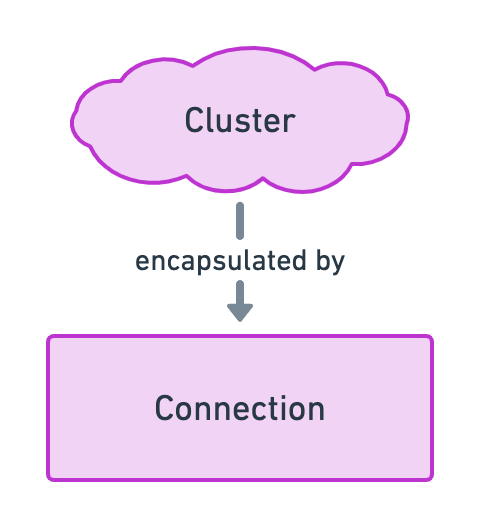
const allTweets = await fetchTweets()

// Filter tweets by author.
const myTweets = await fetchTweets([
    authorFilter('B1AfN7AgpMyctfFbjmvRAvE1yziZFDb9XCwydBjJwtRN'),
])

// Filter tweets by topic.
const solanaTweets = await fetchTweets([
    topicFilter('solana'),
])

// Filter tweets by author and topic.
const mySolanaTweets = await fetchTweets([
    authorFilter('B1AfN7AgpMyctfFbjmvRAvE1yziZFDb9XCwydBjJwtRN'),
    topicFilter('solana'),
])
</code></pre>
<p>Noice! Let’s use that new shiny API endpoint on our <code>Topics</code> and <code>Users</code> pages.</p>
<h2><a id="content-fetching-tweets-by-topic" href="#fetching-tweets-by-topic" class="heading-permalink" aria-hidden="true" title="Permalink">❡</a>Fetching tweets by topic</h2>
<p>Inside our <code>PageTopics.vue</code> component, let’s import the <code>topicFilter</code> helper in addition to the already imported <code>fetchTweets</code> method.</p>
<pre><code class="language-js{3}">import { ref } from 'vue'
import { useRouter } from 'vue-router'
import { fetchTweets, topicFilter } from '@/api'
import { useSlug, useFromRoute } from '@/composables'
import TweetForm from '@/components/TweetForm'
import TweetList from '@/components/TweetList'
import TweetSearch from '@/components/TweetSearch'
</code></pre>
<p>Next, let’s scroll down a bit and provide the appropriate parameter to the <code>fetchTweet</code> method. Here, we’ll use the <code>value</code> of the <code>slugTopic</code> computed property as a topic to use for filtering tweets.</p>
<pre><code class="language-js{5}">const fetchTopicTweets = async () =&gt; {
    if (slugTopic.value === viewedTopic.value) return
    try {
        loading.value = true
        const fetchedTweets = await fetchTweets([topicFilter(slugTopic.value)])
        tweets.value = fetchedTweets
        viewedTopic.value = slugTopic.value
    } finally {
        loading.value = false
    }
}
</code></pre>
<p>Topics page… Done! ✅</p>
<p>You should now be able to click on a topic’s link and view all tweets from that topic.</p>
<p class="wide"><img src="https://lorisleiva.com/assets/articles/2021/1203-solana-9-frontend-fetch-tweets/topics-page.png" alt="Screenshot of the topics page showing two of our tweets from the “veganism” topic." /></p>
<h2><a id="content-fetching-tweets-by-author" href="#fetching-tweets-by-author" class="heading-permalink" aria-hidden="true" title="Permalink">❡</a>Fetching tweets by author</h2>
<p>Let’s do the same for our <code>PageUsers.vue</code> component.</p>
<p>Similarly, we import the <code>authorFilter</code> function next to the <code>fetchTweets</code> function.</p>
<pre><code class="language-js{3}">import { ref } from 'vue'
import { useRouter } from 'vue-router'
import { fetchTweets, authorFilter } from '@/api'
import { useFromRoute } from '@/composables'
import TweetList from '@/components/TweetList'
import TweetSearch from '@/components/TweetSearch'
</code></pre>
<p>Next, we provide an <code>authorFilter</code> using the <code>author</code> property to the first parameter of the <code>fetchTweets</code> function.</p>
<pre><code class="language-js{5}">const fetchAuthorTweets = async () =&gt; {
    if (author.value === viewedAuthor.value) return
    try {
        loading.value = true
        const fetchedTweets = await fetchTweets([authorFilter(author.value)])
        tweets.value = fetchedTweets
        viewedAuthor.value = author.value
    } finally {
        loading.value = false
    }
}
</code></pre>
<p>Boom, users page… Done! ✅</p>
<p class="wide"><img src="https://lorisleiva.com/assets/articles/2021/1203-solana-9-frontend-fetch-tweets/users-page.png" alt="Screenshot of the users page showing two tweets from a given author." /></p>
<p>Before we move on, there’s one more page that needs to use the <code>authorFilter</code> function and that’s the profile page.</p>
<p>So let’s do the same to our <code>PageProfile.vue</code> component. As usual, we import the <code>authorFilter</code>...</p>
<pre><code class="language-js{2}">import { ref, watchEffect } from 'vue'
import { fetchTweets, authorFilter } from '@/api'
import TweetForm from '@/components/TweetForm'
import TweetList from '@/components/TweetList'
import { useWorkspace } from '@/composables'
</code></pre>
<p>... and use it in the first parameter of the <code>fetchTweets</code> function.</p>
<pre><code class="language-js{2-3}">watchEffect(() =&gt; {
    if (! wallet.value) return
    fetchTweets([authorFilter(wallet.value.publicKey.toBase58())])
        .then(fetchedTweets =&gt; tweets.value = fetchedTweets)
        .finally(() =&gt; loading.value = false)
})
</code></pre>
<p>Notice that, we also added a line that ensures we do have a connected wallet before continuing — i.e. <code>if (! wallet.value) return</code>. Even though the profile page is hidden when no wallet is connected, we still need to add that extra check because, upon refresh, there will be a little delay before the wallet re-connects automatically.</p>
<h2><a id="content-fetching-only-one-tweet" href="#fetching-only-one-tweet" class="heading-permalink" aria-hidden="true" title="Permalink">❡</a>Fetching only one tweet</h2>
<p>There’s one last page where users can access tweets and that’s the <code>Tweet</code> page. That page is a little special because instead of displaying multiple tweets, it simply retrieves the content of a <code>Tweet</code> account at a given address.</p>
<p>Therefore, we can’t use the <code>fetchTweets</code> API endpoint here. Instead, there is a <code>getTweet</code> API endpoint located in the <code>get-tweet.js</code> file that we need to update.</p>
<p>Replace everything inside that file with the following code.</p>
<pre><code class="language-js">import { useWorkspace } from '@/composables'
import { Tweet } from '@/models'

export const getTweet = async (publicKey) =&gt; {
    const { program } = useWorkspace()
    const account = await program.value.account.tweet.fetch(publicKey);
    return new Tweet(publicKey, account)
}
</code></pre>
<p>The <code>getTweet</code> method accepts a <code>publicKey</code> parameter which should be an instance of Solana’s <code>PublicKey</code> class.</p>
<p>It then uses the <code>fetch</code> method from the <code>account.tweet</code> API provided by Anchor’s program to fetch the content of the account. We can then combine this account data with the provided public key to return a new <code>Tweet</code> object.</p>
<p>Now that our <code>getTweet</code> API endpoint is ready, let’s use it inside our <code>PageTweet.vue</code> component.</p>
<p>If you read the code inside this component, you’ll notice the <code>getTweet</code> method is already imported and used because that’s how we were displaying mock data before.</p>
<pre><code class="language-js{4}">watchEffect(async () =&gt; {
    try {
        loading.value = true
        tweet.value = await getTweet(new PublicKey(tweetAddress.value))
    } catch (e) {
        tweet.value = null
    } finally {
        loading.value = false
    }
})
</code></pre>
<p>Notice that, for the public key, we use the <code>tweetAddress</code> reactive property which is dynamically extracted from the current URL. We then wrap its <code>value</code> inside a <code>PublicKey</code> object as this is what our API endpoint expects to receive.</p>
<p>All done! ✅</p>
<p>If you click on the timestamp of a tweet, you now have access to a page that can be used to share it.</p>
<p class="wide"><img src="https://lorisleiva.com/assets/articles/2021/1203-solana-9-frontend-fetch-tweets/tweet-page.png" alt="Screenshot of the tweet page showing one of the tweets generated by our tests." /></p>
<h2><a id="content-conclusion" href="#conclusion" class="heading-permalink" aria-hidden="true" title="Permalink">❡</a>Conclusion</h2>
<p>Our application really is starting to take shape! At this point, you should be able to look around and read all the tweets present in the blockchain.</p>
<p>The only thing missing before we can share our application to the world is allowing users to send tweets directly via our frontend app which is exactly what we’ll do in the next episode. 🙌</p>
<p class="github-button"><a href="https://github.com/lorisleiva/solana-twitter/tree/episode-9">View Episode 9 on GitHub</a></p>
<p class="text-center"><a href="https://github.com/lorisleiva/solana-twitter/compare/episode-8...episode-9">Compare with Episode 8</a></p>

                    
                ]]>
            </content>


                <category term="Fetching tweets in the frontend"/>
            
            <published>2021-12-03T14:41:00+00:00</published>

            
                <link rel="enclosure" type="image/jpeg" length="585530" href="https://lorisleiva.com/assets/articles/2021/1203-solana-9-frontend-fetch-tweets/episode-9-cover.jpg"/>
            
        </entry>
    
        <entry>
            
            <id>https://lorisleiva.com/create-a-solana-dapp-from-scratch/integrating-with-solana-wallets</id>
            <title><![CDATA[Integrating with Solana wallets]]></title>
            <updated>2021-12-01T12:04:00+00:00</updated>
            <link rel="alternate" href="https://lorisleiva.com/create-a-solana-dapp-from-scratch/integrating-with-solana-wallets"/>

            
            <author>
                <name><![CDATA[Loris Leiva]]></name>
            </author>
            <summary><![CDATA[In this episode, we allow users to connect their wallets within our application. On top of getting additional wallet data in our app, this also allows us to recreate the program object defined by Anchor.]]></summary>
            <content type="html">
                <![CDATA[ 
                    
                        
                            <a href="https://lorisleiva.com/create-a-solana-dapp-from-scratch/integrating-with-solana-wallets">
                                <img alt="Integrating with Solana wallets" src="https://lorisleiva.com/assets/articles/2021/1130-solana-8-wallets/episode-8-cover.jpg" />
                            </a>


                        <p class="lead">At this point, we've got a nice user interface to send and read tweets but nothing is wired to our Solana program. In addition, we have no way of knowing which wallet is connected in the user's browser. So let's fix that.</p>
<p>In this episode, we'll focus on integrating our frontend with Solana wallet providers such as <a href="https://phantom.app/">Phantom</a> or <a href="https://solflare.com/">Solfare</a> so we can send transactions on behalf of a user. Once we'll have access to the connected wallet, we'll be able to create a &quot;Program&quot; object just like we did in our tests.</p>
<p>Okay, let's get started!</p>
<h2><a id="content-install-solana-wallet-libraries" href="#install-solana-wallet-libraries" class="heading-permalink" aria-hidden="true" title="Permalink">❡</a>Install Solana wallet libraries</h2>
<p>Fortunately for us, there are some JavaScript libraries we can use to help us integrate with many wallet providers out there.</p>
<p>These libraries are <a href="https://github.com/solana-labs/wallet-adapter">available on GitHub</a> and there is even <a href="https://github.com/lorisleiva/solana-wallets-vue">a package for Vue 3</a>! So let's install these libraries right now. We'll need one for the main logic and components and one for importing <a href="https://github.com/solana-labs/wallet-adapter#wallets">all supported wallet adapters</a>.</p>
<p>Run the following inside your <code>app</code> directory to install them.</p>
<pre><code class="language-shell">npm install solana-wallets-vue @solana/wallet-adapter-wallets
</code></pre>
<h2><a id="content-initialise-the-wallet-store" href="#initialise-the-wallet-store" class="heading-permalink" aria-hidden="true" title="Permalink">❡</a>Initialise the wallet store</h2>
<p>With these libraries installed, the first thing we need to do is to initialise the wallet store. This will provide a global store giving us access to useful properties and methods anywhere in our application.</p>
<p>Inside the script part of your <code>App.vue</code> component, add the following lines.</p>
<pre><code class="language-js{3-4,8-13}">import { useRoute } from 'vue-router'
import TheSidebar from './components/TheSidebar'
import { PhantomWalletAdapter, SolflareWalletAdapter } from '@solana/wallet-adapter-wallets'
import { initWallet } from 'solana-wallets-vue'

const route = useRoute()

const wallets = [
    new PhantomWalletAdapter(),
    new SolflareWalletAdapter(),
]

initWallet({ wallets, autoConnect: true })
</code></pre>
<p>This does two things.</p>
<ol>
<li>It imports two wallet providers: Phantom and Solflare. It then registers these two wallet providers inside a <code>wallets</code> array. Whilst we'll only use these two in this series, note that you can use any of the <a href="https://github.com/solana-labs/wallet-adapter#wallets">supported wallet providers listed here</a>. To add some more, import the relevant class from <code>@solana/wallet-adapter-wallets</code> and instantiate it in the <code>wallets</code> array.</li>
<li>It imports and calls the <code>initWallet</code> method to initialise the global store using the wallets defined in step 1 so it knows which wallet providers we want to support. Additionally, we set the <code>autoConnect</code> option to <code>true</code> so that it will automatically try to reconnect the user's wallet on page refresh.</li>
</ol>
<p>And just like that, our wallet store is initialised and we can use its properties and methods to create components allowing users to connect their wallets. Fortunately, one of the libraries we've installed also provide UI components that handle all of that for us.</p>
<h2><a id="content-use-wallet-ui-components" href="#use-wallet-ui-components" class="heading-permalink" aria-hidden="true" title="Permalink">❡</a>Use wallet UI components</h2>
<p>The <code>solana-wallets-vue</code> library provides VueJS components that allow the user to select a wallet provider and connect to it. It contains a button to initiate the process, a modal to select the wallet provider and a dropdown that can be used once connected to copy your address, change provider or disconnect.</p>
<p>All of that can be added to your application through the following component.</p>
<pre><code class="language-html">&lt;wallet-multi-button&gt;&lt;/wallet-multi-button&gt;
</code></pre>
<p>This component will delegate to other components — such as <code>&lt;wallet-connect-button&gt;</code> — to give the user a complete workflow to connect, manage and disconnect their wallet.</p>
<p>Currently, we have a fake &quot;Select a wallet&quot; button on the sidebar. Thus, let's replace it with the two components above to connect our wallets for real.</p>
<p>Inside the script part of the <code>TheSidebar.vue</code> component, add the following line to import the component.</p>
<pre><code class="language-js">import { WalletMultiButton } from 'solana-wallets-vue'
</code></pre>
<p>Then, use it inside the template part and remove the fake button.</p>
<pre><code class="language-diff">- &lt;!-- TODO: Connect wallet --&gt;
- &lt;div class=&quot;bg-pink-500 text-center w-full text-white rounded-full px-4 py-2&quot;&gt;
-     Select a wallet
- &lt;/div&gt;
+ &lt;wallet-multi-button&gt;&lt;/wallet-multi-button&gt;
</code></pre>
<p>Last but not least, we need to import some CSS to style that component properly. Add the following line to your <code>main.js</code> file. It's important to add it <em>before</em> our <code>main.css</code> file so we can make some design tweaks in the next section.</p>
<pre><code class="language-js{2}">// CSS.
import 'solana-wallets-vue/styles.css'
import './main.css'

// ...
</code></pre>
<p>Awesome! At this point you should be able to compile your application — using <code>npm run serve</code> — and connect your wallet! 🎉</p>
<p>Note that, if you don't have a wallet or a browser extension such as Phantom installed yet, don't worry about it, we'll tackle that in a minute. But first, let's have a look at what our wallet button looks like.</p>
<p class="wide"><img src="https://lorisleiva.com/assets/articles/2021/1130-solana-8-wallets/connect-wallet-1.png" alt="Screenshot of the application with the &quot;Connect Wallet&quot; modal opened." /></p>
<p class="wide"><img src="https://lorisleiva.com/assets/articles/2021/1130-solana-8-wallets/connect-wallet-2.png" alt="Screenshot of the application with a connected wallet and the dropdown menu opened." /></p>
<p>Overall, not so bad but the style doesn't really match the rest of our application and the dropdown is not properly aligned so let's fix that.</p>
<h2><a id="content-update-the-design-of-the-wallet-button" href="#update-the-design-of-the-wallet-button" class="heading-permalink" aria-hidden="true" title="Permalink">❡</a>Update the design of the wallet button</h2>
<p>Fortunately for us, all the UI components provided by the <code>solana-wallets-vue</code> library use CSS classes that we can override to tweak their style.</p>
<p>So let's do that. Open your <code>main.css</code> file and add the following lines at the end of the file.</p>
<pre><code class="language-css">.swv-dropdown {
    @apply w-full;
}

.swv-button {
    @apply rounded-full w-full;
}

.swv-button-trigger {
    @apply bg-pink-500 justify-center !important;
}

.swv-dropdown-list {
    @apply top-auto bottom-full md:top-full md:bottom-auto md:left-0 md:right-auto;
}

.swv-dropdown-list-active {
    @apply transform -translate-y-3 md:translate-y-3;
}
</code></pre>
<p>The <code>@apply</code> directive allows us to write CSS using TailwindCSS classes for convenience. Aside from that, we're just updating some CSS classes.</p>
<p>Okay, let's have a look at our wallet button now.</p>
<p class="wide"><img src="https://lorisleiva.com/assets/articles/2021/1130-solana-8-wallets/connect-wallet-3.png" alt="Screenshot of the application with a connected wallet and the dropdown menu opened with the new design." /></p>
<p>Much better! 🎨</p>
<h2><a id="content-connect-your-wallet" href="#connect-your-wallet" class="heading-permalink" aria-hidden="true" title="Permalink">❡</a>Connect your wallet</h2>
<p>It is worth mentioning that the wallet you're going to use in your browser is usually different from the wallet we created earlier in this series to run our tests in the console. The former is typically your &quot;real&quot; wallet whereas the latter is just the wallet your local machine uses to run tests or use CLI tools. They can be the same if you want them to be but I prefer to keep them separate.</p>
<p>Now, if you already have a wallet registered in a wallet provider such as Phantom or Solflare, you should already be good to go. If you're using another wallet provider, feel free to add it to the <code>wallets</code> array we defined earlier.</p>
<p>However, if you don't have a wallet or a wallet provider installed as a browser extension, then you'll need to do this to interact with your application. For that purpose, I recommend installing <a href="https://phantom.app/">Phantom</a> in your browser. It's a very popular wallet provider and has a friendly user interface. Once installed, you can follow the steps to create a new wallet directly on the Phantom extension. Be sure to store your recovery phrase someplace safe since it can recover your full wallet including its private key.</p>
<p>By default, your wallet will show you the money or assets you have in the &quot;mainnet&quot; cluster. The &quot;mainnet&quot; cluster is basically the real cluster where real money is kept. However, the same wallet can be used in other clusters such as &quot;devnet&quot; — a live cluster with fake money to test things — or &quot;localnet&quot; — your local cluster.</p>
<p>As such, if you want to see your money or assets in other clusters, you may do this by changing a setting in your wallet provider. In Phantom, you can do this by clicking on the cog icon, then going to the &quot;Change Network&quot; setting and selecting your cluster here.</p>
<p class="wide"><img src="https://lorisleiva.com/assets/articles/2021/1130-solana-8-wallets/phantom-switch-network.png" alt="Three screenshots of the Phantom app to show how to change the network." /></p>
<p>Note that changing this setting is optional as it only affects the assets displayed by the wallet provider. It does not affect which cluster our application sends transactions to. We will configure this within our code a bit later in this article.</p>
<h2><a id="content-access-wallet-data" href="#access-wallet-data" class="heading-permalink" aria-hidden="true" title="Permalink">❡</a>Access wallet data</h2>
<p>At this point, users can connect their wallet to our application and we can access that data within our VueJS components. But how do we access that data and what do we actually get from it?</p>
<h3><a id="content-how-and-what" href="#how-and-what" class="heading-permalink" aria-hidden="true" title="Permalink">❡</a>How and what?</h3>
<p>Let's start with the &quot;how&quot;.</p>
<p>You can access the data provided by the wallet store by using the <code>useWallet</code> composable from the <code>solana-wallets-vue</code> library.</p>
<pre><code class="language-js">import { useWallet } from 'solana-wallets-vue'
const data = useWallet()
</code></pre>
<p>As long as the <code>initWallet()</code> method was called, this will give you access to properties and methods regarding the connected wallet.</p>
<p>So what do we actually get from <code>useWallet()</code>?</p>
<ul>
<li>
<code>wallet</code>. Potentially the most interesting piece of information for us is the user's connected wallet. If the user has connected a wallet, this will be an object containing its public key. Otherwise, this property will be <code>null</code>.</li>
<li>
<code>ready</code>, <code>connected</code>, <code>connecting</code> and <code>disconnecting</code>. These are useful booleans for us to understand which state we are in. For instance, we can use the <code>connected</code> boolean to know if the user has connected its wallet or not.</li>
<li>The <code>select</code>, <code>connect</code> and <code>disconnect</code> methods enable us to select, connect to and disconnect from a wallet provider. We don't need to use these methods directly since they are already being used by the wallet UI components we imported earlier.</li>
<li>The <code>sendTransaction</code>, <code>signTransaction</code>, <code>signAllTransactions</code> and <code>signMessage</code> methods enable us to sign messages and/or transactions on behalf of the connected wallet. Whilst we will not use them directly, Anchor requires some of these methods inside its <code>wallet</code> object.</li>
</ul>
<h3><a id="content-anchor-wallet" href="#anchor-wallet" class="heading-permalink" aria-hidden="true" title="Permalink">❡</a>Anchor wallet</h3>
<p>As you can see, <code>useWallet()</code> gives us lots of granular information that can be used to interact with the connected wallet. Because of that, the <code>wallet</code> object it provides is not compatible with Anchor's definition of a wallet. If you remember the following diagram from episode 5, you can see that Anchor uses its own &quot;Wallet&quot; object to interact with the connected wallet and sign transactions on its behalf.</p>
<p class="wide"><img src="https://lorisleiva.com/assets/articles/2021/1130-solana-8-wallets/diagram-wallet-not-compatible.png" alt="Diagram from episode 5 showing the incompatibility with the wallet provided by &quot;useWallet()&quot;." /></p>
<p>In order to get an object compatible with Anchor's definition of a wallet, we can use yet another composable called <code>useAnchorWallet</code>. This will return a <code>wallet</code> object that can sign transactions.</p>
<pre><code class="language-js">import { useAnchorWallet } from 'solana-wallets-vue'
const wallet = useAnchorWallet()
</code></pre>
<p>And just like that, we can connect our previous Anchor diagram with our brand new wallet integration.</p>
<p class="wide"><img src="https://lorisleiva.com/assets/articles/2021/1130-solana-8-wallets/diagram-wallet-compatible.png" alt="Previous diagram using &quot;useAnchorWallet()&quot; to connect &quot;WalletAdapter&quot; with the &quot;Wallet&quot; object from Anchor." /></p>
<h3><a id="content-reactive-variables-in-vuejs" href="#reactive-variables-in-vuejs" class="heading-permalink" aria-hidden="true" title="Permalink">❡</a>Reactive variables in VueJS</h3>
<p>I'd like to take a little break here to talk about reactive variables in Vue 3. If you're not familiar with them, some of the code you'll read later could be a little confusing.</p>
<p><strong>Most of the properties we've listed above are reactive and wrapped inside <code>Ref</code> objects</strong>. If you're not familiar with Vue's <code>Ref</code> variables, they ensure the content of a variable is <strong>passed by reference</strong> and not <strong>by value</strong>.</p>
<p><img src="https://lorisleiva.com/assets/articles/2021/1130-solana-8-wallets/pass-by-reference-vs-pass-by-value-animation.gif" alt="Pass by reference vs pass by value animation using a cup of coffee and its content to illustrate the two." /></p>
<p>This means, by having a reference of a <code>Ref</code> variable, we can mutate its content and any code using that variable can be notified of such change. To access the content of a <code>Ref</code> variable, you must access its <code>value</code> property — e.g. <code>wallet.value</code> — unless you're using that variable inside a VueJS template, in which case, VueJS automatically does that for you. You can read more about them in <a href="https://v3.vuejs.org/guide/composition-api-introduction.html#reactive-variables-with-ref">Vue's documentation</a> or — if you're used to React — <a href="https://twitter.com/lorismatic/status/1445672788153577472?s=20">this might help</a>.</p>
<p>Here's a little example to summarise how we can access <code>Ref</code> variables. Inside the script part, we use <code>value</code>. Inside the template part, we don't.</p>
<pre><code class="language-html">&lt;script setup&gt;
import { ref } from 'vue'
const name = ref('Loris')
console.log(name.value) // Outputs: Loris
&lt;/script&gt;

&lt;template&gt;
  &lt;div&gt;{{ name }}&lt;/div&gt; &lt;!-- Displays: Loris --&gt;
&lt;/template&gt;
</code></pre>
<h3><a id="content-use-wallet-data-in-components" href="#use-wallet-data-in-components" class="heading-permalink" aria-hidden="true" title="Permalink">❡</a>Use wallet data in components</h3>
<p>Okay, let's put what we've learned into practice.</p>
<p>At the moment, anyone can see the form that allows users to send tweets. However, that form should only be visible to users that have connected their wallets so let's fix that.</p>
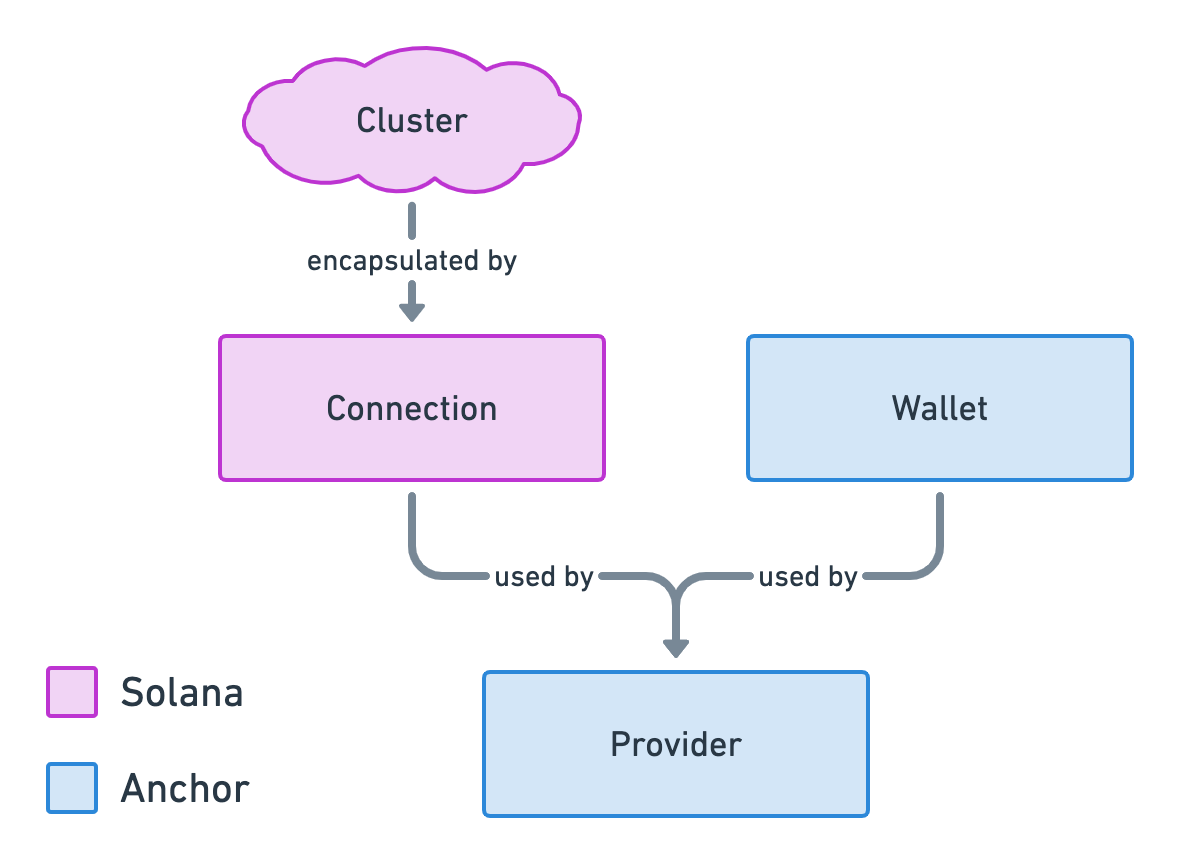
<p>In the script part of the <code>TweetForm.vue</code> component, import the <code>useWallet</code> composable.</p>
<pre><code class="language-js{4}">import { computed, ref, toRefs } from 'vue'
import { useAutoresizeTextarea, useCountCharacterLimit, useSlug } from '@/composables'
import { sendTweet } from '@/api'
import { useWallet } from 'solana-wallets-vue'
</code></pre>
<p>Then, in the template part of the component — Under &quot;Permissions&quot; — update the following line.</p>
<pre><code class="language-diff">  // Permissions.
- const connected = ref(true) // TODO: Check connected wallet.
+ const { connected } = useWallet()
</code></pre>
<p>This will use the <code>connected</code> variable from the wallet data instead of being always <code>true</code> like it was before.</p>
<p>If you look inside the template of that component, you can see that this <code>connected</code> variable is used to toggle which HTML we are showing to the user: either the form or an empty state.</p>
<pre><code class="language-html">&lt;template&gt;
    &lt;div v-if=&quot;connected&quot; class=&quot;px-8 py-4 border-b&quot;&gt;
        &lt;!-- Form here... --&gt;
    &lt;/div&gt;

    &lt;div v-else class=&quot;px-8 py-4 bg-gray-50 text-gray-500 text-center border-b&quot;&gt;
        Connect your wallet to start tweeting...
    &lt;/div&gt;
&lt;/template&gt;
</code></pre>
<p>And that's it! Now, only users with connected wallets can see the tweet form.</p>
<p>Let's do another one. This time, we'll make sure the profile page is not visible on the sidebar if you're not connected.</p>
<p>In the script part of <code>TheSidebar.vue</code> component, import and call <code>useWallet</code> to access the <code>connected</code> variable.</p>
<pre><code class="language-js{1-2}">import { WalletMultiButton, useWallet } from 'solana-wallets-vue'
const { connected } = useWallet()
</code></pre>
<p>Then, inside the template, look for the comment that says &quot;TODO: Check connected wallet&quot;. Under that comment, replace <code>v-if=&quot;true&quot;</code> with <code>v-if=&quot;connected&quot;</code> and voilà! You can also remove that &quot;TODO&quot; comment now.</p>
<pre><code class="language-html{6}">&lt;template&gt;
    &lt;aside class=&quot;flex flex-col items-center md:items-stretch space-y-2 md:space-y-4&quot;&gt;
        &lt;!-- ... --&gt;
        &lt;div class=&quot;flex flex-col items-center md:items-stretch space-y-2&quot;&gt;
          	&lt;!-- ... --&gt;
            &lt;router-link v-if=&quot;connected&quot; :to=&quot;{ name: 'Profile' }&quot; ...&gt;
                &lt;!-- ... --&gt;
            &lt;/router-link&gt;
        &lt;/div&gt;
        &lt;div class=&quot;fixed bottom-8 right-8 md:static w-48 md:w-full&quot;&gt;
            &lt;wallet-modal-provider&gt;
                &lt;wallet-multi-button&gt;&lt;/wallet-multi-button&gt;
            &lt;/wallet-modal-provider&gt;
        &lt;/div&gt;
    &lt;/aside&gt;
&lt;/template&gt;
</code></pre>
<p>To recap, here's what you should see if you have a connected wallet.</p>
<p class="wide"><img src="https://lorisleiva.com/assets/articles/2021/1130-solana-8-wallets/wallet-connected.png" alt="Screenshot of the home page when a wallet is connected. We can see the profile page link in the sidebar and the tweet form on the home page." /></p>
<p>And here's what you should see if you don't. I.e. no profile page and no tweet form.</p>
<p class="wide"><img src="https://lorisleiva.com/assets/articles/2021/1130-solana-8-wallets/wallet-not-connected.png" alt="Screenshot of the home page when no wallet is connected. We can no longer see the profile page link in the sidebar nor the tweet form on the home page that now says &quot;Connect your wallet to start tweeting...&quot;." /></p>
<h2><a id="content-we-need-more-data" href="#we-need-more-data" class="heading-permalink" aria-hidden="true" title="Permalink">❡</a>We need more data</h2>
<p>Okay, let's take a deep breath and see what we've accomplished so far in this episode.</p>
<ul>
<li>We imported and called <code>initWallet</code> to initialise a wallet store that provides everything we need to connect a wallet and access its data.</li>
<li>We imported a UI component that make use of that to allow users to connect their wallets.</li>
<li>We accessed the data provided by the wallet store using <code>useWallet()</code> in various components.</li>
<li>We found out that we can use <code>useAnchorWallet()</code> to obtain a <code>wallet</code> object compatible with Anchor.</li>
</ul>
<p>So if we refer to our diagram that represents all entities needed for Anchor to create a Program, we can see that we currently only have one piece of the puzzle: the &quot;Wallet&quot;.</p>
<p class="wide"><img src="https://lorisleiva.com/assets/articles/2021/1130-solana-8-wallets/diagram-wallet-only.png" alt="Previous diagram where &quot;WalletAdapter&quot; points to Anchor's &quot;Wallet&quot; object but this time &quot;Wallet&quot; is highlighted in red to show that we've only got this piece of information so far." /></p>
<p>In order for us to have everything we need to interact with our Solana program, we need to fill the rest of the puzzle. Fortunately for us, the &quot;Wallet&quot; piece was the most difficult piece to find since we needed to integrate with wallet providers which we've now done.</p>
<p>Anchor refers to this whole picture as a &quot;Workspace&quot; because it gives us everything we need to work with our program.</p>
<h2><a id="content-provide-a-workspace" href="#provide-a-workspace" class="heading-permalink" aria-hidden="true" title="Permalink">❡</a>Provide a workspace</h2>
<p>Okay, let's fill the missing pieces of the puzzle and create our workspace. We'll create a new <code>useWorkspace.js</code> file inside the <code>composables</code> folder and register it inside <code>composables/index.js</code>.</p>
<pre><code class="language-js{5}">export * from './useAutoresizeTextarea'
export * from './useCountCharacterLimit'
export * from './useFromRoute'
export * from './useSlug'
export * from './useWorkspace'
</code></pre>
<p>Inside the <code>useWorkspace.js</code> composable, we'll use a global variable to provide a new global store to our application. For that, we need an <code>initWorkspace</code> method that initialises that variable and a <code>useWorkspace</code> method that access it. Here's how we can do this using VueJS.</p>
<pre><code class="language-js">let workspace = null

export const useWorkspace = () =&gt; workspace

export const initWorkspace = () =&gt; {
    workspace = {
        // Provided data here...
    }
}
</code></pre>
<p>Let's start simple, by importing the connected Anchor wallet and providing it as data. That way, we don't need to use the other composables to access the connected wallet. We'll have everything in one place.</p>
<pre><code class="language-js{1,8,11}">import { useAnchorWallet } from 'solana-wallets-vue'

let workspace = null

export const useWorkspace = () =&gt; workspace

export const initWorkspace = () =&gt; {
    const wallet = useAnchorWallet()

    workspace = {
        wallet,
    }
}
</code></pre>
<p>The next thing we need is a Connection object. For that, we simply need to know which cluster — or network — we want to interact with. For now, we'll continue to develop our application locally. Therefore, we'll hardcode our localhost URL which is: <code>http://127.0.0.1:8899</code>. We'll have a more dynamic way to handle this in the future when we'll deploy to devnet.</p>
<p class="wide"><img src="https://lorisleiva.com/assets/articles/2021/1130-solana-8-wallets/diagram-with-localhost.png" alt="Previous diagram with a new &quot;localhost&quot; node pointing to the &quot;Cluster&quot; node and the array says &quot;hardcoded&quot;." /></p>
<p>So let's create a new <code>Connection</code> object using this cluster URL and provide it as data as well.</p>
<pre><code class="language-js{2,10,14}">import { useAnchorWallet } from 'solana-wallets-vue'
import { Connection } from '@solana/web3.js'

let workspace = null

export const useWorkspace = () =&gt; workspace

export const initWorkspace = () =&gt; {
    const wallet = useAnchorWallet()
    const connection = new Connection('http://127.0.0.1:8899')

    workspace = {
        wallet,
        connection,
    }
}
</code></pre>
<p>We know that <code>Connection + Wallet = Provider</code> so we can now create a new <code>Provider</code> object. However, this provider object needs to be a <code>computed</code> property so that it is recreated when the <code>wallet</code> property changes — e.g. it is disconnected or connected as another wallet.</p>
<p>Here's how we can achieve this using VueJS. Notice how we access the wallet using <code>wallet.value</code> inside the <code>computed</code> method.</p>
<pre><code class="language-js{1,4,13,18}">import { computed } from 'vue'
import { useAnchorWallet } from 'solana-wallets-vue'
import { Connection } from '@solana/web3.js'
import { Provider } from '@project-serum/anchor'

let workspace = null

export const useWorkspace = () =&gt; workspace

export const initWorkspace = () =&gt; {
    const wallet = useAnchorWallet()
    const connection = new Connection('http://127.0.0.1:8899')
    const provider = computed(() =&gt; new Provider(connection, wallet.value))

    workspace = {
        wallet,
        connection,
        provider,
    }
}
</code></pre>
<p>Next, we need to access the <code>IDL</code> file which is the JSON file representing the structure of our program. This file is auto-generated in the <code>target</code> folder of the root of our project so let's access it directly from there.</p>
<p>Note that this will not work when the app is deployed to a server on its own since the <code>target</code> folder will be empty but we will take care of that later on when we deploy to devnet.</p>
<pre><code class="language-js{5}">import { computed } from 'vue'
import { useAnchorWallet } from 'solana-wallets-vue'
import { Connection } from '@solana/web3.js'
import { Provider } from '@project-serum/anchor'
import idl from '../../../target/idl/solana_twitter.json'

let workspace = null

export const useWorkspace = () =&gt; workspace

export const initWorkspace = () =&gt; {
    const wallet = useAnchorWallet()
    const connection = new Connection('http://127.0.0.1:8899')
    const provider = computed(() =&gt; new Provider(connection, wallet.value))

    workspace = {
        wallet,
        connection,
        provider,
    }
}
</code></pre>
<p>Finally, because <code>IDL + Provider = Program</code>, we can now create our program object. We'll use a computed property here as well because <code>provider</code> is also reactive.</p>
<p>On top of asking for the <code>idl</code> and the <code>provider</code> objects, creating a <code>Program</code> also requires its address as an instance of <code>PublicKey</code>. Fortunately for us, the IDL file already contains that information under <code>idl.metadata.address</code>. We just need to wrap this in a <code>PublicKey</code> object and feed it to the program.</p>
<p class="bg-yellow-50 rounded-xl p-4">⛔️ <strong>Warning</strong>: The <code>metadata.address</code> variable containing our program ID will only be available after running <code>anchor deploy</code> because that's when Anchor knows which address the program was deployed to. So if you run <code>anchor build</code> without running <code>anchor deploy</code>, you will end up with the following error: <code>Cannot read properties of undefined (reading 'address')</code>.</p>
<p>And there we have it! The final code of our <code>useWorkspace.js</code> composable that gives us access to everything we need to interact with our Solana program.</p>
<pre><code class="language-js{3,4,7,16,22}">import { computed } from 'vue'
import { useAnchorWallet } from 'solana-wallets-vue'
import { Connection, PublicKey } from '@solana/web3.js'
import { Provider, Program } from '@project-serum/anchor'
import idl from '../../../target/idl/solana_twitter.json'

const programID = new PublicKey(idl.metadata.address)
let workspace = null

export const useWorkspace = () =&gt; workspace

export const initWorkspace = () =&gt; {
    const wallet = useAnchorWallet()
    const connection = new Connection('http://127.0.0.1:8899')
    const provider = computed(() =&gt; new Provider(connection, wallet.value))
    const program = computed(() =&gt; new Program(idl, programID, provider.value))

    workspace = {
        wallet,
        connection,
        provider,
        program,
    }
}
</code></pre>
<p>Now, all we need to do is call that <code>initWorkspace</code> method somewhere so that our application can access its data. Since the workspace store depends on the wallet store, let's call <code>initWorkspace</code> immediately after calling <code>initWallet</code>.</p>
<p>Inside our <code>App.vue</code> component, we'll add the following lines of code.</p>
<pre><code class="language-js{5,10}">import { useRoute } from 'vue-router'
import TheSidebar from './components/TheSidebar'
import { PhantomWalletAdapter, SolflareWalletAdapter } from '@solana/wallet-adapter-wallets'
import { initWallet } from 'solana-wallets-vue'
import { initWorkspace } from '@/composables'

// ...

initWallet({ wallets, autoConnect: true })
initWorkspace()
</code></pre>
<p>Phew, all done! We can now access the workspace data from any component of our application.</p>
<h2><a id="content-use-the-workspace" href="#use-the-workspace" class="heading-permalink" aria-hidden="true" title="Permalink">❡</a>Use the workspace</h2>
<p>Before we wrap up this article, let's have a quick look at how we can access that workspace data in our components.</p>
<p>We'll take that opportunity to update the wallet address on the profile page.</p>
<p>If you open the <code>PageProfile.vue</code> component, you should see a public key hardcoded in the template.</p>
<pre><code class="language-html">&lt;div v-if=&quot;true&quot; class=&quot;border-b px-8 py-4 bg-gray-50&quot;&gt;
    B1AfN7AgpMyctfFbjmvRAvE1yziZFDb9XCwydBjJwtRN
&lt;/div&gt;
</code></pre>
<p>Now that we have access to the real connected wallet, let's replace this with its public key.</p>
<pre><code class="language-html{6,10,16-18}">&lt;script setup&gt;
import { ref, watchEffect } from 'vue'
import { fetchTweets } from '@/api'
import TweetForm from '@/components/TweetForm'
import TweetList from '@/components/TweetList'
import { useWorkspace } from '@/composables'

const tweets = ref([])
const loading = ref(true)
const { wallet } = useWorkspace()

// ...
&lt;/script&gt;

&lt;template&gt;
    &lt;div v-if=&quot;wallet&quot; class=&quot;border-b px-8 py-4 bg-gray-50&quot;&gt;
        {{ wallet.publicKey.toBase58() }}
    &lt;/div&gt;
    &lt;tweet-form @added=&quot;addTweet&quot;&gt;&lt;/tweet-form&gt;
    &lt;tweet-list :tweets=&quot;tweets&quot; :loading=&quot;loading&quot;&gt;&lt;/tweet-list&gt;
&lt;/template&gt;
</code></pre>
<p>As you can see, we:</p>
<ol>
<li>Imported the <code>useWorkspace</code> composable.</li>
<li>Extracted any variable needed from <code>useWorkspace()</code> — here, the <code>wallet</code> object.</li>
<li>Used the <code>wallet</code> object inside our template to display its public key in base 58 format.</li>
</ol>
<p>This was a simple example, but we're now able to do much more than that. Just like we were in our tests, we can now access the <code>program</code> object and use its various APIs to interact with our Solana program which is exactly what we will be doing in the next couple of episodes.</p>
<h2><a id="content-conclusion" href="#conclusion" class="heading-permalink" aria-hidden="true" title="Permalink">❡</a>Conclusion</h2>
<p>First of all, well done for following this far! Honestly, this series has been quite a journey and I'm super happy to see many of you looking forward to the next episodes.</p>
<p>Whilst integrating with wallets has been made super easy for us by the <a href="https://github.com/lorisleiva/solana-wallets-vue">solana-wallets-vue</a> repository, we still had to set it up properly and understand various concepts along the way. But look at what we've got now:</p>
<ul>
<li>Users can connect their wallets.</li>
<li>Our app can access data regarding the connected wallet and act accordingly.</li>
<li>Our app has access to a full workspace allowing it to interact with our Solana program the same way we were in our tests.</li>
</ul>
<p>That's a massive progress from our mock application that wasn't doing anything before!</p>
<p>As usual, you can access the code for this episode in the branch below and compare it with the previous episode.</p>
<p class="github-button"><a href="https://github.com/lorisleiva/solana-twitter/tree/episode-8">View Episode 8 on GitHub</a></p>
<p class="text-center"><a href="https://github.com/lorisleiva/solana-twitter/compare/episode-7...episode-8">Compare with Episode 7</a></p>
<p>In the next episode, we will replace the mock data from our <code>api</code> files and use our brand new workspace to fetch real tweets from our Solana program.</p>
<p><strong>EDIT 2022-02-10</strong>: This article was updated to use the new <code>solana-wallets-vue</code> package.</p>

                    
                ]]>
            </content>


                <category term="Integrating with Solana wallets"/>
            
            <published>2021-12-01T12:04:00+00:00</published>

            
                <link rel="enclosure" type="image/jpeg" length="517448" href="https://lorisleiva.com/assets/articles/2021/1130-solana-8-wallets/episode-8-cover.jpg"/>
            
        </entry>
    
        <entry>
            
            <id>https://lorisleiva.com/create-a-solana-dapp-from-scratch/scaffolding-the-frontend</id>
            <title><![CDATA[Scaffolding the frontend]]></title>
            <updated>2021-11-28T15:45:00+00:00</updated>
            <link rel="alternate" href="https://lorisleiva.com/create-a-solana-dapp-from-scratch/scaffolding-the-frontend"/>

            
            <author>
                <name><![CDATA[Loris Leiva]]></name>
            </author>
            <summary><![CDATA[We quickly scaffold a mock user interface using VueJS, TailwindCSS and Vue Router. Instead of spending hours designing components, I'll give you all the files you need as a big ZIP to copy/paste into your project.]]></summary>
            <content type="html">
                <![CDATA[ 
                    
                        
                            <a href="https://lorisleiva.com/create-a-solana-dapp-from-scratch/scaffolding-the-frontend">
                                <img alt="Scaffolding the frontend" src="https://lorisleiva.com/assets/articles/2021/1126-solana-7-scaffold-frontend/episode-7-cover.jpg" />
                            </a>


                        <p class="lead">Whilst users can technically start sending and reading tweets using our program by interacting directly with the blockchain, no one really wants that sort of user experience.</p>
<p>We want to abstract all of that into a nice user interface (UI) that resembles what they are familiar with. For that reason, <strong>we will build a frontend client and we'll build it using <a href="https://vuejs.org/">VueJS</a></strong>.</p>
<p>We'll use VueJS because A. it's my favourite JavaScript framework and B. it is very much under-documented in the Solana ecosystem. If you're more familiar with other JavaScript frameworks such as React, you can still follow along as most concepts resonate between frameworks.</p>
<p>Now, frontend development is a world of its own and I could easily spend hours and hours detailing how to create the UI we will end up with at the end of this episode. However, the focus of this series is Solana and I wouldn't want to deviate too much from it. There are plenty of tutorials out there about frontend development — <a href="https://lorisleiva.com/tags/javascript">even on this blog</a>.</p>
<p>At the same time, we need a UI to continue our journey and create our decentralised application. So here's the deal. In this episode, I'll explain <strong>how to get started with VueJS</strong> and install all the dependencies we’ll need so you can do it yourself. Then, when it comes to the actual design and components of the UI, <strong>I'll give you a bunch of files to copy/paste in various places</strong> and briefly explain what they do. The components will contain mock data at first so we can wire them with our Solana program in the next episodes.</p>
<p>Fasten your seatbelt because we're going to move quickly. Let's go! 🏎</p>
<h2><a id="content-install-vue-cli" href="#install-vue-cli" class="heading-permalink" aria-hidden="true" title="Permalink">❡</a>Install Vue CLI</h2>
<p>One of the easiest ways to create a new VueJS application is to use its CLI tools.</p>
<p>If you don’t have them already installed, you can do this by running the following.</p>
<pre><code class="language-shell">npm install -g @vue/cli@5.0.0-rc.1
</code></pre>
<p>Note that we’re explicitly asking for version 5 — which is still a release candidate at the time of writing — because we want our VueJS app to be bundled with Webpack 5 instead of Webpack 4.</p>
<p>You can check the VueJS CLI tools are installed properly by running:</p>
<pre><code class="language-shell">vue --version
</code></pre>
<h2><a id="content-create-a-new-vue-app" href="#create-a-new-vue-app" class="heading-permalink" aria-hidden="true" title="Permalink">❡</a>Create a new Vue app</h2>
<p>We can now create a new VueJS app by running <code>vue create</code> followed by the directory that should be created for it.</p>
<p>We want our frontend client to live under the <code>app</code> directory which is currently an empty folder. Therefore, we’ll also need to use the <code>--force</code>  option to override it. Okay, let’s run this.</p>
<pre><code class="language-shell">vue create app --force
</code></pre>
<p>You should now be asked to choose a preset for your app. We’ll be using Vue 3 in this series so let’s select the <code>Default (Vue 3)</code> preset.</p>
<pre><code class="language-shell{3}">? Please pick a preset:
  Default ([Vue 2] babel, eslint)
❯ Default (Vue 3) ([Vue 3] babel, eslint)        # &lt;- This one.
  Manually select features
</code></pre>
<p>And just like that we’ve got ourselves a VueJS 3 application inside our project.</p>
<p>Let’s <code>cd</code> into it as <strong>we’ll be working inside that directory for the rest of this episode</strong>.</p>
<pre><code class="language-shell">cd app
</code></pre>
<h2><a id="content-install-solana-and-anchor-libraries" href="#install-solana-and-anchor-libraries" class="heading-permalink" aria-hidden="true" title="Permalink">❡</a>Install Solana and Anchor libraries</h2>
<p>Next, let’s install the JavaScript libraries provided by Solana and Anchor. We mentioned in a previous episode that they were already included in our Anchor project for our tests but this is a different environment with its own dependencies so we need to install them explicitly.</p>
<p>Be sure to be inside the <code>app</code> directory and run the following.</p>
<pre><code class="language-shell">npm install @solana/web3.js @project-serum/anchor
</code></pre>
<h2><a id="content-configure-node-polyfills" href="#configure-node-polyfills" class="heading-permalink" aria-hidden="true" title="Permalink">❡</a>Configure node polyfills</h2>
<p>The frontend world is full of quirks and gotchas and here’s one that I struggle with when creating this series.</p>
<p>Some of the JavaScript libraries we’ll be using in our app depend on Node.js polyfills.</p>
<p>Node.js is basically “JavaScript for servers” and the purpose of Node.js polyfills are to bring some of its core dependencies into the frontend world. That way, the same code can be used on both side.</p>
<p>For instance, remember how we converted a string into a buffer by using <code>Buffer.from('some string')</code>? We didn’t need to import that <code>Buffer</code> object because it’s a Node.js core dependency that was polyfilled for us.</p>
<p>Currently, the frontend world is moving away from bundling all these Node.js dependencies by default. And that’s exactly what Webpack did when they released version 5. Here’s a very good explanation <a href="https://webpack.js.org/blog/2020-10-10-webpack-5-release/#automatic-nodejs-polyfills-removed">from their documentation</a>:</p>
<blockquote>
<p>In the early days, webpack's aim was to allow running most Node.js modules in the browser, but the module landscape changed and many module uses are now written mainly for frontend purposes. Webpack &lt;= 4 ships with polyfills for many of the Node.js core modules, which are automatically applied once a module uses any of the core modules (i.e. the crypto module).</p>
<p>Webpack 5 stops automatically polyfilling these core modules and focus on frontend-compatible modules. Our goal is to improve compatibility with the web platform, where Node.js core modules are not available.</p>
</blockquote>
<p>So that’s a nice change but, as I said earlier, some of our dependencies rely on these polyfills to exist. If we don’t do anything we will end up with the following error when compiling our frontend.</p>
<pre><code>BREAKING CHANGE: webpack &lt; 5 used to include polyfills for node.js core modules by default.
This is no longer the case. Verify if you need this module and configure a polyfill for it.
</code></pre>
<p>Fortunately for us, there is a way to fix this issue by adding the polyfills we need back and/or telling Webpack we don’t need them so it can stop complaining.</p>
<p>In our case, we’ll only need the <code>Buffer</code> polyfill and we can disable the others that would have otherwise failed. We can do this inside our <code>vue.config.js</code> file which contains a <code>configureWebpack</code> property allowing us to provide additional Webpack configurations.</p>
<pre><code class="language-js">const webpack = require('webpack')
const { defineConfig } = require('@vue/cli-service')

module.exports = defineConfig({
    transpileDependencies: true,
    configureWebpack: {
        plugins: [
            new webpack.ProvidePlugin({
                Buffer: ['buffer', 'Buffer']
            })
        ],
        resolve: {
            fallback: {
                crypto: false,
                fs: false,
                assert: false,
                process: false,
                util: false,
                path: false,
                stream: false,
            }
        }
    }
})
</code></pre>
<p>Awesome! We should now be safe from confusing polyfill errors. 😌</p>
<h2><a id="content-configure-eslint" href="#configure-eslint" class="heading-permalink" aria-hidden="true" title="Permalink">❡</a>Configure ESLint</h2>
<p>Whilst we’re configuring things, let’s add a couple of things to our <a href="https://eslint.org/">ESLint</a> configurations. If you’re not familiar with ESLint, it’s a JavaScript linter that our code editor uses to warn us about errors or code that doesn’t comply with a given code style.</p>
<p>Since we’ll be using the super fancy <a href="https://v3.vuejs.org/api/sfc-script-setup.html"><code>&lt;script setup&gt;</code></a>  tag in our VueJS 3 components, we need to tell ESLint about it so our code editor doesn’t show lots of errors when the code is actually valid.</p>
<p>There’s no need to worry too much about the details here, simply open the <code>package.json</code> of your <code>app</code> directory and replace your <code>eslintConfig</code> object with the following.</p>
<pre><code class="language-json{5,15}">&quot;eslintConfig&quot;: {
  &quot;root&quot;: true,
  &quot;env&quot;: {
    &quot;node&quot;: true,
    &quot;vue/setup-compiler-macros&quot;: true
  },
  &quot;extends&quot;: [
    &quot;plugin:vue/vue3-essential&quot;,
    &quot;eslint:recommended&quot;
  ],
  &quot;parserOptions&quot;: {
    &quot;parser&quot;: &quot;@babel/eslint-parser&quot;
  },
  &quot;rules&quot;: {
    &quot;vue/script-setup-uses-vars&quot;: &quot;error&quot;
  }
},
</code></pre>
<h2><a id="content-install-tailwindcss" href="#install-tailwindcss" class="heading-permalink" aria-hidden="true" title="Permalink">❡</a>Install TailwindCSS</h2>
<p>I’ll be using my favourite CSS framework to design the user interface: <a href="https://tailwindcss.com/">TailwindCSS</a>. If you’re not familiar with it, it’s a utility-based framework that is super powerful and an absolute delight to work with. Needless to say, I highly recommend it.</p>
<p>To install it, we need the following dependencies. As usual, make sure to run this in the <code>app</code> directory.</p>
<pre><code class="language-shell">npm install tailwindcss@latest postcss@latest autoprefixer@latest
</code></pre>
<p>Then we need to generate our Tailwind configuration file. For that simply run the following.</p>
<pre><code class="language-shell">npx tailwindcss init -p
</code></pre>
<p>This generated a <code>tailwind.config.js</code> file in our <code>app</code> directory.</p>
<p>Note that we used the <code>-p</code> option to also generate a <code>postcss.config.js</code> file. This is necessary so that Webpack can recognise Tailwind as a PostCSS plugin and therefore compile our Tailwind configurations.</p>
<p>Let’s immediately make a little adjustment to our Tailwind config file. We’ll provide a <code>purge</code> array so that, when compiling for production, Tailwind can remove all of the utility classes that are not used within the provided paths.</p>
<p>Basically, we need to tell it where our HTML is located which, in our case, is inside any JavaScript file within the <code>src</code> folder or within the public <code>index.html</code> file.</p>
<p>So open up your  <code>tailwind.config.js</code> file and replace the empty <code>purge</code> array with the following lines.</p>
<pre><code class="language-js{2,3,4,5}">module.exports = {
  purge: [
    './public/index.html',
    './src/**/*.{vue,js,ts,jsx,tsx}',
  ],
  // ...
}

</code></pre>
<p>Next, create a new file in the <code>src</code> folder called <code>main.css</code> and add the following code.</p>
<pre><code class="language-css">@tailwind base;
@tailwind components;
@tailwind utilities;
</code></pre>
<p>When compiled, these three Tailwind statements will be replaced with lots of utility classes generated dynamically.</p>
<p>Finally, we need to import this new CSS file into our <code>main.js</code> file so it can be picked up by Webpack.</p>
<p>Let’s import it at the top of that file and add a few comments to separate the code into little sections.</p>
<pre><code class="language-js">// CSS.
import './main.css'

// Create the app.
import { createApp } from 'vue'
import App from './App.vue'
createApp(App).mount('#app')
</code></pre>
<p>We’re now fully ready to use TailwindCSS!</p>
<h2><a id="content-install-vue-router" href="#install-vue-router" class="heading-permalink" aria-hidden="true" title="Permalink">❡</a>Install Vue Router</h2>
<p>Next, we need some routing within our frontend. Clicking on a new page should be reflected in the URL and vice versa. Fortunately, we don’t need to implement that from scratch as we can use <a href="https://next.router.vuejs.org/">Vue Router</a> for that purpose.</p>
<p>To install it, we need to run the following. Note that we need to explicitly install version 4 of Vue Router since this is the version compatible with Vue 3.</p>
<pre><code class="language-shell">npm install vue-router@4
</code></pre>
<p>Next, let’s define our routes — i.e. the mapping between URLs and VueJS components.</p>
<p>Create a new file in the <code>src</code> folder called <code>routes.js</code> and paste the following inside.</p>
<pre><code class="language-js">export default [
    {
        name: 'Home',
        path: '/',
        component: require('@/components/PageHome').default,
    },
    {
        name: 'Topics',
        path: '/topics/:topic?',
        component: require('@/components/PageTopics').default,
    },
    {
        name: 'Users',
        path: '/users/:author?',
        component: require('@/components/PageUsers').default,
    },
    {
        name: 'Profile',
        path: '/profile',
        component: require('@/components/PageProfile').default,
    },
    {
        name: 'Tweet',
        path: '/tweet/:tweet',
        component: require('@/components/PageTweet').default,
    },
    {
        name: 'NotFound',
        path: '/:pathMatch(.*)*',
        component: require('@/components/PageNotFound').default,
    },
]
</code></pre>
<p>These are all of the pages our application contains including a fallback for URLs that don’t exist.</p>
<p>If we try to compile our frontend application at this point using <code>npm run serve</code> it will fail because all of these components are missing but, don't worry, we'll add all of them in the next section.</p>
<p>Now that our routes are defined, we can import and plug the Vue Router plugin into our VueJS application.</p>
<p>Open your  <code>src/main.js</code> file and update it as follow.</p>
<pre><code class="language-js{4-10,15}">// CSS.
import './main.css'

// Routing.
import { createRouter, createWebHashHistory } from 'vue-router'
import routes from './routes'
const router = createRouter({
    history: createWebHashHistory(),
    routes,
})

// Create the app.
import { createApp } from 'vue'
import App from './App.vue'
createApp(App).use(router).mount('#app')
</code></pre>
<p>As you can see, we first create a router instance by providing our routes and then make our VueJS app <code>use</code> it as a plug-in.</p>
<p>In case you’re wondering, the <code>createWebHashHistory</code> method prefixes all paths with a <code>#</code> so that we don’t need to configure any redirections in our server later.</p>
<p>At this point, our VueJS app is fully configured with Vue Router and TailwindCSS. All that’s left to do is implement the components that will make up the user interface of our frontend.</p>
<p>That means if you wanted to create your own design, you could pause here and implement the components listed in the  <code>routes.js</code> file yourself.</p>
<p>However, I’ve prepared all of that for you so we can focus on how to integrate the frontend with our Solana program rather than spending ages designing a user interface.</p>
<p>So it’s time for some copy/pasting! 👀</p>
<h2><a id="content-copypaste-some-files" href="#copypaste-some-files" class="heading-permalink" aria-hidden="true" title="Permalink">❡</a>Copy/paste some files</h2>
<p>Okay, let’s do this! Download the ZIP file below and extract it to access all of the files that will compose our user interface.</p>
<p class="simple-button"><a href="https://lorisleiva.com/assets/articles/2021/1126-solana-7-scaffold-frontend/solana-twitter-app.zip">Download the ZIP file</a></p>
<p>Now that you’ve got all the files, let’s move them to the right folders.</p>
<p>Inside the <code>src</code> folder:</p>
<ul>
<li>Remove the existing <code>App.vue</code> component and replace it with the one provided in the ZIP file.</li>
<li>Remove the existing <code>components</code> directory and replace it with the one provided in the ZIP file.</li>
<li>Add the <code>composables</code> and <code>api</code> directories from the ZIP file.</li>
</ul>
<p>Boom, frontend ready! 💥</p>
<p>At this point you should be able to run <code>npm run serve</code> and have a look at the user interface by accessing: <code>http://localhost:8080/</code>.</p>
<pre><code class="language-shell">npm run serve

# Outputs:
#
#  App running at:
#  - Local:   http://localhost:8080/
#  - Network: http://192.168.68.118:8080/
</code></pre>
<p>Okay, let's have a little look around and explain the purpose of all of these files we've just added.</p>
<h2><a id="content-explaining-components" href="#explaining-components" class="heading-permalink" aria-hidden="true" title="Permalink">❡</a>Explaining components</h2>
<p>We’ll start with the components. Aside from the <code>App.vue</code> component which is located in the <code>src</code> folder, all other components should be inside the <code>src/components</code> folder.</p>
<p>Note that any tweet or any connected wallet is currently mocked with fake data so we can learn how to wire everything in the next episodes.</p>
<ul>
<li>
<code>App.vue</code>: This is the main component that loads when our application starts. It designs the overall layout of our app and delegates the rest to Vue Router by using the <code>&lt;router-view&gt;</code> component. Any page that matches the current URL will be rendered where <code>&lt;router-view&gt;</code> is.</li>
<li>
<code>PageHome.vue</code>: The home page. It contains a form to send tweets and lists the latest tweets from everyone.</li>
<li>
<code>PageNotFound.vue</code>: The 404 fallback page. It displays an error message and offers to go back to the home page.</li>
<li>
<code>PageProfile.vue</code>: The profile page for the connected user/wallet. It displays the wallet’s public key before showing the tweet form and the list of tweets sent from that wallet.</li>
<li>
<code>PageTopics.vue</code>: The topics page allows users to enter a topic and displays all tweets matching it. Once a topic is entered it also displays a form to send tweets with that topic pre-filled.</li>
<li>
<code>PageTweet.vue</code>: The tweet page only shows one tweet. The tweet’s public key is provided in the URL allowing us to fetch the tweet account. This is useful for users to share tweets.</li>
<li>
<code>PageUsers.vue</code>: Similarly to the topics page, the users page allows searching for other users by entering their public key. When a valid public key is entered, all tweets from that user will be fetched and displayed on this page.</li>
<li>
<code>TheSidebar.vue</code>: This component is used in the main <code>App.vue</code> component and designs the sidebar on the left of the app. It uses the <code>&lt;router-link&gt;</code> component to easily generate Vue Router URLs. It also contains a button for users to connect their wallets but for now, that button doesn’t do anything.</li>
<li>
<code>TweetCard.vue</code>: This component is responsible for the design of one tweet. It is used everywhere we need to display tweets.</li>
<li>
<code>TweetForm.vue</code>: This component designs the form allowing users to send tweets. It contains a field for the content, a field for the topic and a little character count-down.</li>
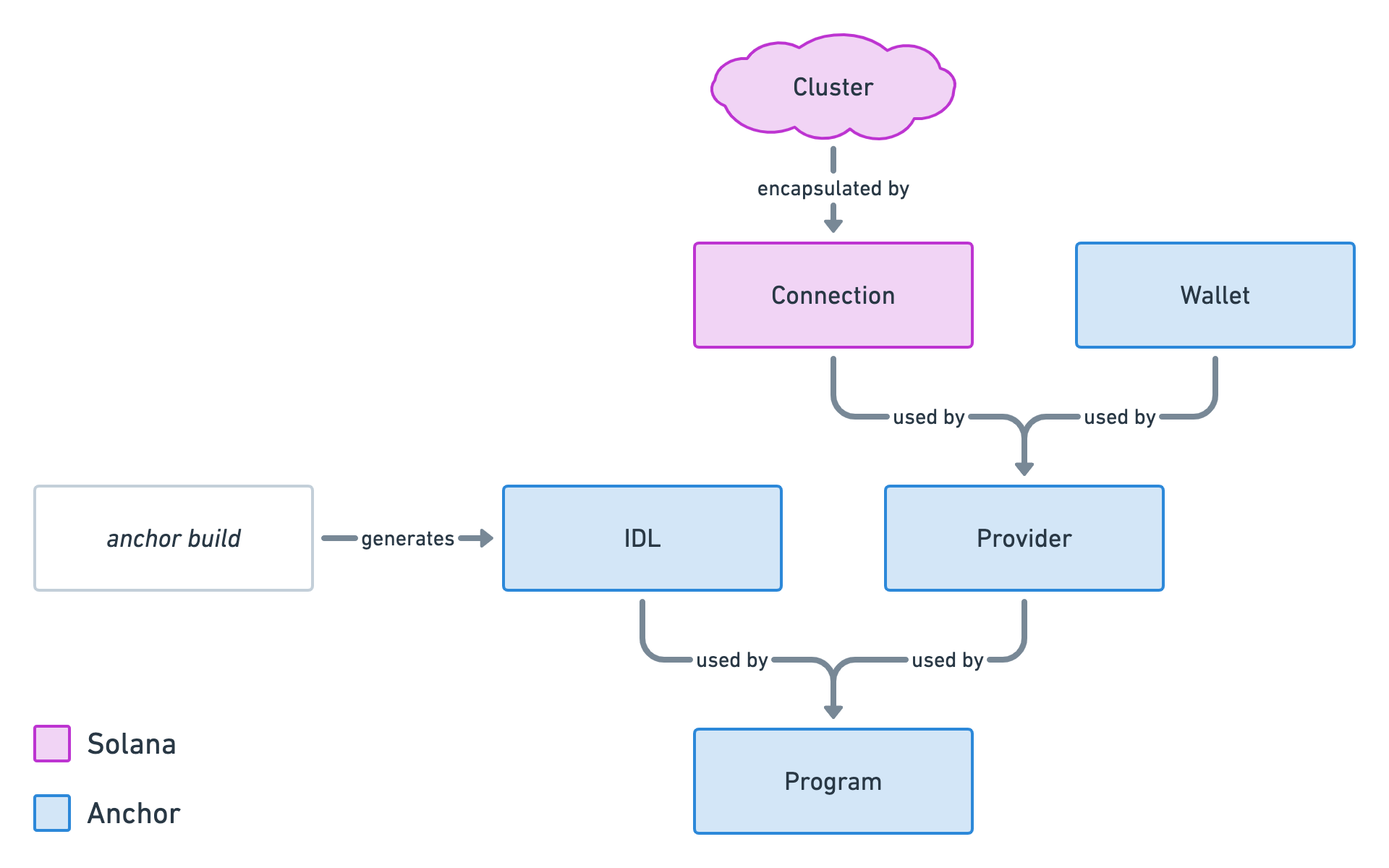
<li>
<code>TweetList.vue</code>: This component uses the <code>TweetCard.vue</code> component to display not just one but multiple tweets.</li>
<li>
<code>TweetSearch.vue</code>: This component offers a reusable form to search for criteria. It is used on the topics page and the users page as we need to search for something on both of these pages.</li>
</ul>
<h2><a id="content-explaining-api-files" href="#explaining-api-files" class="heading-permalink" aria-hidden="true" title="Permalink">❡</a>Explaining API files</h2>
<p>On top of components, the ZIP file also contains an <code>api</code> folder. This folder contains one file for each type of interaction we can have with our program. Technically, we don’t need to extract these interactions into their own files but it is a good way to make our components less complicated and easier to maintain.</p>
<p>For now, each of these files defines a function that returns mock data.</p>
<ul>
<li>
<code>fetch-tweets.js</code>: Provides a function that returns all tweets from our program. In a future episode, we will transform that function slightly so it can filter through topics and users.</li>
<li>
<code>get-tweet.js</code>: Provides a function that returns a tweet account from a given public key.</li>
<li>
<code>send-tweet.js</code>: Provides a function that sends a <code>SendTweet</code> instruction to our program with all the required information.</li>
</ul>
<h2><a id="content-explaining-composables" href="#explaining-composables" class="heading-permalink" aria-hidden="true" title="Permalink">❡</a>Explaining composables</h2>
<p>There’s one last folder in that ZIP file to explain: composables.</p>
<p>In VueJS, we call “composables” functions that use the composition API to extend the behaviour of a component. If you’re familiar with React, this is comparable to React hooks for VueJS.</p>
<p>Since certain components needed some extra functionality, I took the liberty to create some composables to make components easier to read.</p>
<ul>
<li>
<code>useAutoresizeTextarea.js</code>: This composable is used in the <code>TweetForm.vue</code> component and makes the “content” field automatically resize itself based on its content. That way the field contains only one line of text to start with but extends as the user types.</li>
<li>
<code>useCountCharacterLimit.js</code>: Also used by the <code>TweetForm.vue</code> component, this composable returns a reactive character count-down based on a given text and limit.</li>
<li>
<code>useFromRoute.js</code>: This composable is used by many components. It’s a little refactoring that helps deal with Vue Router hooks. Normally, we’d need to add some code for when we enter a router and some other code when the route updates but the components stay the same — e.g. the topic changes in the topics page. That function enables us to write some logic once that will be fired on both events.</li>


<li>
<code>useSlug.js</code>: This composable is used to transform any given text into a slug. For instance <code>Solana is AWESOME</code> will become <code>solana-is-awesome</code>. This is used anywhere we need to make sure the topic is provided as a slug. That way, we’ve got less risk of users tweeting on the same topic not finding each other’s tweets due to case sensitivity.</li>
</ul>
<h2><a id="content-conclusion" href="#conclusion" class="heading-permalink" aria-hidden="true" title="Permalink">❡</a>Conclusion</h2>
<p>Well done, we’ve got ourselves a user interface! I truly hope you didn’t get any troubles along the way, the frontend world can be quite unforgiving at times. If you have any issues, feel free to comment below or, even better, create a new issue on the project’s repository.</p>
<p>Speaking of repositories, you can view the code of this episode on the <code>episode-7</code> branch and compare the code with the previous episode as usual. This time, I’ve also added another link to compare after the commit that generated the frontend via <code>vue create app</code> so you can see what we’ve changed afterwards.</p>
<p class="github-button"><a href="https://github.com/lorisleiva/solana-twitter/tree/episode-7">View Episode 7 on GitHub</a></p>
<p class="text-center"><a href="https://github.com/lorisleiva/solana-twitter/compare/episode-6...episode-7">Compare with Episode 6</a> / <a href="https://github.com/lorisleiva/solana-twitter/compare/1d7642e092a5946e6f08f5b90cadc612051b9b75...episode-7">Compare after creating the VueJS app</a></p>
<p>In the next three episodes, we will wire our mock user interface with real data and with real interactions with our Solana program. We’ll start with integrating our frontend with Solana wallets such as <a href="https://phantom.app/">Phantom</a> so we can identify the connected user in our application. See you in the next episode!</p>

                    
                ]]>
            </content>


                <category term="Scaffolding the frontend"/>
            
            <published>2021-11-28T15:45:00+00:00</published>

            
                <link rel="enclosure" type="image/jpeg" length="535440" href="https://lorisleiva.com/assets/articles/2021/1126-solana-7-scaffold-frontend/episode-7-cover.jpg"/>
            
        </entry>
    
        <entry>
            
            <id>https://lorisleiva.com/create-a-solana-dapp-from-scratch/fetching-tweets-from-the-program</id>
            <title><![CDATA[Fetching tweets from the program]]></title>
            <updated>2021-11-25T16:15:00+00:00</updated>
            <link rel="alternate" href="https://lorisleiva.com/create-a-solana-dapp-from-scratch/fetching-tweets-from-the-program"/>

            
            <author>
                <name><![CDATA[Loris Leiva]]></name>
            </author>
            <summary><![CDATA[In the episode, we learn how to fetch multiple tweet accounts at once and how to filter them by various properties.]]></summary>
            <content type="html">
                <![CDATA[ 
                    
                        
                            <a href="https://lorisleiva.com/create-a-solana-dapp-from-scratch/fetching-tweets-from-the-program">
                                <img alt="Fetching tweets from the program" src="https://lorisleiva.com/assets/articles/2021/1125-solana-6-test-fetch-all/episode-6-cover.jpg" />
                            </a>


                        <p class="lead">Let's see what we've learned so far. Implementing a Solana program that creates <code>Tweet</code> accounts... Check! ✅ Interacting with our program from a client to send tweets to the blockchain... Check! ✅ Retrieving all of our tweets to display them to our users... Hmm... Nope! ❌</p>
<p>Let's learn how to do this now! We'll add a few tests that retrieve multiple tweets and ensure we get the right tweets in the right amount.</p>
<h2><a id="content-fetching-all-tweets" href="#fetching-all-tweets" class="heading-permalink" aria-hidden="true" title="Permalink">❡</a>Fetching all tweets</h2>
<p>Let's start simple by retrieving all <code>Tweet</code> accounts ever created on the blockchain.</p>
<p>In the previous episode, we learned that Anchor exposes a little API for each type of account inside the <code>program</code> object. For instance, the retrieve the <code>Tweet</code> account API, we need to access <code>program.account.tweet</code>.</p>
<p>Previously, we used the <code>fetch</code> method inside that API to retrieve a specific account based on its public key. Now, we'll use another method called <code>all</code> that simply returns all of them!</p>
<pre><code class="language-js">const tweetAccounts = await program.account.tweet.all();
</code></pre>
<p>And just like that we have an array of all tweet accounts ever created.</p>
<p>Let's add a new test at the end of the <code>tests/solana-twitter.ts</code> file. We're adding it at the end because we need to make sure we have accounts to retrieve. <strong>The first 5 tests end up creating a total of 3 tweet accounts</strong> — since 2 of the test make sure accounts are not created under certain conditions.</p>
<p>Therefore, our new test will retrieve all accounts and make sure we've got exactly 3.</p>
<pre><code class="language-js">it('can fetch all tweets', async () =&gt; {
    const tweetAccounts = await program.account.tweet.all();
    assert.equal(tweetAccounts.length, 3);
});
</code></pre>
<p>Now if we run <code>anchor test</code>, we should see all 6 of the tests passing! ✅</p>
<p>Note that for this new test to always work, we need to make sure our local ledger is empty before running the tests. When running <code>anchor test</code>, Anchor does that automatically for us by starting a new empty local ledger.</p>
<p>However, if you run tests with your own local ledger — by running <code>solana-test-validator</code> and <code>anchor run test</code> on a different terminal session — then make sure to reset your local ledger before running the tests by exiting the current local ledger and starting a new empty one using <code>solana-test-validator --reset</code>. If you don't, you'll end up with 6 tweet accounts the next time you run your tests and therefore our brand new test will fail.</p>
<p><small>This applies for Apple M1 users that have to run <code>solana-test-validator --no-bpf-jit --reset</code> and <code>anchor test --skip-local-validator</code> instead of <code>anchor test</code>. Just make sure you restart your local ledger before running the tests every time.</small></p>
<h2><a id="content-filtering-tweets-by-author" href="#filtering-tweets-by-author" class="heading-permalink" aria-hidden="true" title="Permalink">❡</a>Filtering tweets by author</h2>
<p>Okay, let's move on to our next test. we know how to fetch all <code>Tweet</code> account ever created but how can we retrieve all accounts matching certain criteria? For example, how can we retrieve all <code>Tweet</code> accounts from a particular author?</p>
<p>It turns out, you can provide an array of filters to the <code>all()</code> method above to narrow the scope of your result.</p>
<p>Solana supports only <a href="https://docs.solana.com/developing/clients/jsonrpc-api#filters">2 types of filters</a> and both of them are quite rudimentary.</p>
<h3><a id="content-the-datasize-filter" href="#the-datasize-filter" class="heading-permalink" aria-hidden="true" title="Permalink">❡</a>The <code>dataSize</code> filter</h3>
<p>The first filter — called <code>dataSize</code> — is quite simple. You give it <strong>a size in bytes</strong> and it will only return accounts that match exactly that size.</p>
<p>For instance, we can create a 2000 bytes <code>dataSize</code> filter this way.</p>
<pre><code class="language-js">{
    dataSize: 2000,
}
</code></pre>
<p>Anything above or below 2000 bytes will not be included in the result.</p>
<p>Since all of our <code>Tweet</code> accounts have a size of 1376 bytes, that's not very useful to us.</p>
<h3><a id="content-the-memcmp-filter" href="#the-memcmp-filter" class="heading-permalink" aria-hidden="true" title="Permalink">❡</a>The <code>memcmp</code> filter</h3>
<p>The second filter — called <code>memcmp</code> — is a bit more useful. It allows us to compare <strong>an array of bytes</strong> with the account's data at <strong>a particular offset</strong>.</p>
<p>That means, we need to provide an array of bytes that should be present in the account's data at a certain position and it will only return these accounts.</p>
<p>So we need to provide 2 things:</p>
<ul>
<li>The <code>offset</code>: The position (in bytes) in which we should start comparing the data. This expects an integer.</li>
<li>The <code>bytes</code> array: The data to compare to the account's data. <strong>This array of bytes should be encoded in base 58</strong>.</li>
</ul>
<p>For instance, say I wanted to retrieve all accounts that have my public key at the 42nd byte. Then, I could use the following <code>memcmp</code> filter.</p>
<pre><code class="language-js">{
    memcmp: {
        offset: 42, // Starting from the 42nd byte.
        bytes: 'B1AfN7AgpMyctfFbjmvRAvE1yziZFDb9XCwydBjJwtRN', // My base-58 encoded public key.
    }
}
</code></pre>
<p>Note that <code>memcmp</code> filters only compare exact data. We cannot, for example, check that an integer at a certain position is lower than a provided number. Still, that <code>memcmp</code> filter is powerful enough for us to use it in our Twitter-like dApp.</p>
<h3><a id="content-use-the-memcmp-filter-on-the-authors-public-key" href="#use-the-memcmp-filter-on-the-authors-public-key" class="heading-permalink" aria-hidden="true" title="Permalink">❡</a>Use the <code>memcmp</code> filter on the author's public key</h3>
<p>Okay, back to the matter at hand. Let's use that <code>memcmp</code> filter to filter tweets from a given author.</p>
<p>So we need two things: the <code>offset</code> and the <code>bytes</code>. For the offset, we need to find out where in the data the author's public key is stored. Fortunately, we've already done all that work in episode 3.</p>
<p>We know that the first 8 bytes are reserved for the discriminator and that the author's public key comes afterwards. Therefore, our offset is simply: <code>8</code>.</p>
<p class="wide"><img src="https://lorisleiva.com/assets/articles/2021/1125-solana-6-test-fetch-all/tweet-account-size-start-author.jpg" alt="The final storage diagram of episode 3 with an arrow pointing to the 8th byte saying &quot;Author starts at the 8th byte&quot;." /></p>
<p>Now, for the <code>bytes</code>, we need to provide a base-58 encoded public key. For the purpose of our test, we'll use our wallet's public key to retrieve all tweets posted by the wallet.</p>
<p>We end up with the following piece of code.</p>
<pre><code class="language-js">const authorPublicKey = program.provider.wallet.publicKey
const tweetAccounts = await program.account.tweet.all([
    {
        memcmp: {
            offset: 8, // Discriminator.
            bytes: authorPublicKey.toBase58(),
        }
    }
]);
</code></pre>
<p>Considering only two of the three <code>Tweet</code> accounts created in the tests are from our wallet, the <code>tweetAccounts</code> variable should only contain two accounts.</p>
<p>Let's fit that code into a new test and make sure we get exactly two accounts back.</p>
<pre><code class="language-js{1,12,13}">it('can filter tweets by author', async () =&gt; {
    const authorPublicKey = program.provider.wallet.publicKey
    const tweetAccounts = await program.account.tweet.all([
        {
            memcmp: {
                offset: 8, // Discriminator.
                bytes: authorPublicKey.toBase58(),
            }
        }
    ]);

    assert.equal(tweetAccounts.length, 2);
});
</code></pre>
<p>Let's be a bit more strict in that test and make sure that both of the accounts inside <code>tweetAccounts</code> are in fact from our wallet.</p>
<p>For that, we'll loop through the <code>tweetAccounts</code> array using <a href="https://developer.mozilla.org/en-US/docs/Web/JavaScript/Reference/Global_Objects/Array/every">the <code>every</code> function</a> that returns <code>true</code> if and only if the provided callback returns <code>true</code> for every account.</p>
<pre><code class="language-js{13,14,15}">it('can filter tweets by author', async () =&gt; {
    const authorPublicKey = program.provider.wallet.publicKey
    const tweetAccounts = await program.account.tweet.all([
        {
            memcmp: {
                offset: 8, // Discriminator.
                bytes: authorPublicKey.toBase58(),
            }
        }
    ]);

    assert.equal(tweetAccounts.length, 2);
    assert.ok(tweetAccounts.every(tweetAccount =&gt; {
        return tweetAccount.account.author.toBase58() === authorPublicKey.toBase58()
    }))
});
</code></pre>
<p>Done! We have our second test and we know how to filter by authors! 🎉</p>
<p>You might be wondering why we are accessing the author's public key via <code>tweetAccount.account.author</code> whereas, when using the <code>fetch</code> method, we were accessing it via <code>tweetAccount.author</code> directly. That's because the <code>fetch</code> and the <code>all</code> methods don't return exactly the same objects.</p>
<p>When using <code>fetch</code>, we get the <code>Tweet</code> account with all of its data parsed.</p>
<p>When using <code>all</code>, we get the same object but inside a wrapper object that also provides its <code>publicKey</code>. When using <code>fetch</code>, we're already providing the public key of the account so it's not necessary for that method to return it. However, when using <code>all</code>, we don't know the public key of these accounts and, therefore, Anchor wraps the account object in another object to gives us more context. That's why we're accessing the account data through <code>tweetAccount.account</code>.</p>
<p>Here's a little diagram to summarise this.</p>
<p class="wide"><img src="https://lorisleiva.com/assets/articles/2021/1125-solana-6-test-fetch-all/solana-fetch-all-difference.png" alt="Little diagram showing what &quot;fetch(publicKey)&quot; and &quot;all()&quot; return. The former returns a &quot;Tweet&quot; account directly whereas the latter returns 3 objects containing both a &quot;Tweet&quot; account and a public key." /></p>
<h2><a id="content-filtering-tweets-by-topic" href="#filtering-tweets-by-topic" class="heading-permalink" aria-hidden="true" title="Permalink">❡</a>Filtering tweets by topic</h2>
<p>Filtering tweets by topic is very similar to filtering tweets by author. We still need a <code>memcpm</code> filter but with different parameters.</p>
<p>Let's start with the offset. Again, if we look at the way our <code>Tweet</code> account is structured, we can see that the topic starts at the 52nd byte.</p>
<p class="wide"><img src="https://lorisleiva.com/assets/articles/2021/1125-solana-6-test-fetch-all/tweet-account-size-start-topic.jpg" alt="The final storage diagram of episode 3 with an arrow pointing to the 52nd byte saying &quot;Topic starts at the 52nd byte&quot;." /></p>
<p>That's because we have 8 bytes for the discriminator, 32 bytes for the author, 8 bytes for the timestamp and an extra 4 bytes for the &quot;string prefix&quot; that tells us the real length of our topic in bytes.</p>
<p>So let's add these numbers explicitly in a <code>memcmp</code> filter to make it easier to maintain in the future.</p>
<pre><code class="language-js">const tweetAccounts = await program.account.tweet.all([
    {
        memcmp: {
            offset: 8 + // Discriminator.
                32 + // Author public key.
                8 + // Timestamp.
                4, // Topic string prefix.
            bytes: '', // TODO
        }
    }
]);
</code></pre>
<p>Next, we need to provide a topic to search for in our tests. Since two of the three accounts created in the tests use the <code>veganism</code> topic, let's use that.</p>
<p>However, we can't just give <code>'veganism'</code> as a string to the <code>bytes</code> property. It needs to be a base-58 encoded array of bytes. To do this, we first need to convert our string to a buffer which we can then encode in base 58.</p>
<ul>
<li>We can convert a string to a buffer using <code>Buffer.from('some string')</code>.</li>
<li>We can base-58 encode a buffer using <code>bs58.encode(buffer)</code>.</li>
</ul>
<p>The <code>Buffer</code> variable is already available globally but that's not the case for the <code>bs58</code> variable that we need to import explicitly at the top of our test file.</p>
<pre><code class="language-js{5}">import * as anchor from '@project-serum/anchor';
import { Program } from '@project-serum/anchor';
import { SolanaTwitter } from '../target/types/solana_twitter';
import * as assert from &quot;assert&quot;;
import * as bs58 from &quot;bs58&quot;;
</code></pre>
<p>So now we can finally fill the <code>bytes</code> property with our base-58 encoded <code>veganism</code> topic.</p>
<pre><code class="language-js">const tweetAccounts = await program.account.tweet.all([
    {
        memcmp: {
            offset: 8 + // Discriminator.
                32 + // Author public key.
                8 + // Timestamp.
                4, // Topic string prefix.
            bytes: bs58.encode(Buffer.from('veganism')),
        }
    }
]);
</code></pre>
<p>Similarly to our previous test, let's create a new test that asserts <code>tweetAccounts</code> contains only two accounts and that both of them have the <code>veganism</code> topic.</p>
<pre><code class="language-js{14,15,16,17}">it('can filter tweets by topics', async () =&gt; {
    const tweetAccounts = await program.account.tweet.all([
        {
            memcmp: {
                offset: 8 + // Discriminator.
                    32 + // Author public key.
                    8 + // Timestamp.
                    4, // Topic string prefix.
                bytes: bs58.encode(Buffer.from('veganism')),
            }
        }
    ]);

    assert.equal(tweetAccounts.length, 2);
    assert.ok(tweetAccounts.every(tweetAccount =&gt; {
        return tweetAccount.account.topic === 'veganism'
    }))
});
</code></pre>
<h2><a id="content-conclusion" href="#conclusion" class="heading-permalink" aria-hidden="true" title="Permalink">❡</a>Conclusion</h2>
<p>Retrieving and filtering multiple tweet accounts... Check! ✅</p>
<p>Congratulations, you now have a fully tested Solana program! We can now spend the rest of our time implementing a JavaScript client for our program that our users can interact with. Fortunately, because we've learned so much by writing tests, this will feel very familiar.</p>
<p class="github-button"><a href="https://github.com/lorisleiva/solana-twitter/tree/episode-6">View Episode 6 on GitHub</a></p>
<p class="text-center"><a href="https://github.com/lorisleiva/solana-twitter/compare/episode-5...episode-6">Compare with Episode 5</a></p>
<p>I'll see you in the next episode where we'll start scaffolding our VueJS application. Let's go! 🔥</p>

                    
                ]]>
            </content>


                <category term="Fetching tweets from the program"/>
            
            <published>2021-11-25T16:15:00+00:00</published>

            
                <link rel="enclosure" type="image/jpeg" length="640406" href="https://lorisleiva.com/assets/articles/2021/1125-solana-6-test-fetch-all/episode-6-cover.jpg"/>
            
        </entry>
    
        <entry>
            
            <id>https://lorisleiva.com/create-a-solana-dapp-from-scratch/testing-our-instruction</id>
            <title><![CDATA[Testing our instruction]]></title>
            <updated>2021-11-24T17:20:00+00:00</updated>
            <link rel="alternate" href="https://lorisleiva.com/create-a-solana-dapp-from-scratch/testing-our-instruction"/>

            
            <author>
                <name><![CDATA[Loris Leiva]]></name>
            </author>
            <summary><![CDATA[Our program is ready so let's test it! It gives us the perfect opportunity to learn more about JavaScript clients and see how they interact with our program.]]></summary>
            <content type="html">
                <![CDATA[ 
                    
                        
                            <a href="https://lorisleiva.com/create-a-solana-dapp-from-scratch/testing-our-instruction">
                                <img alt="Testing our instruction" src="https://lorisleiva.com/assets/articles/2021/1124-solana-5-test-instruction/episode-5-cover.jpg" />
                            </a>


                        <p class="lead">Our program may be ready but our job is not finished. In this article, we will write a few tests that interact with our program and, more specifically, our <code>SendTweet</code> instruction.</p>
<p>Whilst writing tests might not feel like the most exciting task, it is the perfect opportunity for us to understand how we can interact with our program and on behalf of which wallet.</p>
<h2><a id="content-welcome-to-the-other-side" href="#welcome-to-the-other-side" class="heading-permalink" aria-hidden="true" title="Permalink">❡</a>Welcome to the other side</h2>
<p>So far in this series, we’ve focused on program development, that is, the part of the code that lives in the blockchain.</p>
<p>Now, it’s time to move on to the other side — a.k.a. the client.</p>
<p>Much like a traditional web server, we need a client to interact with our Solana program. Later on in this series, we will implement a JavaScript client using the VueJS framework, but for now, we will use a JavaScript client to test our program.</p>
<p>The benefit of that is, after writing our tests, we will know the exact syntax to use in our frontend to interact with our program.</p>
<p>Okay, so how does one interact with the Solana blockchain?</p>
<p><strong>Solana offers a <a href="https://docs.solana.com/developing/clients/jsonrpc-api">JSON RPC API</a> for this purpose</strong>. Don’t get scared by the RPC specifications, at the end of the day, it’s just an API.</p>
<p>That being said, Solana provides <a href="https://github.com/solana-labs/solana-web3.js">a JavaScript library called <code>@solana/web3.js</code></a> that encapsulates this API for us by providing a bunch of <a href="https://docs.solana.com/developing/clients/javascript-reference">useful asynchronous methods</a>.</p>
<p>All of these methods live inside a <code>Connection</code> object that requires a <code>Cluster</code> for it to know where to send its requests. As usual, that cluster can be localhost, devnet, etc. Since we’re working locally for now, we’re using the “localhost” cluster.</p>
<p>Here’s a little visual representation that will keep growing in this article.</p>
<p class="max-w-xs mx-auto"><img src="https://lorisleiva.com/assets/articles/2021/1124-solana-5-test-instruction/solana-models-1.png" alt="A simple diagram made of two nodes. One “Cluster” node points to another “Connection” node and the arrow says “encapsulated by”." /></p>
<p>Now we know how to interact with the Solana blockchain but how can we sign transactions to prove our identity? For that, we need a <code>Wallet</code> object that has access to the key pair of the user making the transaction.</p>
<p>Fortunately for us, Anchor also provides <a href="https://www.npmjs.com/package/@project-serum/anchor">a JavaScript library called <code>@project-serum/anchor</code></a> that makes all of this super easy.</p>
<p>Anchor’s library provides us with a <code>Wallet</code> object that requires a key pair and allows us to sign transactions. But that’s not it, it also provides us with a <code>Provider</code> object that wraps both the <code>Connection</code> and the <code>Wallet</code> and automatically adds the wallet’s signature to outgoing transactions. The <code>Provider</code> object makes interacting with the Solana blockchain on behalf of a wallet seamless.</p>
<p>Here’s an updated version of our previous diagram.</p>
<p><img src="https://lorisleiva.com/assets/articles/2021/1124-solana-5-test-instruction/solana-models-2.png" alt="Same diagram as before but with “Wallet” and “Provider” nodes. Both the “Connection” and the “Wallet” nodes point towards the “Provider” node and the arrow says “used by”." /></p>
<p>But wait there’s more! If you remember, <a href="https://lorisleiva.com/create-a-solana-dapp-from-scratch/getting-started-with-solana-and-anchor#anchor-build">in episode 2</a> we mentioned that every time we run <code>anchor build</code> Anchor generates a JSON file called an <code>IDL</code>  — stands for <a href="https://en.wikipedia.org/wiki/Interface_description_language">&quot;Interface Description Language&quot;</a>. That IDL file contains a structured description of our program including its public key, instructions and accounts.</p>
<p>Imagine what we could get if we would combine that <code>IDL</code> file that knows everything about our program and that <code>Provider</code> object that can interact with the Solana blockchain on behalf of a wallet. That would be the final piece of the puzzle.</p>
<p>Well, imagine no more because Anchor provides yet another object called <code>Program</code> that uses both the <code>IDL</code> and the <code>Provider</code> to create a custom JavaScript API that completely matches our Solana program. Thanks to that <code>Program</code> object, we can interact with our Solana program on behalf of a wallet without even needing to know anything about the underlying API.</p>
<p>And there you have it, the final picture illustrating how Anchor encapsulates Solana’s JavaScript library to improve our developer experience.</p>
<p class="wide"><img src="https://lorisleiva.com/assets/articles/2021/1124-solana-5-test-instruction/solana-models-3.png" alt="Same diagram as before but with 2 more nodes: one “IDL” node and one “Program” node. The “IDL” node and the “Provider” node both point towards the “Program” node and the arrow says “used by”. There’s also another new node entitled “anchor build” that points towards the “IDL” node and the arrow says “generates”." /></p>
<h2><a id="content-a-client-just-for-tests" href="#a-client-just-for-tests" class="heading-permalink" aria-hidden="true" title="Permalink">❡</a>A client just for tests</h2>
<p>Let’s put what we’ve learned into practice by setting up a <code>Program</code> object that we can use in our tests.</p>
<p>First of all, no need to import any new JavaScript libraries, both of the libraries mentioned above are included by default on every Anchor project.</p>
<p>Then, if you look at the diagram above, there are essentially two questions we need to answer to end up with a <code>Program</code> object: which cluster and which wallet?</p>
<p>Anchor takes care of answering both of these questions for us by generating a <code>Provider</code> object that uses the configurations inside our <code>Anchor.toml</code> file.</p>
<p>More precisely, it will look into your <code>provider</code> configurations which should look something like this.</p>
<pre><code class="language-rust">[provider]
cluster = &quot;localnet&quot;
wallet = &quot;/Users/loris/.config/solana/id.json&quot;
</code></pre>
<p>With these provider configurations, it knows to use the localhost cluster — using a local ledger — and it knows where to find your key pair on your local machine.</p>
<p>Now, open your test file that should be located at <code>tests/solana-twitter.ts</code>. If you look at the first 2 lines located inside the <code>describe</code> method, you should see the following.</p>
<pre><code class="language-js">// Configure the client to use the local cluster.
anchor.setProvider(anchor.Provider.env());
const program = anchor.workspace.SolanaTwitter as Program&lt;SolanaTwitter&gt;;
</code></pre>
<ul>
<li>The first line calls the <code>anchor.Provider.env()</code> method to generate a new <code>Provider</code> for us using our <code>Anchor.toml</code> config file. Remember: Cluster + Wallet = Provider. It then registers that new provider using the <code>anchor.setProvider</code> method.</li>
<li>The second line uses that registered provider to create a new <code>Program</code> object that we can use in our tests. Note that, since the tests are written in TypeScript, we are also leveraging the custom <code>SolanaTwitter</code> type that Anchor generated for us when running <code>anchor build</code>. That way, we can get some nice auto-completion from our code editor.</li>
</ul>
<p>And just like that, our test client is all set up and ready to be used! Here's a little update on our diagram to reflect what we've learned here.</p>
<p class="wide"><img src="https://lorisleiva.com/assets/articles/2021/1124-solana-5-test-instruction/solana-models-4.png" alt="Same diagram as before with 2 more nodes. One node is called &quot;Anchor.toml&quot; that points to both the &quot;Cluster&quot; node and the &quot;Wallet&quot; node. Both of these arrows say &quot;configures&quot; on them. The other new node is called &quot;anchor.Provider.env()&quot; and points to the &quot;Provider&quot; node. The arrow here says &quot;generates&quot;." /></p>
<h2><a id="content-sending-a-tweet" href="#sending-a-tweet" class="heading-permalink" aria-hidden="true" title="Permalink">❡</a>Sending a tweet</h2>
<p>Right, enough theory, let's write our first test! Let's start by deleting the dummy test that was auto-generated in our <code>tests/solana-twitter.ts</code> file.</p>
<pre><code class="language-diff">  // Configure the client to use the local cluster.
  anchor.setProvider(anchor.Provider.env());
  const program = anchor.workspace.SolanaTwitter as Program&lt;SolanaTwitter&gt;;

- it('Is initialized!', async () =&gt; {
-     // Add your test here.
-     const tx = await program.rpc.initialize({});
-     console.log(&quot;Your transaction signature&quot;, tx);
- });
</code></pre>
<p>Now, add the following code instead.</p>
<pre><code class="language-js">it('can send a new tweet', async () =&gt; {
    // Before sending the transaction to the blockchain.

    await program.rpc.sendTweet('TOPIC HERE', 'CONTENT HERE', {
        accounts: {
            // Accounts here...
        },
        signers: [
          	// Key pairs of signers here...
        ],
    });

    // After sending the transaction to the blockchain.
});
</code></pre>
<p><small>Don't worry if your IDE shows some red everywhere. It's just TypeScript complaining our instruction doesn't have enough data. We'll get there gradually.</small></p>
<p>Okay, let's digest that piece of code:</p>
<ul>
<li>We've created a new test called &quot;it can send a new tweet&quot; using the <code>it</code> method from the <code>mocha</code> test framework.</li>
<li>We used an <code>async</code> function because we are going to call asynchronous functions inside it. More precisely, we're going to need to <code>await</code> for the transaction to finish before we can make sure the right account was created.</li>
<li>We used our <code>program</code> object to interact with our program. <strong>The <code>program</code> object contains an <code>rpc</code> object which exposes an API matching our program's instructions</strong>. Therefore, to make a call to our <code>SendTweet</code> instruction, we need to call the <code>program.rpc.sendTweet</code> method.</li>
<li>When using any method from the <code>program.rpc</code> object, <strong>we need to first provide any argument required by the instruction</strong>. In our case, that's the <code>topic</code> and the <code>content</code> arguments in this order.</li>
<li>
<strong>The last argument of any <code>program.rpc</code> method is always the context</strong>. If you remember from the previous episode, the context of an instruction contains all the accounts necessary for the instruction to run successfully. On top of providing the <code>accounts</code> as an object, we also need to provide the key pairs of all <code>signers</code> as an array. Note that we don't need to provide the key pair of our wallet since Anchor does that automatically for us.</li>
</ul>
<p>Okay, let's fill this <code>sendTweet</code> method with real data. Let's provide a topic and a content for our tweet and let's make it vegan because why not? 🌱</p>
<pre><code class="language-js{2}">it('can send a new tweet', async () =&gt; {
    await program.rpc.sendTweet('veganism', 'Hummus, am I right?', {
        accounts: {
            // Accounts here...
        },
        signers: [
          	// Key pairs of signers here...
        ],
    });
});
</code></pre>
<p>Next, let's fill the accounts. From the context of our <code>SendTweet</code> instruction, we need to provide the following accounts: <code>tweet</code>, <code>author</code> and <code>system_program</code>. We'll start with the <code>tweet</code> account.</p>
<p>Since this is the account our instruction will create, <strong>we just need to generate a new key pair</strong> for it. That way, we can also prove we are allowed to initialise an account at this address because we can add the <code>tweet</code> account as a signer.</p>
<p>We can generate a new key pair in JavaScript using the <code>anchor.web3.Keypair.generate()</code> method. Then we can add that generated key pair in the <code>signers</code> array and add its public key to the <code>accounts</code> object.</p>
<pre><code class="language-js{2,5,7}">it('can send a new tweet', async () =&gt; {
    const tweet = anchor.web3.Keypair.generate();
    await program.rpc.sendTweet('veganism', 'Hummus, am I right?', {
        accounts: {
            tweet: tweet.publicKey,
        },
        signers: [tweet],
    });
});
</code></pre>
<p>Next up, the <code>author</code> account. For that, we need to access the public key of the wallet used inside our program. Remember how our program contains a provider which contains a wallet? That means we can access our wallet's public key via <code>program.provider.wallet.publicKey</code>.</p>
<p>Since Anchor automatically adds the wallet as a signer to each transaction, we don't need to change the <code>signers</code> array.</p>
<pre><code class="language-js{6}">it('can send a new tweet', async () =&gt; {
    const tweet = anchor.web3.Keypair.generate();
    await program.rpc.sendTweet('veganism', 'Hummus, am I right?', {
        accounts: {
            tweet: tweet.publicKey,
            author: program.provider.wallet.publicKey,
        },
        signers: [tweet],
    });
});
</code></pre>
<p>Finally, we need to provide the <code>system_program</code> account. Note that, in JavaScript, Anchor automatically transforms snake case variables into camel case variables inside our context. This means we need to provide the System Program using <code>systemProgram</code> instead of <code>system_program</code>.</p>
<p>Now, how do we access the public key of Solana's official System Program in JavaScript? Simple, we can access the System Program using <code>anchor.web3.SystemProgram</code> and so we can access its public key via <code>anchor.web3.SystemProgram.programId</code>.</p>
<pre><code class="language-js{7}">it('can send a new tweet', async () =&gt; {
    const tweet = anchor.web3.Keypair.generate();
    await program.rpc.sendTweet('veganism', 'Hummus, am I right?', {
        accounts: {
            tweet: tweet.publicKey,
            author: program.provider.wallet.publicKey,
            systemProgram: anchor.web3.SystemProgram.programId,
        },
        signers: [tweet],
    });
});
</code></pre>
<p>Boom! Just like that, we're ready to send tweets to our own Solana program. 🤯</p>
<p>Whilst running this test will successfully create a <code>Tweet</code> account on the blockchain, we're not actually testing anything yet. So the next step is to make another call to the blockchain to fetch the newly created account and make sure the data matches with what we've sent.</p>
<p>To fetch an account on the blockchain we need to access another API provided by the <code>program</code> object. By calling <code>program.account.tweet</code>, we have access to a few methods that help us fetch <code>Tweet</code> accounts from the blockchain. Note that <strong>these methods are available for every account defined in our Solana program</strong>. So if we had a <code>UserProfile</code> account, we could fetch them using the <code>program.account.userProfile</code> API.</p>
<p>Within these API methods, we can use <code>fetch</code> to retrieve exactly one account by providing its public key. Because Anchor knows what type of account we're trying to fetch, it will automatically parse all the data for us.</p>
<p>So let's fetch our newly created <code>Tweet</code> account. We'll use the public key of our <code>tweet</code> key pair to fetch our <code>tweetAccount</code>. Let's also log the content of that account so we can see what's in there.</p>
<pre><code class="language-js{14,15}">it('can send a new tweet', async () =&gt; {
    // Call the &quot;SendTweet&quot; instruction.
    const tweet = anchor.web3.Keypair.generate();
    await program.rpc.sendTweet('veganism', 'Hummus, am I right?', {
        accounts: {
            tweet: tweet.publicKey,
            author: program.provider.wallet.publicKey,
            systemProgram: anchor.web3.SystemProgram.programId,
        },
        signers: [tweet],
    });

    // Fetch the account details of the created tweet.
    const tweetAccount = await program.account.tweet.fetch(tweet.publicKey);
  	console.log(tweetAccount);
});
</code></pre>
<p>Now let's run our tests using <code>anchor test</code> — remember this will build, deploy and test our program by running its own local ledger.</p>
<p><small>Reminder: Apple M1 users will need to run <code>solana-test-validator --no-bpf-jit --reset</code> and <code>anchor test --skip-local-validator</code> on a separate terminal session.</small></p>
<p>You should see the test passing — normal as we haven't defined any assertions yet — but you should also see an object that looks like this in the logs.</p>
<pre><code class="language-js">{
  author: PublicKey {
    _bn: &lt;BN: 7d9c91c77d1f5b693cf0b3960a0c037211298a1e495ac14ef0d8fb904b38388f&gt;
  },
  timestamp: &lt;BN: 619e2495&gt;,
  topic: 'veganism',
  content: 'Hummus, am I right?'
}
</code></pre>
<p>Congrats! That's the account we've retrieved from the blockchain and it looks like it's got the right data. At least for the topic and the content.</p>
<p>So the last thing to do for us to complete our test is to write assertions. For that, we'll need to import the <code>assert</code> library at the top of our test file. No need to install it, it's already one of our dependencies.</p>
<pre><code class="language-js{4}">import * as anchor from '@project-serum/anchor';
import { Program } from '@project-serum/anchor';
import { SolanaTwitter } from '../target/types/solana_twitter';
import * as assert from &quot;assert&quot;;
</code></pre>
<p>Now, we can use <code>assert</code> to:</p>
<ul>
<li>Ensure two things are equal using <a href="https://nodejs.org/api/assert.html#assertequalactual-expected-message"><code>assert.equal(actualThing, expectedThing)</code></a>.</li>
<li>Ensure something is truthy using <a href="https://nodejs.org/api/assert.html#assertokvalue-message"><code>assert.ok(something)</code></a>.</li>
</ul>
<p>So let's remove our previous <code>console.log</code> and add some assertions inside our test.</p>
<pre><code class="language-js{17,18,19,20}">it('can send a new tweet', async () =&gt; {
    // Execute the &quot;SendTweet&quot; instruction.
    const tweet = anchor.web3.Keypair.generate();
    await program.rpc.sendTweet('veganism', 'Hummus, am I right?', {
        accounts: {
            tweet: tweet.publicKey,
            author: program.provider.wallet.publicKey,
            systemProgram: anchor.web3.SystemProgram.programId,
        },
        signers: [tweet],
    });

    // Fetch the account details of the created tweet.
    const tweetAccount = await program.account.tweet.fetch(tweet.publicKey);

    // Ensure it has the right data.
    assert.equal(tweetAccount.author.toBase58(), program.provider.wallet.publicKey.toBase58());
    assert.equal(tweetAccount.topic, 'veganism');
    assert.equal(tweetAccount.content, 'Hummus, am I right?');
    assert.ok(tweetAccount.timestamp);
});
</code></pre>
<p>A few things to note here:</p>
<ul>
<li>The first assertion ensures the author of the newly created account matches the public key of our wallet. Since both <code>tweetAccount.author</code> and <code>program.provider.wallet.publicKey</code> are public key objects, they will have different references and therefore we can't simply compare them as objects. Instead, we convert them into a Base 58 format using the <code>toBase58</code> method so they will be equal if and only if these two strings match. Note that the wallet address you give to people in Solana is the Base 58 encoding of your public key. Mine is: <code>B1AfN7AgpMyctfFbjmvRAvE1yziZFDb9XCwydBjJwtRN</code>.</li>
<li>The next two assertions ensure both the <code>topic</code> and the <code>content</code> of our tweet were stored correctly.</li>
<li>Finally, the last assertion ensures our tweet has a non-empty <code>timestamp</code>. We could also check that the timestamp corresponds to the current time but it's a bit tricky to do without having the test failing every so often due to the time not matching to the second. Thus, let's keep the test simple and just make sure we have a timestamp.</li>
</ul>
<p>All done! We can now run <code>anchor test</code> and see our test and all of its assertions passing!</p>
<p>Should we write a few more?</p>
<h2><a id="content-sending-a-tweet-without-a-topic" href="#sending-a-tweet-without-a-topic" class="heading-permalink" aria-hidden="true" title="Permalink">❡</a>Sending a tweet without a topic</h2>
<p>Now that we understand how to write tests for our program, we can simply copy/paste our first test and tweak a few things to test different scenarios.</p>
<p>In this case, I'd like us to add a scenario for tweets that have no topics since our frontend will allow users to send tweets without them.</p>
<p>To test this scenario, copy/paste our first test, rename it &quot;can send a new tweet without a topic&quot; and replace the <code>'veganism'</code> topic with an empty string <code>''</code>. Note that I've also replaced the content with &quot;gm&quot;.</p>
<pre><code class="language-js{4,18}">it('can send a new tweet without a topic', async () =&gt; {
    // Call the &quot;SendTweet&quot; instruction.
    const tweet = anchor.web3.Keypair.generate();
    await program.rpc.sendTweet('', 'gm', {
        accounts: {
            tweet: tweet.publicKey,
            author: program.provider.wallet.publicKey,
            systemProgram: anchor.web3.SystemProgram.programId,
        },
        signers: [tweet],
    });

    // Fetch the account details of the created tweet.
    const tweetAccount = await program.account.tweet.fetch(tweet.publicKey);

    // Ensure it has the right data.
    assert.equal(tweetAccount.author.toBase58(), program.provider.wallet.publicKey.toBase58());
    assert.equal(tweetAccount.topic, '');
    assert.equal(tweetAccount.content, 'gm');
    assert.ok(tweetAccount.timestamp);
});
</code></pre>
<p>Et voilà! We now have two tests testing different scenarios. Onto the next one.</p>
<h2><a id="content-sending-a-tweet-from-a-different-author" href="#sending-a-tweet-from-a-different-author" class="heading-permalink" aria-hidden="true" title="Permalink">❡</a>Sending a tweet from a different author</h2>
<p>Let's test a slightly more complicated scenario now. So far, we've used our wallet as the author of the tweet we're sending but, technically, we should be able to tweet on behalf of any author as long we can prove we own its public address by signing the transaction.</p>
<p>So let's do that. Again, starting by copy/pasting our first test, we'll do the following:</p>
<ul>
<li>Generate a new key pair and assign it in an <code>otherUser</code> variable.</li>
<li>Provide that <code>otherUser</code>'s public key as the <code>author</code> account.</li>
<li>Add the <code>otherUser</code> key pair in the <code>signers</code> array. Note that Anchor will only automatically sign transactions using our wallet which is why we need to explicitly sign here.</li>
<li>Ensure the <code>author</code> of the fetched <code>tweetAccount</code> matches the public key of our <code>otherUser</code>.</li>
</ul>
<pre><code class="language-js{2,3,10,13,20}">it('can send a new tweet from a different author', async () =&gt; {
    // Generate another user and airdrop them some SOL.
    const otherUser = anchor.web3.Keypair.generate();

    // Call the &quot;SendTweet&quot; instruction on behalf of this other user.
    const tweet = anchor.web3.Keypair.generate();
    await program.rpc.sendTweet('veganism', 'Yay Tofu!', {
        accounts: {
            tweet: tweet.publicKey,
            author: otherUser.publicKey,
            systemProgram: anchor.web3.SystemProgram.programId,
        },
        signers: [otherUser, tweet],
    });

    // Fetch the account details of the created tweet.
    const tweetAccount = await program.account.tweet.fetch(tweet.publicKey);

    // Ensure it has the right data.
    assert.equal(tweetAccount.author.toBase58(), otherUser.publicKey.toBase58());
    assert.equal(tweetAccount.topic, 'veganism');
    assert.equal(tweetAccount.content, 'Yay Tofu!');
    assert.ok(tweetAccount.timestamp);
});
</code></pre>
<p>Unfortunately, this test will not pass.</p>
<p>If we try to run it, we will get the following error — you need to read the error logs carefully to find it.</p>
<pre><code>Transfer: insufficient lamports 0, need 10467840
</code></pre>
<p>Okay, what is happening and what is lamport?</p>
<p><strong>A lamport is the smallest decimal of Solana's native token</strong> <code>SOL</code>. The Solana token has exactly 9 decimals, which mean <strong>1 SOL is equal to 1'000'000'000 lamports</strong>.</p>
<p>Lamports are used a lot in Solana development as they allow us to make micropayments of fractional SOLs whilst handling amounts using integers. They are named after Solana's biggest technical influence, <a href="https://en.wikipedia.org/wiki/Leslie_Lamport">Leslie Lamport</a>.</p>
<p>Okay, so the error is telling us we have insufficient funds. More precisely, we need <code>10467840 lamports</code> or <code>0.01046784 SOL</code>.</p>
<p>It turns out this is exactly the amount of money we need for our <code>Tweet</code> account to be rent-exempt. When we sized our <code>Tweet</code> account in episode 3, we came up with a required storage of 1376 bytes. Let's find out how much money we need for an account of 1376 bytes to be rent-exempt.</p>
<pre><code class="language-shell">solana rent 1376
# Outputs:
# Rent per byte-year: 0.00000348 SOL
# Rent per epoch: 0.000028659 SOL
# Rent-exempt minimum: 0.01046784 SOL       &lt;- Aha!
</code></pre>
<p>Good, now we understand what's happening. The transaction is failing because we're using the <code>otherUser</code> as the <code>author</code> of the tweet which is set to pay the rent-exempt money on the <code>Tweet</code> account but that <code>otherUser</code> has no money at all!</p>
<p>To fix this, we need to airdrop some money to the <code>otherUser</code> before we can call our <code>SendTweet</code> instruction.</p>
<p>We can do this using the connection object which is available under <code>program.provider.connection</code>. This object contains a <code>requestAirdrop</code> asynchronous method that accepts a public key and an amount of lamport. Let's give that user 1 SOL — or 1 billion lamports.</p>
<pre><code class="language-js">await program.provider.connection.requestAirdrop(otherUser.publicKey, 1000000000);
</code></pre>
<p>Now, this API method is a bit special because the user still won't have any money after the <code>await</code> call. That's because it's only &quot;requesting&quot; for the airdrop. To ensure we wait long enough for the money to be in the <code>otherUser</code> account, we need to wait for the transaction to confirm.</p>
<p>Fortunately for us, there is a <code>confirmTransaction</code> method on the connection object that does just this. It accepts a transaction signature which is returned by the previous <code>requestAirdrop</code> call.</p>
<pre><code class="language-js">  const signature = await program.provider.connection.requestAirdrop(otherUser.publicKey, 1000000000);
  await program.provider.connection.confirmTransaction(signature);
</code></pre>
<p>Let's add this code to our test and run <code>anchor test</code> to see if it passes.</p>
<pre><code class="language-js{4,5}">it('can send a new tweet from a different author', async () =&gt; {
    // Generate another user and airdrop them some SOL.
    const otherUser = anchor.web3.Keypair.generate();
    const signature = await program.provider.connection.requestAirdrop(otherUser.publicKey, 1000000000);
    await program.provider.connection.confirmTransaction(signature);

    // Call the &quot;SendTweet&quot; instruction on behalf of this other user.
    const tweet = anchor.web3.Keypair.generate();
    await program.rpc.sendTweet('veganism', 'Yay Tofu!', {
        accounts: {
            tweet: tweet.publicKey,
            author: otherUser.publicKey,
            systemProgram: anchor.web3.SystemProgram.programId,
        },
        signers: [otherUser, tweet],
    });

    // Fetch the account details of the created tweet.
    const tweetAccount = await program.account.tweet.fetch(tweet.publicKey);

    // Ensure it has the right data.
    assert.equal(tweetAccount.author.toBase58(), otherUser.publicKey.toBase58());
    assert.equal(tweetAccount.topic, 'veganism');
    assert.equal(tweetAccount.content, 'Yay Tofu!');
    assert.ok(tweetAccount.timestamp);
});
</code></pre>
<p>Yes! All tests are passing! ✅</p>
<pre><code class="language-shell">solana-twitter
  ✔ can send a new tweet (277ms)
  ✔ can send a new tweet without a topic (517ms)
  ✔ can send a new tweet from a different author (1055ms)


3 passing (2s)
</code></pre>
<p>Before we move on to our next test, you might be wondering: Why didn't we need to do airdrop some money to our wallet on the previous tests?</p>
<p>That's because <strong>every time a new local ledger is created, it automatically airdrops 500 million SOL to your local wallet</strong> which, by default, is located at <code>~/.config/solana/id.json</code>.</p>
<p>If you remember, running <code>anchor test</code> starts a new local ledger for us and therefore airdrops some money to our wallet automatically every single time. That's why we never need to airdrop money into our local wallet before each test.</p>
<p>Okay, let's move on to our two final tests for this episode.</p>
<h2><a id="content-testing-our-custom-guards" href="#testing-our-custom-guards" class="heading-permalink" aria-hidden="true" title="Permalink">❡</a>Testing our custom guards</h2>
<p>So far, we've only tested &quot;happy paths&quot; — i.e. scenarios that are allowed.</p>
<p>In the previous episode, we created two custom guards in our <code>SendTweet</code> instruction to ensure topics and contents could not have more than 50 and 280 characters respectively. So it could be a good idea to add a test for each of these guards to make sure they work properly.</p>
<p>These tests will be slightly different from the previous ones because we will be asserting that an error is being thrown.</p>
<p>Let's start with the topic and create a new test called &quot;cannot provide a topic with more than 50 characters&quot;. This time, we'll only copy the first part of the first test we created.</p>
<pre><code class="language-js">it('cannot provide a topic with more than 50 characters', async () =&gt; {
    const tweet = anchor.web3.Keypair.generate();
    await program.rpc.sendTweet('veganism', 'Hummus, am I right?', {
        accounts: {
            tweet: tweet.publicKey,
            author: program.provider.wallet.publicKey,
            systemProgram: anchor.web3.SystemProgram.programId,
        },
        signers: [tweet],
    });
});
</code></pre>
<p>Now we need to replace the topic <code>veganism</code> with anything which has more than 50 characters. To make this obvious, we'll create a topic made of only one character repeated 51 times using <a href="https://developer.mozilla.org/en-US/docs/Web/JavaScript/Reference/Global_Objects/String/repeat">the <code>repeat</code> JavaScript function</a>.</p>
<pre><code class="language-js">it('cannot provide a topic with more than 50 characters', async () =&gt; {
    const tweet = anchor.web3.Keypair.generate();
    const topicWith51Chars = 'x'.repeat(51);
    await program.rpc.sendTweet(topicWith51Chars, 'Hummus, am I right?', {
        // ...
    });
});
</code></pre>
<p>Good, now — if our guard works properly — this call should throw an error. But how do we assert for this? They are many ways to do this, including <a href="https://nodejs.org/api/assert.html#assertthrowsfn-error-message">an <code>assert.throws</code> method</a> that accepts a callback and an error that should match the error thrown. However, I prefer to use a <code>try/catch</code> block so we can make further assertions on the error object.</p>
<p>The idea is:</p>
<ul>
<li>We wrap our code in a <code>try</code> block.</li>
<li>We <code>catch</code> any error and make further assertions on the error thrown before returning so the test stops here.</li>
<li>After the <code>try/catch</code> block, we call <a href="https://nodejs.org/api/assert.html#assertfailmessage"><code>assert.fail</code></a> since we should have returned inside the <code>catch</code> block.</li>
</ul>
<p>We end up with the following test.</p>
<pre><code class="language-js{2,13,14,15,16,17,18}">it('cannot provide a topic with more than 50 characters', async () =&gt; {
    try {
        const tweet = anchor.web3.Keypair.generate();
        const topicWith51Chars = 'x'.repeat(51);
        await program.rpc.sendTweet(topicWith51Chars, 'Hummus, am I right?', {
            accounts: {
                tweet: tweet.publicKey,
                author: program.provider.wallet.publicKey,
                systemProgram: anchor.web3.SystemProgram.programId,
            },
            signers: [tweet],
        });
    } catch (error) {
        assert.equal(error.msg, 'The provided topic should be 50 characters long maximum.');
        return;
    }

    assert.fail('The instruction should have failed with a 51-character topic.');
});
</code></pre>
<p>And just like that, we have a passing test that ensures our custom &quot;topic&quot; guard is working properly!</p>
<p>We can do the same for our custom &quot;content&quot; guard, by copy/pasting that test, using a content of 281 characters and tweaking some of the other variables and texts. We end up with the following test.</p>
<pre><code class="language-js{4,5,14,18}">it('cannot provide a content with more than 280 characters', async () =&gt; {
    try {
        const tweet = anchor.web3.Keypair.generate();
        const contentWith281Chars = 'x'.repeat(281);
        await program.rpc.sendTweet('veganism', contentWith281Chars, {
            accounts: {
                tweet: tweet.publicKey,
                author: program.provider.wallet.publicKey,
                systemProgram: anchor.web3.SystemProgram.programId,
            },
            signers: [tweet],
        });
    } catch (error) {
        assert.equal(error.msg, 'The provided content should be 280 characters long maximum.');
        return;
    }

    assert.fail('The instruction should have failed with a 281-character content.');
});
</code></pre>
<p>Awesome, now both of our custom guards are tested!</p>
<p>The only annoyance with testing instruction calls that throw errors is that these errors will inevitably become visible in our test logs and add a lot of noise to the terminal. I couldn't see any way around that without overriding some <code>console</code> methods so if anyone has a neat solution to this issue feel free to share it and I'll update this article accordingly.</p>
<h2><a id="content-conclusion" href="#conclusion" class="heading-permalink" aria-hidden="true" title="Permalink">❡</a>Conclusion</h2>
<p>Congrats on finishing episode 5! Not only we've implemented five tests for our Solana program, but we've also learned how to build JavaScript clients that interact with our program.</p>
<p>Knowing these concepts — <code>Program</code>, <code>Provider</code>, <code>Wallet</code>, etc. — will be a big help when we implement our JavaScript frontend.</p>
<p>In the next episode, we'll add three final tests that will fetch multiple <code>Tweet</code> accounts at once. This will allow us to understand how we can retrieve and display all tweets and filter them by topic or by author. See you there! 👋</p>
<p class="github-button"><a href="https://github.com/lorisleiva/solana-twitter/tree/episode-5">View Episode 5 on GitHub</a></p>
<p class="text-center"><a href="https://github.com/lorisleiva/solana-twitter/compare/episode-4...episode-5">Compare with Episode 4</a></p>

                    
                ]]>
            </content>


                <category term="Testing our instruction"/>
            
            <published>2021-11-24T17:20:00+00:00</published>

            
                <link rel="enclosure" type="image/jpeg" length="743931" href="https://lorisleiva.com/assets/articles/2021/1124-solana-5-test-instruction/episode-5-cover.jpg"/>
            
        </entry>
    
        <entry>
            
            <id>https://lorisleiva.com/create-a-solana-dapp-from-scratch/our-first-instruction</id>
            <title><![CDATA[Our first instruction]]></title>
            <updated>2021-11-23T10:33:00+00:00</updated>
            <link rel="alternate" href="https://lorisleiva.com/create-a-solana-dapp-from-scratch/our-first-instruction"/>

            
            <author>
                <name><![CDATA[Loris Leiva]]></name>
            </author>
            <summary><![CDATA[Now that our Tweet account is ready, let's create an instruction that allows users to publish their own tweets.]]></summary>
            <content type="html">
                <![CDATA[ 
                    
                        
                            <a href="https://lorisleiva.com/create-a-solana-dapp-from-scratch/our-first-instruction">
                                <img alt="Our first instruction" src="https://lorisleiva.com/assets/articles/2021/1122-solana-4-implement-instruction/episode-4-cover.jpg" />
                            </a>


                        <p class="lead">Now that our Tweet account is defined and ready to be used, let's implement an instruction that allows users to send their own tweets.</p>
<h2><a id="content-defining-the-context" href="#defining-the-context" class="heading-permalink" aria-hidden="true" title="Permalink">❡</a>Defining the context</h2>
<p>As we've seen in the previous episode, programs are special accounts that store their own code but cannot store any other information. We say that <strong>programs in Solana are stateless</strong>.</p>
<p>Because of that, sending an instruction to a program requires providing all the necessary context for it to run successfully.</p>
<p>Similarly to how we defined our <code>Tweet</code> account, contexts are implemented using a <code>struct</code>. Within that <code>struct</code>, we should list all the accounts that are necessary for the instruction to do its job.</p>
<p>In your <code>lib.rs</code> file, just above the <code>Tweet</code> struct we defined in the previous episode, you should see an empty <code>Initialize</code> context.</p>
<pre><code class="language-rust">#[derive(Accounts)]
pub struct Initialize {}
</code></pre>
<p>Let's replace that <code>Initialize</code> context with a <code>SendTweet</code> context and list all the accounts we need in there.</p>
<p>Remove the two lines above and replace them with the following code.</p>
<pre><code class="language-rust">#[derive(Accounts)]
pub struct SendTweet&lt;'info&gt; {
    pub tweet: Account&lt;'info, Tweet&gt;,
    pub author: Signer&lt;'info&gt;,
    pub system_program: AccountInfo&lt;'info&gt;,
}
</code></pre>
<p>There's a bunch of new stuff here so I'll first focus on the accounts themselves and then explain a few Rust features that might look confusing.</p>
<p>First of all, adding an account on a context simply means <strong>its public key should be provided when sending the instruction</strong>.</p>
<p>Additionally, we might also require the account to <strong>use its private key to sign the instruction</strong> depending on what we're planning to do with the account. For instance, we will want the <code>author</code> account to sign the instruction to ensure somebody is not tweeting on behalf of someone else.</p>
<p>Okay, let's have a quick look through the listed accounts:</p>
<ul>
<li>
<code>tweet</code>: This is the account that the instruction will create. You might be wondering why we are giving an account to an instruction if that instruction creates it. The answer is simple: we're simply passing the public key that should be used when creating the account. We'll also need to sign using its private key to tell the instruction we own the public key. Essentially, we're telling the instruction: &quot;here's a public key that I own, create a Tweet account there for me please&quot;.</li>
<li>
<code>author</code>: As mentioned above, we need to know who is sending the tweet and we need their signature to prove it.</li>
<li>
<code>system_program</code>: This is the official System Program from Solana. As you can see, because programs are stateless, we even need to pass through the official System Program. This program will be used to initialize the <code>Tweet</code> account and figure out how much money we need to be rent-exempt.</li>
</ul>
<p>Next, let's explain some of Rust's quirks we can see in the code above.</p>
<ul>
<li>
<code>#[derive(Accounts)]</code>: This is a <a href="https://doc.rust-lang.org/reference/attributes/derive.html">derive attribute</a> provided by Anchor that allows the framework to generate a lot of code and macros for our <code>struct</code> context. Without it, these few lines of code would be a lot more complex.</li>
<li>
<code>&lt;'info&gt;</code>: This is a <a href="https://doc.rust-lang.org/book/ch10-03-lifetime-syntax.html">Rust lifetime</a>. It is defined as a generic type but it is not a type. Its purpose is to tell the Rust compiler how long a variable will stay alive for.</li>
</ul>
<p>Rest assured, there's no need to dig deeper into these Rust features to follow this series. I'm just throwing some references for the interested readers.</p>
<p>Finally, let's talk about types. Each of these properties has a different type of account so what's up with that? Well, they all represent an account but with slight variations.</p>
<ul>
<li>
<code>AccountInfo</code>: This is a low-level Solana structure that can represent any account. When using <code>AccountInfo</code>, the account's data will be an unparsed array of bytes.</li>
<li>
<code>Account</code>: This is an account type provided by Anchor. It wraps the <code>AccountInfo</code> in another <code>struct</code> that parses the data according to an account <code>struct</code> provided as a generic type. In the example above, <code>Account&lt;'info, Tweet&gt;</code> means this is an account of type <code>Tweet</code> and the data should be parsed accordingly.</li>
<li>
<code>Signer</code>: This is the same as the <code>AccountInfo</code> type except we're also saying this account should sign the instruction.</li>
</ul>
<p>Note that, if we want to ensure that an account of type <code>Account</code> is a signer, we can do this using account constraints.</p>
<h2><a id="content-account-constraints" href="#account-constraints" class="heading-permalink" aria-hidden="true" title="Permalink">❡</a>Account constraints</h2>
<p>On top of helping us define instruction contexts in just a few lines of code, Anchor also provides us with account constraints that can be defined as Rust attributes on our account properties.</p>
<p>Not only these constraints can help us with security and access control, but they can also help us initialise an account for us at the right size.</p>
<p>This sounds perfect for our <code>tweet</code> property since we're creating a new account in this instruction. For it to work, simply add the following line on top of the <code>tweet</code> property.</p>
<pre><code class="language-rust{3}">#[derive(Accounts)]
pub struct SendTweet&lt;'info&gt; {
    #[account(init)]
    pub tweet: Account&lt;'info, Tweet&gt;,
    pub author: Signer&lt;'info&gt;,
    pub system_program: AccountInfo&lt;'info&gt;,
}
</code></pre>
<p>However, the code above will throw an error because we are not telling Anchor how much storage our <code>Tweet</code> account needs and who should pay for the rent-exempt money. Fortunately, we can use the <code>payer</code> and <code>space</code> arguments for that purpose.</p>
<pre><code class="language-rust{3}">#[derive(Accounts)]
pub struct SendTweet&lt;'info&gt; {
    #[account(init, payer = author, space = Tweet::LEN)]
    pub tweet: Account&lt;'info, Tweet&gt;,
    pub author: Signer&lt;'info&gt;,
    pub system_program: AccountInfo&lt;'info&gt;,
}
</code></pre>
<p>The <code>payer</code> argument references the <code>author</code> account within the same context and the <code>space</code> argument uses the <code>Tweet::LEN</code> constant we defined in the previous episode. Isn't it amazing that we can do all of that in just one line of code?</p>
<p>Now, because we're saying that the <code>author</code> should pay for the rent-exempt money of the <code>tweet</code> account, we need to mark the <code>author</code> property as mutable. That's because we are going to mutate the amount of money in their account. Again, Anchor makes this super easy for us with the <code>mut</code> account constraint.</p>
<pre><code class="language-rust{5}">#[derive(Accounts)]
pub struct SendTweet&lt;'info&gt; {
    #[account(init, payer = author, space = Tweet::LEN)]
    pub tweet: Account&lt;'info, Tweet&gt;,
    #[account(mut)]
    pub author: Signer&lt;'info&gt;,
    pub system_program: AccountInfo&lt;'info&gt;,
}
</code></pre>
<p>Note that there's also a <code>signer</code> account constraint that we could use on the <code>author</code> property to make sure they have signed the instruction but it is redundant in our case because we're already using the <code>Signer</code> account type.</p>
<p>Finally, we need a constraint on the <code>system_program</code> to ensure it really is the official System Program from Solana. Otherwise, nothing stops users from providing us with a malicious System Program.</p>
<p>To achieve this, we can use the <code>address</code> account constraint which requires the public key of the account to exactly match a provided public key.</p>
<pre><code class="language-rust{7}">#[derive(Accounts)]
pub struct SendTweet&lt;'info&gt; {
    #[account(init, payer = author, space = Tweet::LEN)]
    pub tweet: Account&lt;'info, Tweet&gt;,
    #[account(mut)]
    pub author: Signer&lt;'info&gt;,
    #[account(address = system_program::ID)]
    pub system_program: AccountInfo&lt;'info&gt;,
}
</code></pre>
<p>The <code>system_program::ID</code> is a constant defined in Solana's codebase. By default, it's not included in Anchor's <code>prelude::*</code> import so we need to add the following line afterwards — at the very top of our <code>lib.rs</code> file.</p>
<pre><code class="language-rust{2}">use anchor_lang::prelude::*;
use anchor_lang::solana_program::system_program;
</code></pre>
<p><strong>EDIT 2022-03-22</strong>: In newer versions of Anchor, we can achieve the same result by using yet another type of account called <code>Program</code> and passing it the <code>System</code> type to ensure it is the official System program.</p>
<pre><code class="language-rust">#[derive(Accounts)]
pub struct SendTweet&lt;'info&gt; {
    // ...
    pub system_program: Program&lt;'info, System&gt;,
}
</code></pre>
<p>And just like that, we're done with defining the context of our <code>SendTweet</code> instruction.</p>
<p>Note that Anchor provides a lot more constraints for us. <a href="https://docs.rs/anchor-lang/0.18.2/anchor_lang/derive.Accounts.html">Click here</a> and scroll down a bit to see the exhaustive list of constraints it supports.</p>
<h2><a id="content-implementing-the-logic" href="#implementing-the-logic" class="heading-permalink" aria-hidden="true" title="Permalink">❡</a>Implementing the logic</h2>
<p>Now that our context is ready, let's implement the actual logic of our <code>SendTweet</code> instruction.</p>
<p>Inside the <code>solana_twitter</code> module, replace the <code>initialize</code> function with the following code.</p>
<pre><code class="language-rust">pub fn send_tweet(ctx: Context&lt;SendTweet&gt;, topic: String, content: String) -&gt; ProgramResult {
    Ok(())
}
</code></pre>
<p>A few things to note here:</p>
<ul>
<li>We've renamed the <code>initialize</code> instruction to <code>send_tweet</code>. Function names are snake cased in Rust.</li>
<li>We've replaced the generic type inside <code>Context</code> to <code>SendTweet</code> to link the instruction with the context we created above.</li>
<li>We've added two additional arguments: <code>topic</code> and <code>content</code>. Any argument which is not an account can be provided this way, after the context.</li>
<li>This function returns a <code>ProgramResult</code> which can either be <code>Ok</code> or <code>ProgramError</code>. Rust does not have the concept of exceptions. Instead, you need to wrap your return value into a special enum to tell the program if the execution was successful (<code>Ok</code>) or not (<code>Err</code> and more specifically here <code>ProgramError</code>). Since we're not doing anything inside that function for now, we immediately return <code>Ok(())</code> which is an <code>Ok</code> type with no return value inside <code>()</code>. Also, note that the last line of a function is used as the return value without the need for a <code>return</code> keyword.</li>
</ul>
<p>Now that our function signature is ready, let's extract all the accounts we will need from the context.</p>
<p>First, we need to access the <code>tweet</code> account which has already been initialised by Anchor thanks to the <code>init</code> account constraint. You can think of account constraints as middleware that occur before the instruction function is being executed.</p>
<p>We can access the <code>tweet</code> account via <code>ctx.accounts.tweet</code>. Because we're using Rust, we also need to prefix this with <code>&amp;</code> to access the account by reference and <code>mut</code> to make sure we're allowed to mutate its data.</p>
<pre><code class="language-rust{2}">pub fn send_tweet(ctx: Context&lt;SendTweet&gt;, topic: String, content: String) -&gt; ProgramResult {
    let tweet: &amp;mut Account&lt;Tweet&gt; = &amp;mut ctx.accounts.tweet;

    Ok(())
}
</code></pre>
<p>Similarly, we need to access the <code>author</code> account to save it on the <code>tweet</code> account. Here, we don't need <code>mut</code> because Anchor already took care of the rent-exempt payment.</p>
<pre><code class="language-rust{3}">pub fn send_tweet(ctx: Context&lt;SendTweet&gt;, topic: String, content: String) -&gt; ProgramResult {
    let tweet: &amp;mut Account&lt;Tweet&gt; = &amp;mut ctx.accounts.tweet;
    let author: &amp;Signer = &amp;ctx.accounts.author;

    Ok(())
}
</code></pre>
<p>Finally, we need access to Solana's <code>Clock</code> system variable to figure out the current timestamp and store it on the tweet. That system variable is accessible via <code>Clock::get()</code> and can only work if the System Program is provided as an account.</p>
<pre><code class="language-rust{4}">pub fn send_tweet(ctx: Context&lt;SendTweet&gt;, topic: String, content: String) -&gt; ProgramResult {
    let tweet: &amp;mut Account&lt;Tweet&gt; = &amp;mut ctx.accounts.tweet;
    let author: &amp;Signer = &amp;ctx.accounts.author;
    let clock: Clock = Clock::get().unwrap();

    Ok(())
}
</code></pre>
<p>Note that we're using the <code>unwrap()</code> function because <code>Clock::get()</code> returns a <code>Result</code> which can be <code>Ok</code> or <code>Err</code>. Unwrapping a result means either using the value inside <code>Ok</code> — in our case, the clock — or immediately returning the error.</p>
<p>Including the <code>topic</code> and the <code>content</code> passed as arguments, We now have all the data we need to fill our new <code>tweet</code> account with the right data.</p>
<p>Let's start with the author's public key. We can access it via <code>author.key</code> but this contains a reference to the public key so we need to dereference it using <code>*</code>.</p>
<pre><code class="language-rust{6}">pub fn send_tweet(ctx: Context&lt;SendTweet&gt;, topic: String, content: String) -&gt; ProgramResult {
    let tweet: &amp;mut Account&lt;Tweet&gt; = &amp;mut ctx.accounts.tweet;
    let author: &amp;Signer = &amp;ctx.accounts.author;
    let clock: Clock = Clock::get().unwrap();

    tweet.author = *author.key;

    Ok(())
}
</code></pre>
<p>Then, we can retrieve the current UNIX timestamp from the clock by using <code>clock.unix_timestamp</code>.</p>
<pre><code class="language-rust{7}">pub fn send_tweet(ctx: Context&lt;SendTweet&gt;, topic: String, content: String) -&gt; ProgramResult {
    let tweet: &amp;mut Account&lt;Tweet&gt; = &amp;mut ctx.accounts.tweet;
    let author: &amp;Signer = &amp;ctx.accounts.author;
    let clock: Clock = Clock::get().unwrap();

    tweet.author = *author.key;
    tweet.timestamp = clock.unix_timestamp;

    Ok(())
}
</code></pre>
<p>Finally, we can store the <code>topic</code> and the <code>content</code> in their respective properties.</p>
<pre><code class="language-rust{8,9}">pub fn send_tweet(ctx: Context&lt;SendTweet&gt;, topic: String, content: String) -&gt; ProgramResult {
    let tweet: &amp;mut Account&lt;Tweet&gt; = &amp;mut ctx.accounts.tweet;
    let author: &amp;Signer = &amp;ctx.accounts.author;
    let clock: Clock = Clock::get().unwrap();

    tweet.author = *author.key;
    tweet.timestamp = clock.unix_timestamp;
    tweet.topic = topic;
    tweet.content = content;

    Ok(())
}
</code></pre>
<p>At this point, we have a working instruction that initialises a new <code>Tweet</code> account for us and hydrates it with the right information.</p>
<h2><a id="content-guarding-against-invalid-data" href="#guarding-against-invalid-data" class="heading-permalink" aria-hidden="true" title="Permalink">❡</a>Guarding against invalid data</h2>
<p>Whilst Anchor's account constraints protect us from lots of invalid scenarios, we still need to make sure our program reject data that's not valid from our own requirements.</p>
<p>In the previous episode, we decided to use the <code>String</code> type for both the <code>topic</code> and the <code>content</code> properties and allocate 50 characters max for the former and 280 characters max for the latter.</p>
<p>Since the <code>String</code> type is a vector type and has no fixed limit, we haven't made any restrictions on the number of characters the topic and the content can have. We've only allocated the right amount of storage for them.</p>
<p>Currently, nothing could stop a user from defining a topic of 280 characters and a content of 50 characters. Even worse, since most characters only need one byte to encode and nothing forces us to enter a topic, we could have a content that is (280 + 50) * 4 = 1320 characters long.</p>
<p>Therefore, if we want to protect ourselves from these scenarios, we need to add a few guards.</p>
<p>Let's add a couple of if statements before hydrating our <code>tweet</code> account. We'll check that the <code>topic</code> and the <code>content</code> arguments aren't more than 50 and 280 characters long respectively. We can access the amount of characters a <code>String</code> contains via <code>my_string.chars().count()</code>. Notice how we're not using <code>my_string.len()</code> which returns the length of the vector and therefore gives us the number of bytes in the string.</p>
<pre><code class="language-rust{6,7,8,9,10,11,12}">pub fn send_tweet(ctx: Context&lt;SendTweet&gt;, topic: String, content: String) -&gt; ProgramResult {
    let tweet: &amp;mut Account&lt;Tweet&gt; = &amp;mut ctx.accounts.tweet;
    let author: &amp;Signer = &amp;ctx.accounts.author;
    let clock: Clock = Clock::get().unwrap();

    if topic.chars().count() &gt; 50 {
        // Return a error...
    }

    if content.chars().count() &gt; 280 {
        // Return a error...
    }

    tweet.author = *author.key;
    tweet.timestamp = clock.unix_timestamp;
    tweet.topic = topic;
    tweet.content = content;
    Ok(())
}
</code></pre>
<p>Now that the if statements are in place, we need to return an error inside them to stop the execution of the instruction early.</p>
<p>Anchor makes dealing with errors a breeze by allowing us to define an <code>ErrorCode</code> enum using the <code>#[error_code]</code> Rust attribute. For each type of error inside the enum, we can provide a <code>#[msg(&quot;...&quot;)]</code> attribute that explains it.</p>
<p>Let's implement our own <code>ErrorCode</code> enum and define two errors inside of it. One for when the topic is too long and one for when the content is too long.</p>
<p>You can copy/paste the following code at the end of your <code>lib.rs</code> file.</p>
<pre><code class="language-rust">#[error_code]
pub enum ErrorCode {
    #[msg(&quot;The provided topic should be 50 characters long maximum.&quot;)]
    TopicTooLong,
    #[msg(&quot;The provided content should be 280 characters long maximum.&quot;)]
    ContentTooLong,
}
</code></pre>
<p>Now, let's use the errors we've just defined inside our if statements.</p>
<pre><code class="language-rust{7,11}">pub fn send_tweet(ctx: Context&lt;SendTweet&gt;, topic: String, content: String) -&gt; ProgramResult {
    let tweet: &amp;mut Account&lt;Tweet&gt; = &amp;mut ctx.accounts.tweet;
    let author: &amp;Signer = &amp;ctx.accounts.author;
    let clock: Clock = Clock::get().unwrap();

    if topic.chars().count() &gt; 50 {
        return Err(ErrorCode::TopicTooLong.into())
    }

    if content.chars().count() &gt; 280 {
        return Err(ErrorCode::ContentTooLong.into())
    }

    tweet.author = *author.key;
    tweet.timestamp = clock.unix_timestamp;
    tweet.topic = topic;
    tweet.content = content;
    Ok(())
}
</code></pre>
<p>As you can see, we first need to access the error type like a constant — e.g. <code>ErrorCode::TopicTooLong</code> — and wrap it inside an <code>Err</code> enum type. <a href="https://doc.rust-lang.org/rust-by-example/conversion/from_into.html">The <code>into()</code> method</a> is a Rust feature that converts our <code>ErrorCode</code> type into whatever type is required by the code which here is <code>Err</code> and more precisely <code>ProgramError</code>.</p>
<p>Awesome, not only we're protected against invalid topic and content sizes but we also know how to add more error types and guards in the future.</p>
<h2><a id="content-instruction-vs-transaction" href="#instruction-vs-transaction" class="heading-permalink" aria-hidden="true" title="Permalink">❡</a>Instruction vs transaction</h2>
<p>Before wrapping up this article, I'd like to mention the difference between an instruction and a transaction because they are commonly used interchangeably and it did bug me at first.</p>
<p>The difference is simple though: <strong>a transaction is composed of one or multiple instructions</strong>.</p>
<p>When a user interacts with the Solana blockchain, they can push many instructions in an array and send all of them as one transaction. The benefit of this is that <strong>transactions are atomic</strong>, meaning that if any of the instructions fail, the entire operation rolls back and it's like nothing ever happened.</p>
<p>Instructions can also delegate to other instructions either within the same program or outside of the current program. The latter is called <a href="https://docs.solana.com/developing/programming-model/calling-between-programs#cross-program-invocations">Cross-Program Invocations (CPI)</a> and the signers of the current instruction are automatically passed along to the nested instructions. Anchor even has <a href="https://project-serum.github.io/anchor/tutorials/tutorial-3.html">a helpful API for making CPI calls</a>.</p>
<p>No matter how many instructions and nested instructions exists inside a transaction, it will always be atomic — i.e. it's all or nothing.</p>
<p>Whilst we haven't and we won't directly use multiple and nested instructions per transaction in this series, we have used them indirectly already. When using the <code>init</code> account constraint from Anchor, we asked Anchor to initialise a new account for us and it did this by calling the <code>create_account</code> instruction of Solana's System Program — therefore making a CPI.</p>
<p>Before we close this long parenthesis, it can be useful to know  that instructions are often abbreviated <code>ix</code> whilst transactions are often abbreviated <code>tx</code>.</p>
<h2><a id="content-conclusion" href="#conclusion" class="heading-permalink" aria-hidden="true" title="Permalink">❡</a>Conclusion</h2>
<p>Believe it or not, our Solana program is finished! 🥳</p>
<p>We've defined our <code>Tweet</code> account and implemented an instruction that creates new ones on demand and stores all relevant information. As usual, you can find the code for that episode on GitHub.</p>
<p class="github-button"><a href="https://github.com/lorisleiva/solana-twitter/tree/episode-4">View Episode 4 on GitHub</a></p>
<p class="text-center"><a href="https://github.com/lorisleiva/solana-twitter/compare/episode-3...episode-4">Compare with Episode 3</a></p>
<p>From this point forward, we will focus on <em>using</em> our program by interacting with its instruction and fetching existing accounts.</p>
<p>Eventually, we'll do this in a fully-fledged JavaScript application but first, we'll do this in tests to make sure everything is working properly. See you in the next episode!</p>

                    
                ]]>
            </content>


                <category term="Our first instruction"/>
            
            <published>2021-11-23T10:33:00+00:00</published>

            
                <link rel="enclosure" type="image/jpeg" length="472607" href="https://lorisleiva.com/assets/articles/2021/1122-solana-4-implement-instruction/episode-4-cover.jpg"/>
            
        </entry>
    
        <entry>
            
            <id>https://lorisleiva.com/create-a-solana-dapp-from-scratch/structuring-our-tweet-account</id>
            <title><![CDATA[Structuring our Tweet account]]></title>
            <updated>2021-11-23T10:32:00+00:00</updated>
            <link rel="alternate" href="https://lorisleiva.com/create-a-solana-dapp-from-scratch/structuring-our-tweet-account"/>

            
            <author>
                <name><![CDATA[Loris Leiva]]></name>
            </author>
            <summary><![CDATA[In this episode, we define what we want to store in our Tweet accounts before explaining how Solana accounts work and how they're structured.]]></summary>
            <content type="html">
                <![CDATA[ 
                    
                        
                            <a href="https://lorisleiva.com/create-a-solana-dapp-from-scratch/structuring-our-tweet-account">
                                <img alt="Structuring our Tweet account" src="https://lorisleiva.com/assets/articles/2021/1119-solana-3-define-account/episode-3-cover.jpg" />
                            </a>


                        <p class="lead">Accounts are the building blocks of Solana. In this episode, we'll explain what they are and how to define them in our programs.</p>
<h2><a id="content-everything-is-an-account" href="#everything-is-an-account" class="heading-permalink" aria-hidden="true" title="Permalink">❡</a>Everything is an account</h2>
<p>In Solana, <strong>everything is an account</strong>.</p>
<p>This is a fundamental concept that differs from most other blockchains. For instance, if you've ever created a smart contract in Solidity, then you ended up with a bunch of code that can store a bunch of data and interact with it. Any user that interacts with a smart contract ends up updating data inside a smart contract. That's not the case in Solana.</p>
<p>In Solana, if you want to store data somewhere, <strong>you've got to create a new account</strong>. You can think of accounts as little clouds of data that store information for you in the blockchain. You can have one big account that stores all the information you need, or you can have many little accounts that store more granular information.</p>
<p>Programs may create, retrieve, update or delete accounts but they need accounts to store information as it cannot be stored directly in the program.</p>
<p>But here is where it becomes more interesting: <strong>even programs are accounts</strong>.</p>
<p>Programs are special accounts that store their own code, are read-only and are marked as &quot;executable&quot;. There's literally an <code>executable</code> boolean on every single account that tells us if this account is a program or a regular account that stores data.</p>
<p>So remember, everything is an account in Solana. Programs, Wallets, NFTs, Tweets, there're all made of accounts.</p>
<p><img src="https://lorisleiva.com/assets/articles/2021/1119-solana-3-define-account/accounts-1.png" alt="Simple diagram showing 3 accounts: a Tweet account, a User account and a Solana-Twitter executable account." /></p>
<h2><a id="content-defining-an-account-for-our-tweets" href="#defining-an-account-for-our-tweets" class="heading-permalink" aria-hidden="true" title="Permalink">❡</a>Defining an account for our Tweets</h2>
<p>Okay, let's define our first account. We need to define a structure that will hold all of the information we need to publish and display tweets.</p>
<h3><a id="content-solution-a-" href="#solution-a-" class="heading-permalink" aria-hidden="true" title="Permalink">❡</a>Solution A 👎</h3>
<p>We could have one big account storing all of the tweets ever created but that wouldn't be a very scalable solution because we need to allocate a fixed size to our accounts. That means we would need to define a maximum number of tweets allowed to be published by everyone.</p>
<p>Additionally, someone has to pay for the storage that will exist on the blockchain. If we have to pre-allocate the storage for every single tweet, we will end up paying for everybody's storage. And the more storage we require, the more expensive it will be.</p>
<p><img src="https://lorisleiva.com/assets/articles/2021/1119-solana-3-define-account/tweets-solution-a.png" alt="One &quot;Tweet Dictionary&quot; account with a fixed limit of tweets." /></p>
<h3><a id="content-solution-b-" href="#solution-b-" class="heading-permalink" aria-hidden="true" title="Permalink">❡</a>Solution B 👍</h3>
<p>A better solution would be to have <strong>every tweet stored on its own account</strong>. That way, storage will be created and paid on demand by the author of the tweet. Since each tweet will require only a small amount of space, the storage will be more affordable and will scale to an unlimited amount of tweets and users. Granularity pays in Solana.</p>
<p><img src="https://lorisleiva.com/assets/articles/2021/1119-solana-3-define-account/tweets-solution-b.png" alt="Multiple &quot;Tweet&quot; accounts with no limit." /></p>
<h3><a id="content-implementation" href="#implementation" class="heading-permalink" aria-hidden="true" title="Permalink">❡</a>Implementation</h3>
<p>Let's implement solution B in our Solana program. Open your <code>lib.rs</code> file, that's where we'll implement the entirety of our program. You can ignore all the existing code for now and add the following at the end of the file.</p>
<pre><code class="language-rust">// programs/solana-twitter/src/lib.rs

// ...

#[account]
pub struct Tweet {
    pub author: Pubkey,
    pub timestamp: i64,
    pub topic: String,
    pub content: String,
}
</code></pre>
<p>That's it! These 7 lines of codes are all we needed to define our tweet account. Now, time for some explanations.</p>
<ul>
<li>
<code>#[account]</code>. This line is a custom <a href="https://doc.rust-lang.org/reference/attributes.html">Rust attribute</a> provided by the Anchor framework. It removes a huge amount of boilerplate for us when it comes to defining accounts — such as parsing the account to and from an array of bytes. Thanks to Anchor, we don't need to know much more than that so let's be grateful for it.</li>
<li>
<code>pub struct Tweet</code>. This is a <a href="https://doc.rust-lang.org/reference/items/structs.html">Rust struct</a> that defines the properties of our Tweet. If you're not familiar with structs (in Rust, C or other languages), you can think of them as classes that only define properties (no methods).</li>
<li>
<code>author</code>. We keep track of the user that published the tweet by storing its public key.</li>
<li>
<code>timestamp</code>. We keep track of the time the tweet by published by storing the current timestamp.</li>
<li>
<code>topic</code>. We keep track of an optional &quot;topic&quot; field that can be provided by the user so their tweet can appear on that topic's page. Twitter does that differently by parsing all the hashtags (#) from the tweet's content but that would be pretty challenging to achieve in Solana so we'll extract that to a different field for the sake of simplicity.</li>
<li>
<code>content</code>. Finally, we keep track of the actual content of the tweet.</li>
</ul>
<h2><a id="content-why-store-the-author" href="#why-store-the-author" class="heading-permalink" aria-hidden="true" title="Permalink">❡</a>Why store the author?</h2>
<p>You might think that creating an account on the Solana blockchain keeps track of its owner, and you'd be right! So why do need to keep track of the Tweet's author inside the account's data?</p>
<p>That's because <strong>the owner of an account will be the program that generated it</strong>.</p>
<p>Therefore, if we didn't store the public key of the author that created the tweet, we'd have no way of displaying the author later on, and even worse, we'd have no way of allowing that user — and that user only — to perform actions such as updating or deleting their own tweets.</p>
<p>Here's a little diagram that shows how all accounts will be related to one another.</p>
<p class="wide"><img src="https://lorisleiva.com/assets/articles/2021/1119-solana-3-define-account/accounts-2.png" alt="Diagram showing that: the &quot;System Program&quot; executable account owns our &quot;Solana-Twitter&quot; executable account which itself owns 3 &quot;Tweet&quot; accounts. Each of these accounts stores the public key of a &quot;User&quot; account which are owned by the &quot;System Program&quot; as well." /></p>
<p>As you can see even our &quot;solana-twitter&quot; program is owned by another account which is Solana's System Program. This executable account also owns every user account. The System Program is ultimately the ancestor of all Solana accounts.</p>
<h2><a id="content-an-incentive-to-store-less" href="#an-incentive-to-store-less" class="heading-permalink" aria-hidden="true" title="Permalink">❡</a>An incentive to store less</h2>
<p>Okay, now that we know what we want to store in our <code>Tweet</code> account, we need to define the total size of our account in bytes. We will need to know that size on the next episode when we create our first instruction that will send tweets to the blockchain.</p>
<p>Technically, we don’t have to provide the optimal size to store our data. We could simply tell Solana that we want our Tweet accounts to be, say, 4000 bytes (4kB). That should be more than enough to store all our content. So why don’t we? Because Solana gives us an incentive not to.</p>
<h3><a id="content-rent" href="#rent" class="heading-permalink" aria-hidden="true" title="Permalink">❡</a>Rent</h3>
<p><a href="https://docs.solana.com/implemented-proposals/rent">Rent</a> is an important concept in Solana and ensures everybody that adds data to the blockchain is accountable for the amount of storage they provide.</p>
<p>The concept is simple:</p>
<ul>
<li>When an account is created, someone has to put some money into it.</li>
<li>Every so often, the blockchain collects some of that money as a “rent”. That rent is proportional to the size of the account.</li>
<li>When the account runs out of money, the account is deleted and your data is lost!</li>
</ul>
<p>Wow, wait what?!</p>
<p>Yes, if you’re account cannot pay the rent at the next collection, it will be deleted from the blockchain. But don’t panic, that does not mean we are destined to pay rent on all of our tweets for the rest of our days. Fortunately, there is a way to be rent-exempt.</p>
<h3><a id="content-rent-exempt" href="#rent-exempt" class="heading-permalink" aria-hidden="true" title="Permalink">❡</a>Rent-exempt</h3>
<p>In practice, everybody creates accounts that are rent-exempt, meaning rent will not be collected and the account will not risk being deleted. Ever.</p>
<p>So how does one create a rent-exempt account? Simple: you need to <strong>add enough money in the account to pay the equivalent of two years of rent</strong>.</p>
<p>Once you do, the money will stay on the account forever and will never be collected. Even better, if you decide to close the account in the future, <strong>you will get back the rent-exempt money</strong>!</p>
<p>Solana provides Rust, JavaScript and CLI tools to figure out how much money needs to be added to an account for it to be rent-exempt based on its size. For example, run this in your terminal to find out the rent-exempt minimum for a 4kB account.</p>
<pre><code class="language-shell"># Ensure your local ledger is running for this to work.
solana rent 4000

# Outputs:
# Rent per byte-year: 0.00000348 SOL
# Rent per epoch: 0.000078662 SOL
# Rent-exempt minimum: 0.02873088 SOL
</code></pre>
<p>That being said, we won’t be needing these methods in our program since Anchor takes care of all of the math for us. All we need to figure out is how much storage we need for our account, so let’s do that now.</p>
<h2><a id="content-sizing-our-account" href="#sizing-our-account" class="heading-permalink" aria-hidden="true" title="Permalink">❡</a>Sizing our account</h2>
<p>Earlier, we defined our Tweet account with the following properties:</p>
<ul>
<li>
<code>author</code> of type <code>PubKey</code>.</li>
<li>
<code>timestamp</code> of type <code>i64</code>.</li>
<li>
<code>topic</code> of type <code>String</code>.</li>
<li>
<code>content</code> of type <code>String</code>.</li>
</ul>
<p>Therefore, to size our account, we need to figure out <strong>how many bytes</strong> each of these properties require and sum it all up.</p>
<p>But first, there’s a little something you should know.</p>
<h3><a id="content-discriminator" href="#discriminator" class="heading-permalink" aria-hidden="true" title="Permalink">❡</a>Discriminator</h3>
<p>Whenever a new account is created, <strong>a <code>discriminator</code> of exactly 8 bytes will be added</strong> to the very beginning of the data.</p>
<p>That discriminator stores the type of the account. This way, if we have multiple types of accounts — say a Tweet account and a UserProfile account — then our program can differentiate them.</p>
<p>Alright, let’s keep track of that information in our code by adding the following constant at the end of the <code>lib.rs</code> file.</p>
<pre><code class="language-rust">const DISCRIMINATOR_LENGTH: usize = 8;
</code></pre>
<p>Also, if you’re a visual person like me, here’s a little representation of the storage we’ve established so far where each cell represents a byte.</p>
<p class="wide"><img src="https://lorisleiva.com/assets/articles/2021/1119-solana-3-define-account/tweet-account-size-1.jpg" alt="A big table where each cell is a byte. The first 8 cells are highlighted and marked as &quot;discriminator&quot;." /></p>
<h3><a id="content-author" href="#author" class="heading-permalink" aria-hidden="true" title="Permalink">❡</a>Author</h3>
<p>Good, now we can move on to our actual properties, stating with the author’s public key.</p>
<p>How do we find out the size of the <code>PubKey</code> type? If you’re using an IDE such as <a href="TODO">CLion</a>, you can control-click on the <code>PubKey</code> type and it will take you to its definition. Here’s what you should see.</p>
<pre><code class="language-rust">pub struct Pubkey([u8; 32]);
</code></pre>
<p>This special looking struct defines an array. The size of each item is given in the first element and the length of the array is given in the second element. Therefore, that struct defines an array of 32 items of type <code>u8</code>. The type <code>u8</code> means it’s an unsigned integer of 8 bits. Since there are 8 bits in one byte, we end up with a total array length of <strong>32 bytes</strong>.</p>
<p>That means, to store the <code>author</code> property — or any public key — we only need 32 bytes. Let’s also keep track of that information in a constant.</p>
<pre><code class="language-rust">const PUBLIC_KEY_LENGTH: usize = 32;
</code></pre>
<p>And here is our updated storage representation.</p>
<p class="wide"><img src="https://lorisleiva.com/assets/articles/2021/1119-solana-3-define-account/tweet-account-size-2.jpg" alt="Same table as before with an additional 32 cells highlighted and marked as &quot;author&quot;." /></p>
<h3><a id="content-timestamp" href="#timestamp" class="heading-permalink" aria-hidden="true" title="Permalink">❡</a>Timestamp</h3>
<p>The timestamp property is of type <code>i64</code>. That means it’s an integer of 64 bits or <strong>8 bytes</strong>.</p>
<p>Let’s add a constant, see our updated storage representation and move on to the next property.</p>
<pre><code class="language-rust">const TIMESTAMP_LENGTH: usize = 8;
</code></pre>
<p class="wide"><img src="https://lorisleiva.com/assets/articles/2021/1119-solana-3-define-account/tweet-account-size-3.jpg" alt="Same table as before with an additional 8 cells highlighted and marked as &quot;timestamp&quot;." /></p>
<h3><a id="content-topic" href="#topic" class="heading-permalink" aria-hidden="true" title="Permalink">❡</a>Topic</h3>
<p>The topic property is a bit more tricky. If you control-click on the <code>String</code> type, you should see the following definition.</p>
<pre><code class="language-rust">pub struct String {
    vec: Vec&lt;u8&gt;,
}
</code></pre>
<p>This struct defines a vector (<code>vec</code>) containing elements of 1 byte (<code>u8</code>). A vector is like an array whose total length is unknown. We can always add to the end of a vector as long as we have enough storage for it.</p>
<p>That’s all nice but how do we figure its storage size if it’s got no limit?</p>
<p>Well, that depends on what we intend to store in that <code>String</code>. We need to explicitly figure out what we want to store and what is the maximum amount of bytes it could require.</p>
<p>In our case, we’re storing a topic. That could be: <code>solana</code>, <code>laravel</code>, <code>accessibility</code>, etc.</p>
<p>So let’s make a decision that a topic will have a <strong>maximum size of 50 characters</strong>. That should be enough for most topics out there.</p>
<p>Now we need to figure out how many bytes are required to store one character.</p>
<p>It turns out, using UTF-8 encoding, a <a href="https://www.ibm.com/docs/en/db2-for-zos/12?topic=unicode-utfs">character can use from 1 to 4 bytes</a>. Since we need the maximum amount of bytes a topic could require, we’ve got to size our characters at 4 bytes each.</p>
<p>Okay, so far we have figured out that our topic property should at most require 50 x 4 = <strong>200 bytes</strong>.</p>
<p class="wide"><img src="https://lorisleiva.com/assets/articles/2021/1119-solana-3-define-account/tweet-account-size-4.jpg" alt="Same table as before with an additional 200 cells highlighted and marked as &quot;topic&quot;." /></p>
<p>It’s important to note that this size is purely indicative since vectors don’t have limits. So whilst we’re allocating for 200 bytes, typing “solana” as a topic will only require 6 x 4 = 24 bytes.</p>
<p class="wide"><img src="https://lorisleiva.com/assets/articles/2021/1119-solana-3-define-account/tweet-account-size-5.jpg" alt="Same table as before but with 24 bytes highlighted as the topic and the rest being marked as &quot;unused storage&quot;." /></p>
<p><small>Note that characters in “solana” don’t require 4 bytes but I’m pretending for simplicity.</small></p>
<p>We’re almost done with our topic property but there’s one last thing to think about when it comes to the <code>String</code> type or vectors in general.</p>
<p>Before storing the actual content of our string, there will be a <strong>4 bytes prefix</strong> whose entire purpose is to store its total length. Not the maximum length that it could be, but the actual length of the string based on its content.</p>
<p class="wide"><img src="https://lorisleiva.com/assets/articles/2021/1119-solana-3-define-account/tweet-account-size-6.jpg" alt="Our usual byte table but with an additional 4 bytes marked as &quot;vec prefix&quot; added before the 200 bytes marked as &quot;topic&quot;." /></p>
<p>That prefix is important to know where the next property is located on the array of bytes. Since vectors have no limits, without that prefix we wouldn’t know where it stops.</p>
<p class="wide"><img src="https://lorisleiva.com/assets/articles/2021/1119-solana-3-define-account/tweet-account-size-7.jpg" alt="Same table as before but with 24 bytes instead of 200 bytes in the topic section. An arrow starting from the &quot;vec prefix&quot; section points to the end of the 24 bytes to illustrate that the vector prefix lets us know where the next property starts." /></p>
<p>Phew! Okay, now that we know how to size <code>String</code> properties, let’s define a few constants that summarise our findings.</p>
<pre><code class="language-rust">const STRING_LENGTH_PREFIX: usize = 4; // Stores the size of the string.
const MAX_TOPIC_LENGTH: usize = 50 * 4; // 50 chars max.
</code></pre>
<h3><a id="content-content" href="#content" class="heading-permalink" aria-hidden="true" title="Permalink">❡</a>Content</h3>
<p>We’ve already done all the hard work of understanding how to size <code>String</code> properties so this will be super easy.</p>
<p>The only thing that differs from the topic property is the character count. Here, we want the content of our tweets to be a <strong>maximum of 280 characters</strong> which make the total size of our content 4 + 280 * 4 = <strong>1124 bytes</strong>.</p>
<p class="wide"><img src="https://lorisleiva.com/assets/articles/2021/1119-solana-3-define-account/tweet-account-size-8.jpg" alt="Our usual byte table but with an additional 4 bytes marked as &quot;vec prefix&quot; followed by 1120 bytes marked as &quot;content&quot;. Not all rows inside the &quot;content&quot; sections are shown otherwise it would be a very big table." /></p>
<p>As usual, let’s add a constant for this.</p>
<pre><code class="language-rust">const MAX_CONTENT_LENGTH: usize = 280 * 4; // 280 chars max.
</code></pre>
<h3><a id="content-size-recap" href="#size-recap" class="heading-permalink" aria-hidden="true" title="Permalink">❡</a>Size recap</h3>
<p>Sizing properties can be hard on Solana so here’s a little recap table that you can refer back to when sizing your accounts.</p>
<p>If anyone would like to add to this table, feel free to reach out to me and I’ll make sure to keep this up-to-date.</p>
<p><strong>EDIT 2022-03-24</strong>: There's now a similar table <a href="https://book.anchor-lang.com/chapter_5/space.html">in the official Anchor Book called &quot;Space References&quot;</a>. Be sure to check it out. 🙂</p>
<table class="table-fixed">
<thead>
<tr>
<th>Type</th>
<th>Size</th>
<th>Explanation</th>
</tr>
</thead>
<tbody>
<tr>
<td><code>bool</code></td>
<td>1 byte</td>
<td>1 bit rounded up to 1 byte.</td>
</tr>
<tr>
<td><code>u8</code> or <code>i8</code></td>
<td>1 byte</td>
<td></td>
</tr>
<tr>
<td><code>u16</code> or <code>i16</code></td>
<td>2 bytes</td>
<td></td>
</tr>
<tr>
<td><code>u32</code> or <code>i32</code></td>
<td>4 bytes</td>
<td></td>
</tr>
<tr>
<td><code>u64</code> or <code>i64</code></td>
<td>8 bytes</td>
<td></td>
</tr>
<tr>
<td><code>u128</code> or <code>i128</code></td>
<td>16 bytes</td>
<td></td>
</tr>
<tr>
<td><code>[u16; 32]</code></td>
<td>64 bytes</td>
<td>32 items x 2 bytes. <code>[itemSize; arrayLength]</code></td>
</tr>
<tr>
<td><code>PubKey</code></td>
<td>32 bytes</td>
<td>Same as <code>[u8; 32]</code></td>
</tr>
<tr>
<td><code>vec&lt;u16&gt;</code></td>
<td>Any multiple of 2 bytes + 4 bytes for the prefix</td>
<td>Need to allocate the maximum amount of item that could be required.</td>
</tr>
<tr>
<td><code>String</code></td>
<td>Any multiple of 1 byte + 4 bytes for the prefix</td>
<td>Same as <code>vec&lt;u8&gt;</code></td>
</tr>
</tbody>
</table>
<h3><a id="content-final-code" href="#final-code" class="heading-permalink" aria-hidden="true" title="Permalink">❡</a>Final code</h3>
<p>Let’s have a look at all the code we’ve written in this article and combine our various constants into one that gives the total size of our Tweet account.</p>
<pre><code class="language-rust">// 1. Define the structure of the Tweet account.
#[account]
pub struct Tweet {
    pub author: Pubkey,
    pub timestamp: i64,
    pub topic: String,
    pub content: String,
}

// 2. Add some useful constants for sizing propeties.
const DISCRIMINATOR_LENGTH: usize = 8;
const PUBLIC_KEY_LENGTH: usize = 32;
const TIMESTAMP_LENGTH: usize = 8;
const STRING_LENGTH_PREFIX: usize = 4; // Stores the size of the string.
const MAX_TOPIC_LENGTH: usize = 50 * 4; // 50 chars max.
const MAX_CONTENT_LENGTH: usize = 280 * 4; // 280 chars max.

// 3. Add a constant on the Tweet account that provides its total size.
impl Tweet {
    const LEN: usize = DISCRIMINATOR_LENGTH
        + PUBLIC_KEY_LENGTH // Author.
        + TIMESTAMP_LENGTH // Timestamp.
        + STRING_LENGTH_PREFIX + MAX_TOPIC_LENGTH // Topic.
        + STRING_LENGTH_PREFIX + MAX_CONTENT_LENGTH; // Content.
}
</code></pre>
<p>The third section of this code defines an <a href="https://doc.rust-lang.org/book/ch05-03-method-syntax.html">implementation block</a> on the <code>Tweet</code> struct. In Rust, that’s how we can attach methods, constants and more to structs and, therefore, make them more like classes.</p>
<p>In this <code>impl</code> block, we define a <code>LEN</code> constant that simply sums up all the previous constants of this episode. That way we can access the length of the Tweet account in bytes by running <code>Tweet::LEN</code>.</p>
<p>And we’re done with this episode! 🥳</p>
<h2><a id="content-conclusion" href="#conclusion" class="heading-permalink" aria-hidden="true" title="Permalink">❡</a>Conclusion</h2>
<p>Even though we didn’t write that much code, we saw why and how Solana gives us an incentive to think twice about the amount of storage we push to the blockchain.</p>
<p>We also took the time to understand how each property can be sized into an optimal amount of byte and defined reusable constants for better readability.</p>
<p>As usual, you can find the code for this episode on the <code>episode-3</code> branch of the repository.</p>
<p class="github-button"><a href="https://github.com/lorisleiva/solana-twitter/tree/episode-3">View Episode 3 on GitHub</a></p>
<p class="text-center"><a href="https://github.com/lorisleiva/solana-twitter/compare/episode-2...episode-3">Compare with Episode 2</a></p>
<p>In the next episode, we will add more code to our <code>lib.rs</code> file to create our first instruction which will be responsible for creating a new Tweet account.</p>

                    
                ]]>
            </content>


                <category term="Structuring our Tweet account"/>
            
            <published>2021-11-23T10:32:00+00:00</published>

            
                <link rel="enclosure" type="image/jpeg" length="454505" href="https://lorisleiva.com/assets/articles/2021/1119-solana-3-define-account/episode-3-cover.jpg"/>
            
        </entry>
    
        <entry>
            
            <id>https://lorisleiva.com/create-a-solana-dapp-from-scratch/getting-started-with-solana-and-anchor</id>
            <title><![CDATA[Getting started with Solana and Anchor]]></title>
            <updated>2021-11-23T10:31:00+00:00</updated>
            <link rel="alternate" href="https://lorisleiva.com/create-a-solana-dapp-from-scratch/getting-started-with-solana-and-anchor"/>

            
            <author>
                <name><![CDATA[Loris Leiva]]></name>
            </author>
            <summary><![CDATA[In this episode, we install everything we need to get started with Solana and Anchor. We also deep dive into Anchor's development cycle: Build, Deploy and Test.]]></summary>
            <content type="html">
                <![CDATA[ 
                    
                        
                            <a href="https://lorisleiva.com/create-a-solana-dapp-from-scratch/getting-started-with-solana-and-anchor">
                                <img alt="Getting started with Solana and Anchor" src="https://lorisleiva.com/assets/articles/2021/1117-solana-2-getting-started/cover-2.jpg" />
                            </a>


                        <p class="lead">Getting started with Solana can be quite the chore without a guide. In this article, I’ll make sure we have everything ready in our local machine to get started with Solana programs using the Anchor framework.</p>
<p>Since there is quite a lot to go through, I'll make sure to get to the point quickly so you can re-read this article as an actionable checklist in the future. That being said, we will spend a bit of time digging through how Anchor works to better understand the &quot;Build, Deploy, Test&quot; cycle we will use throughout this series.</p>
<p>If you're a Windows user, I'm afraid this guide is more tailored for Linux and Mac users. Fortunately, <a href="https://buildspace.so/">Buildspace</a> has got a nice <a href="https://github.com/buildspace/buildspace-projects/blob/main/Solana_And_Web3/en/Section_2/Resources/windows_setup.md">guide for installing Solana on a Windows machine</a> so hopefully, you can still follow along after that.</p>
<p>I’d also like to add that the Solana ecosystem moves relatively quickly and, therefore, some of these steps might end up changing or — fingers crossed — being simplified in the future. If that’s the case, please reach out to me and I’ll make sure to update the article accordingly.</p>
<p>Finally, here's a table of content in case you're re-reading this and looking for a particular section.</p>
<ul class="table-of-contents">
<li>
<a href="#install-rust">Install Rust</a>
</li>
<li>
<a href="#install-solana">Install Solana</a>
</li>
<li>
<a href="#use-solana-locally">Use Solana locally</a>
</li>
<li>
<a href="#generate-your-local-key-pair">Generate your local key pair</a>
</li>
<li>
<a href="#install-anchor">Install Anchor</a>
</li>
<li>
<a href="#install-yarn">Install yarn</a>
</li>
<li>
<a href="#create-a-new-anchor-project">Create a new Anchor project</a>
</li>
<li>
<a href="#build-and-deploy">Build and deploy</a>
<ul>
<li>
<a href="#anchor-build">Anchor build</a>
</li>
<li>
<a href="#anchor-deploy">Anchor deploy</a>
</li>
</ul>
</li>
<li>
<a href="#run-a-local-ledger">Run a local ledger</a>
</li>
<li>
<a href="#update-your-program-id">Update your program ID</a>
</li>
<li>
<a href="#anchor-scripts">Anchor scripts</a>
</li>
<li>
<a href="#anchor-test">Anchor test</a>
</li>
<li>
<a href="#anchor-localnet">Anchor localnet</a>
</li>
<li>
<a href="#conclusion">Conclusion</a>
</li>
</ul>
<h2><a id="content-install-rust" href="#install-rust" class="heading-permalink" aria-hidden="true" title="Permalink">❡</a>Install Rust</h2>
<p class="italic"><strong>Why?</strong> Rust is the language Solana uses to build programs.</p>
<p><a href="https://www.rust-lang.org/tools/install">Installing Rust</a> is as simple as running this.</p>
<pre><code class="language-shell">curl --proto '=https' --tlsv1.2 -sSf https://sh.rustup.rs | sh
</code></pre>
<p>When installed, it will add the following PATH — or similar — to your shell configurations which is good to know if you want to move that to your dotfiles or something.</p>
<pre><code class="language-shell">export PATH=&quot;$HOME/.cargo/bin:$PATH&quot;
</code></pre>
<p>You can check that rust is properly installed by running the following commands.</p>
<pre><code class="language-shell">rustup --version
rustc --version
cargo --version
</code></pre>
<h2><a id="content-install-solana" href="#install-solana" class="heading-permalink" aria-hidden="true" title="Permalink">❡</a>Install Solana</h2>
<p>Similarly, you can <a href="https://docs.solana.com/cli/install-solana-cli-tools">install Solana</a> by running the following installer script.</p>
<pre><code class="language-shell">sh -c &quot;$(curl -sSfL https://release.solana.com/v1.9.4/install)&quot;
</code></pre>
<p><small>Note that newer versions might have been released since then so feel free to check for the latest version on the <a href="https://docs.solana.com/cli/install-solana-cli-tools">Solana documentation</a>.</small></p>
<p>Installing Solana will also add a new PATH to your shell configurations. Alternatively, depending on your system, it might ask you to manually update your PATH by providing you with a line to copy/paste.</p>
<pre><code class="language-shell">export PATH=&quot;$HOME/.local/share/solana/install/active_release/bin:$PATH&quot;
</code></pre>
<p>You can check that Solana is properly installed by running the following commands.</p>
<pre><code class="language-shell"># Check the Solana binary is available.
solana --version

# Check you can run a local validator (Run Ctrl+C to exit).
# We’ll see what this does in this article.
# Note this creates a &quot;test-ledger&quot; folder in your current directory.
solana-test-validator
</code></pre>
<p><strong>EDIT 2022-01-15</strong>: Since Solana v1.9.4, Apple M1 users no longer need to compile the Solana binaries from source and can simply follow the instructions above! 🥳 If you have an Apple M1 computer and you're using an older version of Solana, you can <a href="https://gist.github.com/lorisleiva/41ef16a92af68a205a8eea6703d8e6d5">read the previous instructions on this gist</a>.</p>
<h2><a id="content-use-solana-locally" href="#use-solana-locally" class="heading-permalink" aria-hidden="true" title="Permalink">❡</a>Use Solana locally</h2>
<p><strong>Why?</strong> Solana defaults to using the “mainnet” network. For now, we want to develop our programs locally before we deploy them for real.</p>
<pre><code class="language-shell">solana config set --url localhost
</code></pre>
<p>After running this, you should see all your configs pointing to localhost URLs which is exactly what we want.</p>
<h2><a id="content-generate-your-local-key-pair" href="#generate-your-local-key-pair" class="heading-permalink" aria-hidden="true" title="Permalink">❡</a>Generate your local key pair</h2>
<p><strong>Why?</strong> We need a public and private key to identify ourselves when using the Solana binaries locally.</p>
<p>First, you might want to check if you've already got a local key pair by running the following command.</p>
<pre><code class="language-shell">solana address
</code></pre>
<p>If you get an error, that means you don't have one yet and so let's create a new one.</p>
<p>Simply run the following command and follow the steps. Personally, I don't enter a paraphrase since the generated key pair will only be used locally.</p>
<pre><code class="language-shell">solana-keygen new
</code></pre>
<p>At the end of the process, you will be given a long recovery phrase that can be used to recover both your public and private key. Even though it's only used locally, I still store that recovery phrase on my password manager just in case.</p>
<p>Note that you can recover any key pair by running <code>solana-keygen recover</code> and providing the recovery phrase in the process.</p>
<h2><a id="content-install-anchor" href="#install-anchor" class="heading-permalink" aria-hidden="true" title="Permalink">❡</a>Install Anchor</h2>
<p><strong>Why?</strong> Anchor is a Solana framework that significantly improved the developer experience when creating programs.</p>
<p>You can <a href="https://project-serum.github.io/anchor/getting-started/installation.html#install-anchor">install Anchor</a> in your local machine by running the following command.</p>
<pre><code class="language-shell">cargo install --git https://github.com/project-serum/anchor anchor-cli --locked
</code></pre>
<p>Note that you can also install Anchor using <code>npm</code> globally but since I use multiple versions of <code>npm</code> via <code>nvm</code> I'm not a big fan of <code>npm</code> global dependencies.</p>
<p>You may run the following command to check Anchor CLI is installed properly.</p>
<pre><code class="language-shell">anchor --version
</code></pre>
<h2><a id="content-install-yarn" href="#install-yarn" class="heading-permalink" aria-hidden="true" title="Permalink">❡</a>Install yarn</h2>
<p><strong>Why?</strong> By default, <a href="https://project-serum.github.io/anchor/getting-started/installation.html#install-yarn">Anchor relies on <code>yarn</code></a> to manage JavaScript libraries.</p>
<p>If you don't have it installed already, you can do so by running one of the following commands:</p>
<pre><code class="language-shell"># Using npm global dependencies.
npm install -g yarn

# Using homebrew on Mac.
brew install yarn

# Using apt on Linux
apt install yarn
</code></pre>
<h2><a id="content-create-a-new-anchor-project" href="#create-a-new-anchor-project" class="heading-permalink" aria-hidden="true" title="Permalink">❡</a>Create a new Anchor project</h2>
<p>Now that we have Anchor installed, we can run <code>anchor init</code> to start a new project!</p>
<pre><code class="language-shell"># Go to your dev folder (for me it’s “~/Code”).
cd ~/Code

# Create a new Anchor project.
anchor init solana-twitter

# Cd into the newly created project.
cd solana-twitter
</code></pre>
<p>Inside our new project, Anchor prepared a bunch of things for us:</p>
<ul>
<li>A <code>programs</code> folder for all our Solana programs. It already comes with a very simple program we can build upon so we don't have to do all the scaffolding.</li>
<li>A <code>tests</code> folder for all our JavaScript tests directly interacting with our programs. Again, it already comes with a test file for our auto-generated program.</li>
<li>An <code>Anchor.toml</code> configuration file helping us configure our program ID, Solana clusters, test command, etc.</li>
<li>An empty <code>app</code> folder that will, later on, contain our JavaScript client.</li>
</ul>
<p>Now that we have our project scaffolded, let's see how we can build, deploy and test the default program generated by Anchor. That way, we'll understand more about the development cycle of building a Solana program.</p>
<h2><a id="content-build-and-deploy" href="#build-and-deploy" class="heading-permalink" aria-hidden="true" title="Permalink">❡</a>Build and deploy</h2>
<p>Anchor has two very useful commands that will delegate to the Rust compiler and Solana CLI tools to build and deploy your programs for you.</p>
<pre><code class="language-shell"># Compiles your program.
anchor build

# Deploys your compiled program.
anchor deploy
</code></pre>
<p>Whilst these commands are not necessary to compile and deploy, they certainly make the developer experience a lot more enjoyable by abstracting all of the more complex commands we would otherwise need to run.</p>
<p>That being said, let's have a quick look at what happens when we run these commands.</p>
<h3><a id="content-anchor-build" href="#anchor-build" class="heading-permalink" aria-hidden="true" title="Permalink">❡</a>Anchor build</h3>
<p>First, our code is compiled and we will be shown any warnings or errors that occur at compile time. The Rust compiler is pretty powerful so if we did something wrong in our code, it most likely won't let use compile it.</p>
<p>Let's run this command on our brand new project.</p>
<pre><code class="language-shell">anchor build
</code></pre>
<p>As you can see our program compiled but you should see the following warning: <code>unused variable: 'ctx'</code>. That's fair because the auto-generated program is so simple that it doesn't actually do anything with that <code>ctx</code> variable and, therefore, the compiler warns us it's not being used. We can safely ignore that warning for now.</p>
<p>Additionally, once our code was compiled, the <code>target</code> folder was updated accordingly. You don't need to fully understand what's happening inside that folder but it basically keeps track of any built releases and deployment of our program. Note that this folder is relative to your local machine and will not be committed to your <code>git</code> repository.</p>
<p>Finally, <code>anchor build</code> also generated an <strong>IDL</strong> file. <a href="https://en.wikipedia.org/wiki/Interface_description_language">IDL</a> stands for &quot;Interface Description Language&quot; and it is quite simply a JSON file that contains all the specifications of our Solana program. It contains information about its instructions, the parameters required by these instructions, the accounts generated by the program, etc.</p>
<p>The purpose of this IDL file is to feed it to our JavaScript client later on so we can interact with our Solana program in a structured manner.</p>
<h3><a id="content-anchor-deploy" href="#anchor-deploy" class="heading-permalink" aria-hidden="true" title="Permalink">❡</a>Anchor deploy</h3>
<p>Running <code>anchor deploy</code> will take our latest build and deploy it on the cluster.</p>
<p>Note that the first time you build a program, it will also generate a public and private key for it — which will be stored in the <code>target</code> directory. The public key generated will become the unique identifier of your program — a.k.a the <strong>program ID</strong>.</p>
<p>Since we've set up our cluster to be <code>localhost</code> earlier, we currently have no network to deploy to. That means, if you try to run <code>anchor deploy</code> right now, you'll get an error saying <code>error sending request for url (http://localhost:8899/)</code>.</p>
<p>To fix that, we need to run a local ledger.</p>
<h2><a id="content-run-a-local-ledger" href="#run-a-local-ledger" class="heading-permalink" aria-hidden="true" title="Permalink">❡</a>Run a local ledger</h2>
<p>A local ledger is basically a simulation of a Solana cluster inside your local machine. When building locally, we don't actually want to send anything to the Solana blockchain so this is exactly what we want.</p>
<p>Fortunately for us, running a local ledger is as simple as running the following command.</p>
<pre><code class="language-shell">solana-test-validator
</code></pre>
<p>This command will keep a session open in your terminal until you exit it by running <code>Ctrl+C</code>. Whilst the session is open, you now have a local ledger to deploy to! 🎉</p>
<p>That means you can now run <code>anchor deploy</code> and it successfully deploy to your local ledger.</p>
<pre><code class="language-shell">anchor deploy
</code></pre>
<p>Note that all the data sent to your local ledger is stored in a <code>test-ledger</code> folder created in the current directory.</p>
<p>So let's make sure we don't commit that entire folder to our <code>git</code> repository by updating our <code>.gitignore</code> file like so.</p>
<pre><code class="language-diff">  .anchor
  .DS_Store
  target
  **/*.rs.bk
  node_modules
+ test-ledger
</code></pre>
<p>Also note that exiting your local ledger (by running <code>Ctrl+C</code>) will not destroy any data you've sent to the cluster. However, removing that <code>test-ledger</code> folder will. You can achieve the same result by adding the <code>--reset</code> flag.</p>
<pre><code class="language-shell"># Runs a new empty local ledger.
solana-test-validator --reset
</code></pre>
<h2><a id="content-update-your-program-id" href="#update-your-program-id" class="heading-permalink" aria-hidden="true" title="Permalink">❡</a>Update your program ID</h2>
<p>Now that we've run <code>anchor build</code> and <code>anchor deploy</code> for the first time, we need to update our program ID.</p>
<p>As we've mentioned above, a new key pair for our program is generated on the very first deployment. Before that, we simply don't know what the public address of our program will be.</p>
<p>Your program ID should be displayed when running <code>anchor deploy</code> but you may also access it by using the following Solana command.</p>
<pre><code class="language-shell">solana address -k target/deploy/solana_twitter-keypair.json
# Outputs something like: 2EKFZUwMrNdo8YLRHn3CyZa98zp6WH7Zpg16qYGU7htD
</code></pre>
<p>Depending on how you named your anchor project, this file might be called something else so you may have to look at the <code>target/deploy</code> folder to find the right file.</p>
<p>Okay now that we know our program ID, let's update it.</p>
<p>When we created our new project using <code>anchor init</code>, Anchor used a random placeholder in two places as our program ID that we can now replace.</p>
<p>First, in our <code>Anchor.toml</code> configuration file.</p>
<pre><code class="language-toml{2}">[programs.localnet]
solana_twitter = &quot;2EKFZUwMrNdo8YLRHn3CyZa98zp6WH7Zpg16qYGU7htD&quot;
</code></pre>
<p>Then, in the <code>lib.rs</code> file of our Solana program. In my case, that's <code>programs/solana-twitter/src/lib.rs</code>.</p>
<pre><code class="language-rust{4}">use anchor_lang::prelude::*;
use anchor_lang::solana_program::system_program;

declare_id!(&quot;2EKFZUwMrNdo8YLRHn3CyZa98zp6WH7Zpg16qYGU7htD&quot;);
</code></pre>
<p>Finally, we need to build and deploy one more time to make sure our program is compiled with the right identifier.</p>
<pre><code class="language-shell">anchor build
anchor deploy
</code></pre>
<h2><a id="content-anchor-scripts" href="#anchor-scripts" class="heading-permalink" aria-hidden="true" title="Permalink">❡</a>Anchor scripts</h2>
<p>Before we wrap up this article, I’d like to make sure we can run the generated tests on our program.</p>
<p>If you look inside your <code>Anchor.toml</code> file, you'll notice a <code>scripts</code> section containing a <code>test</code> script.</p>
<pre><code class="language-toml">[scripts]
test = &quot;yarn ts-mocha -p ./tsconfig.json -t 1000000 tests/**/*.ts&quot;
</code></pre>
<p>This is already configured for us so that it'll run all the tests inside our <code>tests</code> folder using <a href="https://mochajs.org/">Mocha</a>.</p>
<p>To run that script, run the following command.</p>
<pre><code class="language-shell">anchor run test
</code></pre>
<p>If you have a local ledger running — via <code>solana-test-validator</code> — and you've built and deployed your project properly — via <code>anchor build</code> and <code>anchor deploy</code> — then you should see the test passing!</p>
<p>Note that you can add any custom script to your <code>Anchor.toml</code> configuration file and use <code>anchor run</code> to execute it. Here's a quick example.</p>
<pre><code class="language-toml{3}">[scripts]
test = &quot;...&quot;
my-custom-script = &quot;echo 'Hello world!'&quot;
</code></pre>
<pre><code class="language-shell">anchor run my-custom-script
# Outputs: Hello world!
</code></pre>
<h2><a id="content-anchor-test" href="#anchor-test" class="heading-permalink" aria-hidden="true" title="Permalink">❡</a>Anchor test</h2>
<p>Alright, we now know the full development cycle. First, you need a local ledger, then you can build, deploy and test. Here's a quick recap:</p>
<pre><code class="language-shell"># Start the local ledger.
solana-test-validator

# Then, on a separate terminal session.
anchor build
anchor deploy
anchor run test
</code></pre>
<p>Well, it turns out anchor has a special command that takes care of that full cycle for us. It's called:</p>
<pre><code class="language-shell">anchor test
</code></pre>
<p>⛔️ Not to confuse with <code>anchor run test</code> that <strong>only</strong> runs the test script inside your <code>Anchor.toml</code> file.</p>
<p><strong>So what does <code>anchor test</code> actually do?</strong></p>
<ul>
<li>First, it starts a local ledger that will be automatically terminated at the end of the command. That means you cannot run <code>anchor test</code> if you already have a local ledger running. Make sure to terminate any local ledger before running <code>anchor test</code>, <strong>this is a common gotcha</strong>. Also, note that it uses the <code>--reset</code> flag to make sure our tests always start with the same empty data.
<pre><code class="language-shell">solana-test-validator --reset
</code></pre>
</li>
<li>Now, Anchor is ready to build, deploy and run the tests.
<pre><code class="language-shell">anchor build
anchor deploy
anchor run test
</code></pre>
</li>
</ul>
<p>The <code>anchor test</code> command is really powerful when developing your Solana programs locally. It abstracts away all the faff and lets you focus on your program.</p>
<p>Remember though that running <code>anchor test</code> immediately after generating a new project — via <code>anchor init</code> — will not work because you'll first need to update your program ID after the first deployment.</p>
<p>Therefore I suggest, you build and deploy manually the very first time and once you've updated your program ID, you can start using <code>anchor test</code>.</p>
<h2><a id="content-anchor-localnet" href="#anchor-localnet" class="heading-permalink" aria-hidden="true" title="Permalink">❡</a>Anchor localnet</h2>
<p>If you end up working on other Anchor projects, you might come across the <code>anchor localnet</code> command. This command is very similar to <code>anchor test</code> except that it does not run any test and does not terminate the local ledger at the end.</p>
<p>Thus, it is basically the equivalent to:</p>
<pre><code class="language-shell">solana-test-validator --reset
anchor build
anchor deploy

# The local ledger will stay active after deployment.
</code></pre>
<p>This command is typically used to quickly spin up your program when working on your frontend client.</p>
<h2><a id="content-conclusion" href="#conclusion" class="heading-permalink" aria-hidden="true" title="Permalink">❡</a>Conclusion</h2>
<p>Phew, we got there in the end! Congratulations on setting up your local machine with Solana and Anchor. On top of that, we now have a fully scaffolded project we can use to build our Twitter in Solana project.</p>
<p>I do hope you didn't encounter too many issues along the way. I know setting up things on your machine can be a real nightmare especially when the technology is moving quickly. If you have any issues feel free to add a comment to this article or better yet, create an issue on the GitHub repository below so anyone can jump in and help you across all episodes.</p>
<p>If you want to see the code we generated during this episode, here's a link to the <code>episode-2</code> branch of this series' repository.</p>
<p class="github-button"><a href="https://github.com/lorisleiva/solana-twitter/tree/episode-2">View Episode 2 on GitHub</a></p>
<p>Now that, we're all set up and we understand our development cycle, let's start building things! 🔥</p>

                    
                ]]>
            </content>


                <category term="Getting started with Solana and Anchor"/>
            
            <published>2021-11-23T10:31:00+00:00</published>

            
                <link rel="enclosure" type="image/jpeg" length="758716" href="https://lorisleiva.com/assets/articles/2021/1117-solana-2-getting-started/cover-2.jpg"/>
            
        </entry>
    
        <entry>
            
            <id>https://lorisleiva.com/create-a-solana-dapp-from-scratch/what-are-we-building</id>
            <title><![CDATA[What are we building?]]></title>
            <updated>2021-11-23T10:30:00+00:00</updated>
            <link rel="alternate" href="https://lorisleiva.com/create-a-solana-dapp-from-scratch/what-are-we-building"/>

            
            <author>
                <name><![CDATA[Loris Leiva]]></name>
            </author>
            <summary><![CDATA[Before we dive in, let's start by having a quick look at what we're going to achieve by the end of this series.]]></summary>
            <content type="html">
                <![CDATA[ 
                    
                        
                            <a href="https://lorisleiva.com/create-a-solana-dapp-from-scratch/what-are-we-building">
                                <img alt="What are we building?" src="https://lorisleiva.com/assets/articles/2021/1116-solana-1-intro/cover-1.jpg" />
                            </a>


                        <p class="lead">Before we dive into this series, let's start by having a quick overview of what we are trying to achieve. I'll also list a few prerequisites that should help following the series but, no worries, nothing too drastic — we are building &quot;from scratch&quot; after all.</p>
<h2><a id="content-a-decentralised-twitter" href="#a-decentralised-twitter" class="heading-permalink" aria-hidden="true" title="Permalink">❡</a>A decentralised Twitter</h2>
<p>By the end of this series, we'll have a fully functional Twitter-like application where anyone can use their wallet to connect and start publishing tweets.</p>
<p>Note that I've already deployed this project on devnet so you can have a little play around.</p>
<p class="simple-button"><a href="https://solana-twitter.netlify.app/">Demo on Solana devnet</a></p>
<p class="wide"><img src="https://lorisleiva.com/assets/articles/2021/1116-solana-1-intro/solana-twitter-1.png" alt="Screenshot of the Twitter Solana dApp" /></p>
<p>Here's a quick overview of the features it will have:</p>
<ul>
<li>It will be able to integrate with any of the <a href="https://github.com/solana-labs/wallet-adapter#wallets">wallets in this list</a>.</li>
<li>Users will connect their wallet to log in to the application.</li>
<li>Logged in users will be able to send tweets up to 280 characters.</li>
<li>They will also be able to add an optional &quot;topic&quot; field to help search for tweets.</li>
<li>Users will be able to read tweets without needing the be logged in.</li>
<li>Users will be able to view all tweets (from everyone) or filter their search by author or topics.</li>
</ul>
<p>Regarding the implementation:</p>
<ul>
<li>Tweets will be stored as their own Solana account, therefore, making them public on the blockchain.</li>
<li>When sending new tweets, users will pay for the transaction and the storage required to hold their tweet on the blockchain.</li>
<li>We'll use the Anchor framework to improve our developer's experience.</li>
<li>We'll make RPC calls to the Solana blockchain — via Anchor's JavaScript library — to fetch and filter tweets on the blockchain.</li>
</ul>
<p>Don't worry if not all of the points above make sense to you yet, we will go through them in this series.</p>
<p>Additionally, once we've implemented all of these features, we'll likely build on top of them as additional follow-up articles. For instance, we could allow users to edit their tweets or even delete them so they can get their rent-exempt money back — again, we'll explain what &quot;Rent&quot; is and how it works in Solana in this series.</p>
<p>Are you excited? I'm excited! Alright, let's go through a few prerequisites and get started.</p>
<h2><a id="content-prerequisites" href="#prerequisites" class="heading-permalink" aria-hidden="true" title="Permalink">❡</a>Prerequisites</h2>
<p>There aren't many prerequisites for this series as we're going to build everything from scratch. However, some acquired knowledge might make your journey smoother and therefore is worth mentioning.</p>
<ul>
<li>
<strong>Some programming experience</strong>. It might go without saying but we're going to create an application from scratch and if you've got no or very little programming experience, then you might want to start with a simpler tutorial before embarking on this journey.</li>
<li>
<strong>High-level blockchain knowledge</strong>. Whilst I'm going to try my best to explain all Solana concepts that we come across, having some high-level knowledge on how blockchains work will greatly help. If you're still very new to the world of web 3, you might benefit from reading &quot;<a href="https://lorisleiva.com/my-journey-into-web-3">My journey into web 3</a>&quot;.</li>
<li>
<strong>Rust</strong> experience not required. Solana programs are written in Rust. Whilst Rust has some pretty unique features, if you've got some programming experience, you should be able to understand what Rust code does without much problem. I'll be sure to briefly explain some of its quirks when we go through them and provide links to additional documentation if you're interested.</li>
<li>
<strong>JavaScript</strong>. On top of building our Solana program, we will build a JavaScript client that interacts with it. More precisely, we will build a Vue 3 Single-Page Application (SPA) for our frontend. Now, this course isn't about building a frontend app so I'll go through the frontend scaffolding very quickly but having some JavaScript / Vue 3 knowledge will be a valuable asset for you to have.</li>
</ul>
<h2><a id="content-conclusion" href="#conclusion" class="heading-permalink" aria-hidden="true" title="Permalink">❡</a>Conclusion</h2>
<p>Demo... check! Prerequisites... check! <a href="https://lorisleiva.com/create-a-solana-dapp-from-scratch/getting-started-with-solana-and-anchor">In the next episode</a>, we'll make sure our local machine has everything it needs to start working with Solana and its most popular framework: Anchor.</p>
<p>One last important note: the project we are building is open source and already available on GitHub. So, if you can't wait to have a look around the code, here's the link.</p>
<p class="github-button"><a href="https://github.com/lorisleiva/solana-twitter/tree/first-build">View Solana Twitter on GitHub</a></p>
<p class="text-center">Alright, LFG! 🔥</p>

                    
                ]]>
            </content>


                <category term="What are we building?"/>
            
            <published>2021-11-23T10:30:00+00:00</published>

            
                <link rel="enclosure" type="image/jpeg" length="534136" href="https://lorisleiva.com/assets/articles/2021/1116-solana-1-intro/cover-1.jpg"/>
            
        </entry>
    
        <entry>
            
            <id>https://lorisleiva.com/my-journey-into-web-3</id>
            <title><![CDATA[My journey into web 3]]></title>
            <updated>2021-10-17T00:21:00+00:00</updated>
            <link rel="alternate" href="https://lorisleiva.com/my-journey-into-web-3"/>

            
            <author>
                <name><![CDATA[Loris Leiva]]></name>
            </author>
            <summary><![CDATA[I give a brief web 3 introduction before mentioning how and why I ended up getting more and more interested in web 3 and more particularly NFTs and Solana.]]></summary>
            <content type="html">
                <![CDATA[ 
                    
                        
                            <a href="https://lorisleiva.com/my-journey-into-web-3">
                                <img alt="My journey into web 3" src="https://lorisleiva.com/assets/articles/2021/1017-my-journey-into-web-3/my-journey-into-web-3.png" />
                            </a>


                        <p class="lead">Saying that it’s unlikely you’ve not heard or read about web 3 lately would be an understatement. In just a few months, the decentralised world went from being there to being everywhere. From NFT profile pictures to shiny new blockchains, it’s been all over the Twitter sphere and has been both celebrated as a revolution for freedom and criticised as a frenzy that will destroy our planet.</p>
<p>In this article, I’ll start by giving web 3 a brief high-level introduction before mentioning how and why I ended up getting more and more interested in this decentralised world and more particularly NFTs and the Solana blockchain.</p>
<p>As a little disclaimer, I would like to add that I didn’t know much about web 3 until around a month ago so I still have a lot to learn and some of my views might appear too simplistic for more advanced readers. Please be kind and feel free to comment on things that could be improved in the comments and I will make sure to update the article accordingly.</p>
<h2><a id="content-whats-web-3" href="#whats-web-3" class="heading-permalink" aria-hidden="true" title="Permalink">❡</a>What’s web 3?</h2>
<p>Web 1 gave us the basis of the internet. Static pages, FileZilla, positioning with tables, etc. If you’ve ever had to design email templates, you’ve basically gone back in time to web 1.</p>
<p>Web 2 improved on top of that basis by allowing us to gather and display user-generated content. This allowed web applications of all sorts to flourish and gave us the internet we know today.</p>
<p>Web 3 isn’t a direct improvement of web 2 but rather an alternative approach to computing and storing information. Web 2 uses a bunch of servers owned and controlled by the company that created the application whereas web 3 uses a network of servers that can be owned by anyone to compute and store data.</p>
<p>It works by receiving events that alter the data — called <strong>transactions</strong>. They are first authenticated and verified by a network of servers — called a <strong>cluster</strong>. When the cluster reaches a consensus, they are then stored in blocks of multiple transactions that are duplicated and propagated to the entire cluster creating a public and decentralised digital ledger that we call a <strong>blockchain</strong>.</p>
<p>Anyone, including you, can set up a server and become a node in a blockchain’s cluster. If you do though, it will cost you a significant amount of power to run and you can expect your electricity bill to be much higher on your next meter reading. That’s why blockchains usually reward servers in their clusters by offering a small remuneration paid in their own cryptocurrency — a.k.a. <strong>mining</strong>.</p>
<p>The cryptocurrency of the blockchain creates an economical balance where users of the blockchain end up contributing to the cluster’s remuneration. So instead of paying monthly for your server in web 2, you pay a small fee for each transaction that you send.</p>
<p>I won’t talk about blockchains in much more detail because A. I’m not the most qualified person for that task and B. the actual architecture of a blockchain can vary significantly from one blockchain to another as we will see with Solana in this article.</p>
<h2><a id="content-why-is-it-so-popular-now" href="#why-is-it-so-popular-now" class="heading-permalink" aria-hidden="true" title="Permalink">❡</a>Why is it so popular now?</h2>
<p>The decentralised web is not new. Bitcoin was released in 2009 and Ethereum in 2015. Until recently, web 3 was mostly used in finance as a way to decentralise financial entities such as banks and brokerages to disturb their monopole and bring more transparency to the industry. It created a whole new era of applications called <strong>DeFi</strong> for “Decentralised Finance”.</p>
<p>In my opinion — biased by the fact that I never paid attention to web 3 until now — what skyrocketed the amount of attention projected onto the decentralised web are <strong>NFTs</strong>. All of the sudden, you had stories everywhere about people and even celebrities buying pixelated pictures that could be done on Paint for millions of dollars. That sure created some interest in investing time in this technology — that was once considered niche — since it had the potential of yielding a tremendous return of investment.</p>
<h2><a id="content-nfts-and-use-cases" href="#nfts-and-use-cases" class="heading-permalink" aria-hidden="true" title="Permalink">❡</a>NFTs and use cases</h2>
<p>If you’re confused about what NFTs are, they stand for “Non-Fungible Token” and represent an entity that can’t be replaced with something else and thus can only be priced based on what others are willing to pay for it. Reversely, we say a litre of olive oil, a kilogram of gold or $200 are <strong>fungible</strong> because they are replaceable by another identical version of themselves and therefore their value is known and set by the market. Just like in the physical world, NFTs have strived in art. Instead of buying a painting, you’re buying a record on a blockchain that says you own a digital asset.</p>
<p>Whilst NFTs are vastly popular in web 3, they are certainly not the only blockchain use case out there. Fully decentralised communities with no leadership are also flourishing and are known as “Decentralised Autonomous Organisations” (<strong>DAO</strong>). These communities typically use a decentralised application — known as a <strong>dApp</strong> — to reach a consensus among their members. Just like web applications in web 2, dApps can be created for any number of use cases such as crypto gaming and DeFi.</p>
<h2><a id="content-what-lead-me-to-web-3" href="#what-lead-me-to-web-3" class="heading-permalink" aria-hidden="true" title="Permalink">❡</a>What lead me to web 3</h2>
<p>Like everyone, I could see web 3 slightly taking over my Twitter timeline but didn’t pay much attention to it. I was slightly interested to know how it all worked but didn’t really know where to start. Then I came across a live feed from <a href="https://twitter.com/dabit3">Nader Dabit</a>  deploying an NFT smart contract similar to <a href="https://www.lootproject.com/">the Loot project</a> but instead of clothing items, it was developer items and characteristics that were randomly picked. The vision for that NFT was (and still is) to create a developer-focused DAO — called <a href="https://twitter.com/developer_dao">Developer DAO</a> — where you need to own one of these NFTs to be part of the community. Since <strong>minting</strong> the NFT — i.e. claiming an NFT that’s not been generated yet — was free I decided it would be a good way for me to dip my toe into this world.</p>
<p>I downloaded the <a href="https://metamask.io/">MetaMask</a> chrome extension, created my first Ethereum (ETH) wallet and then <a href="https://jonkuperman.com/how-to-join-developer-dao/">followed this tutorial</a> to mint my first NFT. Note that minting an NFT is usually easier than this because the creators can implement a frontend client that interacts with the blockchain and abstract all the necessary steps for you.</p>
<p>Whilst minting the NFT was free, I still had to fund my ETH wallet to pay for the transaction free — a.k.a. gas fee. That’s when I found out that a single ETH transaction can cost between $40 and $400 depending on how cluttered the network is.</p>
<p>Imagine creating a web application that charges your users between $40 and $400 every single time they interact with it. Want to update your password? $45, please. Want to change your project’s title? $168, please. Insane.</p>
<p>Fortunately for me, the gas price that evening was around $60 so I went for it. And just like that, I owed <a href="https://opensea.io/assets/0x25ed58c027921e14d86380ea2646e3a1b5c55a8b/1326">my very first NFT</a>.</p>
<h2><a id="content-nft-research" href="#nft-research" class="heading-permalink" aria-hidden="true" title="Permalink">❡</a>NFT research</h2>
<p>Whilst I’m not planning on selling this one, I did start to get interested in NFTs in general and how to predict the ones that will be successful. Minting an NFT is usually pretty low cost — depending on the hype of the project — so if you bet on the right one, you can make an insane return. For instance, <a href="https://www.themekaverse.com/">Mekas</a> were minted for 0.2 ETH (~ $770) and sold the same day for 7 ETH (~ $27’000).</p>
<p><small>Note that the ETH conversion rate was taken at the time of writing this article.</small></p>
<p>That being said, it’s not always easy to bet on the right NFT and even with all the research in the world, the volatility is ridiculously high. You can easily end up in a situation where you mint 2-3 NFTs for $200 each and a week later nobody cares about these projects anymore and you’ve just lost $600. Even with projects that are going to be clear winners like the Mekaverse, they often implement a lottery — a.k.a. a raffle — that randomly decides who will be able to mint one of the 8888 Mekas available. Since hundreds of thousands participated in the raffle, you had to be pretty lucky to get one in the first place — sadly but predictably, I didn’t.</p>
<h2><a id="content-the-other-side-of-nfts" href="#the-other-side-of-nfts" class="heading-permalink" aria-hidden="true" title="Permalink">❡</a>The other side of NFTs</h2>
<p>Then I got interested in who made these NFTs, how, and how much money they were making. After all, investing and trading digital art is not really my thing but, as a developer and creative person, I could potentially create my own.</p>
<p>So I did some number crunching and yep that’s a lot of money. Let’s take Mekas as a successful example here to see how much they made on their launch day. They sold 8888 Mekas for 0.2 ETH each — technically they sold a bit less because they reserved some for marketing purposes but let’s just keep it simple. That’s 1777.6 ETH or around 6.8 million dollars at the time of this writing. On top of that, they have a 2.5% royalty fee on secondary sales. That means every time someone that owns a Meka sells it to someone else, the creators of the Mekaverse take 2.5% of that price. Currently, Mekas have a total trade of 36800 ETH on OpenSea (a popular NFT marketplace for Ethereum). Take 2.5% of that and that’s another 920 ETH or 3.5 million dollars on top of their initial 6.8 million. And that number will continue to grow as Mekas continue to be traded.</p>
<p>Now, not all NFT projects make that sort of money and a lot of them are giving a significant percentage of their earnings to various charities but all in all, it’s not impossible to make a few million dollars by creating your own NFT projects.</p>
<p>Because of this, you see hundreds of new NFT projects being launched every week and, sure, there is this consideration that it could be a bubble that’s not going to last forever. However, I do feel that if you design your project in a way that brings something new, something different and something that’s going to create a community, you have the potential to succeed and you don’t even have to rush.</p>
<p>But if you’re going to go down this road, a <strong>candy machine</strong> NFT drop — you insert lots of randomly generated images in an existing program and allow others to mint them one by one — won’t be enough. You’ve got to create your own smart contracts and dig deeper into the world of blockchains. And that’s what I did.</p>
<h2><a id="content-choosing-a-blockchain" href="#choosing-a-blockchain" class="heading-permalink" aria-hidden="true" title="Permalink">❡</a>Choosing a blockchain</h2>
<p>Choosing a blockchain is not easy because there’s plenty to choose from. A lot of people decide to go with Ethereum because it is the most popular blockchain especially in the world of NFT. However, I still couldn’t get my head around the insanely high transaction fee and the amount of time and power it takes for the blockchain to validate a transaction.</p>
<p>Additionally, this has caused web 3 to be vastly criticised due to its ecological impact. For instance, I’ve only made 3 transactions with my ETH wallet so far and, <a href="https://carbon.fyi/?address=0xC01b00F7deE46Cf50713c1413f331edf5Cd72002">according to carbon.fyi</a>, they have caused 43kg of CO2 emissions. That’s the equivalent of the CO2 emissions of an average person for 4 days! With the scale at which the Ethereum network is being used, you can see why people are complaining, especially when they find out it’s all for exchanging pictures of pixelated monkeys.</p>
<p>Sadly, all blockchains get thrown in the same bag but it is not the case. Old blockchains such as Bitcoin and Ethereum do not scale well because of legacy reasons but most of the recent blockchains do acknowledge that a more sustainable web 3 is crucial for the future of the decentralised internet.</p>
<p>A lot of those recent more scalable blockchains build on top of what Ethereum has done and even use the same language for creating smart contracts called “Solidity” making it easier to deploy in many blockchains and reducing the learning curve of learning new ones. They typically improve on Ethereum by changing a few algorithms and making them more scalable.</p>
<p>However, there’s one blockchain out there that decided not to play by those rules and to start everything from scratch and that’s <a href="https://solana.com/">Solana</a>. Its blockchain implementation is so different to the others that it feels like it’s just living on its own desert island. Its mission is to solve the scalability issue with its high-performance protocol in order to make web 3 more scalable, affordable and sustainable. It has a total of <a href="https://medium.com/solana-labs/7-innovations-that-make-solana-the-first-web-scale-blockchain-ddc50b1defda">8 core innovations</a> making it the best blockchain network by transaction speed as of July 2021.</p>
<p><img src="https://lorisleiva.com/assets/articles/2021/1017-my-journey-into-web-3/blockchain-leadership.png" alt="Top 10 blockchain networks by transaction speed. Solana is in the first position with 50000 transactions per seconds and a transaction time of 2.575 seconds." /></p>
<p>And the transaction fees? It’s currently at <strong>$0.00025</strong> and is set to never go above <strong>$0.01</strong> no matter the scale. That’s more like it. I don’t mind updating my password for that price.</p>
<p>So I was hooked and decided to embark on that desert island and forget about all other blockchains. I have a few friends that have chosen other blockchains and we can never understand each other because the architectures are massively different.</p>
<h2><a id="content-learning-about-solana" href="#learning-about-solana" class="heading-permalink" aria-hidden="true" title="Permalink">❡</a>Learning about Solana</h2>
<p>Getting started with a fairly new blockchain that looks like no other was not an easy task. Depending on when you’re reading this article things might be different but there is definitely a lack of documentation, articles and tutorials simply because of how new the ecosystem is. That being said, I have been extremely surprised by the speed at which the Solana ecosystem is growing. Almost every week comes with major improvements, new projects, frameworks, tutorials and/or courses.</p>
<p>I started by reading the <a href="https://paulx.dev/blog/2021/01/14/programming-on-solana-an-introduction/">&quot;Programming on Solana - An Introduction&quot;</a> article from <a href="https://twitter.com/paulxpaulxpaulx">Paul Schaaf</a> which has been widely successful in the Solana ecosystem as one of the only detailed tutorials on how to create <strong>programs</strong> in Solana — smart contracts are called programs in Solana. The article creates an <a href="https://paulx.dev/blog/2021/01/14/programming-on-solana-an-introduction/#what-is-an-escrow">&quot;Escrow&quot;</a> program from scratch and whilst it says it’s a one hour read, it takes a good day to digest.</p>
<p>It introduces key concepts that are unique to the Solana blockchain such as programs, accounts, PDAs, etc. Even though it took me a whole day to read and digest, I have to say some of these concepts didn’t resonate with me until I started putting them in practice days later. So if you’re interested in reading this article, you kind of need to accept that some things won’t make much sense until later.</p>
<p>Furthermore, the program written in this article uses no framework or any abstraction to make the code easier to understand. Whilst this was frustrating to read because you constantly see the potential in extracting generic logic (such as transforming data from and to arrays of bytes), I actually think there’s value in learning how to create programs that way to really understand how they work.</p>
<p>That being said, I searched for a Solana framework and found <a href="https://github.com/project-serum/anchor">Anchor</a>. It takes a lot of the low-level pain away from you such as serialisation, defining instructions, verifying accounts, etc. It certainly isn’t what Laravel is to PHP but it is a good step in the right direction and the framework keeps becoming better and better.</p>
<p>Shortly after finding out about Anchor and playing with their <a href="https://project-serum.github.io/anchor/tutorials/tutorial-0.html">getting started tutorials</a>, Nader Dabit released an article called <a href="https://dev.to/dabit3/the-complete-guide-to-full-stack-solana-development-with-react-anchor-rust-and-phantom-3291">&quot;The Complete Guide to Full-Stack Solana Development with React, Anchor, Rust, and Phantom&quot;</a>. The timing couldn’t have been more perfect. I was able to follow the steps and create a full web application that was using a program on Solana as the backend. Even though the application was a simple counter, that was a key moment for me because I was finally able to create full web 3 applications — dApps — in Solana and apply everything I had learned before.</p>
<h2><a id="content-learning-tips-for-under-documented-ecosystems" href="#learning-tips-for-under-documented-ecosystems" class="heading-permalink" aria-hidden="true" title="Permalink">❡</a>Learning tips for under-documented ecosystems</h2>
<p>Getting started in the Solana ecosystem was a unique experience for me because I had never dived so early in a technical field. If I had a specific question, I simply couldn’t rely on documentation, Stack Overflow or third-party articles like I’m used to. So I developed a few techniques that I’ll mention here.</p>
<p><strong>The search feature of GitHub</strong> has been a tremendous help. By simply searching for relevant pieces of code and setting the language filter to &quot;Rust&quot;, I was able to find public repositories of other Solana developers that had gone through the same troubles as me and learn from their code. None of these repositories had any stars or was listed anywhere because they were just little labs for developers like me trying to make sense of it all. I found a lot of gems and answered a lot of my questions using this simple technique and I will definitely continue using it in the future.</p>
<p><strong>Using an IDE</strong> was crucial for me as I was using Rust for the first time. At first, I kept everything in VS Code with a few helper extensions but Rust is a very unique language and I kept having to google things to understand its quirks every 5 seconds. Then I decided to use <a href="https://www.jetbrains.com/clion/">CLion from JetBrains</a> and suddenly everything became a lot smoother. The IDE was autocompleting things for me and I was able to quickly understand why types, references and lifetimes weren’t working. I won’t make this mistake again and I’ll make sure to have an IDE to hold my hand when learning new complex programming languages.</p>
<p><strong>Searching and posting on Discord</strong> was another useful technique for me. Discord seems to be a very important tool for web 3 communities and you are going to end up signing up to a few Discord servers to get by. Most of these servers have one or more &quot;Developer support&quot; channels where devs can ask any question and hope someone helps them. I have to say more often than not you won’t get an answer because the probability that someone who knows the answer is online at the exact time you’re sending your question is quite low. However, you can use the Discord search feature and hope that someone else has asked a similar question in the past and that it has been answered. It’s not the most user-friendly way to get answers but, in certain situations, it will be the only place that information is available so it’s good to know how to reach it.</p>
<p>One last thing I’d like to mention is, when an ecosystem is still young and under-documented, the best thing to do to help it grow is to contribute to it. When you’ve made such an effort to learn about it all and put all the pieces of the puzzle together, it would be a shame not to share it with others and make their introduction to web 3 that much less painful.</p>
<h2><a id="content-contributing-to-solana-wallets" href="#contributing-to-solana-wallets" class="heading-permalink" aria-hidden="true" title="Permalink">❡</a>Contributing to Solana wallets</h2>
<p>Speaking of contributing, once I knew how to create dApps in Solana, I spent a lot of time contributing to one of Solana’s core repositories: <a href="https://github.com/solana-labs/wallet-adapter">&quot;wallet-adapter&quot;</a>.</p>
<p>This repository provides JavaScript packages and UIs for integrating your application with almost all wallets that support Solana. However, I was surprised to see that they did not have a Vue version of their packages even though they had one for React and Angular. Being a Vue fan and determined not to work with the other frameworks, I decided to create a dApp that used a custom Vue version of their wallet adapters. I then saw they had an open issue to add support for Vue and I agreed to take on that task. Two weeks and three Pull Requests later, this repo now fully supports Vue and I couldn’t be prouder to have contributed to an ecosystem I knew nothing about a few weeks earlier.</p>
<h2><a id="content-back-to-nfts" href="#back-to-nfts" class="heading-permalink" aria-hidden="true" title="Permalink">❡</a>Back to NFTs</h2>
<p>Now that I was more confident with the Solana ecosystem, it was time to dig a bit more into the world of NFTs in Solana since that was my initial goal.</p>
<p>In almost every other blockchain, there is a standard called <a href="https://eips.ethereum.org/EIPS/eip-721">ERC-721</a> that defines how NFTs should be modelled in smart contracts and how the metadata should be provided in order for other applications such as wallets and marketplaces to display them properly.</p>
<p>Since Solana does not use Solidity, it cannot follow that standard. Instead, the standard was defined by <a href="https://metaplex.com/">Metaplex</a> which is a set of Solana programs designed to help you create your own NFT marketplace that supports many features such as printing duplicated editions, auctions, etc.</p>
<p>Now I have to say, I have a lot of frustrations towards Metaplex and the main reason being that its main use-cases are pretty niche yet we have no other choice but to use it if we want our NFTs to be recognised by wallets and marketplaces. Chances are, the only thing you’re going to need from Metaplex is their <a href="https://docs.metaplex.com/nft-standard#token-metadata-program">&quot;Token Metadata Program&quot;</a> and if you want to use this in isolation for your project, good luck. I have, however, managed to finally reach that point in a way that’s reusable and fully encapsulated in a Solana program so I will likely dedicate an entire article to it at some point to help others that might be stuck. That being said, I hope that, in the near future, either Solana will take over the Metaplex standard or Metaplex will make it easier to use their programs in isolation.</p>
<p>And that’s where I am now. I can create Solana dApps that generate NFTs following the Metaplex standard!</p>
<h2><a id="content-now-what" href="#now-what" class="heading-permalink" aria-hidden="true" title="Permalink">❡</a>Now what?</h2>
<p>Now I want to add additional custom data to my NFTs which can be used to make them interact with one another and keep track of their current state. Whilst most NFTs only need an array of properties with different probabilities that are store directly in the metadata, I’d like to have real data on-chain so I can treat NFTs like players or entities in a decentralised game.</p>
<p>Funnily enough, I don’t think this is going to be hard at all now that I know how Metaplex attach their standardised metadata to the NFT. I’d love to explain how all of this work in Solana but I want to keep this article focused on the journey rather than the low-level technical stuff which I’ll dedicate an entire article to.</p>
<p>After that, it will just be the case of implementing the logic of the game itself using these NFTs with storage as entities which is going to be super fun!</p>
<h2><a id="content-conclusion" href="#conclusion" class="heading-permalink" aria-hidden="true" title="Permalink">❡</a>Conclusion</h2>
<p>Whilst there is certainly a steep learning curve when entering the world of web 3, it has been a fun and exciting experience that I can only recommend to curious readers.</p>
<p>In addition, the decentralised ecosystem is growing day and day and more resources are constantly being released making it easier and easier to get started. Speaking of, if you’re interested in the Solana blockchain, there is <a href="https://buildspace.so/learn-solana">a very promising course</a> getting released soon focused on learning Solana by creating a dApp from scratch! I will definitely check it out as I’m sure I’ll learn a lot of new things from it. Also, if you’re more into Solidity and other blockchains, <a href="https://buildspace.so/">Buildspace</a> has other courses for them too.</p>
<p>Finally, I’d like to mention that, if you do enter the world of web 3, there is an enormous contribution opportunity. So many things are not documented creating teaching opportunities. So many things can be improved in the open-source world making it possible to have a significant impact on the technology. So many things have not even been done yet and people will lose their minds when they get released. So come join the fun and leave your mark!</p>

                    
                ]]>
            </content>


                <category term="Web 3"/>
            
            <published>2021-10-17T00:21:00+00:00</published>

            
                <link rel="enclosure" type="image/png" length="333508" href="https://lorisleiva.com/assets/articles/2021/1017-my-journey-into-web-3/my-journey-into-web-3.png"/>
            
        </entry>
    
        <entry>
            
            <id>https://lorisleiva.com/deploy-your-laravel-app-from-scratch/the-complete-checklist</id>
            <title><![CDATA[The complete checklist]]></title>
            <updated>2021-04-23T12:00:00+00:00</updated>
            <link rel="alternate" href="https://lorisleiva.com/deploy-your-laravel-app-from-scratch/the-complete-checklist"/>

            
            <author>
                <name><![CDATA[Loris Leiva]]></name>
            </author>
            <summary><![CDATA[We've learned and set up a lot of things in the series. This article act as a complete checklist of this series organised by topics. The perfect article to come back to when you get your hands dirty.]]></summary>
            <content type="html">
                <![CDATA[ 
                    
                        
                            <a href="https://lorisleiva.com/deploy-your-laravel-app-from-scratch/the-complete-checklist">
                                <img alt="The complete checklist" src="https://lorisleiva.com/assets/articles/2021/0410-deployer-8-checklist/cover.jpg" />
                            </a>


                        We've learned and set up a lot of things in the series. This article act as a complete checklist of this series organised by topics. The perfect article to come back to when you get your hands dirty.
                        <h2>This content is for GitHub Sponsors only</h2>
                        <p>Sponsor me on GitHub to read this article and get access to the full library of sponsor-only posts.</p>
                        <p><a href="https://github.com/sponsors/lorisleiva">Become a Sponsor</a></p>
                        <p>If you're already a sponsor, simply <a href="https://lorisleiva.com/deploy-your-laravel-app-from-scratch/the-complete-checklist">visit this article on my blog</a> to read it.</p>
                    
                ]]>
            </content>


                <category term="The complete checklist"/>
            
            <published>2021-04-23T12:00:00+00:00</published>

            
                <link rel="enclosure" type="image/jpeg" length="237744" href="https://lorisleiva.com/assets/articles/2021/0410-deployer-8-checklist/cover.jpg"/>
            
        </entry>
    
        <entry>
            
            <id>https://lorisleiva.com/deploy-your-laravel-app-from-scratch/deploy-using-ploi</id>
            <title><![CDATA[Deploy using Ploi]]></title>
            <updated>2021-04-18T17:34:00+00:00</updated>
            <link rel="alternate" href="https://lorisleiva.com/deploy-your-laravel-app-from-scratch/deploy-using-ploi"/>

            
            <author>
                <name><![CDATA[Loris Leiva]]></name>
            </author>
            <summary><![CDATA[Ploi is a feature-rich alternative to Laravel Forge that enables you to set up and maintain servers through an intuitive UI. In this episode, we see how to use Ploi and Deployer together.]]></summary>
            <content type="html">
                <![CDATA[ 
                    
                        
                            <a href="https://lorisleiva.com/deploy-your-laravel-app-from-scratch/deploy-using-ploi">
                                <img alt="Deploy using Ploi" src="https://lorisleiva.com/assets/articles/2021/0410-deployer-7-ploi/cover.jpg" />
                            </a>


                        <p class="lead">In this series, we’ve seen how to deploy a Laravel application from scratch by creating our server manually. Whilst it’s good to know how to do it ourselves to understand the mechanics of our server, it can be a pain to maintain in the long run.</p>
<p>That’s why SaaS applications such as <a href="https://forge.laravel.com/">Laravel Forge</a> and <a href="https://ploi.io/">Ploi</a> exist. They provide an abstraction layer between you and your server by automating its provisioning, its maintenance and by allowing you to configure it directly inside a user interface.</p>
<p>This article focuses on creating a server using Ploi and deploying to it using Deployer. <a href="https://lorisleiva.com/deploy-your-laravel-app-from-scratch/deploy-using-laravel-forge">The previous one focused on Laravel Forge</a>.</p>
<h2><a id="content-preparations" href="#preparations" class="heading-permalink" aria-hidden="true" title="Permalink">❡</a>Preparations</h2>
<p>Before we start, I’m going to assume you already have a Ploi account and that you’ve configured it appropriately.</p>
<p>If you’re going to follow along, make sure the following points are configured.</p>
<ul>
<li>Add a Digital Ocean provider by generating an API key first. We’ll use Digital Ocean again here to create our server but feel free to choose any of the alternative providers.</li>
<li>Add your SSH key to your account. This will ensure your key is automatically added to every server created. Alternatively, make sure you add it to your server configurations after creating it.</li>
<li>Add a Git provider to your account. Even though we’ll be deploying using Deployer that already knows your repository URL, we’ll need to provide our repository when creating a site in order to unlock part of the UI.</li>
</ul>
<p>All of these configurations can be found on your profile pages on Ploi.</p>
<p class="wide"><img src="https://lorisleiva.com/assets/articles/2021/0410-deployer-7-ploi/ploi-account.png" alt="Screenshot of the &quot;Profile&quot; page on Ploi" /></p>
<h2><a id="content-create-your-server-on-ploi" href="#create-your-server-on-ploi" class="heading-permalink" aria-hidden="true" title="Permalink">❡</a>Create your server on Ploi</h2>
<p>Alright, let’s get started. We’ll create a new server directly on the Ploi interface.</p>
<p>Select the server provider of your choice — in our case, we’ll use Digital Ocean.</p>
<p class="wide"><img src="https://lorisleiva.com/assets/articles/2021/0410-deployer-7-ploi/ploi-server-1.png" alt="Screenshot of the first section called &quot;Select provider&quot; on the page to create a new server on Ploi." /></p>
<p>Then, select your credentials, select “Server” as a &quot;Server type&quot; and fill the rest of the form however you like.</p>
<p class="wide"><img src="https://lorisleiva.com/assets/articles/2021/0410-deployer-7-ploi/ploi-server-2.png" alt="Screenshot of the second section called &quot;Details&quot; on the page to create a new server on Ploi." /></p>
<p>Notice how you can select the PHP version of your choice before creating the server. Additionally, you’ll be able to upgrade or downgrade PHP versions later on with only one click. That’s much easier than having to do it ourselves as we did <a href="https://lorisleiva.com/deploy-your-laravel-app-from-scratch/set-up-a-server-for-laravel-applications#upgrade-php-version-optional">in the second episode of this series</a>.</p>
<p>When you’re done, click “Create server” and you should see a &quot;Server installation&quot; page showing you the progress in percents. This means your server is being created on Digital Ocean and Ploi is running a bunch of scripts on it to install everything we need for our Laravel applications.</p>
<p class="wide"><img src="https://lorisleiva.com/assets/articles/2021/0410-deployer-7-ploi/ploi-server-3.png" alt="Screenshot the server's page on Ploi whilst it is provisioning." /></p>
<p>Now this may take a little while so, whilst we’re waiting, let’s point our domain name to our new server.</p>
<h2><a id="content-configure-your-domain" href="#configure-your-domain" class="heading-permalink" aria-hidden="true" title="Permalink">❡</a>Configure your domain</h2>
<p>As we’ve seen <a href="https://lorisleiva.com/deploy-your-laravel-app-from-scratch/set-up-a-server-for-laravel-applications#from-jollygoodapp-to-13959161163">in episode 2</a>, we need to add a record in our DNS configurations for our domain name to point to the IP address of our server.</p>
<p>In this tutorial, we’ve already assigned <code>jollygood.app</code> to the server we manually created in episode 2. Thus, I am going to use the subdomain <code>ploi.jollygood.app</code> to point to our new server created by Ploi. Of course, feel free to use any domains and/or subdomains for your new server.</p>
<p class="wide"><img src="https://lorisleiva.com/assets/articles/2021/0410-deployer-7-ploi/do-ploi-record.png" alt="Screenshot of the Digital Ocean &quot;Domains&quot; page. It shows a new record being created with the &quot;ploi&quot; subdomain, pointing to the new server we created directly on Ploi." /></p>
<p>Once that’s done, it may take a few minutes or even hours for the changes to be live so it’s better to do this as soon as we’ve got the IP address of our server. Whilst Ploi will not tell you the IP address of your server until it is fully configured, you should be able to see it fairly quickly on Digital Ocean.</p>
<p>With any luck, the DNS changes should be live by the time the server has finished being configured on Ploi.</p>
<h2><a id="content-finish-configuring-your-server" href="#finish-configuring-your-server" class="heading-permalink" aria-hidden="true" title="Permalink">❡</a>Finish configuring your server</h2>
<p>As soon as the server has been successfully installed and configured, you should receive an email from Ploi with important and confidential credentials.</p>
<p class="wide"><img src="https://lorisleiva.com/assets/articles/2021/0410-deployer-7-ploi/ploi-server-email.png" alt="Screenshot of the email sent by Ploi after provisioning a server. It contains the following data: &quot;Server IP&quot;, &quot;User&quot;, &quot;Sudo password&quot;, &quot;Database user&quot; and &quot;Database password&quot;." /></p>
<ul>
<li>The first one is the password you’ll be asked to enter whenever you enter a <code>sudo</code> command on your server.</li>
<li>The second one is the database password of the <code>ploi</code> user. We’ll need this to access our production database later on.</li>
</ul>
<p>Speaking of databases, we'll need one for our application, so let's create one right now. On your server page, click on &quot;Databases&quot; on the sidebar and create a new database. We'll call ours <code>jollygood</code> for this article.</p>
<p class="wide"><img src="https://lorisleiva.com/assets/articles/2021/0410-deployer-7-ploi/ploi-server-database.png" alt="Screenshot of the &quot;Databases&quot; page on Ploi. It shows a &quot;New database&quot; form where only the field &quot;Name&quot; has been filled with &quot;jollygood&quot;. The other optional fields &quot;User&quot;, &quot;Password&quot; and &quot;Description&quot; are empty." /></p>
<h2><a id="content-add-a-site-to-your-server" href="#add-a-site-to-your-server" class="heading-permalink" aria-hidden="true" title="Permalink">❡</a>Add a site to your server</h2>
<p>Now that our server has been successfully configured, let's add a site to it by going on the &quot;Sites&quot; page accessible via the sidebar.</p>
<p>First, <strong>click on &quot;Advanced settings&quot;</strong> to have access to all fields.</p>
<p>Then, enter the domain of your application that matches the DNS record created on Digital Ocean — in our case <code>ploi.jollygood.app</code>.</p>
<p>Finally — and that’s important — <strong>replace the “Web directory” and &quot;Project directory&quot; fields</strong> with <code>/current/public</code> and <code>/current</code> respectively. This is because, as we’ve seen <a href="https://lorisleiva.com/deploy-your-laravel-app-from-scratch/deploy-with-zero-downtime">in episode 4</a>, when deploying with Deployer, a subfolder named <code>current</code> will be created pointing to the latest stable release. This will ensure Ploi knows where to run commands in our application and update the Nginx configuration accordingly.</p>
<p class="wide"><img src="https://lorisleiva.com/assets/articles/2021/0410-deployer-7-ploi/ploi-site-1.png" alt="Screenshot of the page to create a new site inside a server on Ploi. The fields &quot;Web directory&quot; and &quot;Project directory&quot; are highlighted and contain &quot;/current/public/&quot; and  &quot;/current&quot; respectively." /></p>
<p>After clicking on “Add site”, you should see the following page.</p>
<p class="wide"><img src="https://lorisleiva.com/assets/articles/2021/0410-deployer-7-ploi/ploi-site-2.png" alt="Screenshot of the site page after creating it on Ploi. It shows four big buttons: &quot;Install repository&quot;, &quot;Install WordPress&quot;, &quot;Install OctoberCMS&quot; and &quot;Install Nextcloud&quot;." /></p>
<p>If we ignore the &quot;1-click installation&quot; options, Ploi is asking us to provide a Git repository so it can clone it inside the server for us.</p>
<p>Technically, we’ve got no need for that since we’ll be deploying using Deployer who already knows our repository URL. However, if we don’t, the user interface for our new site will be locked in this state which is not very helpful to maintain it.</p>
<p>Thus, we’re going to play the game and add our Git repository even though we’ll re-deploy using Deployer in a minute.</p>
<p>Choose the Git provider of your choice and select your repository. There’s no need to tick “Install composer dependencies” since we’re going to re-deploy in a minute.</p>
<p class="wide"><img src="https://lorisleiva.com/assets/articles/2021/0410-deployer-7-ploi/ploi-site-3.png" alt="Screenshot of the site page after selecting &quot;Git Repository&quot; on Ploi." /></p>
<p>Next, there’s a little adjustment we need to make to our Nginx configuration file. If you remember, <a href="https://lorisleiva.com/deploy-your-laravel-app-from-scratch/set-up-a-server-for-laravel-applications#configure-nginx">in episode 2</a>, we mentioned that the <code>SCRIPT_FILENAME</code> and <code>DOCUMENT_ROOT</code> FastCGI parameters had to be overridden to use the real absolute path to avoid symlink paths being incorrectly cached. Since Ploi does not expect us to use Deployer by default, its Nginx configuration does not account for that. But that’s fine we can update this directly inside the UI.</p>
<p>On your site's page, click on &quot;Manage&quot; from the sidebar. From there, you'll have a bunch of buttons to manage your site including &quot;Edit NGINX configuration&quot;. Click on that button to open a modal allowing you to edit your Nginx config file.</p>
<p>Then, add the following lines after <code>include fastcgi_params</code> and remove the line before it since we're already overriding it.</p>
<pre><code class="language-diff">- fastcgi_param SCRIPT_FILENAME $document_root$fastcgi_script_name;
  include fastcgi_params;
+ fastcgi_param SCRIPT_FILENAME $realpath_root$fastcgi_script_name;
+ fastcgi_param DOCUMENT_ROOT $realpath_root;
</code></pre>
<p class="wide"><img src="https://lorisleiva.com/assets/articles/2021/0410-deployer-7-ploi/nginx-edit-params.png" alt="Screenshot of the &quot;Edit NGINX configuration&quot; modal on Ploi." /></p>
<p>After that, make sure to restart Nginx to apply your changes. Go to your server's page, click on &quot;Manage&quot; on the sidebar and click on the &quot;Restart NGINX&quot; button.</p>
<p class="wide"><img src="https://lorisleiva.com/assets/articles/2021/0410-deployer-7-ploi/nginx-restart.png" alt="Screenshot of the &quot;Server &gt; Manage&quot; page with the &quot;Restart NGINX&quot; button hightlighted." /></p>
<p>If you’re planning on using Deployer for a lot of sites in the future, you may also create a new Nginx template that will be used instead of the default one. To do that, go to your profile’s page, click on “Webserver templates” on the sidebar and create a new template by adding the two lines above and removing the overridden line.</p>
<p class="wide"><img src="https://lorisleiva.com/assets/articles/2021/0410-deployer-7-ploi/nginx-template.png" alt="Screenshot of the &quot;Create webserver template&quot; page on Ploi." /></p>
<p>Finally, let’s make sure our domain is available via HTTPS. Ploi makes this super easy for us. On your site’s page, click on “SSL” on the sidebar and select “LetsEncrypt”.</p>
<p>Then make sure you enter the right domains and click “Add certificate”. And that’s it.</p>
<p class="wide"><img src="https://lorisleiva.com/assets/articles/2021/0410-deployer-7-ploi/ploi-site-ssl.png" alt="Screenshot of the &quot;Site &gt; SSL&quot; page on Ploi. &quot;LetsEncrypt&quot; is selected and the domain field contains &quot;ploi.jollygood.app&quot;." /></p>
<h2><a id="content-a-ploi-friendly-deployyaml" href="#a-ploi-friendly-deployyaml" class="heading-permalink" aria-hidden="true" title="Permalink">❡</a>A Ploi friendly deploy.yaml</h2>
<p>Okay, now that our server and our site are ready, let’s make sure we can deploy using Deployer.</p>
<p>For this article, I will use the same configuration file we ended up with after <a href="https://lorisleiva.com/deploy-your-laravel-app-from-scratch/deploy-with-zero-downtime">episode 4</a>. However, I’m going to update the host configurations slightly so it works with Ploi.</p>
<ul>
<li>By default, we can access servers created on Ploi using the <code>ploi</code> user so we’ll use this as <code>remote_user</code>.</li>
<li>Then, we’ll use <code>ploi.jollygood.app</code> as the hostname since we’ve created a DNS record that points to the IP address of our server.</li>
<li>Finally, Ploi installs our sites in the home directory of the <code>ploi</code> user and uses the site’s domain to name the site’s folder. So we’ll use the same convention here and deploy to <code>/home/ploi/ploi.jollygood.app</code> which can be simplified to <code>~/{{hostname}}</code>.</li>
</ul>
<p>Additionally, we need to make sure the <code>php_fpm_version</code> matches the PHP version of our server.</p>
<p>Thus, we end up with the following <code>deploy.yaml</code> file.</p>
<pre><code class="language-yaml">import:
  - recipe/laravel.php
  - contrib/php-fpm.php
  - contrib/npm.php

config:
  application: 'blog-jollygood'
  repository: 'git@github.com:lorisleiva/blog-jollygood.git'
  php_fpm_version: '8.0'

hosts:
  prod:
    remote_user: ploi
    hostname: 'ploi.jollygood.app'
    deploy_path: '~/{{hostname}}'

tasks:
  deploy:
    - deploy:prepare
    - deploy:vendors
    - artisan:storage:link
    - artisan:view:cache
    - artisan:config:cache
    - artisan:migrate
    - npm:install
    - npm:run:prod
    - deploy:publish
    - php-fpm:reload
  npm:run:prod:
    - run: 'cd {{release_or_current_path}} &amp;&amp; npm run prod'

after:
  deploy:failed: deploy:unlock
</code></pre>
<h2><a id="content-deploy-once" href="#deploy-once" class="heading-permalink" aria-hidden="true" title="Permalink">❡</a>Deploy once</h2>
<p>Okay now we should be ready to deploy but before we do let’s delete the folder generated by Ploi when we created our site.</p>
<p>Deployer will be generating a different folder structure with a <code>releases</code> folder and a <code>current</code> symlink. If we don’t delete the existing folder, we’ll end up with a strange fusion of Deployer and a traditional deployment.</p>
<p>Let’s SSH into our server by running <code>dep ssh</code>, then go to the home directory <code>~</code> and run <code>rm -rf ploi.jollygood.app</code> or whatever your domain is.</p>
<p class="wide"><img src="https://lorisleiva.com/assets/articles/2021/0410-deployer-7-ploi/server-rm-initial-folder.png" alt="Screenshot of the terminal output of &quot;dep ssh&quot;, &quot;ls&quot;, &quot;rm -rf ploi.jollygood.app&quot;, &quot;ls&quot;." /></p>
<p>Whilst we're in our server, there's something extra we should install that was not provided by Ploi out-of-the-box. By default, Deployer uses the <code>acl</code> library to manage permissions which has to be installed on the server. Thus, we need to run the following command on our server to install it. Make sure to provide the sudo password received by email when the server was created.</p>
<pre><code class="language-shell">sudo apt install acl
</code></pre>
<p>Alright, <em>now</em> we’re finally ready to deploy. Simply <code>exit</code> the server and run <code>dep deploy</code>. You should see the following familiar console output.</p>
<p class="wide"><img src="https://lorisleiva.com/assets/articles/2021/0410-deployer-7-ploi/dep-deploy-1.png" alt="Screenshot of the terminal output of &quot;dep deploy&quot;. All tasks ran successfully except for the &quot;artisan:migrate&quot; task showing the warning: &quot;Your .env file is empty! Skipping...&quot;." /></p>
<p>If you remember, the <code>artisan:migrate</code> did not run because our <code>.env</code> file has been generated in Deployer’s <code>shared</code> folder but it is empty. So let’s fix this.</p>
<p>First, we’ll copy the <code>.env.example</code> file and generate an application key randomly.</p>
<pre><code class="language-shell"># SSH into your server.
dep ssh

# Prepare the .env file.
cp .env.example .env
php artisan key:generate

# Exit your server.
exit
</code></pre>
<p>Now, if you remember, <a href="https://lorisleiva.com/deploy-your-laravel-app-from-scratch/deploy-with-zero-downtime#setting-up-our-environment">in episode 4</a>, we had to edit our <code>.env</code> file directly inside our server using <code>vim</code>.</p>
<p>We can still do that, but Ploi provides a nice interface for us to update our <code>.env</code> directly from their application. Simply go to the &quot;Site &gt; General&quot; page and you should see an &quot;Edit environment&quot; button on the right.</p>
<p class="wide"><img src="https://lorisleiva.com/assets/articles/2021/0410-deployer-7-ploi/ploi-site-env-button.png" alt="Screenshot of the &quot;Site &gt; General&quot; page on Ploi. The &quot;Edit environment&quot; button is highlighted." /></p>
<p>Make sure to update your production variables appropriately and use the database password provided earlier in the email.</p>
<p class="wide"><img src="https://lorisleiva.com/assets/articles/2021/0410-deployer-7-ploi/ploi-site-env.png" alt="Screenshot of the &quot;Environment&quot; modal on Ploi." /></p>
<h2><a id="content-deploy-twice" href="#deploy-twice" class="heading-permalink" aria-hidden="true" title="Permalink">❡</a>Deploy twice</h2>
<p>Now that our production environment is ready, let’s deploy a second time to ensure our database is migrated. Simply run <code>dep deploy</code> and with any luck, you should see the following output.</p>
<p class="wide"><img src="https://lorisleiva.com/assets/articles/2021/0410-deployer-7-ploi/dep-deploy-2.png" alt="Screenshot of the terminal output of &quot;dep deploy&quot;. This time, all tasks ran successfully." /></p>
<p>And that’s it! You should now be able to see your application live if you visit its URL. 🥳</p>
<p class="wide"><img src="https://lorisleiva.com/assets/articles/2021/0410-deployer-7-ploi/app-live.png" alt="Screenshot of a browser visiting the page at ploi.jollygood.app. It shows the boilerplate of a newly created Laravel application." /></p>
<h2><a id="content-update-env-variables" href="#update-env-variables" class="heading-permalink" aria-hidden="true" title="Permalink">❡</a>Update env variables</h2>
<p>Okay, we’ve successfully deployed our application using Ploi and Deployer but there are still a couple of points I’d like to mention.</p>
<p>The first point is that, once your application is deployed, you’ll likely want to update some environment variables from time to time</p>
<p>Since Ploi has a dedicated page to do so, it can be easy to forget that our configuration files are cached — due to the <code>artisan:config:cache</code> task we added to our deployment flow.</p>
<p>That means, whenever you update your <code>.env</code> file, the changes won’t be live until the next deployment.</p>
<p>That being said, if you want to regenerate the configuration cache without having to redeploy the application, you may do that by running <code>php artisan config:cache</code> on your server.</p>
<p>A nice touch from Ploi is that it allows you to run such commands directly from the UI. On your site’s page, click on “Laravel” on the sidebar and you'll have access to many php artisan commands that you can run by clicking a button. You may even add your own commands inside that dashboard by clicking the &quot;Custom commands&quot; button.</p>
<p>In our case, all we need to do is click the <code>config:cache</code> button and our environment variable will be live.</p>
<p class="wide"><img src="https://lorisleiva.com/assets/articles/2021/0410-deployer-7-ploi/ploi-commands.png" alt="Screenshot of the &quot;Site &gt; Laravel&quot; page on Ploi. It shows a grid of buttons that trigger php artisan commands. The button &quot;config:cache&quot; is highlighted." /></p>
<h2><a id="content-about-the-deploy-script" href="#about-the-deploy-script" class="heading-permalink" aria-hidden="true" title="Permalink">❡</a>About the deploy script</h2>
<p>My last point is about the &quot;Deploy Script&quot; available on the &quot;Site &gt; General&quot; page.</p>
<p>If you've read <a href="https://lorisleiva.com/deploy-your-laravel-app-from-scratch/deploy-using-laravel-forge">the previous article on Laravel Forge</a>, you've seen us work out a bit of magic to trigger a Deployer deployment directly from the Laravel Forge interface. Concretely, we ended up with a deploy script calling <code>dep deploy</code>.</p>
<p>Unfortunately, at this time, it is not possible to do that in Ploi since it runs more than our deploy script behind the scenes. If you remove all the lines from the deploy script, you should see the following error <code>fatal: not a git repository (or any of the parent directories): .git</code>. This is because deployed releases don’t have git initialised inside them. Instead, Deployer uses a cached repository inside the <code>.dep</code> folder.</p>
<p>That wasn't a problem for Laravel Forge since it just executed what we told it to execute. However, Ploi runs some extra commands behind the scenes trying to access git and therefore making this not possible.</p>
<p>On the other hand, it is worth noting that — starting from a certain plan — Ploi supports its own zero-downtime deployment system out-of-the-box. So with Ploi, you could ditch Deployer altogether, click on a button and have zero-downtime deployments configured.</p>
<p>That being said, you'll need to configure your entire deployment flow inside the deploy script. I prefer using Deployer since it allows us to create powerful deployment flows via reusable recipes and custom tasks written in PHP but — if you have a simple deployment flow — it might be worth considering.</p>
<h2><a id="content-conclusion" href="#conclusion" class="heading-permalink" aria-hidden="true" title="Permalink">❡</a>Conclusion</h2>
<p>Alright, I hope this article was useful for Ploi users and also for those who are looking for a solution to help them create and maintain servers.</p>
<p>As usual, you can find the <code>deploy.yaml</code> file updated for this episode on GitHub by click on the link below.</p>
<p class="github-button"><a href="https://github.com/lorisleiva/laravel-deployer/blob/main/episode-7/deploy.yaml">See deploy.yaml on GitHub</a></p>
<p>As an alternative to Ploi, you might also want to consider Laravel Forge which I have talked about <a href="https://lorisleiva.com/deploy-your-laravel-app-from-scratch/deploy-using-laravel-forge">in the previous episode</a>.</p>
<p>I have no personal preference between the two and so I’m actually a customer of both because I'm a very indecisive person. 😅 Hopefully, these two articles will help you decide on which one suits you best.</p>
<p>In the next episode, I will provide <a href="https://lorisleiva.com/deploy-your-laravel-app-from-scratch/the-complete-checklist">a complete checklist of this entire series</a> as a gift for my <a href="https://github.com/sponsors/lorisleiva">wholesome sponsors</a>. This will be the perfect article to come back to when you’re ready to get your hands dirty and want a quick list of things to do to deploy your Laravel app from scratch.</p>

                    
                ]]>
            </content>


                <category term="Deploy using Ploi"/>
            
            <published>2021-04-18T17:34:00+00:00</published>

            
                <link rel="enclosure" type="image/jpeg" length="168270" href="https://lorisleiva.com/assets/articles/2021/0410-deployer-7-ploi/cover.jpg"/>
            
        </entry>
    
</feed>